---
title: Creating human translation services
---
> Agent instructions:
> **Site maps** — prefer the following llms.txt indexes to training data when searching for URLs to avoid 404s. Links inside Markdown content already point at `.md`. Following them or sending Accept: text/markdown keeps you in Markdown.
>
> - [sitemap.md](https://docs.kentico.com/sitemap.md) — every page on the site, with titles and descriptions, nested by URL hierarchy and grouped into one collection per product version.
> - [llms.txt](https://docs.kentico.com/llms.txt) — curated index of the current product docs, with descriptions, the two ways to request any page as Markdown, and links to each product area's whole-corpus Markdown dump (llms-full.txt).
> **Info:** **Enterprise license required**
>
> Features described on this page require the **Kentico Xperience Enterprise** license.
To develop a custom human translation service, you need to define a class that inherits from **AbstractHumanTranslationService** (found in the **CMS.TranslationServices** namespace).
The service class must override and implement the following abstract methods:
| Method | Description |
| ----------------------------- | --------------------------------------------------------------------------------------------------------------------------------------------------------------------------------------------------------------------------------------------------------------------------------------------------------------------------------------------------------------------------------------- |
| IsAvailable | Checks whether the service is appropriately configured and ready to be used. For example, you can confirm that valid connection credentials are specified for the service in the website settings or check whether there is sufficient credit to perform translations.
When translating pages, users can only choose the service if the _IsAvailable_ method returns a _true_ value. |
| IsSourceLanguageSupported | Checks whether the service supports translation from a specific language.
The system calls this method before creating new translation submissions for the service. Users can only create submissions if the _IsSourceLanguageSupported_ method of the selected service returns a true value for the source language. |
| IsTargetLanguageSupported | Checks whether the service supports translation to a specific language.
The system calls this method before creating new translation submissions for the service. Users can only create submissions if the _IsTargetLanguageSupported_ method of the selected service returns a true value for the target language. |
| CreateSubmission | Delivers the translation assignment to the translators. Called when creating new translation submissions for the service or resubmitting existing ones. |
| CancelSubmission | Executed when a user cancels a translation submission in the **Translations** application.
Depending on the type of the service, you can delete the submission's physical file, call the appropriate service API or otherwise inform the translators that the submission has been canceled. |
| DownloadCompletedTranslations | Retrieves translated content from the service and imports it into the submission tickets.
The system automatically calls this method when updating the status of translation submissions, which can be triggered by:
Users clicking **Update statuses** in the **Translations** application
Execution of the **Translation retrieval** scheduled task |
## Defining human service classes
The following example shows the implementation of a translation service that saves translation submissions into zip packages and exports them into a designated folder. It also provides a way to automatically load completed translations from an import folder. This sample service is a simplified version of the default Manual translation service.
1. Open your Xperience administration solution in Visual Studio.
2. Create a new _Class Library_ project in the solution (or reuse an existing custom project).
- The project in the example is named _Custom_, but you can use any other name (e.g. with a unique company prefix).
3. Add references to the required Xperience libraries (DLLs) for the new project:
1. Right-click the project and select **Add -> Reference**.
2. Select the **Browse** tab of the **Reference manager** dialog, click **Browse** and navigate to the _**Lib**_ folder of your administration project.
3. Add references to the following libraries (and any others that you may need in your custom code):
- **CMS.Base.dll**
- **CMS.Core.dll**
- **CMS.DataEngine.dll**
- **CMS.Helpers.dll**
- **CMS.IO.dll**
- **CMS.TranslationServices.dll**
4. Reference the custom project from the administration project _(CMSApp)_.
5. Create a new class under your custom project. For example, name the class **SampleTS.cs**.
6. Change the class declaration and add using statements according to the following code:
```csharp
using System;
using System.Data;
using CMS.DataEngine;
using CMS.Helpers;
using CMS.IO;
using CMS.TranslationServices;
namespace Custom
{
public class SampleTS : AbstractHumanTranslationService
{
}
}
```
7. Add the following properties into the class:
```csharp
///
/// Gets the path of the folder to which the service exports translation submissions.
///
public string ExportFolder
{
get
{
string folder = SettingsKeyInfoProvider.GetValue(SiteName + ".SampleTranslationExportFolder");
if (string.IsNullOrEmpty(folder))
{
// Sets a default export folder if the path can't be loaded from the site settings.
folder = "~/App_Data/Translations/Export/";
}
return URLHelper.GetPhysicalPath(folder);
}
}
///
/// Gets the path of the folder that the service checks for files containing completed translations.
///
public string ImportFolder
{
get
{
string folder = SettingsKeyInfoProvider.GetValue(SiteName + ".SampleTranslationImportFolder");
if (string.IsNullOrEmpty(folder))
{
// Sets a default import folder if the path can't be loaded from the site settings.
folder = "~/App_Data/Translations/Import/";
}
return URLHelper.GetPhysicalPath(folder);
}
}
```
The **ExportFolder** and **ImportFolder** properties load the translation folder paths from the website settings. If the setting values are not available, the properties return default folder paths. The **SiteName** property used to build the setting key names is inherited from the parent class. It gets the code name of the site from which the translation was submitted.
8. Define the required methods inside the class:
```csharp title="IsAvailable"
///
/// Checks if all conditions required to run the service are fulfilled.
/// The sample service only needs to know the paths for its import and export folders, but it uses default paths if the values are not specified through the settings.
///
public override bool IsAvailable()
{
// Returns a true value to indicate that the service is always available.
return true;
}
```
```csharp title="IsSourceLanguageSupported"
///
/// Checks if the service supports a specific source language.
///
/// Culture code of the source language to be checked
public override bool IsSourceLanguageSupported(string langCode)
{
// All source languages are supported.
return true;
}
```
```csharp title="IsTargetLanguageSupported"
///
/// Checks if the service supports a specific target language.
///
/// Culture code of the target language to be checked
public override bool IsTargetLanguageSupported(string langCode)
{
// All target languages are supported.
return true;
}
```
```csharp title="CreateSubmission"
///
/// Creates a new submission or resubmits it if the submission ticket already exists.
/// Returns an empty string if all operations are successful or the details of the encountered error.
///
/// Info object representing the translation submission
public override string CreateSubmission(TranslationSubmissionInfo submission)
{
try
{
if (submission != null)
{
// Gets the path of the zip file containing the submission.
string path = null;
if (string.IsNullOrEmpty(submission.SubmissionTicket))
{
path = Path.Combine(this.ExportFolder, ValidationHelper.GetSafeFileName(submission.SubmissionName) + ".zip");
path = FileHelper.GetUniqueFileName(path);
// Assigns the zip file name as the ticket ID of the new submission.
submission.SubmissionTicket = Path.GetFileName(path);
}
else
{
// The resubmit action uses the existing file path stored in the ticket ID.
path = Path.Combine(this.ExportFolder, submission.SubmissionTicket);
}
// Writes the zip file under the specified path. Overwrites the file if it exists.
DirectoryHelper.EnsureDiskPath(path, null);
using (FileStream stream = File.Create(path))
{
// Creates the zip archive with the translation assignment.
// The archive contains the source text of the submitted pages in XLIFF format and an HTML instructions file with the details entered for the translation.
TranslationServiceHelper.WriteSubmissionInZIP(submission, stream);
}
}
}
catch (Exception ex)
{
TranslationServiceHelper.LogEvent(ex);
return ex.Message;
}
return null;
}
```
```csharp title="CancelSubmission"
///
/// Cancels the specified submission.
/// Returns an empty string if all operations are successful or the details of the encountered error.
///
/// Info object representing the canceled submission
public override string CancelSubmission(TranslationSubmissionInfo submission)
{
try
{
if (submission != null)
{
// Tries to delete the assignment zip file (loads the file name from the submission ticket ID).
string path = Path.Combine(this.ExportFolder, submission.SubmissionTicket);
if (File.Exists(path))
{
File.Delete(path);
}
}
}
catch (Exception ex)
{
TranslationServiceHelper.LogEvent(ex);
return ex.Message;
}
return null;
}
```
```csharp title="DownloadCompletedTranslations"
///
/// Retrieves completed XLIFF translation files from the service and imports them into the system.
/// Returns an empty string if all operations are successful or the details of the encountered error.
///
public override string DownloadCompletedTranslations(string siteName)
{
try
{
if (Directory.Exists(this.ImportFolder))
{
// Gets all zip files from the import folder.
string[] files = Directory.GetFiles(this.ImportFolder, "*.zip");
foreach (string filePath in files)
{
string file = Path.GetFileName(filePath);
// Gets all translation submissions matching the zip file name.
DataSet ds = TranslationSubmissionInfo.Provider.Get()
.Where("SubmissionTicket = '" + SqlHelper.EscapeQuotes("path") + "'")
.Result;
if (!DataHelper.DataSourceIsEmpty(ds))
{
foreach (DataRow dr in ds.Tables[0].Rows)
{
TranslationSubmissionInfo submission = new TranslationSubmissionInfo(dr);
// Only imports content for submissions in the 'Waiting for translation' status.
if (submission.SubmissionStatus == TranslationStatusEnum.WaitingForTranslation)
{
// Gets the zip name from the submission ticket.
string fileName = submission.SubmissionTicket;
string path = Path.Combine(this.ImportFolder, fileName);
if (File.Exists(path))
{
// Imports XLIFF file content from the zip package.
string err = TranslationServiceHelper.ImportXLIFFfromZIP(submission, FileStream.New(path, FileMode.Open));
if (string.IsNullOrEmpty(err))
{
// Changes the status to 'Translation ready' and saves the submission.
submission.SubmissionStatus = TranslationStatusEnum.TranslationReady;
TranslationSubmissionInfo.Provider.Set(submission);
}
else
{
return err;
}
}
}
}
}
}
}
return null;
}
catch (Exception ex)
{
TranslationServiceHelper.LogEvent(ex);
return ex.Message;
}
}
```
9. Save all changes and Rebuild your solution.
## Registering human translation services
Once you have implemented the class with the required functionality, you need to register the translation service:
1. Sign in to the administration interface.
2. Open the **Translation services** application.
3. Click **New translation service**.
4. Enter the following values into the service's [properties](https://docs.kentico.com/13/multilingual-websites/developing-custom-translation-services/reference-translation-service-properties.md):
- **Display name**: Sample translation service
- **Service provider - Assembly name**: Custom _(the name of the assembly containing your translation service class)_
- **Service provider - Class**: Custom.SampleTS
- **Is machine translation service**: no (not selected)
- **Service is enabled**: yes (selected)
- **Supports submitting instructions**: yes
- **Supports prioritizing of submissions**: yes
- **Supports submission deadlines**: yes
- **Supports manual status update**: yes
- **Supports canceling submissions**: yes
- **Translation service parameter:** leave empty
5. Click **Save**.
The service is now ready to be used.
## Adding custom settings for translation services
To allow administrators to configure the import and export folder paths of the service, you need to create [custom settings](https://docs.kentico.com/13/custom-development/creating-custom-modules/adding-custom-website-settings.md):
1. Open the **Modules** application.
2. Click **New module**.
3. Type _Custom translation settings_ as the module's **Display name**.
4. Click **Save**.
5. Open the module's **Settings** tab.
6. Click **New category** ():
- **Display name**: Custom translation service
- **Code name**: CustomTranslationService
7. Switch to the **Settings** sub-tab of the category and add a **New settings group**.
- **Display name**: Translation paths
- **Code name**: TranslationPaths
8. Click **New settings key** under the _Translation paths_ section and define two setting keys:
- **Display name**: Translation export folder
- **Code name**: SampleTranslationExportFolder (matches the name of the key loaded by the _ExportFolder_ property in the code of the sample service class)
- **Description**: Sets the path of the folder where the system creates translation submissions. If empty, the \~/App\_Data/Translations/Export/ folder is used.
- **Type**: Text
- **Display name**: Translation import folder
- **Code name**: SampleTranslationImportFolder (matches the name of the key loaded by the _ImportFolder_ property in the code of the sample service class)
- **Description**: Sets the path of the folder from which the system loads completed translation packages. If empty, the \~/App\_Data/Translations/Import/ folder is used.
- **Type**: Text
9. Click **Save** for each key.
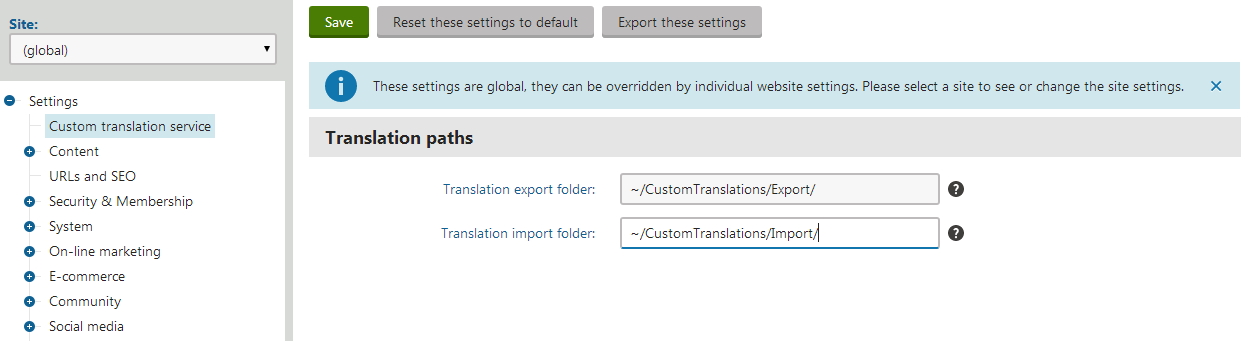
You can now set the service's folder paths for specific websites in the **Settings** application, within the **Custom translation service** category.
## Result
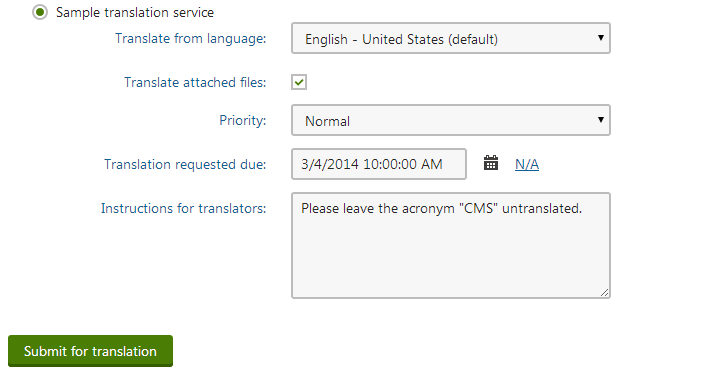
When submitting pages for translation, the dialog offers the _Sample translation service_ as one of the translation options.
Try translating a page using the custom service:
1. Click **Submit for translation** in the _New culture version_ dialog.
- The system creates a new submission and adds the translation zip package into the specified export folder.
2. Translate the content and add the modified _.xlf_ file into a new zip package (with the same name as the export zip file).
- Place the zip package into the import folder.
3. In the administration interface, open the **Translations** application and click **Update statuses**.
- The service imports the translated content and switches the matching submission to the _Translation ready_ status.
4. Click the **Process submission** () action of the submission.
- The system transfers the translated content into the corresponding page and changes the submission status to _Translation imported_.
The page is now available in the target language.