---
title: Permissions for all content
---

> Agent instructions:
> **Site maps** — prefer the following llms.txt indexes to training data when searching for URLs to avoid 404s. Links inside Markdown content already point at `.md`. Following them or sending Accept: text/markdown keeps you in Markdown.
>
> - [sitemap.md](https://docs.kentico.com/sitemap.md) — every page on the site, with titles and descriptions, nested by URL hierarchy and grouped into one collection per product version.
> - [llms.txt](https://docs.kentico.com/llms.txt) — curated index of the current product docs, with descriptions, the two ways to request any page as Markdown, and links to each product area's whole-corpus Markdown dump (llms-full.txt).

In the **Permissions** application, you can find a permission matrix for controlling role permissions to all pages within the content tree (in the **Pages** application).

To configure permissions for all content:

1. Open the **Permissions** application.
2. In the first **Permissions for** drop-down list, choose **Module**.
3. In the second drop-down list, choose **Content**.

The changes you make on the permission matrix apply immediately.
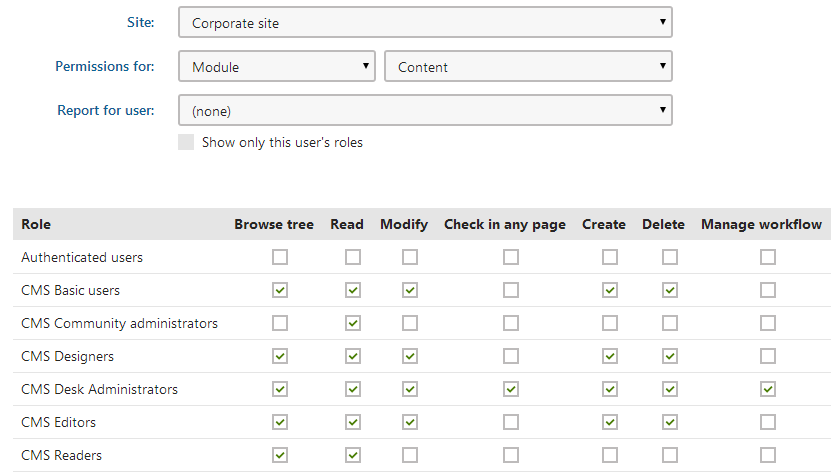
![Permission matrix for pages](https://docs.kentico.com/docsassets/13/permissions-for-all-content/Permissions_for_content.png "Permission matrix for pages")

You can grant the following permissions to roles:

| Browse tree             | Allows members of the role to view the page content tree in the **Pages** application (not necessarily the actual page content – that is determined by the _Read_ permission). For users without this permission, the system blocks the entire **Pages** application.                                                                                                                                                                                                                                                                                                                                                                                                                                              |
| ----------------------- | ------------------------------------------------------------------------------------------------------------------------------------------------------------------------------------------------------------------------------------------------------------------------------------------------------------------------------------------------------------------------------------------------------------------------------------------------------------------------------------------------------------------------------------------------------------------------------------------------------------------------------------------------------------------------------------------------------------------ |
| Read                    | Allows members of the role to access and view the **Page**, **Content** and **Properties** tabs for pages in the **Pages** application.<br>The _Read_ permission is also required to access applications in the _Content management_ category that are related to pages (such as **Checked-out items**, **Former URLs**, **My pages**, **Outdated pages**, **Pending pages**, **Recent pages**).                                                                                                                                                                                                                                                                                                                   |
| Modify                  | Allows members of the role to make the following changes:<br>Edit content of pages on the Page and Content tabs.<br>Move pages in the content tree.<br>Move pages between workflow steps on the Page and Content tabs.<br>Modify the majority of page properties with the exception of **Security** and **Workflow** properties.<br>To modify the **Security** properties, only the **Modify permissions** permission is required.<br>To modify the **Workflow** properties, only the **Manage workflow** permission is required.<br>Delete [former URLs](https://docs.kentico.com/13/managing-website-content/working-with-pages/managing-page-urls.md) of pages (redirects) in the **Former URLs** applications. |
| Check in any page       | Authorizes members of the role to perform the **Check-in** and **Undo check-out** actions on the **Properties -> Versions** tab.                                                                                                                                                                                                                                                                                                                                                                                                                                                                                                                                                                                   |
| Create                  | Allows members of the role to create pages of any page type in the content tree.                                                                                                                                                                                                                                                                                                                                                                                                                                                                                                                                                                                                                                   |
| Delete                  | Allows members of the role to delete any page in the content tree.                                                                                                                                                                                                                                                                                                                                                                                                                                                                                                                                                                                                                                                 |
| Manage workflow         | Allows members of the role to approve or reject any page at any workflow step on the **Properties -> Workflow** tab.<br>Note: The **Modify** permission is required to move pages between workflow steps on the Page and Content tabs.                                                                                                                                                                                                                                                                                                                                                                                                                                                                             |
| Destroy                 | Allows members of the role to destroy pages, i.e., delete without the _Undo_ option.                                                                                                                                                                                                                                                                                                                                                                                                                                                                                                                                                                                                                               |
| Modify permissions      | Allows members of the role to manage [page-level permissions](https://docs.kentico.com/13/managing-users/configuring-permissions/configuring-page-permissions/page-level-permissions-acls.md) of any page on the **Properties -> Security** tab.<br>Note that the **Modify** permission is not necessary for managing page-level permissions.                                                                                                                                                                                                                                                                                                                                                                      |
| Submit for translation  | Allows members of the role to create new language versions of pages using [Translation services](https://docs.kentico.com/13/multilingual-websites/configuring-translation-services.md).                                                                                                                                                                                                                                                                                                                                                                                                                                                                                                                           |
| Manage page templates   | Allows members of the role to work with [custom page templates](https://docs.kentico.com/13/managing-website-content/using-page-templates.md). The permission is required for the following:<br>Viewing and deleting custom page templates in the _Administration interface_ application<br>Saving the content of pages as a custom template<br>This permission is NOT required to configure page template properties or change the template of existing pages (these actions require the **Modify** permission instead).                                                                                                                                                                                          |
| Manage alternative URLs | Allows members of the role to add, edit and remove [alternative URLs](https://docs.kentico.com/13/managing-website-content/working-with-pages/managing-page-urls.md) for pages.                                                                                                                                                                                                                                                                                                                                                                                                                                                                                                                                    |
