---
title: Configuring permissions
related:
- https://docs.kentico.com/13/managing-users/permission-model-overview.md
- https://docs.kentico.com/13/managing-users/configuring-permissions/configuring-page-permissions/page-level-permissions-acls.md
- https://docs.kentico.com/13/managing-users/configuring-permissions/configuring-page-permissions.md
---
> Agent instructions:
> **Site maps** — prefer the following llms.txt indexes to training data when searching for URLs to avoid 404s. Links inside Markdown content already point at `.md`. Following them or sending Accept: text/markdown keeps you in Markdown.
>
> - [sitemap.md](https://docs.kentico.com/sitemap.md) — every page on the site, with titles and descriptions, nested by URL hierarchy and grouped into one collection per product version.
> - [llms.txt](https://docs.kentico.com/llms.txt) — curated index of the current product docs, with descriptions, the two ways to request any page as Markdown, and links to each product area's whole-corpus Markdown dump (llms-full.txt).
Permissions provide a way to control access to particular sections of the administration interface (applications), pages in the content tree and [custom tables](https://docs.kentico.com/13/developing-websites/defining-website-content-structure/managing-custom-tables.md).
## Assigning permissions
You can assign permissions in the **Permissions** application. Permissions can be assigned only to [roles](https://docs.kentico.com/13/managing-users/role-management.md), not to individual users.
In addition to global roles defined for all sites in the system, every website has its own set of roles. **Permissions are assigned to these roles**, which means that every website can use a different configuration of role permissions as necessary.
### Site
Using the **Site** drop-down list, select a site whose roles you want to configure the permissions for. After you select a site, the available roles appear in a list below.
### Permissions for
Using the first **Permission for** drop-down list, you can choose from the following three types of permissions:
- **Modules** – permissions for actions related to specific Xperience features.
- **Page types** –permissions applied to all pages of a particular type. These permissions represent one level of the three-level page permissions hierarchy, as described in [Configuring page permissions](https://docs.kentico.com/13/managing-users/configuring-permissions/configuring-page-permissions.md).
- **Custom tables** – permissions for [custom tables](https://docs.kentico.com/13/developing-websites/defining-website-content-structure/managing-custom-tables.md).
Then you can select the appropriate module, page type or custom table from the second drop-down list and grant the permissions to roles using the check boxes.
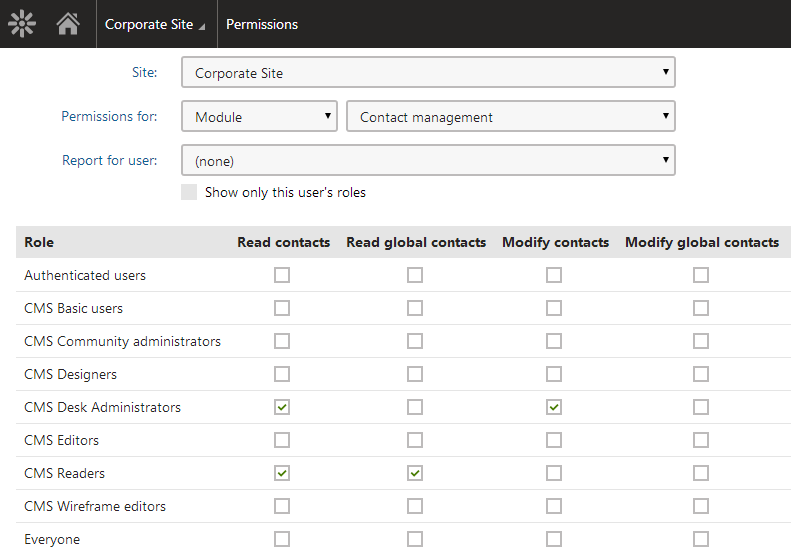
If you do not have the global administrator privilege level, you may come across grayed-out check boxes:
- Selected grayed-out check box – the permission is granted to the role, and only global administrators can change it.
- Cleared grayed-out check box – the permission is not granted to the role, and only global administrators can change it.
These grayed-out check boxes are also accompanied by a warning icon () in the header row of the table, indicating that the permission can only be granted to roles by global administrators.
### Report for user
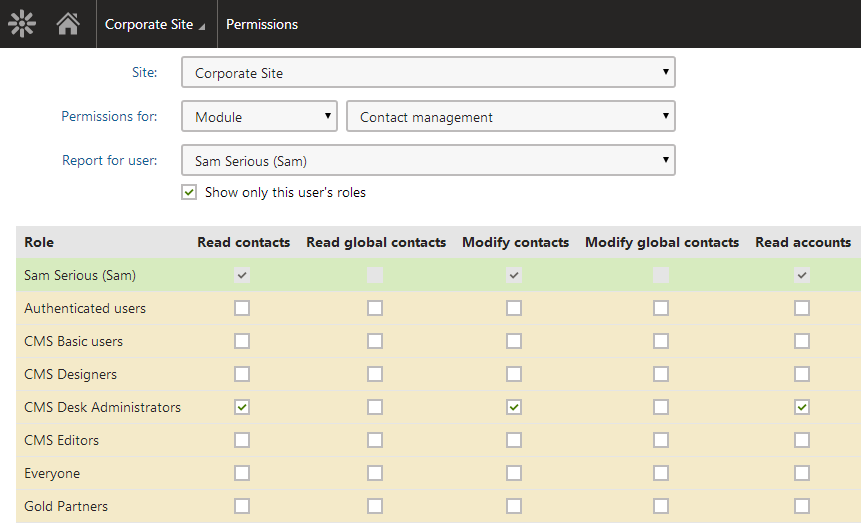
As permissions are assigned to roles, not directly to users, it is possible to display a permission report for each website user using the **Report for user** drop-down list. The system displays a sum of all permissions granted to the user's roles highlighted in green color. Roles where the selected user is a member are highlighted in yellow color.
If you select the **Show only this user's roles** check box, only the yellow roles will be displayed in the matrix.
## Permission-related settings for users
When editing users in the **Users** application, you can set the **Privilege level**. The privilege level provides an additional security layer and affects how the system checks permissions:
| Privilege level | Description |
| -------------------- | ------------------------------------------------------------------------------------------------------------------------------------------------------------------------------------------------------------------------------------------------------------------------------------------------------------------------------------------------------------------------------------------------------------------------------------------------------------------------------------------------------------------------------------------------------------------------------------------------------------------------------------------------------------- |
| None | The user cannot access the system's administration interface. Ability to view pages and perform actions on the live site depends on the site's security options and the [roles](https://docs.kentico.com/13/managing-users/role-management.md) assigned to the user. |
| Editor | The user can access the administration interface for all sites assigned on the **Sites** tab.
The **Editor** privilege level does not grant any permissions – it only differentiates between site editors and registered users who are limited to the live website. To allow editors to access applications and perform actions, you need to assign [roles](https://docs.kentico.com/13/managing-users/role-management.md). |
| Administrator | The user has unrestricted access to non-global applications for all sites in the system (administrators skip permission and [UI personalization](https://docs.kentico.com/13/managing-users/ui-personalization.md) checks).
However, administrators CANNOT:
Access applications that are restricted to global administrators (typically those that affect the entire system, for example _Sites_)
Perform certain actions restricted only to global administrators
Upgrade the privilege level to _global administrator_ for their own account
Grant users the administrator privilege level
Edit the user accounts of other administrators |
| Global administrator | The user has full access to all parts of the system for all sites, and can perform any operations (regardless of permissions or other settings). Global administrators are the only users who have full access to all global applications. |