---
title: Selectors for page builder components
related:
- https://docs.kentico.com/13/developing-websites/page-builder-development/developing-widgets.md
- https://docs.kentico.com/13/developing-websites/page-builder-development/developing-widgets/defining-widget-properties.md
- https://docs.kentico.com/13/developing-websites/page-builder-development/developing-modal-dialogs-for-builder-component-properties.md
- https://docs.kentico.com/13/developing-websites/form-builder-development/reference-system-form-components.md
- https://docs.kentico.com/13/developing-websites/page-builder-development/selectors-for-page-builder-components/using-content-selector-javascript-api.md
---
> Agent instructions:
> **Site maps** — prefer the following llms.txt indexes to training data when searching for URLs to avoid 404s. Links inside Markdown content already point at `.md`. Following them or sending Accept: text/markdown keeps you in Markdown.
>
> - [sitemap.md](https://docs.kentico.com/sitemap.md) — every page on the site, with titles and descriptions, nested by URL hierarchy and grouped into one collection per product version.
> - [llms.txt](https://docs.kentico.com/llms.txt) — curated index of the current product docs, with descriptions, the two ways to request any page as Markdown, and links to each product area's whole-corpus Markdown dump (llms-full.txt).
Selectors are system form components that enable users to select Xperience content and objects and use them in the properties of page builder components. Items available for selection include pages from a site's [content tree](https://docs.kentico.com/13/managing-website-content/working-with-pages.md), media files from [media libraries](https://docs.kentico.com/13/managing-website-content/working-with-files/media-library-files/creating-media-libraries.md), [unsorted page attachments](https://docs.kentico.com/13/managing-website-content/working-with-files/page-attachments/attaching-files-to-pages.md) attached to pages via the _Attachments_ tab, Xperience objects, and any items in general loaded by a custom data source.
The selectors return a collection of identifiers representing the chosen items. You can use these identifiers to access objects in the logic of your page builder components. For example, when developing a widget displaying links to a set of pages, a property of the widget could use the page selector form component to enable editors to choose the pages.
In addition to using the selectors in the administration interface as standard form components (when building [property dialogs](https://docs.kentico.com/13/developing-websites/page-builder-development/developing-widgets/defining-widget-properties.md) of page builder components), you can also use the [content selector JavaScript API](https://docs.kentico.com/13/developing-websites/page-builder-development/selectors-for-page-builder-components/using-content-selector-javascript-api.md) utilizing the system's [modal dialog support](https://docs.kentico.com/13/developing-websites/page-builder-development/developing-modal-dialogs-for-builder-component-properties.md) to offer identical functionality anywhere within the code of your components.
> **Tip:** You can examine an implementation of a sample widget using selector form components in the [LearningKit project](https://github.com/Kentico/LearningKit-Mvc) on GitHub. To set up the project, follow the instructions in the repository's README file.
## Selector form components
> **Note:** **Selector editing components usability**
>
> The selectors described on this page are primarily intended to facilitate [page builder](https://docs.kentico.com/13/developing-websites/page-builder-development.md) component development. These editing components are not meant to be used on the live site or within [form builder](https://docs.kentico.com/13/developing-websites/form-builder-development.md) components.
>
> One exception are the _Object_ and _General_ selector, which are also supported in the configuration dialogs used to edit [form section properties](https://docs.kentico.com/13/developing-websites/form-builder-development/developing-custom-form-layouts/defining-form-section-properties.md) in the form builder.
### Media files selector
The media files selector form component enables users to select files from a site's [media libraries](https://docs.kentico.com/13/managing-website-content/working-with-files/media-library-files/creating-media-libraries.md) using an intuitive interface. The selector returns a collection of _MediaFilesSelectorItem_ objects, which contain the GUID of the selected media file in the _FileGuid_ property. The media files are in the order in which they were selected within the dialog.
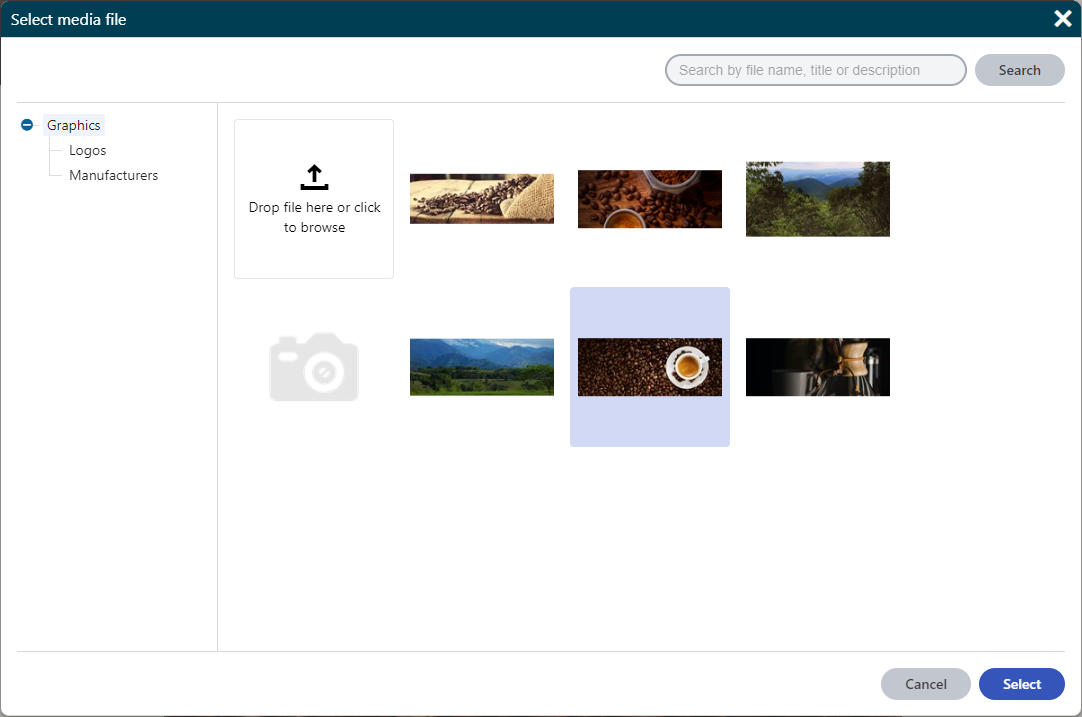
The media files selector form component has the following configurable properties:
| Property | Type | Description |
| ----------------- | ------ | --------------------------------------------------------------------------------------------------------------------------------------------------------------------------------------------------------------------------------------------------------------------------------------------------------------------------------------------------------------------------------------------------------------------------------------------------------------------------------------------------------------------------------------------------- |
| LibraryName | string | Configures the (single) media library from which you can select files in the selector. If not specified, the selector allows selecting from all media libraries on the current site for which the user has permissions.
Set the _LibraryName_ to the code name of the media library. The media library code name is available in the **Media libraries** application. |
| MaxFilesLimit | int | Configures the maximum number of files allowed to be selected:
0 – no limit.
_n_ – at most _n_ files can be selected at once.
If not specified, the default value is 1 (single file selection). |
| AllowedExtensions | string | A semicolon-delimited string of file extensions that specify the allowed file extensions for the files to be selected. The listed extensions need to form a subset of allowed extensions specified in the _[Media file allowed extensions](https://docs.kentico.com/13/configuring-xperience/configuring-the-environment-for-content-editors/configuring-media-libraries/configuring-supported-file-types-in-media-libraries.md)_ site settings key.
If not specified, the selector uses the extensions from the site settings key by default. |
The following example shows the declaration of a property in a page builder component's property model class that has the _MediaFilesSelector_ form component assigned as its editing component. A URL of the selected image is then retrieved in the corresponding component's controller.
```csharp title="Component model class utilizing the selector"
// Assigns a selector component to the 'Images' property
[EditingComponent(MediaFilesSelector.IDENTIFIER)]
// Configures the media library from which you can select files in the selector
[EditingComponentProperty(nameof(MediaFilesSelectorProperties.LibraryName), "Graphics")]
// Limits the maximum number of files that can be selected at once
[EditingComponentProperty(nameof(MediaFilesSelectorProperties.MaxFilesLimit), 5)]
// Configures the allowed file extensions for the selected files
[EditingComponentProperty(nameof(MediaFilesSelectorProperties.AllowedExtensions), ".gif;.png;.jpg;.jpeg")]
// Returns a list of media files selector items (objects that contain the GUIDs of selected media files)
public IEnumerable Images { get; set; } = Enumerable.Empty();
```
```csharp title="Component controller class utilizing the selector"
private readonly IMediaFileInfoProvider mediaFileInfo;
private readonly IComponentPropertiesRetriever componentPropertiesRetriever;
private readonly ISiteService siteService;
public MediaFilesSelectorExample(IMediaFileInfoProvider mediaFileInfo,
IComponentPropertiesRetriever componentPropertiesRetriever,
ISiteService siteService)
{
this.mediaFileInfo = mediaFileInfo;
this.componentPropertiesRetriever = componentPropertiesRetriever;
this.siteService = siteService;
}
public ActionResult Index()
{
// Retrieves the GUID of the first selected media file from the 'Images' property
Guid guid = componentPropertiesRetriever.Retrieve().Images.FirstOrDefault()?.FileGuid ?? Guid.Empty;
// Retrieves the MediaFileInfo object that corresponds to the selected media file GUID
MediaFileInfo mediaFile = mediaFileInfo.Get(guid, siteService.CurrentSite.SiteID);
string url = String.Empty;
if (mediaFile != null)
{
// Retrieves an URL of the selected media file
url = MediaLibraryHelper.GetDirectUrl(mediaFile);
}
// Custom logic...
return View();
}
```
#### Configuring maximum file upload size and timeout
The media files selector also provides a media file uploader for uploading new files into media libraries as part of its functionality. By default, the uploader is limited to 200MB and times out after 120 seconds. If you wish to enable uploads of larger files or you want to set a different timeout interval, edit your MVC project's **web.config** file and modify the following values:
- Modify the value of the **\** element's **maxRequestLength** and **executionTimeout** attributes. Enter the values in **kilobytes** and **seconds**.
- Modify the value of the **\** element's **maxAllowedContentLength** attribute. Enter the value in **bytes**. The value of the _maxAllowedContentLength_ attribute in kiloBytes must be greater or equal to the value of the _maxRequestLength_attribute.
```html
```
### Page selector
The page selector [form component](https://docs.kentico.com/13/developing-websites/form-builder-development/assigning-editing-components-to-properties.md) allows users to select pages from the [content tree](https://docs.kentico.com/13/managing-website-content/working-with-pages.md) using a [dialog window](https://docs.kentico.com/13/developing-websites/page-builder-development/developing-modal-dialogs-for-builder-component-properties.md). The selector returns a collection of _PageSelectorItem_ objects, which contain the _NodeGUID_ property with the GUID of the selected page. The pages are in the order in which they were selected within the dialog.
If you wish to select the node alias path value of pages, use the [path selector](#path-selector) component instead.
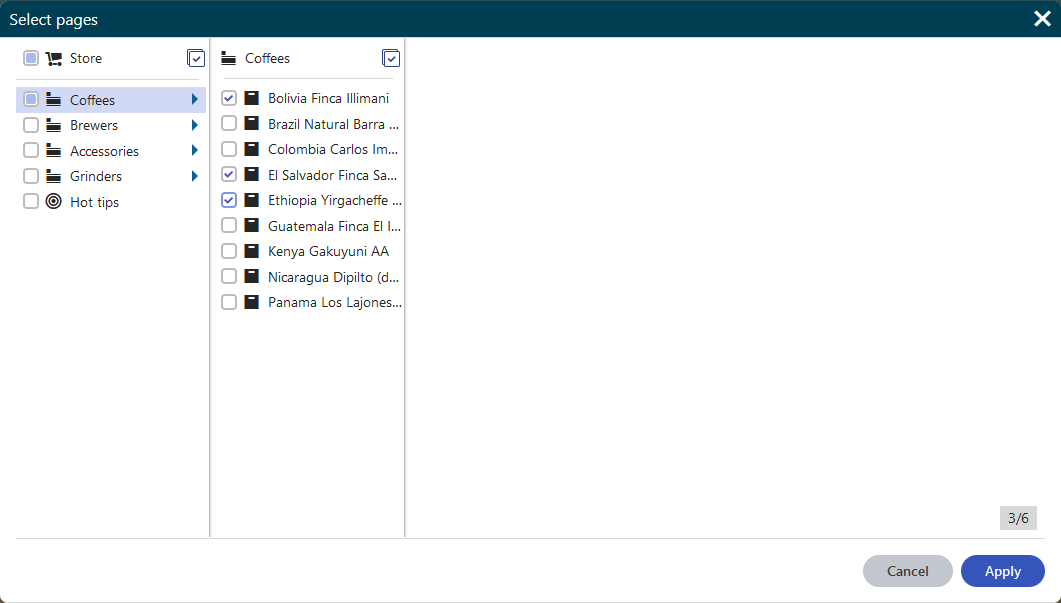
The page selector form component has the following configurable properties:
| Property | Type | Description |
| ------------- | ------ | ---------------------------------------------------------------------------------------------------------------------------------------------------------------------------------------------------------------------------------------------------------------- |
| MaxPagesLimit | int | Configures the maximum number of pages allowed to be selected:
0 – no limit.
_n_ – at most _n_ pages can be selected at once.
If not specified, the default value is 1 (single page selection). |
| RootPath | string | Limits the selection of pages to a subtree rooted at a page identified by its node alias path (e.g. "_/Products/Coffee-grinders_"). Only the specified page and its sub-pages can be selected. If not configured, users can select from the entire content tree. |
The following example shows the declaration of a property in a page builder component's property model class that has the _PageSelector_ form component assigned as its editing component.
```csharp title="Component model class utilizing the selector"
// Assigns a selector component to the Pages property
[EditingComponent(PageSelector.IDENTIFIER)]
// Limits the selection of pages to a subtree rooted at the 'Products' page
[EditingComponentProperty(nameof(PageSelectorProperties.RootPath), "/Products")]
// Sets an unlimited number of selectable pages
[EditingComponentProperty(nameof(PageSelectorProperties.MaxPagesLimit), 0)]
// Returns a list of page selector items (node GUIDs)
public IEnumerable Pages { get; set; } = Enumerable.Empty();
```
**MVC 5 development model.** Applies only when building with ASP.NET MVC 5. If this page also covers ASP.NET Core, that version is in its own block.
The selected pages are then retrieved in the corresponding component's controller.
```csharp title="Component controller class utilizing the page selector"
private readonly IPageRetriever pagesRetriever;
private readonly IComponentPropertiesRetriever componentPropertiesRetriever;
public PageSelectorExample(IPageRetriever pagesRetriever, IComponentPropertiesRetriever componentPropertiesRetriever)
{
this.pagesRetriever = pagesRetriever;
this.componentPropertiesRetriever = componentPropertiesRetriever;
}
public ActionResult Index()
{
// Retrieves the node GUIDs of the selected pages from the 'Pages' property
List selectedPageGuids = componentPropertiesRetriever.Retrieve().Pages
.Select(i => i.NodeGuid)
.ToList();
// Retrieves the pages that correspond to the selected GUIDs
List pages = pagesRetriever.Retrieve(query => query
.WhereIn("NodeGUID", selectedPageGuids))
.ToList();
// Custom logic...
return View();
}
```
**ASP.NET Core development model.** Applies only when building with ASP.NET Core. If this page also covers MVC 5, that version is in its own block.
The selected pages are then retrieved in the corresponding view component.
```csharp title="Component class utilizing the page selector"
public class PageSelectorWidget : ViewComponent
{
private readonly IPageRetriever pagesRetriever;
public PageSelectorWidget(IPageRetriever pagesRetriever)
{
this.pagesRetriever = pagesRetriever;
}
public IViewComponentResult Invoke(ComponentViewModel properties)
{
// Retrieves the node GUIDs of the selected pages from the 'Pages' property
List selectedPageGuids = properties?.Properties?.Pages?
.Select(i => i.NodeGuid)
.ToList();
// Retrieves the pages that correspond to the selected GUIDs
List pages = pagesRetriever.Retrieve(query => query
.WhereIn("NodeGUID", selectedPageGuids))
.ToList();
// Custom logic...
return View("~/Components/Widgets/PageSelectorWidget/_PageSelectorWidget.cshtml");
}
}
```
### Path selector
The path selector [form component](https://docs.kentico.com/13/developing-websites/form-builder-development/assigning-editing-components-to-properties.md) allows users to select pages from the content tree using a [dialog window](https://docs.kentico.com/13/developing-websites/page-builder-development/developing-modal-dialogs-for-builder-component-properties.md). The path selector returns a collection of _PathSelectorItem_ objects, which contain the _NodeAliasPath_ property with the node alias path of the selected page. The items are in the order in which they were selected within the dialog.
If you wish to select the GUID value of pages, use the [page selector](#page-selector) component instead.

The path selector form component has the following configurable properties:
| Property | Type | Description |
| ------------- | ------ | ---------------------------------------------------------------------------------------------------------------------------------------------------------------------------------------------------------------------------------------------------------------- |
| MaxPagesLimit | int | Configures the maximum number of pages allowed to be selected:
0 – no limit.
_n_ – at most _n_ pages can be selected at once.
If not specified, the default value is 1 (single page selection). |
| RootPath | string | Limits the selection of pages to a subtree rooted at a page identified by its node alias path (e.g. "_/Products/Coffee-grinders_"). Only the specified page and its sub-pages can be selected. If not configured, users can select from the entire content tree. |
The following example shows the declaration of a property in a page builder component's model class that has the _PathSelector_form component assigned as its editing component.
```csharp title="Component model class utilizing the path selector"
// Assigns a selector component to the 'PagePaths' property
[EditingComponent(PathSelector.IDENTIFIER)]
// Limits the selection of pages to a subtree rooted at the 'Products' page
[EditingComponentProperty(nameof(PathSelectorProperties.RootPath), "/Products")]
// Sets the maximum number of selected pages to 6
[EditingComponentProperty(nameof(PathSelectorProperties.MaxPagesLimit), 6)]
// Returns a list of path selector items (page paths)
public IEnumerable PagePaths { get; set; } = Enumerable.Empty();
```
**MVC 5 development model.** Applies only when building with ASP.NET MVC 5. If this page also covers ASP.NET Core, that version is in its own block.
The selected pages are then retrieved in the corresponding component's controller.
```csharp title="Component class utilizing the path selector"
private readonly IPageRetriever pagesRetriever;
private readonly IComponentPropertiesRetriever componentPropertiesRetriever;
public PathSelectorExample(IPageRetriever pagesRetriever, IComponentPropertiesRetriever componentPropertiesRetriever)
{
this.pagesRetriever = pagesRetriever;
this.componentPropertiesRetriever = componentPropertiesRetriever;
}
public ActionResult Index()
{
// Retrieves the node alias paths of the selected pages from the 'PagePaths' property
string[] selectedPagePaths = componentPropertiesRetriever.Retrieve().PagePaths
.Select(i => i.NodeAliasPath)
.ToArray();
// Retrieves the pages that correspond to the selected alias paths
List pages = pagesRetriever.Retrieve(query => query
.Path(selectedPagePaths))
.ToList();
// Custom logic...
return View();
}
```
**ASP.NET Core development model.** Applies only when building with ASP.NET Core. If this page also covers MVC 5, that version is in its own block.
The selected pages are then retrieved in the corresponding view component.
```csharp title="Component controller class utilizing the page selector"
public class PathSelectorWidget : ViewComponent
{
private readonly IPageRetriever pagesRetriever;
public PathSelectorWidget(IPageRetriever pagesRetriever)
{
this.pagesRetriever = pagesRetriever;
}
public IViewComponentResult Invoke(ComponentViewModel properties)
{
// Retrieves the node alias paths of the selected pages from the 'PagePaths' property
string[] selectedPagePaths = properties?.Properties?.PagePaths?
.Select(i => i.NodeAliasPath)
.ToArray();
// Retrieves the pages that correspond to the selected alias paths
List pages = pagesRetriever.Retrieve(query => query
.Path(selectedPagePaths))
.ToList();
// Custom logic...
return View("~/Components/Widgets/PathSelectorWidget/_PathSelectorWidget.cshtml");
}
}
```
### Attachment selector
The attachment selector form component allows users to select [unsorted page attachments](https://docs.kentico.com/13/managing-website-content/working-with-files/page-attachments/attaching-files-to-pages.md) using a [dialog window](https://docs.kentico.com/13/developing-websites/page-builder-development/developing-modal-dialogs-for-builder-component-properties.md). The selector returns a collection of _AttachmentSelectorItem_ objects, which contain GUIDs of the selected attachments in their _FileGuid_ property. The attachments are in the order in which they were selected within the dialog.

The attachment selector form component has the following configurable properties:
| Property | Type | Description |
| ----------------- | ------ | -------------------------------------------------------------------------------------------------------------------------------------------------------------------------------------------------------- |
| MaxFilesLimit | int | Configures the maximum number of files allowed to be selected:
0 – no limit.
_n_ – at most _n_ files can be selected at once.
If not specified, the default value is 1 (single file selection). |
| AllowedExtensions | string | A semicolon-delimited string of file extensions that specify the allowed file extensions for the files to be selected. When no allowed extensions are specified, all extensions are displayed. |
The following example shows the declaration of a property in a page builder component's property model class that has the _AttachmentSelector_ form component assigned as its editing component. A relative URL of the selected attachment is then retrieved in the corresponding component's controller.
```csharp title="Component model class utilizing the attachment selector"
// Assigns a selector component to the 'Attachments' property
[EditingComponent(AttachmentSelector.IDENTIFIER)]
// Limits the maximum number of attachments that can be selected at once
[EditingComponentProperty(nameof(AttachmentSelectorProperties.MaxFilesLimit), 3)]
// Configures the allowed file extensions for the selected attachments
[EditingComponentProperty(nameof(AttachmentSelectorProperties.AllowedExtensions), ".gif;.png;.jpg;.jpeg")]
// Returns a list of attachment selector items (attachment objects)
public IEnumerable Attachments { get; set; } = Enumerable.Empty();
```
```csharp title="Component controller class utilizing the attachment selector"
private readonly IComponentPropertiesRetriever propertiesRetriever;
private readonly ISiteService siteService;
private readonly IPageAttachmentUrlRetriever attachmentUrlRetriever;
public AttachmentSelectorExample(IComponentPropertiesRetriever propertiesRetriever,
ISiteService siteService,
IPageAttachmentUrlRetriever attachmentUrlRetriever)
{
this.propertiesRetriever = propertiesRetriever;
this.siteService = siteService;
this.attachmentUrlRetriever = attachmentUrlRetriever;
}
public ActionResult Index()
{
// Retrieves the GUID of the first selected attachment from the 'Attachments' property
Guid guid = propertiesRetriever.Retrieve().Attachments.FirstOrDefault()?.FileGuid ?? Guid.Empty;
// Retrieves the DocumentAttachment object that corresponds to the selected attachment GUID
DocumentAttachment attachment = DocumentHelper.GetAttachment(guid, siteService.CurrentSite.SiteID);
string url = String.Empty;
if (attachment != null)
{
// Retrieves the relative URL of the selected attachment
url = attachmentUrlRetriever.Retrieve(attachment).RelativePath;
}
// Custom logic...
return View();
}
```
### URL selector
The URL selector form component allows users to select one content item ([pages](https://docs.kentico.com/13/managing-website-content/working-with-pages.md), [media library](https://docs.kentico.com/13/managing-website-content/working-with-files/media-library-files/creating-media-libraries.md) files, or [unsorted page attachments](https://docs.kentico.com/13/managing-website-content/working-with-files/page-attachments/attaching-files-to-pages.md)) and returns its relative URL. Alternatively, a URL to an external resource may be entered directly into the text input field.
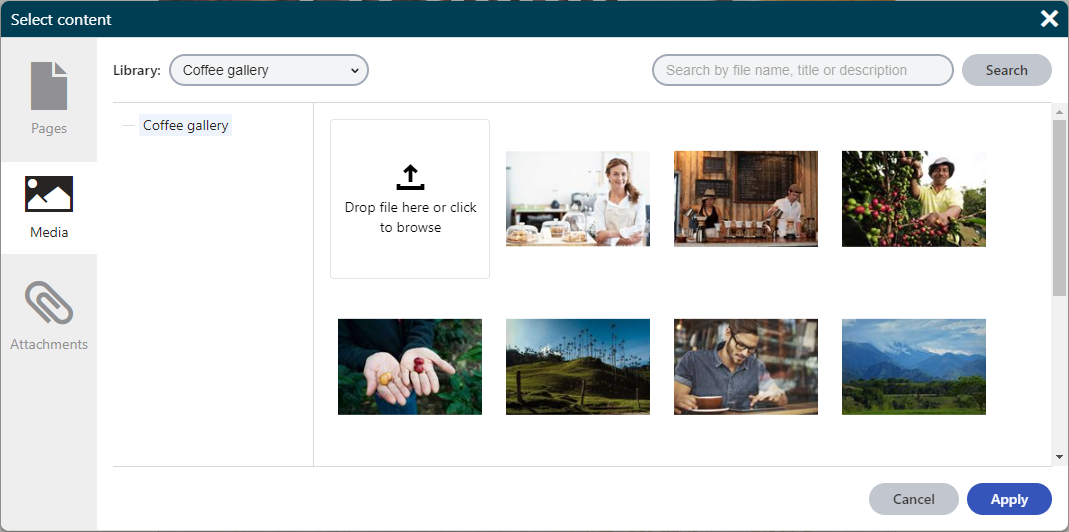
The URL selector form component has the following configurable properties:
| Property | Type | Descriptions |
| --------------------------- | ------ | --------------------------------------------------------------------------------------------------------------------------------------------------------------------------------------------------------------------------------------------------------------------------------------------------------------------------------------------------------------------------------------------------------------------------------------------------------------------------------------------------------------------------------------------------------------------------------------------- |
| Tabs | enum | Specifies what tabs (and inherently what object types) will be available for selection to content editors. To select multiple tabs, use the logical OR ('\|') operator. |
| DefaultTab | enum | Specifies which tab will be opened first when the dialog is invoked. (e.g. _ContentSelectorTabs.Page_) |
| PageRootPath | string | Limits the selection of pages to a subtree with root specified by its node alias path (e.g. " _/Products/Coffee-grinders_ "). Only the specified page and its sub-pages can be selected. If not specified, the whole content tree is allowed. |
| MediaLibraryName | string | Code name of a (single) media library from which you can select files in the selector. If not specified, the selector allows selecting from all media libraries of the current site for which the user has permissions.
The media library code name is available in the **Media libraries** application. |
| MediaAllowedExtensions | string | A semicolon-delimited string of file extensions that specify the allowed file extensions for the files to be selected on the media tab. The listed extensions need to form a subset of allowed extensions specified in the _[Media file allowed extensions](https://docs.kentico.com/13/configuring-xperience/configuring-the-environment-for-content-editors/configuring-media-libraries/configuring-supported-file-types-in-media-libraries.md)_ site settings key. When no allowed extensions are specified, all files with the extensions from the site settings key can be selected. |
| AttachmentAllowedExtensions | string | A semicolon-delimited string of file extensions that specify the allowed file extensions for the files to be selected on the attachment tab. When no allowed extensions are specified, all extensions are displayed. |
The following example shows the declaration of a property in a page builder component's property model class that has the _UrlSelector_ form component assigned as its [editing component](https://docs.kentico.com/13/developing-websites/form-builder-development/assigning-editing-components-to-properties.md). A relative URL of the selected content item is then stored in the component's property.
```csharp title="Component model class utilizing the URL selector"
// Assigns a selector component to the 'ImageUrl' property
[EditingComponent(UrlSelector.IDENTIFIER)]
// Configures which tabs will be available
[EditingComponentProperty(nameof(UrlSelectorProperties.Tabs), ContentSelectorTabs.Attachment | ContentSelectorTabs.Media)]
// Configures which extensions will be available on the media tab
[EditingComponentProperty(nameof(UrlSelectorProperties.MediaAllowedExtensions), ".gif;.png;.jpg;.jpeg")]
// Configures which extensions will be available on the attachment tab
[EditingComponentProperty(nameof(UrlSelectorProperties.AttachmentAllowedExtensions), ".gif;.png;.jpg;.jpeg")]
// Configures the media library from which the media files can be selected
[EditingComponentProperty(nameof(UrlSelectorProperties.MediaLibraryName), "Graphics")]
// Returns a string containing the relative URL of the selected image file
public string ImageUrl { get; set; }
```
### Object selector
The object selector form component allows users to select Xperience objects using a drop-down menu with a search bar. Both the default object types and [custom object types](https://docs.kentico.com/13/custom-development/creating-custom-modules.md) created under modules are supported. For custom object types, the _Info_, _IInfoProvider_ and _InfoProvider_ code must be deployed to the live site application to be available in the object selector.
The selector returns a collection of _ObjectSelectorItem_ objects, which contain the code names or the GUIDs of selected objects.
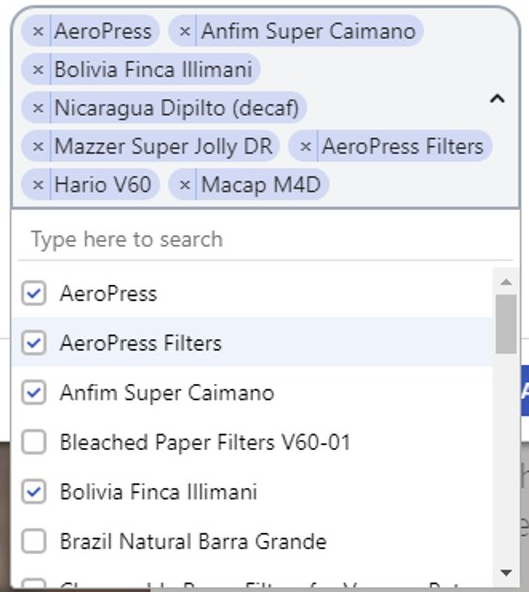
> **Info:** If the selection contains seven or more items, the selector automatically displays a search bar that allows users to filter displayed results.
The object selector form component has the following configurable properties:
| Property | Type | Description |
| -------------------------- | ------------ | ---------------------------------------------------------------------------------------------------------------------------------------------------------------------------------------------------------------------------------------------------------------------------------------------------------------------------------------------------------------------------------------------------------------------------------------------------------------------------------------------------------------------------------------------------------------------------------- |
| ObjectType | string | A string property that sets the name of the object type listed in the selector.
To find the name for specific object types, open the **System** application in the Xperience administration interface and select the **Object types** tab. For example, use _personas.persona_ to list personas.
[Custom object types](https://docs.kentico.com/13/custom-development/creating-custom-modules.md) created under modules are also supported. The _Info_, _IInfoProvider_ and _InfoProvider_ code generated for the object type must be deployed to the live site application. |
| IdentifyObjectByGuid | bool | A boolean property that indicates whether the returned object contains the GUID identifier of the selected object instead of the code name. By default, the option is disabled ( _false_ ) and the returned object contains the object code name.
We recommend identifying objects by their code names for optimal performance. |
| MaxItemsLimit | int | Configures the maximum number of files allowed to be selected:
0 – no limit
n – at most n files can be selected at once
If not specified, the default value is 1 (single object selection). |
| WhereConditionProviderType | type | Allows you to filter what data is available in the object selector using a custom _Where_ condition. The specified condition class must implement the _IObjectSelectorWhereConditionProvider_ interface and define its _Get_ method. The _Get_ method specifies the where condition applied to the data before the list of objects is shown to users. |
| OrderBy | string array | An array of strings that specifies page data columns by which the items are ordered, as well as the type of ordering: ascending (ASC) or descending (DESC).
Use the following format: _new string\[] {"\ \", "..."}_
You can define multiple ordering clauses (later clauses are evaluated in cases where the preceding clauses result in a match).
By default, the data is ordered alphabetically by the object's display name. |
| IncludeGlobalObjects | bool | Indicates whether global objects are included in the selection in cases where the selected object type may exist in both site and global scope. |
The following example shows the declaration of a property in a component's property model class that has the _ObjectSelector_ form component assigned as its editing component to select email feeds (_newsletter.newsletter_ objects). The selected object is then retrieved in the corresponding component's controller.
```csharp title="Component model class utilizing the selector"
// Assigns a selector component to the Newsletters property
[EditingComponent(ObjectSelector.IDENTIFIER)]
// Configures the code name of the selected object type
[EditingComponentProperty(nameof(ObjectSelectorProperties.ObjectType), "newsletter.newsletter")]
// Limits the selected newsletters to exclude email campaigns
[EditingComponentProperty(nameof(ObjectSelectorProperties.WhereConditionProviderType), typeof(NewslettersWhere))]
// Orders items in the selector by their display name alphabetically from Z to A
[EditingComponentProperty(nameof(ObjectSelectorProperties.OrderBy), new string[] { "NewsletterDisplayName DESC" })]
// Returns a list of object selector items
public IEnumerable Newsletters { get; set; } = Enumerable.Empty();
```
```csharp title="Where condition class"
public class NewslettersWhere : IObjectSelectorWhereConditionProvider
{
// Where condition limiting the objects
public WhereCondition Get() => new WhereCondition().WhereEquals("NewsletterType", (int)EmailCommunicationTypeEnum.Newsletter);
}
```
```csharp title="Component controller class utilizing the object selector"
private readonly IComponentPropertiesRetriever componentPropertiesRetriever;
private readonly INewsletterInfoProvider newsletterInfoProvider;
public ObjectSelectorExample(IComponentPropertiesRetriever componentPropertiesRetriever, INewsletterInfoProvider newsletterInfoProvider)
{
this.componentPropertiesRetriever = componentPropertiesRetriever;
this.newsletterInfoProvider = newsletterInfoProvider;
}
public ActionResult Index()
{
// Retrieves the code name of the selected newsletter from the properties
string? codeName = componentPropertiesRetriever.Retrieve().Newsletters.FirstOrDefault()?.ObjectCodeName;
// Retrieves the corresponding newsletter object
var newsletter = newsletterInfoProvider.Get(codeName, SiteContext.CurrentSiteID);
// Custom logic...
return View();
}
```
### General selector
The general selector form component allows users to select items using a drop-down menu with a search bar. The items offered by the selector can be of any type, including external data outside of Xperience. Developers need to implement a data provider that loads and prepares the items displayed in the selector.
The selector returns a collection of _GeneralSelectorItem_ objects, which contain identifiers of the selected items.
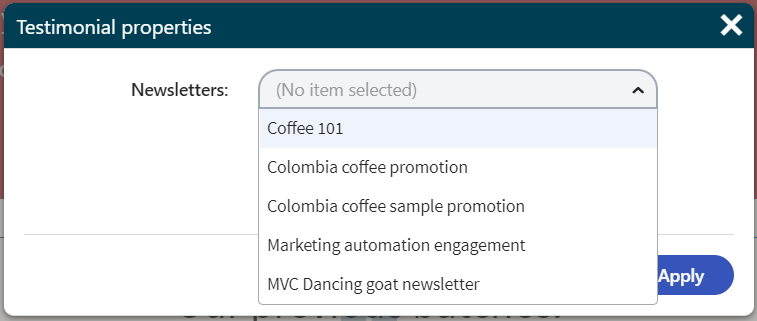
> **Info:** If the selection contains seven or more items, the selector automatically displays a search bar that allows users to filter displayed results.
The general selector form component has the following configurable properties:
| Property | Type | Description |
| ---------------- | ---- | ------------------------------------------------------------------------------------------------------------------------------------------------------------------------------------------------------------------------------------------------------------------------------------------------------------------------------------------------------------------------------------------------------------------------------------------------------------------------------------------------------------------------------------------------------------------------------------------------------------------------------------------------------------------------------------------------------------------------------------------------------------------------------------------------------------------------------------------------------------------------------------------------------------------------------------------------------------------------------------------------------------------------------------------------------------------------------------------------------------------------------------------------------------------------------------------------------------------------------------------------------------------------------------------------------------------------------------------------------------------------------------------------------------------------------------------------------------------------------------------------------------------------------------------------------------------------------------------------------------------------------------------------------------------------------------------------------------------------------------------------------------------------------------------------------------------------------------------------------------------------------------------------------------------------------------------------------------------------------------------------------------------------------------------------------------------------------------------------------------------------------------------------------------------------------------------------------------------------------------------------------------------------------------------------------------------------------------------------------------------------------------------------------------------------------------------------------------------------------------------------------------------------------------------------------------------------------------------------------------------------------------------------------------------------------------------------------------------------------------------------------------------------------------------------------------------------------------------------------------------------------------------------------------------------------------------------------------------------------------------------------------------------------------------------------------------------------------------------ |
| DataProviderType | type | Allows you to specify what data is available in the selector using a custom provider class. The class must implement the _IGeneralSelectorDataProvider_ interface and define the following methods:
**GetItemsAsync**
The _GetItemsAsync_ method provides the items available in the general selector. The method has the following parameters:
searchTerm – a search string entered into the search box by the user. Initially, when the selector is opened, no search term is specified.
pageIndex – the index of the current page in [pagination](https://en.wikipedia.org/wiki/Pagination). You need to ensure that the page index is reflected and a correct set of items is served to the selector. Otherwise, the selector may load too many objects at once, hindering performance. When working with Xperience objects, you can use the _Page_ [ObjectQuery method](https://docs.kentico.com/13/custom-development/working-with-pages-in-the-api/reference-documentquery-methods.md).
To disable paging, ignore this parameter and set the _NextPageAvailable_ property of the return object to false. **Note** that you should only disable paging if you are sure that the number of loaded items will not negatively impact browser performance when rendering the selector.
cancellationToken – a [cancellation token](https://docs.microsoft.com/en-us/dotnet/api/system.threading.cancellationtoken) for asynchronous tasks.
The method returns a _GeneralSelectorSelectListItems_ object, which contains the following properties:
Items – a collection of _GeneralSelectorSelectListItem_ objects, each of which contains:
Value – a _GeneralSelectorItem_ object containing the _Identifier_ of a single item
Text – a string displayed for the item in the selector interface
NextPageAvailable – a bool property that indicates whether there are more items after the current page.
**MVC 5 development model.** Applies only when building with ASP.NET MVC 5. If this page also covers ASP.NET Core, that version is in its own block.
**GetSelectedItems**
The _GetSelectedItems_ method identifies which items are currently selected. Within this method, you need to transform a received collection of _GeneralSelectorItem_ objects into _GeneralSelectorSelectListItem_ objects, which contain the identifiers of items, as well as the text displayed in the selector interface.
**ASP.NET Core development model.** Applies only when building with ASP.NET Core. If this page also covers MVC 5, that version is in its own block.
**GetSelectedItemsAsync**
The _GetSelectedItemsAsync_ method identifies which items are currently selected. Within this method, you need to transform a received collection of _GeneralSelectorItem_ objects into _GeneralSelectorSelectListItem_ objects, which contain the identifiers of items, as well as the text displayed in the selector interface. |
| MaxItemsLimit | int | Configures the maximum number of files allowed to be selected:
0 – no limit
n – at most n files can be selected at once
If not specified, the default value is 1 (single object selection). |
The following example shows the declaration of a property in a component's property model class that has the GeneralSelector form component assigned as its editing component to select email feeds. The selected object is then retrieved in the corresponding component's controller.
```csharp title="Component model class utilizing the selector"
[EditingComponent(GeneralSelector.IDENTIFIER)]
[EditingComponentProperty(nameof(GeneralSelectorProperties.DataProviderType), typeof(NewslettersDataProvider))]
public IEnumerable Newsletters { get; set; } = Enumerable.Empty();
```
**MVC 5 development model.** Applies only when building with ASP.NET MVC 5. If this page also covers ASP.NET Core, that version is in its own block.
```csharp title="Data provider class"
public class NewslettersDataProvider : IGeneralSelectorDataProvider
{
public async Task GetItemsAsync(string searchTerm, int pageIndex, CancellationToken cancellationToken)
{
// Defines a query that loads all email feeds on the current site
ObjectQuery query = NewsletterInfo.Provider.Get().OnSite(SiteContext.CurrentSiteName);
if (!String.IsNullOrEmpty(searchTerm))
{
// Applies the search term to the database query
query.WhereContains("NewsletterDisplayName", searchTerm);
}
// Ensures paging of items
query.Page(pageIndex, 50);
// Retrieves a list of NewsletterInfo objects
IEnumerable items = await query.GetEnumerableTypedResultAsync(cancellationToken: cancellationToken);
// Formats and returns the data
return new GeneralSelectorSelectListItems
{
// Transforms the data into the correct format
Items = items.Select(GetSelectedListItem),
// Indicates whether there is another page of incoming results
NextPageAvailable = query.NextPageAvailable
};
}
public IEnumerable GetSelectedItems(IEnumerable selectedValues)
{
// Creates a list containing identifiers of the selected objects
var identifiers = selectedValues.Select(x => x.Identifier).ToList();
// Retrieves NewsletterInfo objects based on the identifiers
ObjectQuery query = NewsletterInfo.Provider.Get()
.OnSite(SiteContext.CurrentSiteName)
.WhereIn("NewsletterName", identifiers);
IEnumerable items = query.GetEnumerableTypedResult();
// Orders the retrieved items by their display name
IOrderedEnumerable orderedItems = items.OrderBy(o => identifiers.IndexOf(o["NewsletterName"].ToString()));
// Transforms the data into the correct format
return orderedItems.Select(GetSelectedListItem);
}
// Transforms a single NewsletterInfo object into a GeneralSelectorSelectListItem object
private GeneralSelectorSelectListItem GetSelectedListItem(NewsletterInfo newsletter)
{
return new GeneralSelectorSelectListItem
{
// Sets the string used in the selector interface
Text = newsletter.NewsletterDisplayName,
// Sets the identifier used to store the selected item
// The email feed code name serves as the identifier in this case
Value = new GeneralSelectorItem { Identifier = newsletter.NewsletterName }
};
}
}
```
**ASP.NET Core development model.** Applies only when building with ASP.NET Core. If this page also covers MVC 5, that version is in its own block.
```csharp title="Data provider class"
public class NewslettersDataProvider : IGeneralSelectorDataProvider
{
public async Task GetItemsAsync(string searchTerm, int pageIndex, CancellationToken cancellationToken)
{
// Defines a query that loads all email feeds on the current site
ObjectQuery query = NewsletterInfo.Provider.Get().OnSite(SiteContext.CurrentSiteName);
if (!String.IsNullOrEmpty(searchTerm))
{
// Applies the search term to the database query
query.WhereContains("NewsletterDisplayName", searchTerm);
}
// Ensures paging of items
query.Page(pageIndex, 50);
// Retrieves a list of NewsletterInfo objects
IEnumerable items = await query.GetEnumerableTypedResultAsync(cancellationToken: cancellationToken);
// Formats and returns the data
return new GeneralSelectorSelectListItems
{
// Transforms the data into the correct format
Items = items.Select(GetSelectedListItem),
// Indicates whether there is another page of incoming results
NextPageAvailable = query.NextPageAvailable
};
}
public async Task> GetSelectedItemsAsync(IEnumerable selectedValues, CancellationToken cancellationToken)
{
// Creates a list containing identifiers of the selected objects
var identifiers = selectedValues.Select(x => x.Identifier).ToList();
// Retrieves NewsletterInfo objects based on the identifiers
ObjectQuery query = NewsletterInfo.Provider.Get()
.OnSite(SiteContext.CurrentSiteName)
.WhereIn("NewsletterName", identifiers);
IEnumerable items = await query.GetEnumerableTypedResultAsync(cancellationToken: cancellationToken);
// Order the retrieved collection by the original selected values order.
// This way we keep the selected items in the selector UI in the same order as is in DB.
return items.OrderBy(o => identifiers.IndexOf(o["NewsletterName"].ToString()))
.Select(GetSelectedListItem);
}
// Transforms a single NewsletterInfo object into a GeneralSelectorSelectListItem object
private GeneralSelectorSelectListItem GetSelectedListItem(NewsletterInfo newsletter)
{
return new GeneralSelectorSelectListItem
{
// Sets the string used in the selector interface
Text = newsletter.NewsletterDisplayName,
// Sets the identifier used to store the selected item
// The email feed code name serves as the identifier in this case
Value = new GeneralSelectorItem { Identifier = newsletter.NewsletterName }
};
}
}
```
```csharp title="Component controller class utilizing the general selector"
private readonly IComponentPropertiesRetriever componentPropertiesRetriever;
private readonly INewsletterInfoProvider newsletterInfoProvider;
public GeneralSelectorExample(IComponentPropertiesRetriever componentPropertiesRetriever, INewsletterInfoProvider newsletterInfoProvider)
{
this.componentPropertiesRetriever = componentPropertiesRetriever;
this.newsletterInfoProvider = newsletterInfoProvider;
}
public ActionResult Index()
{
// Retrieves the code name of the selected email feed from the properties
string? codeName = componentPropertiesRetriever.Retrieve().Newsletters.FirstOrDefault()?.Identifier;
// Retrieves the corresponding email feed object
var newsletter = newsletterInfoProvider.Get(codeName, SiteContext.CurrentSiteID);
// Custom logic...
return View();
}
```