---
title: Editing metafiles using WebDAV edit mode
---

> Agent instructions:
> **Site maps** — prefer the following llms.txt indexes to training data when searching for URLs to avoid 404s. Links inside Markdown content already point at `.md`. Following them or sending Accept: text/markdown keeps you in Markdown.
>
> - [sitemap.md](https://docs.kentico.com/sitemap.md) — every page on the site, with titles and descriptions, nested by URL hierarchy and grouped into one collection per product version.
> - [llms.txt](https://docs.kentico.com/llms.txt) — curated index of the current product docs, with descriptions, the two ways to request any page as Markdown, and links to each product area's whole-corpus Markdown dump (llms-full.txt).

Metafiles in Kentico are files stored together with system objects. Typical examples of metafiles are:

- E-commerce product images
- web part thumbnails
- widget thumbnails
- page template thumbnails
- etc.

All these files can be edited using WebDAV Edit mode — in the respective fields, you can find the **Edit in client application** () icon. Clicking the icon opens the document for editing in a client application (if there is an application for the particular file type installed on the client machine and if the application supports WebDAV).
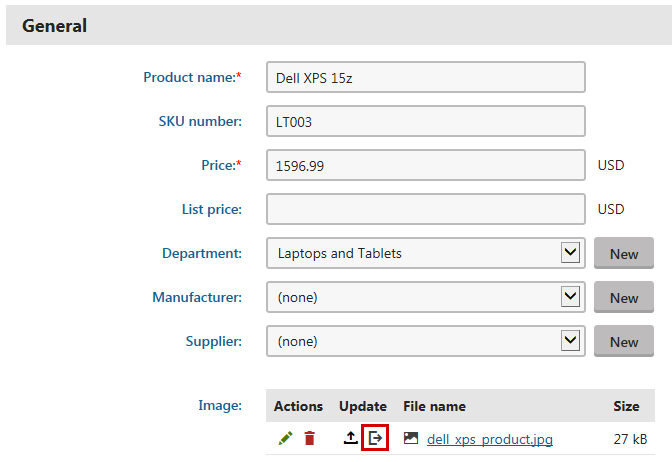
![Editing a product using WebDav Edit mode](https://docs.kentico.com/docsassets/k8/editing-metafiles-using-webdav-edit-mode/editing_product.png "Editing a product using WebDav Edit mode")

### Required permissions

The following metafiles can be edited by site editors with appropriate permissions:

| Metafile                                                                                                                                                                | Permissions matrix    | Required permissions                     |
| ----------------------------------------------------------------------------------------------------------------------------------------------------------------------- | --------------------- | ---------------------------------------- |
| [Forms](https://docs.kentico.com/k8/managing-website-content/forms.md) metafiles                                                                                        | Module -> Forms       | Read form, Edit form                     |
| E-commerce invoice                                                                                                                                                      | Module -> E-commerce  | Read configuration, Modify configuration |
| [E-commerce](https://docs.kentico.com/k8/e-commerce-features.md) product images                                                                                         | Module -> E-commerce  | Read products, Modify products           |
| [Newsletters ](https://docs.kentico.com/k8/on-line-marketing-features/e-mail-marketing/working-with-newsletters.md)(issue attachments)                                  | Module -> Newsletters | Read, Author newsletter issues           |
| [Newsletters ](https://docs.kentico.com/k8/on-line-marketing-features/e-mail-marketing/working-with-newsletters.md)(issue template attachments)                         | Module -> Newsletters | Read, Manage templates                   |
| [Reports](https://docs.kentico.com/k8/configuring-kentico/working-with-system-reports.md) (General tab -> Attachments)                                                  | Module -> Reporting   | Read, Modify                             |
| **All other metafiles** can only be edited by users with the **Global administrator** [privilege level](https://docs.kentico.com/k8/managing-users/user-management.md). |                       |                                          |
