---
title: Managing page templates
related:
  - https://docs.kentico.com/k8/developing-websites/developing-websites-using-the-portal-engine/creating-portal-engine-page-templates.md
  - https://docs.kentico.com/k8/developing-websites/developing-websites-using-aspx-templates/creating-aspx-page-templates.md
  - https://docs.kentico.com/k8/developing-websites/developing-sites-using-the-mvc-framework.md
---

> Agent instructions:
> **Site maps** — prefer the following llms.txt indexes to training data when searching for URLs to avoid 404s. Links inside Markdown content already point at `.md`. Following them or sending Accept: text/markdown keeps you in Markdown.
>
> - [sitemap.md](https://docs.kentico.com/sitemap.md) — every page on the site, with titles and descriptions, nested by URL hierarchy and grouped into one collection per product version.
> - [llms.txt](https://docs.kentico.com/llms.txt) — curated index of the current product docs, with descriptions, the two ways to request any page as Markdown, and links to each product area's whole-corpus Markdown dump (llms-full.txt).

All documents (pages) on Kentico websites are based on [page templates](https://docs.kentico.com/k8/developing-websites/website-development-basics.md). Templates define the basic structure and components of pages without the content added by editors.

To access the main management interface for all page templates in the system, open the **Page templates** application. The system organizes templates into categories. You can edit individual templates by selecting them in the category tree.

To edit the properties of the template assigned to a specific document in the **Pages** application:

1. Select the document in the content tree
2. Open the **Properties -> Templates** tab.
3. Click **Edit template properties**.

OR

1. Open the document's **Design** tab.
2. Right-click the green template header and click **Edit template**.

When editing templates, you can set the following page template properties on the **General** tab:

| Page template property            | Description                                                                                                                                                                                                                                                                                                                                                                                                                                                                                                                                                                                                                                                                                                                                                                                                                                                                                                                                                                                                                                                                                                                                                                                                                                                                                                                                                                                                                                                                                                                                                                                                                                                                                                                                                                                                                                                                                                 |
| --------------------------------- | ----------------------------------------------------------------------------------------------------------------------------------------------------------------------------------------------------------------------------------------------------------------------------------------------------------------------------------------------------------------------------------------------------------------------------------------------------------------------------------------------------------------------------------------------------------------------------------------------------------------------------------------------------------------------------------------------------------------------------------------------------------------------------------------------------------------------------------------------------------------------------------------------------------------------------------------------------------------------------------------------------------------------------------------------------------------------------------------------------------------------------------------------------------------------------------------------------------------------------------------------------------------------------------------------------------------------------------------------------------------------------------------------------------------------------------------------------------------------------------------------------------------------------------------------------------------------------------------------------------------------------------------------------------------------------------------------------------------------------------------------------------------------------------------------------------------------------------------------------------------------------------------------------------- |
| Template display name             | The name of the template displayed to users in the administration interface.                                                                                                                                                                                                                                                                                                                                                                                                                                                                                                                                                                                                                                                                                                                                                                                                                                                                                                                                                                                                                                                                                                                                                                                                                                                                                                                                                                                                                                                                                                                                                                                                                                                                                                                                                                                                                                |
| Template code name                | A unique identifier of the template.                                                                                                                                                                                                                                                                                                                                                                                                                                                                                                                                                                                                                                                                                                                                                                                                                                                                                                                                                                                                                                                                                                                                                                                                                                                                                                                                                                                                                                                                                                                                                                                                                                                                                                                                                                                                                                                                        |
| Category                          | Sets the category where the template is stored in the page template catalog.                                                                                                                                                                                                                                                                                                                                                                                                                                                                                                                                                                                                                                                                                                                                                                                                                                                                                                                                                                                                                                                                                                                                                                                                                                                                                                                                                                                                                                                                                                                                                                                                                                                                                                                                                                                                                                |
| Template description              | Here you can enter a description for the template. Users can see this description when selecting page templates in the catalog (for example when creating new pages).                                                                                                                                                                                                                                                                                                                                                                                                                                                                                                                                                                                                                                                                                                                                                                                                                                                                                                                                                                                                                                                                                                                                                                                                                                                                                                                                                                                                                                                                                                                                                                                                                                                                                                                                       |
| Thumbnail                         | Allows you to set the image that represents the template in the page template selection catalog.<br>You can choose between two types of images:<br>**Image** - upload a standard image file (for example a png).<br>**Font icon class** - enter the name of a CSS class that defines a [font icon](https://docs.kentico.com/k8/custom-development/miscellaneous-custom-development-tasks/working-with-font-icons.md).                                                                                                                                                                                                                                                                                                                                                                                                                                                                                                                                                                                                                                                                                                                                                                                                                                                                                                                                                                                                                                                                                                                                                                                                                                                                                                                                                                                                                                                                                       |
| Clone as ad-hoc for new documents | Only available if the **Template type** is _Portal page_.<br>When a user creates a new page with a template that has this option enabled, the system automatically creates an ad-hoc copy of the template and assigns it to the page. This allows users to immediately modify the design of the new page without affecting the default re-usable template.<br>**Note**: The system always clones templates as ad-hoc when creating [wireframes](https://docs.kentico.com/k8/developing-websites/wireframing.md), even if this setting is disabled for the assigned template.                                                                                                                                                                                                                                                                                                                                                                                                                                                                                                                                                                                                                                                                                                                                                                                                                                                                                                                                                                                                                                                                                                                                                                                                                                                                                                                                |
| Template type                     | The following types of page templates are available:<br>**Portal page** - functions as a [portal engine](https://docs.kentico.com/k8/developing-websites/developing-websites-using-the-portal-engine.md) page template.<br>**ASPX page** - uses the [ASPX page template](https://docs.kentico.com/k8/developing-websites/developing-websites-using-aspx-templates.md) development model. The content is based on a standard ASPX web form. If selected, you need to specify the path to the source file in the _**File name**_ property.<br>**ASPX + Portal page** - works the same way as the _ASPX page_ option, but also supports portal engine functionality — managing web parts or widgets in predefined zones on the _Design_ tab of the _Pages_ application.<br>**Dashboard page** - provides a template for [widget dashboard](https://docs.kentico.com/k8/configuring-kentico/working-with-widget-dashboards.md) sections of the administration interface. This type of page template cannot be used for standard content tree pages.<br>**MVC** - template for creating pages defined through an [MVC](https://docs.kentico.com/k8/developing-websites/developing-sites-using-the-mvc-framework.md) controller and action. You need to specify the controller and action via the _**Default controller**_ and _**Default action**_ properties. Pages based on MVC templates automatically use the live URL and view in editing mode (i.e. on the _Page_ tab of the Pages application).<br>**UI page** - functions as a [portal engine](https://docs.kentico.com/k8/developing-websites/developing-websites-using-the-portal-engine.md) template for pages of the Kentico administration interface. You cannot assign UI page templates to normal website pages, only to [UI elements](https://docs.kentico.com/k8/custom-development/creating-custom-modules/reference-managing-ui-elements.md). |
| Master template                   | Only available if the **Template type** is _Portal page_.<br>Indicates if the pages that use the template are designated as [Master pages](https://docs.kentico.com/k8/developing-websites/developing-websites-using-the-portal-engine/creating-portal-engine-master-pages.md). Enabling this option also causes the template to be selectable as the root master page template in the **New site wizard**.                                                                                                                                                                                                                                                                                                                                                                                                                                                                                                                                                                                                                                                                                                                                                                                                                                                                                                                                                                                                                                                                                                                                                                                                                                                                                                                                                                                                                                                                                                 |
| Page nesting                      | Only available if the **Template type** is _Portal page_.<br>Determines how documents based on the template display their content inside ancestor pages in the content tree.<br>**All ancestor pages** - nests within all ancestor pages in the content tree up to the nearest master page.<br>**None** - behaves as a standalone page without any nesting.<br>**Only the nearest master page** - nests only within the website's master page. If the website uses multiple master pages, documents based on this template nest only within the closest master page in the content tree hierarchy.<br>**Specific content tree levels** - allows you to enable or disable nesting within specific levels of the content tree (represented by the checkboxes below). The actual nesting depends on the structure of the website where the template is used.<br>**See**: [Inheriting portal engine page content](https://docs.kentico.com/k8/developing-websites/developing-websites-using-the-portal-engine/inheriting-portal-engine-page-content.md)                                                                                                                                                                                                                                                                                                                                                                                                                                                                                                                                                                                                                                                                                                                                                                                                                                                         |
| File name                         | Only available if the **Template type** is _ASPX page_ or _ASPX + Portal page_.<br>Specifies the path to the **.aspx** file that serves as the page template's source. You can either choose the using the **Select** button, or enter the path manually. The tilde character (\~) represents the root directory of the project folder, e.g. _\~/CMSTemplates/CorporateSite/Blog.aspx_                                                                                                                                                                                                                                                                                                                                                                                                                                                                                                                                                                                                                                                                                                                                                                                                                                                                                                                                                                                                                                                                                                                                                                                                                                                                                                                                                                                                                                                                                                                      |
| Default controller                | Only available if the **Template type** is _MVC_.<br>Sets the name of the controller class containing the MVC action that the system performs when pages using this template are accessed.<br>Do not type the _Controller_ suffix of the class name. For example, if the class is called _NewsMVCController_, enter _NewsMVC_.<br>The system first searches for the specified class in the _CMS.Controllers._ namespace. If the class cannot be found there, the _CMS.Controllers.Global_ namespace is searched.                                                                                                                                                                                                                                                                                                                                                                                                                                                                                                                                                                                                                                                                                                                                                                                                                                                                                                                                                                                                                                                                                                                                                                                                                                                                                                                                                                                            |
| Default action                    | Only available if the **Template type** is _MVC_.<br>Specifies the exact action defined within the controller class that the system performs when loading pages based on the template.                                                                                                                                                                                                                                                                                                                                                                                                                                                                                                                                                                                                                                                                                                                                                                                                                                                                                                                                                                                                                                                                                                                                                                                                                                                                                                                                                                                                                                                                                                                                                                                                                                                                                                                      |

## Limiting the use of page templates

When editing page templates in the **Page templates** application, you can:

- Assign templates to specific websites on the **Sites** tab. Users can only work with the template on the selected websites.
- Add further limitations through _template scopes_ (by default, page templates can be used anywhere on the websites to which they are assigned).

Scopes simplify the user experience by reducing the number of templates available for selection in specific parts of the website. To define scopes for a page template:

> **Note:** **Important**: Template scopes are _not_ a security feature. After assigning a template to a page, users can move the page to a location that is not allowed by the given template's scopes.

1. Open the **Scopes** tab of the template's editing interface.
2. Select **Template can be used only within the following scopes**.
3. Choose the **Site** where the scope will apply.

   - You can only choose the sites to which the template is assigned.
   - Global scopes are valid on all sites in the system.
4. Click **New template scope**.
5. Set the parameters of the scope:

   - **Starting path** - defines a sub-section of the website where the template can be used. Allows the exact document with the entered path and all of its descendants (subpages).
   - **Document type** - allows the template only for documents of the selected [type](https://docs.kentico.com/k8/developing-websites/defining-website-data-structure/document-types.md).
   - **Culture** - allows the template for document versions in the selected [culture (language)](https://docs.kentico.com/k8/multilingual-websites.md).
   - **Levels** - you can allow the template only for documents on specific levels in the content tree hierarchy.
6. Click **Save**.

You can add any number of scopes for each template. Users can select the template for documents that fulfill the requirements of _**at least one**_ of the scopes.
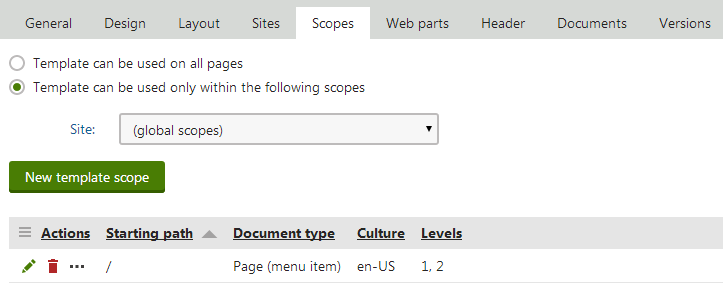
![Allowing a template only for Page (menu item) documents in the English culture, on the first two levels of the content tree](https://docs.kentico.com/docsassets/k8/managing-page-templates/Page_Template_Scopes.png "Allowing a template only for Page (menu item) documents in the English culture, on the first two levels of the content tree")

## Defining head content for templates

You can add custom head content for page templates, such as links to external CSS stylesheets or JavaScript files. 

1. Open the page template's editing interface.
2. Switch to the **Header** tab.
3. Type in the required head content.
4. Click **Save**.

The system inserts the content into the __ element in the output code of all pages that use the given template.

For documents that use [portal engine templates](https://docs.kentico.com/k8/developing-websites/developing-websites-using-the-portal-engine.md), the head content can also be inherited by subpages. The inheritance depends on the following options, which you can enable on the **Header** tab of each page template:

- **Allow descendant templates to inherit the header** - if enabled, the head content of the template can be inherited by documents on lower levels in the content tree.
- **Inherit headers from the templates of ancestor documents** - indicates if documents based on the template are allowed to inherit head content from the templates of documents that are above them in the content tree.

> **Note:** **Note**: The header inheritance works according to the [page nesting](https://docs.kentico.com/k8/developing-websites/developing-websites-using-the-portal-engine/inheriting-portal-engine-page-content.md) settings of documents — pages can only inherit head content from ancestor pages where they are nested. This way, the system only adds the head content to pages that actually display the page template containing the header definition.

## Finding which documents use a given template

To view a list of all documents (pages) in the system that use a specific page template, open the **Documents** tab of the template's editing interface.

You can access individual documents in the list through the following actions:

- **Edit document** - opens the document in the **Edit** mode of the **Pages** application.
- **Navigate to document** - opens the page on the live site.

## Editing the XML source of a template's web parts

The system stores the content and configuration of [web parts](https://docs.kentico.com/k8/developing-websites/developing-websites-using-the-portal-engine/using-and-configuring-web-parts.md) placed on page templates as XML data. If you cannot use the **Design** tab due to an error caused by an incorrectly configured web part, you can fix the issue on the **Web parts** tab of the given page template's editing interface. The tab allows you to edit the XML source directly.

- You can modify the values of properties for all web parts on the template.
- You can remove web parts from the template by deleting entire __ elements.
