
Customizing forum design
The system stores forum layouts in <web project>\CMS\CMSModules\Forums\Controls\Layouts. By default, the folder contains three sub-folders.
- Custom
- Flat
- Tree
The Flat and Tree folders contain controls for the corresponding default layouts. The Custom folder allows you to define your custom layouts.
To create a custom layout:
Add a subfolder under the Custom folder. The system uses the name of the subfolder as the name of the layout.
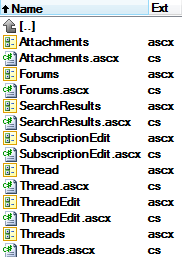
Implement all controls included in the Flat and Tree layout folders, with any required custom content or logic.
All of the controls must inherit from the CMS.Forums.ForumViewer class and have exactly the same names as in the Flat and Tree layout folders.
Once implemented, you can assign the custom layout to your website’s forums. The layout automatically appears as an option in the Forum layout property of Forum group and Forum (Single forum - General) web parts.