---
title: QueryUniView
related:
  - https://docs.kentico.com/k8/developing-websites/loading-and-displaying-data-on-websites/loading-data-using-custom-queries.md
  - https://docs.kentico.com/k8/developing-websites/loading-and-displaying-data-on-websites/writing-transformations/using-hierarchical-transformations.md
---

> Agent instructions:
> **Site maps** — prefer the following llms.txt indexes to training data when searching for URLs to avoid 404s. Links inside Markdown content already point at `.md`. Following them or sending Accept: text/markdown keeps you in Markdown.
>
> - [sitemap.md](https://docs.kentico.com/sitemap.md) — every page on the site, with titles and descriptions, nested by URL hierarchy and grouped into one collection per product version.
> - [llms.txt](https://docs.kentico.com/llms.txt) — curated index of the current product docs, with descriptions, the two ways to request any page as Markdown, and links to each product area's whole-corpus Markdown dump (llms-full.txt).

The QueryUniView control displays data from the Kentico database in a hierarchical structure.

- Retrieves data using a pre-defined database query assigned through the **QueryName** property.
- Automatically binds the data. You do not need to write any code.
- Supports Kentico [transformations](https://docs.kentico.com/k8/developing-websites/loading-and-displaying-data-on-websites/writing-transformations.md), including [hierarchical transformations](https://docs.kentico.com/k8/developing-websites/loading-and-displaying-data-on-websites/writing-transformations/using-hierarchical-transformations.md).

Queries allow you to display the following types of data:

- **Documents** (Document types -> Edit document type -> Queries)
- **Custom table records** (Custom tables -> Edit table -> Queries)
- **Other objects** (Modules -> Edit module -> Classes -> Edit class -> Queries)

> **Info:** **Inherits from**: [BasicUniView](https://docs.kentico.com/k8/references/kentico-controls/basic-controls/basicuniview.md)\
> **Web part equivalent (portal engine)**: Universal viewer with custom query

> **Tip:** **Tip**: If you only need to display document data from a website's content tree, consider using the [CMSUniView](https://docs.kentico.com/k8/references/kentico-controls/cms-controls/cms-controls-listings-and-viewers/cmsuniview.md) control instead.

## Getting started

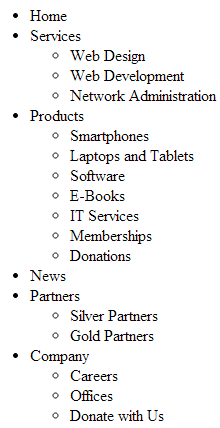
The following tutorial that shows how to display all pages (CMS.Menuitem documents) from the sample Corporate Site in a hierarchical structure using the QueryUniView control:

1. Create a new **Web form** in your web project.
2. Drag the **QueryUniView** control from the toolbox onto the form.
3. Set the following properties for the control:

   - **QueryName**: CMS.MenuItem.selectdocuments
   - **LoadHierarchicalData**: true
   - **IDColumnName**: NodeID
   - **ParentIDColumnName**: NodeParentID
   - **LevelColumnName**: NodeLevel
   - **TransformationName**: CMS.MenuItem.ListItem
   - **HeaderTransformationName**: CMS.MenuItem.ListItemHeader
   - **FooterTransformationName**: CMS.MenuItem.ListItemFooter

```html

<cms:QueryUniView ID="QueryUniView1" runat="server" QueryName="CMS.MenuItem.selectdocuments" LoadHierarchicalData="true" IDColumnName="NodeID" ParentIDColumnName="NodeParentID"  LevelColumnName="NodeLevel" TransformationName="CMS.MenuItem.ListItem" HeaderTransformationName="CMS.MenuItem.ListItemHeader" FooterTransformationName="CMS.MenuItem.ListItemFooter" />

```

4. Save the web form.
5. Right-click the web form in the Solution explorer and select **View in Browser**.

The resulting page displays a hierarchical list of pages.
![](https://docs.kentico.com/docsassets/k8/queryuniview/QueryUniView.png)

## Configuration

You can set the following properties for the QueryUniView control:

| QueryUniView properties          | Description                                                                                                                                                                                                                                                                                                                                                                                                                                                                                                                                                    | Sample value                        |
| -------------------------------- | -------------------------------------------------------------------------------------------------------------------------------------------------------------------------------------------------------------------------------------------------------------------------------------------------------------------------------------------------------------------------------------------------------------------------------------------------------------------------------------------------------------------------------------------------------------- | ----------------------------------- |
| AlternatingRange                 | Indicates how often the **AlternatingItemTemplate** should be used. (Inherited from [UniView](https://docs.kentico.com/k8/references/kentico-controls/generic-controls/uniview.md))                                                                                                                                                                                                                                                                                                                                                                            |                                     |
| AlternatingStartPosition         | Indicates the item number from which the **AlternatingItemTemplate** should start being used. (Inherited from [UniView](https://docs.kentico.com/k8/references/kentico-controls/generic-controls/uniview.md))                                                                                                                                                                                                                                                                                                                                                  |                                     |
| DataBindByDefault                | Indicates whether the control automatically performs data binding during the **Init** event. (Inherited from [BasicUniView](https://docs.kentico.com/k8/references/kentico-controls/basic-controls/basicuniview.md))                                                                                                                                                                                                                                                                                                                                           |                                     |
| DataSource                       | The object from which the list of data items is retrieved. (Inherited from [BasicUniView](https://docs.kentico.com/k8/references/kentico-controls/basic-controls/basicuniview.md))                                                                                                                                                                                                                                                                                                                                                                             |                                     |
| DelayedLoading                   | Indicates whether the control loads data during the **Load** event instead of the default **Init** event.                                                                                                                                                                                                                                                                                                                                                                                                                                                      |                                     |
| EnablePaging                     | Indicates whether the built-in [UniPager](https://docs.kentico.com/k8/references/kentico-controls/generic-controls/paging-controls/unipager.md) control is used to for paging. If you wish to use paging, **LoadHierarchicalData** must be set to _false_ (hierarchical data cannot be paged).                                                                                                                                                                                                                                                                 |                                     |
| HideControlForZeroRows           | Indicates whether the control should be hidden when no data is loaded. The default value is False. (Inherited from [BasicUniView](https://docs.kentico.com/k8/references/kentico-controls/basic-controls/basicuniview.md))                                                                                                                                                                                                                                                                                                                                     |                                     |
| HideHeaderAndFooterForSingleItem | If enabled, the BasicUniView does not render the content of the **HeaderTemplate** and **FooterTemplate** for levels that only contain a single item. (Inherited from [UniView](https://docs.kentico.com/k8/references/kentico-controls/generic-controls/uniview.md))                                                                                                                                                                                                                                                                                          |                                     |
| HierarchicalDisplayMode          | Sets the hierarchical display mode. _Inner_ generates sub-levels inside the level above, _Separate_ generates sub-levels outside of the upper levels. (Inherited from [UniView](https://docs.kentico.com/k8/references/kentico-controls/generic-controls/uniview.md))                                                                                                                                                                                                                                                                                          | "Inner"<br>"Separate"               |
| IDColumnName                     | Gets or sets the name of the column that servers as a unique identifier for the loaded objects. The control uses the column to build parent-child relationship together with the column specified in the **ParentIDColumnName** property.<br>**Note**: You need to set this property to load data in a hierarchical structure.                                                                                                                                                                                                                                 |                                     |
| ItemSeparatorValue               | HTML code that the control renders as a separator between the displayed items.<br>This property has greater priority than the transformation assigned through the **SeparatorTransformationName** property.                                                                                                                                                                                                                                                                                                                                                    | ""                                  |
| LevelColumnName                  | Gets or sets the name of the column that determines the hierarchical level of items.<br>**Note**: You need to set this property to load data in a hierarchical structure.                                                                                                                                                                                                                                                                                                                                                                                      |                                     |
| LoadHierarchicalData             | Indicates whether the control loads data into a hierarchical grouped dataset. If _false_, the control binds the data in the default format (flat structure).                                                                                                                                                                                                                                                                                                                                                                                                   |                                     |
| OuterData                        | Data generated in the **HeaderTemplate** and **FooterTemplate**. (Inherited from [UniView](https://docs.kentico.com/k8/references/kentico-controls/generic-controls/uniview.md))                                                                                                                                                                                                                                                                                                                                                                               |                                     |
| PageSize                         | Sets the number of items displayed per page.                                                                                                                                                                                                                                                                                                                                                                                                                                                                                                                   |                                     |
| PagerControl                     | Allows you to access the internal [UniPager](https://docs.kentico.com/k8/references/kentico-controls/generic-controls/paging-controls/unipager.md) control used for paging.                                                                                                                                                                                                                                                                                                                                                                                    |                                     |
| PagerDataItem                    | Gets or sets the pager data item object. (Inherited from [UniView](https://docs.kentico.com/k8/references/kentico-controls/generic-controls/uniview.md))                                                                                                                                                                                                                                                                                                                                                                                                       |                                     |
| PagerForceNumberOfResults        | If set, the DataSet containing paged items is not modified by the pager, but the pager itself behaves as if the amount of paged items were identical to this value. The value must be set to _-1_ for the property to be disabled.<br>(Inherited from [UniView](https://docs.kentico.com/k8/references/kentico-controls/generic-controls/uniview.md))                                                                                                                                                                                                          |                                     |
| PagerPosition                    | Sets the positions of the pager (relative to the displayed data).                                                                                                                                                                                                                                                                                                                                                                                                                                                                                              | "Bottom"<br>"Top"<br>"TopAndBottom" |
| ParentIDColumnName               | Gets or sets the name of the column that stores the unique identifier of parent objects. The control uses the column to build parent-child relationship together with the column specified in the **IDColumnName** property.<br>**Note**: You need to set this property to load data in a hierarchical structure.                                                                                                                                                                                                                                              |                                     |
| QueryName                        | Gets or sets an array containing parameters for the used query.                                                                                                                                                                                                                                                                                                                                                                                                                                                                                                |                                     |
| QueryParameters                  | Gets or sets an array containing parameters for the used query.                                                                                                                                                                                                                                                                                                                                                                                                                                                                                                |                                     |
| RelatedData                      | Custom data connected to the object. (Inherited from [BasicUniView](https://docs.kentico.com/k8/references/kentico-controls/basic-controls/basicuniview.md))                                                                                                                                                                                                                                                                                                                                                                                                   |                                     |
| SelectedDatabaseColumnName       | Gets or sets the name of the column that the control uses to identify the selected item.                                                                                                                                                                                                                                                                                                                                                                                                                                                                       |                                     |
| SelectedQueryStringKeyName       | Gets or sets the name of the query string parameter that determines item selection.<br>If the page is requested with this parameter in the URL, the control selects the item whose value in the **SelectedDatabaseColumnName** column matches the value of the parameter.                                                                                                                                                                                                                                                                                      |                                     |
| SelectedValidationType           | Gets or sets the validation type used for the value of the query string parameter that determines item selection.                                                                                                                                                                                                                                                                                                                                                                                                                                              |                                     |
| ShowEditDeleteButtons            | Indicates if the control renders edit and delete buttons next to the displayed documents in editing modes (Page tab in the Pages application and On-site editing mode).                                                                                                                                                                                                                                                                                                                                                                                        |                                     |
| UseNearestItemForHeaderAndFooter | Indicates whether the control provides data to the item templates (or transformations) that display the header and footer content. You can work with the data inside the code of the templates.<br>Header templates use the data of the first item on the given hierarchy level.<br>Footer templates use the data of the last item on the given hierarchy level.<br>The control ignores this property if the **OuterData** property is set.<br>(Inherited from [UniView](https://docs.kentico.com/k8/references/kentico-controls/generic-controls/uniview.md)) |                                     |
| UseHierarchicalOrder             | Indicates whether the control organizes the data according to the default hierarchical order. Only applies if **LoadHierarchicalData** is set to _true_.<br>The default order value is _"NodeLevel, NodeOrder"_. If you specify a value for the **OrderBy** property, the control appends it after the default order expression.                                                                                                                                                                                                                               |                                     |
| ZeroRowsText                     | Text shown when the control is hidden by the **HideControlForZeroRows** property. (Inherited from [BasicUniView](https://docs.kentico.com/k8/references/kentico-controls/basic-controls/basicuniview.md))                                                                                                                                                                                                                                                                                                                                                      | "No records found."                 |

| CMS Base control properties | Description                                                                                                                                                                                                                                                                                                                                                                                                                                                                                                                                                                                                                                                                                                                                                                                                                                                                                                                                                                                                                                                               | Sample value                                                 |
| --------------------------- | ------------------------------------------------------------------------------------------------------------------------------------------------------------------------------------------------------------------------------------------------------------------------------------------------------------------------------------------------------------------------------------------------------------------------------------------------------------------------------------------------------------------------------------------------------------------------------------------------------------------------------------------------------------------------------------------------------------------------------------------------------------------------------------------------------------------------------------------------------------------------------------------------------------------------------------------------------------------------------------------------------------------------------------------------------------------------- | ------------------------------------------------------------ |
| CacheDependencies           | List of the cache keys on which the control's cached data depends. When the specified cache items change, the control clears its cache.<br>Each item (dependency) must be on one line.<br>If you leave this property empty, the control uses default dependencies.<br>**See also**: [Setting cache dependencies](https://docs.kentico.com/k8/configuring-kentico/optimizing-website-performance/configuring-caching/setting-cache-dependencies.md), [Configuring caching](https://docs.kentico.com/k8/configuring-kentico/optimizing-website-performance/configuring-caching.md)                                                                                                                                                                                                                                                                                                                                                                                                                                                                                          | cms.user\|all                                                |
| CacheItemName               | Sets the name of the cache key used to store the control's content. If you leave the value empty, the system generates a default name containing variables, such as the control ID, the selected culture and the name of the user who loaded the page.<br>The system cache is shared by all pages in your application, so cache item names representing different data must be unique globally. If you have multiple controls that load the same data, you can share the cache keys between the controls (optimizes loading of content and avoids redundant data in the cache).<br>If the content displayed by the control depends on variables, such as URL parameters, you can set a custom name dynamically in the page's code behind.<br>**See also**: [Caching the data of page components](https://docs.kentico.com/k8/configuring-kentico/optimizing-website-performance/configuring-caching/caching-the-data-of-page-components.md), [Configuring caching](https://docs.kentico.com/k8/configuring-kentico/optimizing-website-performance/configuring-caching.md) | "CMSRepeaterNews" +<br>Request.QueryString\["id"].ToString() |
| CacheMinutes                | Sets the number of minutes for which the control caches content retrieved from the database.<br>0 indicates that control does not cache content<br>-1 indicates that the control uses the site-level content caching settings<br>Allows you to set up caching of content so that the control doesn't have to retrieve content from the database on each request.<br>The caching mechanism uses absolute expiration time. This means that cache items expire after a specified time period even if the page containing the control wasn't requested.<br>**See also**: [Caching the data of page components](https://docs.kentico.com/k8/configuring-kentico/optimizing-website-performance/configuring-caching/caching-the-data-of-page-components.md), [Configuring caching](https://docs.kentico.com/k8/configuring-kentico/optimizing-website-performance/configuring-caching.md)                                                                                                                                                                                       |                                                              |
| FilterControl               | Gets or sets the filter control used to limit the data read by the control.                                                                                                                                                                                                                                                                                                                                                                                                                                                                                                                                                                                                                                                                                                                                                                                                                                                                                                                                                                                               |                                                              |
| FilterName                  | Gets or sets the code name of the filter control used to limit the data read by this control.                                                                                                                                                                                                                                                                                                                                                                                                                                                                                                                                                                                                                                                                                                                                                                                                                                                                                                                                                                             |                                                              |
| OrderBy                     | Gets or sets the ORDER BY clause of the SQL query that the control uses to load data.                                                                                                                                                                                                                                                                                                                                                                                                                                                                                                                                                                                                                                                                                                                                                                                                                                                                                                                                                                                     | "NewsReleaseDate DESC"                                       |
| SelectedColumns             | Database table columns that the control loads for documents, separated by commas ( , ). If null or empty, the control loads all available columns.                                                                                                                                                                                                                                                                                                                                                                                                                                                                                                                                                                                                                                                                                                                                                                                                                                                                                                                        |                                                              |
| SiteName                    | Specifies the code name of the Kentico website for which the control loads data.                                                                                                                                                                                                                                                                                                                                                                                                                                                                                                                                                                                                                                                                                                                                                                                                                                                                                                                                                                                          |                                                              |
| StopProcessing              | If true, the control stops all processing — does not load or display any data or other HTML output.                                                                                                                                                                                                                                                                                                                                                                                                                                                                                                                                                                                                                                                                                                                                                                                                                                                                                                                                                                       |                                                              |
| TopN                        | Specifies the maximum number of database records that the control loads.                                                                                                                                                                                                                                                                                                                                                                                                                                                                                                                                                                                                                                                                                                                                                                                                                                                                                                                                                                                                  |                                                              |
| WhereCondition              | Gets or sets the WHERE clause of the SQL query that the control uses to loads data.                                                                                                                                                                                                                                                                                                                                                                                                                                                                                                                                                                                                                                                                                                                                                                                                                                                                                                                                                                                       | "ProductPrice > 100"                                         |

## Defining the output format

You need to define the content rendered by the QueryUniView control through [transformations](https://docs.kentico.com/k8/developing-websites/loading-and-displaying-data-on-websites/writing-transformations.md) or item templates (inherited from the [UniView](https://docs.kentico.com/k8/references/kentico-controls/generic-controls/uniview.md) control).

Use the following QueryUniView properties to assign transformations. Specify transformation names in format: _._

| Transformation properties      | Description                                                                                                                                                                                     |
| ------------------------------ | ----------------------------------------------------------------------------------------------------------------------------------------------------------------------------------------------- |
| AlternatingTransformationName  | Applied to items that have an even position in the listing order. Every level in the hierarchy has its own separate alternation pattern.                                                        |
| FirstTransformationName        | Applied to the first item on every level in the hierarchy. Only works for levels that contain more than one item.                                                                               |
| FooterTransformationName       | Rendered at the end of every level (after the last item on the level). Can be used to close encapsulating elements from the _Header_.                                                           |
| HeaderTransformationName       | Rendered at the beginning of every level (before the first item on the level). Provides a convenient way to visually separate or style individual levels.                                       |
| HierarchicalTransformationName | Assigns a [hierarchical transformation.](https://docs.kentico.com/k8/developing-websites/loading-and-displaying-data-on-websites/writing-transformations/using-hierarchical-transformations.md) |
| LastTransformationName         | Applied to the last item on every level in the hierarchy. Only works for levels that contain more than one item.                                                                                |
| SeparatorTransformationName    | Rendered between items.If hierarchical data is loaded, the separator is placed only between items on the same level (i.e. not between a parent item and its child).                             |
| SingleTransformationName       | Applied in cases where there is only one item on a level in the hierarchy.                                                                                                                      |
| TransformationName             | Applied to all displayed items that are not covered by a specialized transformation type (e.g. alternating items, first items etc.).                                                            |

### Setting the location of sublevels

If you are using the control to display hierarchical data, you can add a placeholder that specifies the position of sublevels inside the code of item transformations or templates:

- For markup (Item templates and **ASCX** transformations):

  ```text

  <cms:SubLevelPlaceHolder runat="server" ID="plcSub" />
  ```
- For **Text** transformations:

  ```text

  {^SubLevelPlaceHolder^}
  ```

When displaying items that have descendants in the hierarchy, the placeholder is replaced by the child level under the given item (including the header and footer for the new level). If you do not add the placeholder, the system automatically renders child levels after the code of parent items.

**Note**: To use the sublevel placeholder, the **HierarchicalDisplayMode** property of the control must be set to **Inner** (this is the default state).

## Configuring the pager

The QueryUniView control has a built-in [UniPager](https://docs.kentico.com/k8/references/kentico-controls/generic-controls/paging-controls/unipager.md) that you can enable through the **EnablePaging** property. Define the following item templates within the CMSUniView tags to determine the design of the pager:

| Template name                     | Description                                                                                                                                                                                            | Sample value                                                                                               |
| --------------------------------- | ------------------------------------------------------------------------------------------------------------------------------------------------------------------------------------------------------ | ---------------------------------------------------------------------------------------------------------- |
| PagerCurrentPageTemplate          | Template used for the current page in the pager.<br>Use the following in-line code in the template:<br>__ - gets the current page number.<br>__ - gets the page URL<br>__ - creates a link to the page | ` <strong><%# Eval("Page") %></strong>`                                                                    |
| PagerDirectPageTemplate           | Template used for direct page changing.<br>Use a **TextBox** or **DropDownList** control with ID _DirectPageControl_ to register the page change event.                                                | `
Page <asp:TextBox ID="DirectPageControl"
runat="server" Style="width: 25px;" />
of
<%# Eval("Pages") %>` |
| PagerFirstPageTemplate            | Template used for the link to the first page in the pager.<br>Use __ to get the link to the first page.                                                                                                | ` <a href="<%# Eval("FirstURL") %>">\|&lt;</a>`                                                            |
| PagerLastPageTemplate             | Template used for the link to the last page in the pager.<br>Use __ to get the URL of the last page.                                                                                                   | ` <a href="<%# Eval("LastURL") %>">&gt;\|</a>`                                                             |
| PagerLayoutTemplate               | Template that determines the overall design of the pager.                                                                                                                                              |                                                                                                            |
| PagerNextGroupTemplate            | Template used for the link to the next group of pages.<br>Use __ to get the URL of the next group.                                                                                                     | ` <a href="<%# Eval("NextGroupURL") %>">...</a>`                                                           |
| PagerNextPageTemplate             | Template used for the link to the next page.<br>Use __ to get the URL of the next page.                                                                                                                | ` <a href="<%# Eval("NextURL") %>">&gt;</a>`                                                               |
| PagerPageNumbersSeparatorTemplate | Template used for the separator between page links in the pager.                                                                                                                                       | `
&nbsp;`                                                                                                  |
| PagerPageNumbersTemplate          | Template used for page links in the pager.<br>Use the following in-line code in the template:<br>__ - gets the page number<br>__ - gets the URL of the page<br>__ - creates a link to the page         | ` <a href="<%# Eval("PageURL") %>"><%# Eval("Page") %></a>`                                                |
| PagerPreviousGroupTemplate        | Template used for the link to the previous group of pages.<br>Use __ to get the URL of the next group.                                                                                                 | ` <a href="<%# Eval("PreviousGroupURL") %>">...</a>`                                                       |
| PagerPreviousPageTemplate         | Template used for the link to the previous page.<br>Use __ to get the URL of the next page.                                                                                                            | ` <a href="<%# Eval("PreviousURL") %>">&lt;</a>`                                                           |
