
Personas
Kentico EMS required
Features described on this page require the Kentico EMS license.
Personas are a transparent and easily manageable way of segmenting your site visitors. Using the Personas application, you can define the typical visitor groups of your site. Once you have defined personas, the system assigns visitors to the persona they fit the most. This is done based on data about the visitors and their behavior on the site. You can use personas throughout the whole system (pages, e-mails, macros) to display different content to each persona defined on your site.
Wikipedia description of Personas.
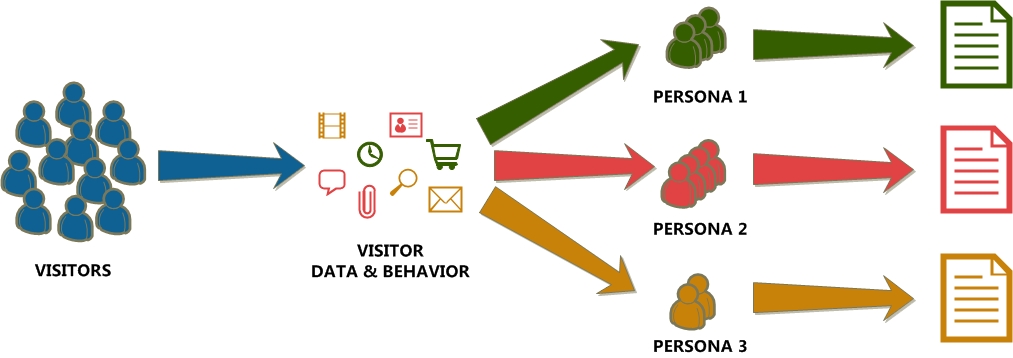
Diagram: Visitors coming to the website are segmented into personas based on their behavior and data,*** each persona is shown personalized content.***
Examples of segmenting site visitors into personas
The following are rough examples of personas in two businesses. Ideally, these would be based on research and would also contain additional information.
Hospital website
- Patient - looking for information about the hospital. Such as pricing of services, admission requirements or meals that are served on that day.
- Visitor of another patient - may be looking for information such as visiting hours, parking information or information on getting around the hospital.
- Foreigner - patients and potential patients not participating in the health insurance system provided in the country may require special information.
E-commerce website selling computer hardware
- Budget buyer - looking for the best bargains on the site and what is usually the low-end specification version of the currently available hardware.
- Early adopter - looking for the latest gadgets and pieces of hardware. Willing to invest substantially more even into unproven products.
- Mid-market buyer - usually looking for the best price / performance ratio. Buying products that do not lose value as quickly as high end products.
- Community enthusiast - a visitor who often aids other in product comments, or who writes reviews for other visitors of the website.
Personas should ideally be defined based on market research and finding out how they people fitting these personas really work. Find more information in Defining personas.
Ways of displaying content to Personas
- Recommending documents to personas
- Recommending page component variants to personas
- Subscribing personas to newsletters
Allowing users to work with personas
Users that want to work with personas need the following permissions:
- For working with the Persona application, users need to have the Read and Modify Personas permissions.
- For assigning personas to documents, users need to have the Browse tree, Read and Modify Content permissions.