---
title: Configuring content personalization
related:
  - https://docs.kentico.com/k10/on-line-marketing-features/managing-your-on-line-marketing-features/content-personalization.md
  - https://docs.kentico.com/k10/on-line-marketing-features/configuring-and-customizing-your-on-line-marketing-features/configuring-on-line-marketing-permissions.md
---

> Agent instructions:
> **Site maps** — prefer the following llms.txt indexes to training data when searching for URLs to avoid 404s. Links inside Markdown content already point at `.md`. Following them or sending Accept: text/markdown keeps you in Markdown.
>
> - [sitemap.md](https://docs.kentico.com/sitemap.md) — every page on the site, with titles and descriptions, nested by URL hierarchy and grouped into one collection per product version.
> - [llms.txt](https://docs.kentico.com/llms.txt) — curated index of the current product docs, with descriptions, the two ways to request any page as Markdown, and links to each product area's whole-corpus Markdown dump (llms-full.txt).

> **Info:** **Kentico EMS required**
>
> Features described on this page require the **Kentico EMS** license.

Content personalization is an on‑line marketing feature that can significantly increase the flexibility of your website. Personalization allows you to create pages that display different content depending on the circumstances in which they are viewed.

Users with the [permissions](https://docs.kentico.com/k10/on-line-marketing-features/configuring-and-customizing-your-on-line-marketing-features/configuring-on-line-marketing-permissions.md#content-personalization) for the **Content personalization** module can create personalization variants of page components, such as [widgets](https://docs.kentico.com/k10/on-line-marketing-features/managing-your-on-line-marketing-features/content-personalization/personalizing-editor-widgets.md). Note that for creating personalization variants of [web parts and web part zones](https://docs.kentico.com/k10/on-line-marketing-features/configuring-and-customizing-your-on-line-marketing-features/configuring-content-personalization/personalizing-web-parts-and-web-part-zones.md), you also need the [Design website](https://docs.kentico.com/display/K10/Configuring+design+permissions) permission for the **Design** module.

First, you need to allow content personalization:

- [Enable content personalization](#enabling-content-personalization)

Furthermore, page designers can also personalize web parts and web part zones:

- [Personalize web parts and web part zones](https://docs.kentico.com/k10/on-line-marketing-features/configuring-and-customizing-your-on-line-marketing-features/configuring-content-personalization/personalizing-web-parts-and-web-part-zones.md)
- [See an example of creating a personalized page](https://docs.kentico.com/k10/on-line-marketing-features/configuring-and-customizing-your-on-line-marketing-features/configuring-content-personalization/creating-a-personalized-page-example.md)

## Enabling content personalization

To start using [content personalization](https://docs.kentico.com/k10/on-line-marketing-features/managing-your-on-line-marketing-features/content-personalization.md) on your website:

1. Open the **Settings** application.
2. Switch to **On-line marketing**.
3. Select your **Site** (or enable content personalization globally).
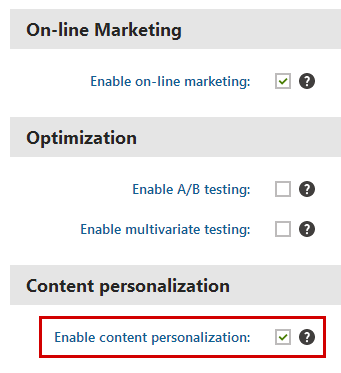
4. Select the **Enable content personalization** checkbox.
5. Click **Save**.

![Enabling content personalization](https://docs.kentico.com/docsassets/k10/configuring-content-personalization/enabling_content_personalization.png "Enabling content personalization")

When visitors view personalized pages on the live website, the system processes the variants and displays the corresponding content.

> **Note:** **Note**: If you disable content personalization at a later time:
>
> - Existing personalization variants on your website will not be deleted. The system stops processing the conditions of variants on personalized pages and always displays the default content on the live website.
> - Users will no longer be able to manage personalization variants or define new ones.