---
title: Configuring forum search
related:
  - https://docs.kentico.com/k10/configuring-kentico/setting-up-search-on-your-website.md
  - https://docs.kentico.com/k10/configuring-kentico/setting-up-search-on-your-website/creating-search-indexes/defining-forum-indexes.md
---

> Agent instructions:
> **Site maps** — prefer the following llms.txt indexes to training data when searching for URLs to avoid 404s. Links inside Markdown content already point at `.md`. Following them or sending Accept: text/markdown keeps you in Markdown.
>
> - [sitemap.md](https://docs.kentico.com/sitemap.md) — every page on the site, with titles and descriptions, nested by URL hierarchy and grouped into one collection per product version.
> - [llms.txt](https://docs.kentico.com/llms.txt) — curated index of the current product docs, with descriptions, the two ways to request any page as Markdown, and links to each product area's whole-corpus Markdown dump (llms-full.txt).

> **Info:** The web parts described on this page use the SQL search engine. You can also try index-based searching provided by the [Smart search](https://docs.kentico.com/k10/configuring-kentico/setting-up-search-on-your-website.md) module.
>
> Smart search offers better performance than SQL search but requires more configuration steps.

If you want to let users search forum posts for some text, you can use the **Forum search box** and **Forum search results** web parts. You will typically place them both on the same page. However, if you need to place the Forum search box on a different page, you can set its **Redirect to URL** property to the page where you have the Forum search results web part, such as _\~/SearchForum.aspx_.

You can also use the **Forum search - advanced dialog** web part, which offers a larger dialog allowing users to specify multiple search parameters.
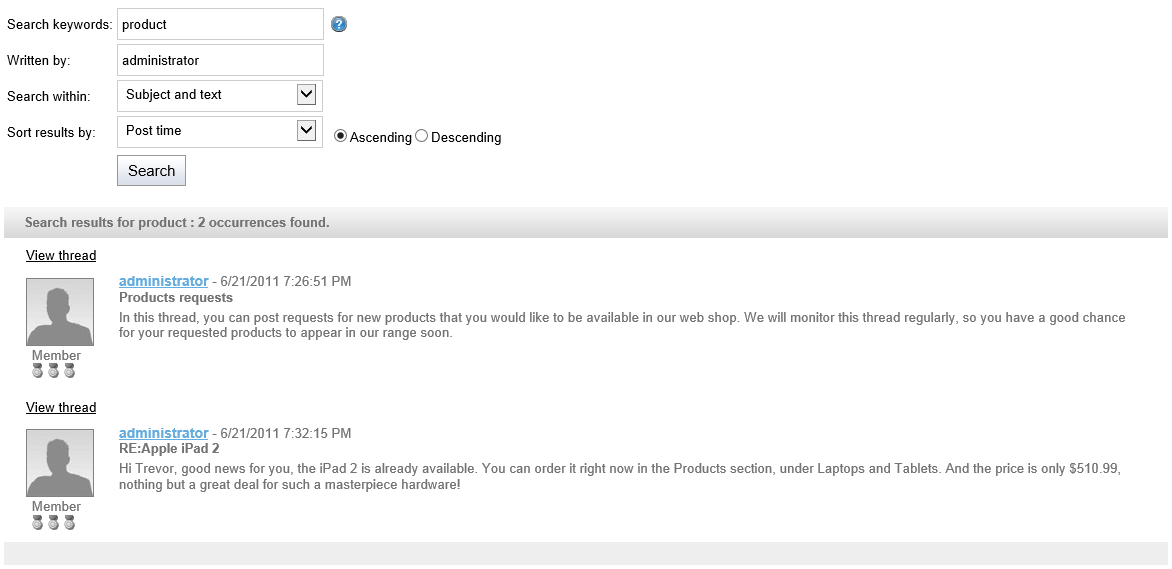
![Searching forums with advanced parameters](https://docs.kentico.com/docsassets/k10/configuring-forum-search/forum_search.png "Searching forums with advanced parameters")

> **Tip:** **Tip:** If you want to use the basic search box by default, but want to let users have the option of using the advanced dialog as well, enter the path to the page containing the **Forum search - advanced dialog** web part into the **Advanced search path** property of the **Forum search box** web part. This displays the **Advanced search** link next to the search box.
