---
title: CMSSearchResults
---

> Agent instructions:
> **Site maps** — prefer the following llms.txt indexes to training data when searching for URLs to avoid 404s. Links inside Markdown content already point at `.md`. Following them or sending Accept: text/markdown keeps you in Markdown.
>
> - [sitemap.md](https://docs.kentico.com/sitemap.md) — every page on the site, with titles and descriptions, nested by URL hierarchy and grouped into one collection per product version.
> - [llms.txt](https://docs.kentico.com/llms.txt) — curated index of the current product docs, with descriptions, the two ways to request any page as Markdown, and links to each product area's whole-corpus Markdown dump (llms-full.txt).

The CMSSearchResults control displays search results according to parameters provided from the [CMSSearchDialog](https://docs.kentico.com/k10/references/kentico-controls/cms-controls/sql-search-controls/cmssearchdialog.md) control. The controls use the SQL search engine, which utilizes standard queries to find results in the Kentico database.

> **Note:** **Note**: Current versions of Kentico provide an index-based [smart search engine](https://docs.kentico.com/k10/configuring-kentico/setting-up-search-on-your-website.md). The smart search has significantly better performance than the SQL search.

The SQL search uses the following queries:

- Automatically generated queries for the data of individual [page types](https://docs.kentico.com/k10/developing-websites/defining-website-content-structure/page-types.md). To override the search query for a page type, create a new query named **searchtree** in _Page types -> Edit page type -> Queries_.
- The **searchdocuments** query of the **Root** page type for fields that are shared by all pages (such as the document name).
- The **searchattachments** query of the **Root** page type for files uploaded as page attachments. To search attachments, you need to configure the system as described in [Configuring SQL search for attachment files](https://docs.kentico.com/k10/configuring-kentico/setting-up-search-on-your-website/searching-attachment-files/configuring-sql-search-for-attachment-files.md).

The control combines the results of all relevant queries into a single data source and displays the data.

> **Info:** **Web part equivalent (portal engine)**: SQL Search results

## Configuration

You can set the following properties for the CMSSearchResults control:

| Property name             | Description                                                                                                                                                                                                                                                                                                                                                                                                                                                                                                                                                                                                                                                                                                                                                                                                                                                                                                                                                                           | Sample value                                             |
| ------------------------- | ------------------------------------------------------------------------------------------------------------------------------------------------------------------------------------------------------------------------------------------------------------------------------------------------------------------------------------------------------------------------------------------------------------------------------------------------------------------------------------------------------------------------------------------------------------------------------------------------------------------------------------------------------------------------------------------------------------------------------------------------------------------------------------------------------------------------------------------------------------------------------------------------------------------------------------------------------------------------------------- | -------------------------------------------------------- |
| CacheDependencies         | List of the cache keys on which the control's cached data depends. When the specified cache items change, the control clears its cache.<br>Each item (dependency) must be on one line.<br>If you leave this property empty, the control uses default dependencies.<br>**See also**: [Setting cache dependencies](https://docs.kentico.com/k10/configuring-kentico/optimizing-website-performance/configuring-caching/setting-cache-dependencies.md), [Configuring caching](https://docs.kentico.com/k10/configuring-kentico/optimizing-website-performance/configuring-caching.md)                                                                                                                                                                                                                                                                                                                                                                                                    | cms.user\|all                                            |
| CacheItemName             | Sets the name of the cache key used to store the control's content. If you leave the value empty, the system generates a default name containing variables, such as the control ID, the selected culture and the name of the user who loaded the page.<br>The system cache is shared by all pages in your application, so cache item names representing different data must be unique globally. If the content displayed by the control depends on variables, such as URL parameters, you can set a custom name dynamically in the page's code behind.<br>**See also**: [Caching the data of page components](https://docs.kentico.com/k10/configuring-kentico/optimizing-website-performance/configuring-caching/caching-the-data-of-page-components.md), [Configuring caching](https://docs.kentico.com/k10/configuring-kentico/optimizing-website-performance/configuring-caching.md)                                                                                              | "mycachename" +<br>Request.QueryString\["id"].ToString() |
| CacheMinutes              | Sets the number of minutes for which the control caches content retrieved from the database.<br>0 indicates that control does not cache content<br>-1 indicates that the control uses the site-level content caching settings<br>Allows you to set up caching of content so that the control doesn't have to retrieve content from the database on each request.<br>The caching mechanism uses absolute expiration time. This means that cache items expire after a specified time period even if the page containing the control wasn't requested.<br>**See also**: [Caching the data of page components](https://docs.kentico.com/k10/configuring-kentico/optimizing-website-performance/configuring-caching/caching-the-data-of-page-components.md), [Configuring caching](https://docs.kentico.com/k10/configuring-kentico/optimizing-website-performance/configuring-caching.md)                                                                                                 |                                                          |
| CheckPermissions          | Indicates if the control checks the permissions of the user viewing the page. If the value is _false_ (default value) no permissions are checked.<br>If true, the control only loads pages for which the user viewing the page has read permissions.                                                                                                                                                                                                                                                                                                                                                                                                                                                                                                                                                                                                                                                                                                                                  |                                                          |
| ClassNames                | Specifies which [page types](https://docs.kentico.com/k10/developing-websites/defining-website-content-structure/page-types.md) the control loads and displays. Identify page types through their code names, separated by semicolons (;).<br>You can use the \* wildcard as a substitute for any number of characters. For example _Product.\*_ includes the page types _Product.Camera_, _Product.CellPhone_, _Product.Computer_ etc.<br>If the property is left empty, the control retrieves all page types by default. In the case of menu and navigation controls, only _CMS.MenuItem_ pages are loaded by default.<br>**Note**: If the control loads all page types (empty value), only the common data columns from the _View\_CMS\_Tree\_Joined_ view are available in the retrieved data. The specific fields of individual page types are not included. You need to keep this in mind when writing the code of transformations, WHERE conditions, ORDER BY expressions etc. | "cms.news"<br>"cms.news;cms.article"                     |
| CMSSearchDialogID         | Specifies the ID of the [CMSSearchDialog](https://docs.kentico.com/k10/references/kentico-controls/cms-controls/sql-search-controls/cmssearchdialog.md) control that provides the search expression and parameters.                                                                                                                                                                                                                                                                                                                                                                                                                                                                                                                                                                                                                                                                                                                                                                   | "CMSSearchDialog1"                                       |
| CombineWithDefaultCulture | Indicates whether the control loads pages from the website's default culture version if the required pages are not available in the user's selected culture.<br>Only applies if you do not set the **TreeProvider** property manually.                                                                                                                                                                                                                                                                                                                                                                                                                                                                                                                                                                                                                                                                                                                                                |                                                          |
| CultureCode               | Specifies the culture code of the pages that the control loads. If not specified, the control automatically uses the preferred culture of the user viewing the page.                                                                                                                                                                                                                                                                                                                                                                                                                                                                                                                                                                                                                                                                                                                                                                                                                  | "en-us"                                                  |
| DataSource                | Allows you to manually assign a DataSet or DataTable containing pages for the control to display.<br>You can retrieve the search data in your code using the **CMS.DocumentEngine.TreeProvider.Search** method:<br>` 
DataSet results = TreeProvider.Search(...);
CMSSearchResults1.DataSource = results;
CMSSearchResults1.DataBind();
 `                                                                                                                                                                                                                                                                                                                                                                                                                                                                                                                                                                                                                                            |                                                          |
| EnablePaging              | Enables the paging of search results. True by default.                                                                                                                                                                                                                                                                                                                                                                                                                                                                                                                                                                                                                                                                                                                                                                                                                                                                                                                                |                                                          |
| FilterControl             | Gets or sets the filter control used to limit the data read by the control.                                                                                                                                                                                                                                                                                                                                                                                                                                                                                                                                                                                                                                                                                                                                                                                                                                                                                                           |                                                          |
| FilterName                | Gets or sets the ID of the filter control used to limit the data read by this control.                                                                                                                                                                                                                                                                                                                                                                                                                                                                                                                                                                                                                                                                                                                                                                                                                                                                                                |                                                          |
| FilterOutDuplicates       | Indicates if the control filters out duplicated (linked) pages from the data.                                                                                                                                                                                                                                                                                                                                                                                                                                                                                                                                                                                                                                                                                                                                                                                                                                                                                                         |                                                          |
| IgnoreTransformations     | Indicates whether the control ignores the **TransformationName** property and uses the item templates instead.                                                                                                                                                                                                                                                                                                                                                                                                                                                                                                                                                                                                                                                                                                                                                                                                                                                                        |                                                          |
| NoResultsLabel            | The label control that the control displays when there are no matching search results.                                                                                                                                                                                                                                                                                                                                                                                                                                                                                                                                                                                                                                                                                                                                                                                                                                                                                                |                                                          |
| OrderBy                   | Gets or sets the ORDER BY clause of the SQL query that the control uses to load data.                                                                                                                                                                                                                                                                                                                                                                                                                                                                                                                                                                                                                                                                                                                                                                                                                                                                                                 | "NewsReleaseDate DESC"                                   |
| PagerControl              | DataPager object used for the paging of search results.                                                                                                                                                                                                                                                                                                                                                                                                                                                                                                                                                                                                                                                                                                                                                                                                                                                                                                                               |                                                          |
| Path                      | Limits the content tree path where the control searches.<br>**See**: [Writing page path expressions](https://docs.kentico.com/k10/developing-websites/loading-and-displaying-data-on-websites/loading-page-data/writing-page-path-expressions.md)                                                                                                                                                                                                                                                                                                                                                                                                                                                                                                                                                                                                                                                                                                                                     |                                                          |
| QueryStringKey            | Name of the query string parameter that contains the current page number (if paging is used).                                                                                                                                                                                                                                                                                                                                                                                                                                                                                                                                                                                                                                                                                                                                                                                                                                                                                         | "pagenumber"                                             |
| SearchExpression          | Contains the words of the entered search expression.                                                                                                                                                                                                                                                                                                                                                                                                                                                                                                                                                                                                                                                                                                                                                                                                                                                                                                                                  |                                                          |
| SearchMode                | Search mode - any word, all words or exact phrase.                                                                                                                                                                                                                                                                                                                                                                                                                                                                                                                                                                                                                                                                                                                                                                                                                                                                                                                                    | "AllWords"<br>"AnyWord"<br>"ExactPhrase"                 |
| SearchScope               | Indicates whether the control searches:<br>All pages on the website (_SearchAllContent_)<br>Only pages that are placed under the page containing the control in the content tree (_SearchCurrentSection_)<br>Only applies if the **Path** property is empty.                                                                                                                                                                                                                                                                                                                                                                                                                                                                                                                                                                                                                                                                                                                          | "SearchAllContent"<br>"SearchCurrentSection"             |
| SelectOnlyPublished       | If true, the control only loads published pages.                                                                                                                                                                                                                                                                                                                                                                                                                                                                                                                                                                                                                                                                                                                                                                                                                                                                                                                                      |                                                          |
| SiteName                  | Specifies the code name of the Kentico website for which the control loads data.                                                                                                                                                                                                                                                                                                                                                                                                                                                                                                                                                                                                                                                                                                                                                                                                                                                                                                      |                                                          |
| StopProcessing            | If true, the control stops all processing — does not load or display any data or other HTML output.                                                                                                                                                                                                                                                                                                                                                                                                                                                                                                                                                                                                                                                                                                                                                                                                                                                                                   |                                                          |
| TagKey                    | Overrides the SPAN tags generated by the control with a custom tag.                                                                                                                                                                                                                                                                                                                                                                                                                                                                                                                                                                                                                                                                                                                                                                                                                                                                                                                   |                                                          |
| TransformationName        | Name of the transformation applied to displayed search results. Enter the transformation name in format _._.<br>The default transformation is **cms.root.searchresults**.                                                                                                                                                                                                                                                                                                                                                                                                                                                                                                                                                                                                                                                                                                                                                                                                             | "cms.searchresults"                                      |
| WhereCondition            | Gets or sets the WHERE clause of the SQL query that the control uses to loads data.                                                                                                                                                                                                                                                                                                                                                                                                                                                                                                                                                                                                                                                                                                                                                                                                                                                                                                   | " DocumentModifiedWhen > '1/1/2007' "                    |

The CMSSearchResults control accepts the following query string (URL) parameters:

| Parameter name | Description               | Sample value                                       |
| -------------- | ------------------------- | -------------------------------------------------- |
| searchtext     | Contains the search text. | products                                           |
| searchmode     | Sets the search mode.     | allwords<br>exactphrase<br>anyword (default value) |

## Appearance and styling

The appearance of the CMSSearchResults control is determined by the code of the [transformation](https://docs.kentico.com/k10/developing-websites/loading-and-displaying-data-on-websites/writing-transformations.md) used to format the result. Alternatively, you can add the following item templates between the tags of the CMSSearchResults control:

| Item template  | Description                                 | Sample value |
| -------------- | ------------------------------------------- | ------------ |
| FooterTemplate | Template rendered above the search results. |              |
| HeaderTemplate | Template rendered below the search results. |              |
| ItemTemplate   | Template applied to search result items.    |              |
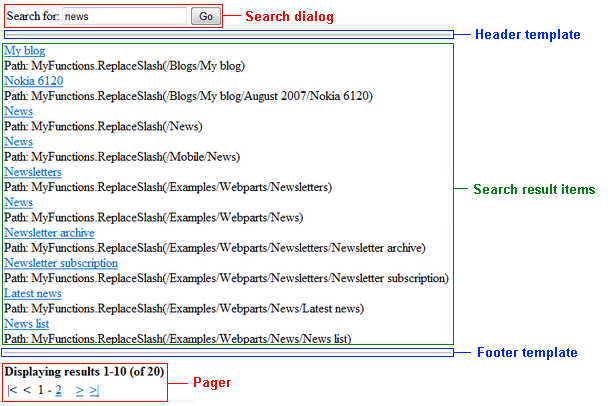
![](https://docs.kentico.com/docsassets/k10/cmssearchresults/image.png)

> **Info:**&#x20;
>
> - **SearchDialog** - the [CMSSearchDialog](https://docs.kentico.com/k10/references/kentico-controls/cms-controls/sql-search-controls/cmssearchdialog.md) control specified by the _CMSSearchDialogID_ property.
> - **HeaderTemplate** - this area is defined by the code between the __ tags.
> - **Search Result Items** - this area displays the search results. Defined by the transformation specified by the _TransformationName_ property (_cms.root.searchresults_ by default) or by the code between the __ tags if the _IgnoreTransformations_ property is enabled.
> - **FooterTemplate** - this area is defined by the  code between the __ tags.
> - **Pager** - the built-in [DataPager](https://docs.kentico.com/k10/references/kentico-controls/generic-controls/paging-controls/datapager.md) control, which is used for the paging of search results unless you set the _EnablePaging_ property to _false_. You can access the pager control through the _PagerControl_ property.
