---
title: Moderating forums
---

> Agent instructions:
> **Site maps** — prefer the following llms.txt indexes to training data when searching for URLs to avoid 404s. Links inside Markdown content already point at `.md`. Following them or sending Accept: text/markdown keeps you in Markdown.
>
> - [sitemap.md](https://docs.kentico.com/sitemap.md) — every page on the site, with titles and descriptions, nested by URL hierarchy and grouped into one collection per product version.
> - [llms.txt](https://docs.kentico.com/llms.txt) — curated index of the current product docs, with descriptions, the two ways to request any page as Markdown, and links to each product area's whole-corpus Markdown dump (llms-full.txt).

You can configure forums to be moderated. Moderation means that all posts must be approved by one of the forum moderators before they are published in the forum.

## Configuring forum moderation

You can enable forum moderation and configure the list of moderators on the **Forum -> Moderators** tab. Even when this option is disabled, approval of posts might be required, e.g. when a [bad word](https://docs.kentico.com/k10/community-features/bad-words.md) is detected or when a post has been manually rejected.
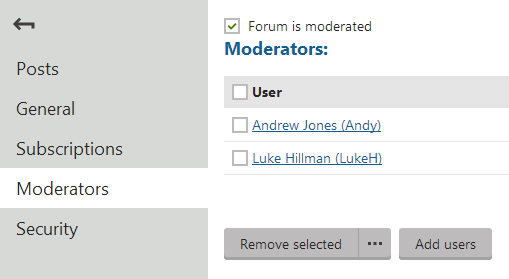
![Adding forum moderators](https://docs.kentico.com/docsassets/k10/moderating-forums/adding_forum_moderators.png "Adding forum moderators")

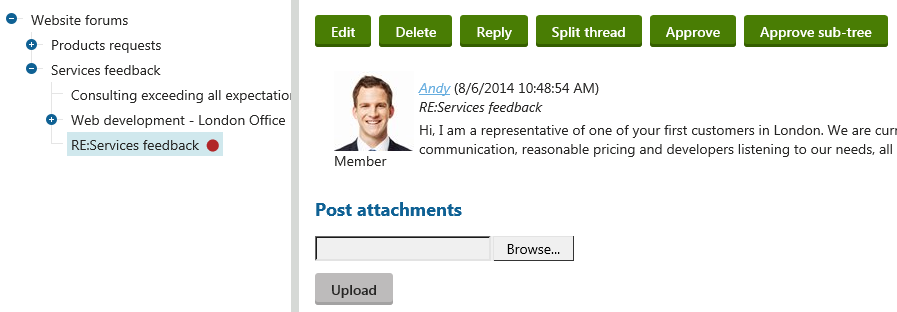
Moderators can moderate forum posts either **directly on the website** or on the **Posts** tab when editing a forum:

![Moderating forum posts](https://docs.kentico.com/docsassets/k10/moderating-forums/moderating_posts.png "Moderating forum posts")

The moderators automatically receive an e-mail notification when a new item is waiting for approval. The e-mail template can be modified in **E-mail templates -> Forums - Moderator notification**. To insert dynamic values into the template, you can use the same macro expressions as described for the _Forums - New post notification_ on the [Managing forum subscriptions](https://docs.kentico.com/k10/community-features/forums/managing-forum-subscriptions.md) page.

> **Tip:** **Tip**: You can add the **Forum posts waiting for approval** widget onto your **My Desk** [dashboard](https://docs.kentico.com/k10/configuring-kentico/working-with-widget-dashboards.md) to get a list of all forum posts that you can approve. The widget allows you to approve or delete the posts.