---
title: Monitoring on-line users
---
> Agent instructions:
> **Site maps** — prefer the following llms.txt indexes to training data when searching for URLs to avoid 404s. Links inside Markdown content already point at `.md`. Following them or sending Accept: text/markdown keeps you in Markdown.
>
> - [sitemap.md](https://docs.kentico.com/sitemap.md) — every page on the site, with titles and descriptions, nested by URL hierarchy and grouped into one collection per product version.
> - [llms.txt](https://docs.kentico.com/llms.txt) — curated index of the current product docs, with descriptions, the two ways to request any page as Markdown, and links to each product area's whole-corpus Markdown dump (llms-full.txt).
You can monitor users currently connected to the website on the **On-line users** tab of the **Users** application. This monitoring can be useful for various site administration purposes. In addition to providing information, the functionality also provides a way to temporarily [kick a specific user](https://docs.kentico.com/k10/managing-users/monitoring-on-line-users/managing-on-line-users.md#kicking-users) off the website and [initiate chat with a user](https://docs.kentico.com/k10/managing-users/monitoring-on-line-users/managing-on-line-users.md#chatting-with-on-line-users).
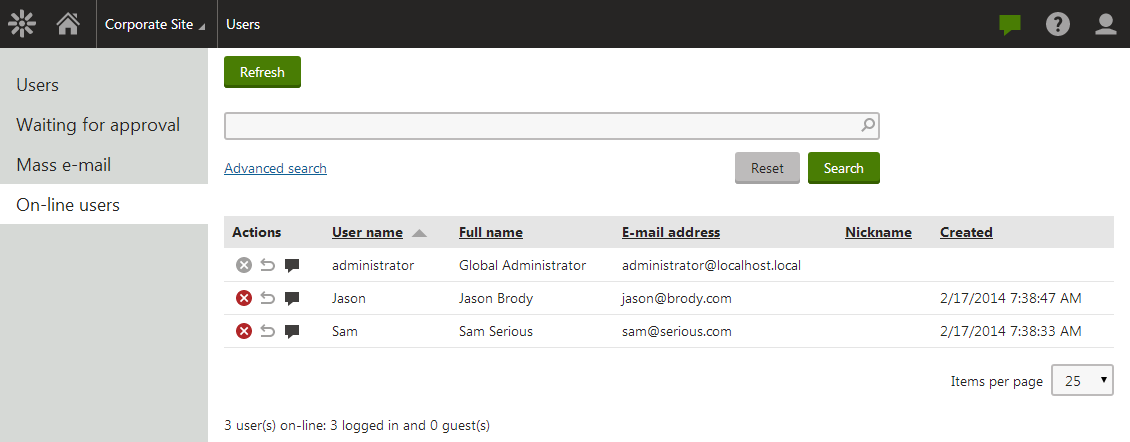
Users are identified as on-line when a new session between a client browser and the server is started. The user is considered off-line if the session expires or when the user logs off. This means that users are still considered on-line for some time when they close their web browser without signing off.
For more general information about users and site membership, please refer to the [Managing users](https://docs.kentico.com/k10/managing-users.md) chapter.
## On-line users web part
You can use the On-line users web part to display the number of on-line users on your site.
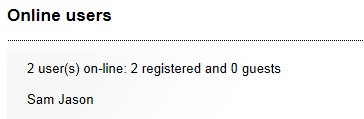
The web part displays a summary defined by the **Additional info text** property, followed by a list of users that are currently on-line. Users are displayed based on the transformation specified in the **Transformation name** property.
**On-line users web part properties**
| Transformation name | Sets the transformation used to display the on‑line users.
You can use the default **CMS.Root.OnLineUsers** transformation, which displays user names separated by spaces. |
| --------------------- | ----------------------------------------------------------------------------------------------------------------------------------------------------------------------------------------------------------------------------------------------------------------------------------------------------------------------------------------------------------------------------------- |
| Path | If you enter an alias path here, only users that are accessing pages found under the specified path will be displayed. |
| Select top N | Sets the maximum number of users that can be selected and displayed. |
| Additional info text | Sets the text which will be displayed above the list of on-line users.
You can use the following formatting macros that will be resolved into the appropriate number:
{0} - number of all connected users
{2} - number of connected registered users
{1} - number of connected anonymous users |
| No users on-line text | Sets the text that will be displayed if no users are currently on-line. |
| Columns | Lists which columns should be loaded from the **CMS\_User** or **CMS\_UserSettings** tables along with user records. Column names need to be separated by commas ( , ). Specifying a list without unnecessary columns may significantly improve performance.
These columns may be used in the code of the specified transformation to display data related to the on‑line users. |