
Creating custom notification gateway forms
The following diagram shows how the default Email notification gateway form is contained within the Content subscription web part.
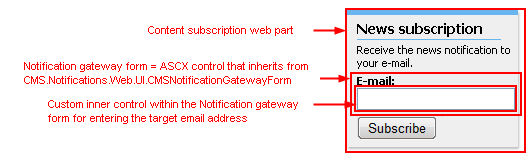
To create a custom notification gateway form:
Create a new web user control (*.ascx) and place it into your site folder in the root of your web project.
- You can place it anywhere in your web project, the control will be included in the site’s export package when in the site folder.
Set the control’s class to inherit from the CMS.Notifications.Web.UI.CMSNotificationGatewayForm class.
Override the following members of the base class:
- object Value - gets or sets the value from the custom inner control (e.g. gets or sets the text of the inner TextBox in the picture above).
- string Validate() – validates the inner control’s value and returns an error message if the value doesn’t meet the requirements of the notification gateway (e.g. the TextBox value is validated for email address format for the Email notification gateway).
- void ClearForm() – your custom code inside this method should set the inner control to the default state; example: text of the TextBox should be cleared (set to the empty string).
Example - Email notification gateway form
The following code samples show how to implement a custom email notification gateway form:
EmailNotificationForm.ascx
If you installed the Kentico project as a web application, you need to rename the CodeFile attribute on the first line to Codebehind.
<%@ Control Language="C#" AutoEventWireup="true" CodeFile="EmailNotificationForm.ascx.cs" Inherits="CorporateSite_EmailNotificationForm" %>

<asp:Label ID="lblEmail" runat="server" />
<asp:TextBox ID="txtEmail" runat="server" CssClass="EmailNotificationForm" EnableViewState="false" />
EmailNotificationForm.ascx.cs
using CMS.Notifications.Web.UI;
using CMS.Helpers;
using CMS.Membership;

public partial class CorporateSite_EmailNotificationForm : CMSNotificationGatewayForm
{
    #region "Variables"

    private bool mEnableMultipleEmails = false;

    #endregion

    #region "Properties"

    /// <summary>
    /// Gets or sets the email(s) from/to textbox.
    /// </summary>
    public override object Value
    {
        get
        {
            return this.txtEmail.Text.Trim();
        }
        set
        {
            this.txtEmail.Text = ValidationHelper.GetString(value, "");
        }
    }

    /// <summary>
    /// Gets or sets the value which determines whether to allow multiple emails separated with semicolon.
    /// </summary>
    public bool EnableMultipleEmails
    {
        get
        {
            return this.mEnableMultipleEmails;
        }
        set
        {
            this.mEnableMultipleEmails = value;
        }
    }
    #endregion

    protected void Page_Load(object sender, EventArgs e)
    {
       this.lblEmail.Text = (this.EnableMultipleEmails ? ResHelper.GetString("general.emails") : ResHelper.GetString("general.email")) + ResHelper.Colon;

        // Fill in the default email
        if ((!RequestHelper.IsPostBack()) && (MembershipContext.AuthenticatedUser != null) && (!String.IsNullOrEmpty(MembershipContext.AuthenticatedUser.Email)))
        {
            this.txtEmail.Text = MembershipContext.AuthenticatedUser.Email;
        }
    }

    #region "Public methods"

    /// <summary>
    /// Checks whether the input is correct email address (or multiple email addresses).
    /// </summary>
    public override string Validate()
    {
        if (this.EnableMultipleEmails)
        {
            if (!ValidationHelper.AreEmails(this.txtEmail.Text.Trim()))
            {
                return ResHelper.GetString("notifications.emailgateway.formats");
            }
        }
        else
        {
            if (!ValidationHelper.IsEmail(this.txtEmail.Text.Trim()))
            {
                return ResHelper.GetString("notifications.emailgateway.format");
            }
        }
        return String.Empty;
    }

    /// <summary>
    /// Clears the email textbox field.
    /// </summary>
    public override void ClearForm()
    {
        this.txtEmail.Text = "";
    }

    #endregion
}