---
title: Configuring on-line marketing permissions
related:
- https://docs.kentico.com/k12sp/managing-users/configuring-permissions.md
- https://docs.kentico.com/k12sp/managing-users/ui-personalization.md
- https://docs.kentico.com/k12sp/securing-websites.md
---
> Agent instructions:
> **Site maps** — prefer the following llms.txt indexes to training data when searching for URLs to avoid 404s. Links inside Markdown content already point at `.md`. Following them or sending Accept: text/markdown keeps you in Markdown.
>
> - [sitemap.md](https://docs.kentico.com/sitemap.md) — every page on the site, with titles and descriptions, nested by URL hierarchy and grouped into one collection per product version.
> - [llms.txt](https://docs.kentico.com/llms.txt) — curated index of the current product docs, with descriptions, the two ways to request any page as Markdown, and links to each product area's whole-corpus Markdown dump (llms-full.txt).
You can control access to on-line marketing features through:
- [Permissions](https://docs.kentico.com/k12sp/managing-users/configuring-permissions.md)
- [UI personalization](https://docs.kentico.com/k12sp/managing-users/ui-personalization.md)
The system only allows users to perform on-line marketing actions if they belong to roles with permissions for individual on-line marketing modules.
1. Create global on-line marketing roles.
2. Configure the permissions of the global roles.
3. Assign individual users to the appropriate roles.
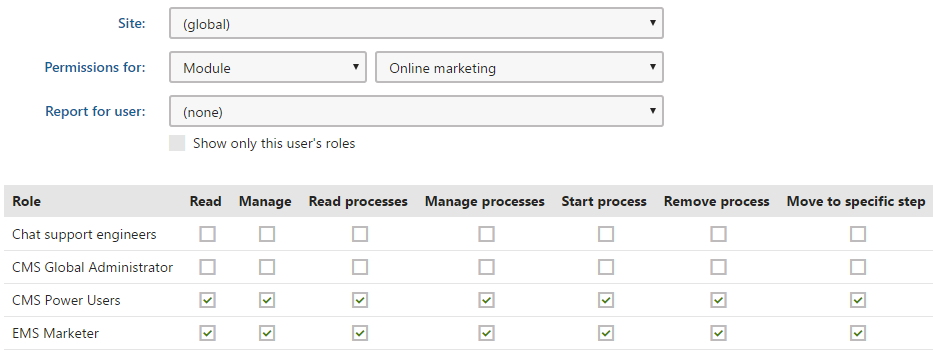
You can configure module permissions for roles in the **Permissions** application.
## On-line marketing
You can set the following permissions for the **On-line marketing** module.
| Permission | Description |
| ---------- | ------------------------------------------------------------------------------------------------------------------ |
| Read | Allows members of the selected roles to view data in some of the _On-line marketing_ application categories. |
| Manage | Allows members of the selected roles to manage the data in some of the _On-line marketing_ application categories. |
Parts of the system where these permissions apply (along with their UI):
- _Marketing overview_ application
- Activities
- _Contact management_ application -> editing a contact -> _Activities_ tab
- _Contact management_ application -> _Activity_ _log_ tab
- _Contact management_ application -> _Configuration_ -> _Macro rules_ tab
> **Note:** **Note**
>
> The **Contact management -> Configuration -> Activity types** tab is accessible only to users with the global administrator [privilege level](https://docs.kentico.com/k12sp/managing-users/user-management.md).
> **Info:** To access these applications and tabs, you also need the **Read** and **Read configuration** [Contact management permissions](#contact-management).
- Parts of marketing automation
- _Contact management_ application -> editing a contact -> _Processes_ tab
> **Info:** To access this application and tab, you also need the **Read** [Contact management permission](#contact-management) and the **Read processes** [Marketing automation permission](#marketing-automation).
- Parts of contact management
- _Contact management_ application -> _Pending contacts_ tab
- _Contact management_ application -> _On-line users_ tab
- _My pending contacts_ application
> **Info:** To access these applications and tabs, you also need the **Read** [Contact management permission](#contact-management).
## Activities
Configure the permissions for [activity log](https://docs.kentico.com/k12sp/on-line-marketing-features/managing-your-on-line-marketing-features/contact-management/tracking-contact-activities.md) through the **Activities** module.
| Permission | Description |
| ----------------- | -------------------------------------------------------------------------------------- |
| Read activities | Allows members of the selected roles to view activities in the activity log. |
| Modify activities | Allows members of the selected roles to edit or delete activities in the activity log. |
## Banners
Configure the permissions for [Banners](https://docs.kentico.com/k12sp/on-line-marketing-features/managing-your-on-line-marketing-features/banners.md) through the **Banner management** module.
| Permission | Description |
| ------------- | --------------------------------------------------------------------------------------------------------------- |
| Read | Allows members of the selected roles to view banners and their categories on a specific site. |
| Modify | Allows members of the selected roles to create, edit or delete banners and their categories on a specific site. |
| Global read | Allows members of the selected roles to view global banners and their global categories. |
| Global modify | Allows members of the selected roles to create, edit or delete global banners and their global categories. |
## Contact management
You can configure four basic types of permissions for the **Contact management** module.
| Permission | Description |
| -------------------- | ------------------------------------------------------------------------------------------------------------------------------------------------------------------------------------------------------------------------------------------------------------------------------------------------------------------------------------------------------------------------------------------------------------------------------------------------------------------------------------------------------------------------------------------------------------------------------------------------------------------------------------------------------------------------------------------- |
| Read | Allows members of the selected roles to view [contacts](https://docs.kentico.com/k12sp/on-line-marketing-features/managing-your-on-line-marketing-features/contact-management/working-with-contacts.md), [contact groups](https://docs.kentico.com/k12sp/on-line-marketing-features/managing-your-on-line-marketing-features/contact-management/segmenting-contacts-into-contact-groups.md), and [contact accounts](https://docs.kentico.com/k12sp/on-line-marketing-features/managing-your-on-line-marketing-features/contact-management/working-with-contacts/organizing-contacts-into-accounts.md). |
| Modify | Allows members of the selected roles to create, edit and delete contacts, contact groups, and contact accounts. |
| Read configuration | Allows members of the selected roles to view [account statuses](https://docs.kentico.com/k12sp/on-line-marketing-features/managing-your-on-line-marketing-features/contact-management/working-with-contacts/organizing-contacts-into-accounts.md#assigning-statuses-to-accounts), [contact statuses](https://docs.kentico.com/k12sp/on-line-marketing-features/managing-your-on-line-marketing-features/contact-management/working-with-contacts/assigning-statuses-to-contacts.md), and [contact roles](https://docs.kentico.com/k12sp/on-line-marketing-features/managing-your-on-line-marketing-features/contact-management/working-with-contacts/organizing-contacts-into-accounts.md). |
| Modify configuration | Allows members of the selected roles to create, edit and delete account statuses, contact statuses, and contact roles. |
## Scoring
Configure the permissions for [Contact scoring](https://docs.kentico.com/k12sp/on-line-marketing-features/managing-your-on-line-marketing-features/contact-management/scoring-contacts.md) through the **Scoring** module.
| Permission | Description |
| ---------- | ---------------------------------------------------------------------------------------------------------------------------------------- |
| Read | Allows members of the selected roles to view the settings of scores and their rules, as well as the score points of individual contacts. |
| Manage | Allows members of the selected roles to create, edit and delete scores and their rules. Also authorizes users to recalculate scores. |
## Content personalization
Configure the permissions for [Content personalization](https://docs.kentico.com/k12sp/on-line-marketing-features/managing-your-on-line-marketing-features/content-personalization.md) through the **Content personalization** module.
| Permission | Description |
| ---------- | -------------------------------------------------------------------------------------------------------------------------------------------------------------------------------------------------------------------------------------------------------------------------------------------------------------------------------------------------------------------------------------------------------------------------------------------------------------------------------------------------------------------------------------------------------------------------------------------------------------------------- |
| Read | Allows members of the selected roles to view the following in the **Pages** application administration interface:
The content of personalization variants
The properties of personalization variants
Variant lists
No permissions are required to view personalized content on the live site. |
| Manage | Allows members of the selected roles to create, edit and delete personalization variants of objects.
**Note**: For websites that use both content personalization and [workflow](https://docs.kentico.com/k12sp/configuring-kentico/configuring-the-environment-for-content-editors/configuring-workflows.md), define editor roles without the **Content personalization -> Manage** permission if you wish to strictly enforce the workflow publishing process. Personalization variants of editor widgets are not included within the scope of workflow, so changes can have an immediate effect on the live website. |
> **Note:** **Note**
>
> On [Portal Engine](https://docs.kentico.com/k12sp/developing-websites/portal-engine-development-overview.md) sites, users need the **Design website** permission for the **Design** module to [manage the variants](https://docs.kentico.com/k12sp/on-line-marketing-features/configuring-and-customizing-your-on-line-marketing-features/configuring-content-personalization/personalizing-web-parts-and-web-part-zones.md) of web parts and zones on the **Design** tab of the **Pages** application.
>
> To work with variants of editor widgets on the **Pages** application **Page** tab, the **Modify** permission for the **Content** module is required. The [security settings of specific widgets](https://docs.kentico.com/k12sp/developing-websites/preparing-widgets-for-users/configuring-permissions-for-widgets.md) also apply.
## Email marketing
Configure the permissions for [Email marketing](https://docs.kentico.com/k12sp/on-line-marketing-features/managing-your-on-line-marketing-features/email-marketing.md) actions through the **Email marketing** module.
| Permission | Description |
| ---------------------------- | --------------------------------------------------------------------------------------------------------------------------------------------------------------------------------------------------------------------------------------------------------------------------------------------------------------------------------------------------------------------------------------------------------------------------------- |
| Read | Allows members of the selected roles to view all data in the _Email marketing_ application interface. |
| Destroy | Allows members of the selected roles to delete the version history of newsletter and email campaign objects. |
| Configure email feeds | Allows members of the selected roles to configure the settings of all newsletters and email campaigns on the site. |
| Author marketing emails | Allows members of the selected roles to create and edit marketing emails within newsletters and email campaigns. |
| Manage recipients | Allows members of the selected roles to add and remove email feed recipients ([contacts](https://docs.kentico.com/k12sp/on-line-marketing-features/managing-your-on-line-marketing-features/contact-management/working-with-contacts.md) and [contact groups](https://docs.kentico.com/k12sp/on-line-marketing-features/managing-your-on-line-marketing-features/contact-management/segmenting-contacts-into-contact-groups.md)). |
| Manage templates and widgets | Allows members of the selected roles to create, edit and delete email feed templates and widgets. |
## Marketing automation
Configure the permissions for [Marketing automation](https://docs.kentico.com/k12sp/on-line-marketing-features/managing-your-on-line-marketing-features/marketing-automation.md) through the **On-line marketing** module.
| Permission | Description |
| --------------------- | --------------------------------------------------------------------------------------------------------------------------------------------------------------------------------------------------------------------------------------------------------------------------------------------------------------------------------------------------------------------------------------------------------------------------------------------------------- |
| Read processes | Allows members of the selected roles to view automation processes. |
| Manage processes | Allows members of the selected roles to:
Create, configure and delete automation processes
Design the steps of automation processes
Move contacts within any process to the previous and next step (regardless of step security settings)
**Important**: Automation processes run within a global context in certain scenarios. To allow moving of contacts from steps in all cases, you need to assign the permission via a **Global** role. |
| Start process | Allows members of the selected roles to start automation processes for contacts and contact groups. |
| Remove process | Allows members of the selected roles to cancel instances of automation processes running for contacts. |
| Move to specific step | Allows members of the selected roles to move contacts to any step within automation processes (regardless of step security settings).
**Important**: Automation processes run within a global context in certain scenarios. To allow moving of contacts from steps in all cases, you need to assign the permission via a **Global** role. |
> **Note:** **Note**: Users need the **Read** permission for the **Contact management** module to be able to view and manage instances of automation processes running for contacts.
## A/B testing on MVC sites
Configure the permissions for [A/B testing](https://docs.kentico.com/k12sp/on-line-marketing-features/managing-your-on-line-marketing-features/a-b-testing-pages.md) through the **A/B testing** module.
| Permission | Description |
| ---------- | ------------------------------------------------------------------------------------------------------------------------------------ |
| Read | Allows members of the selected roles to view all parts of the A/B testing interface and the corresponding reports. |
| Manage | Allows members of the selected roles to:
Create, edit and delete A/B tests
Create, edit and delete page variants for A/B tests |
> **Note:** **Note**: A/B testing page variants are created and managed on the _Page_ tab in the **Pages** application. Users require the standard page permissions to view and edit the related pages (see [Configuring page permissions](https://docs.kentico.com/k12sp/managing-users/configuring-permissions/configuring-page-permissions.md)).
## A/B and MVT testing on Portal Engine sites
Configure the permissions for [optimization testing](https://docs.kentico.com/k12sp/on-line-marketing-features/managing-your-on-line-marketing-features/optimization-testing.md) through the **A/B testing** and **MVT testing** modules.
| Permission | Description |
| ---------- | ----------------------------------------------------------------------------------------------------------------------------------------------------------------------------------------------------------------------------------------------------------------------------------------------------------------------------------------------------------------------------------------------------------------------------------------------------------------------------------------------------------------------------------------------------------------------------------------------------------------------------------------------------------------- |
| Read | Allows members of the selected roles to view all parts of the A/B or MVT testing management interface and the corresponding reports.
**Note**: Users also need permissions for the [Web analytics](#web-analytics) module to be able to access A/B and MVT testing reports. |
| Manage | Allows members of the selected roles to:
Create, edit and delete tests
Manage test variants (page variants for A/B tests; web part, zone and widget variants for MVT tests)
**Note**: For websites that use both MVT testing and [workflows](https://docs.kentico.com/k12sp/configuring-kentico/configuring-the-environment-for-content-editors/configuring-workflows.md), define editor roles without the **MVT testing -> Manage** permission if you wish to strictly enforce the workflow publishing process. Variants of editor widgets are not included by workflow scopes, so even unapproved changes can be directly visible on the live website. |
### Editing A/B testing page variants
- Because every A/B testing page variant is represented by a page in the content tree, the standard page permissions apply. See [Configuring page permissions](https://docs.kentico.com/k12sp/managing-users/configuring-permissions/configuring-page-permissions.md).
- Users need the **Design website** permission for the **Design** module to edit page variants on the **Design** tab of the **Pages** application.
### Managing MVT object variants
- Users need the **Design website** permission for the **Design** module to manage the variants of web parts and zones on the **Design** tab of the **Pages** application.
- To work with variants of editor widgets on the **Pages** application **Page** tab, the **Modify** permission for the **Content** module is required. The [security settings of specific widgets](https://docs.kentico.com/k12sp/developing-websites/preparing-widgets-for-users/configuring-permissions-for-widgets.md) also apply.
## Personas
Configure the permissions for [Personas](https://docs.kentico.com/k12sp/on-line-marketing-features/managing-your-on-line-marketing-features/personas.md) through the **Personas** module.
| Permission | Description |
| ---------- | --------------------------------------------------------------------------------------------------------------------------------------------------------------------------------------------------------------------------------------------------------------------------------------------------------------------------------------------------------------------------------------------------------------------------------------- |
| Read | Allows members of the selected roles to view the content of the **Personas** application.
To view the content of personalization variants, members of the selected roles need [Content personalization](#content-personalization) permissions.
No special permissions are required to view personalized content on the live site. |
| Modify | Allows members of the selected roles to create, edit and delete personas in the **Personas** application.
**Note** that to be able to tag pages with personas in the **Pages** application, members of the selected roles need the **Browse tree**, **Read** and **ModifyContent** [permissions](https://docs.kentico.com/k12sp/managing-users/configuring-permissions/configuring-page-permissions/permissions-for-all-content.md). |
> **Note:** **Note**
>
> Users need the **Design website** permission for the **Design** module to manage the variants of web parts and zones on the **Design** tab of the **Pages** application.
>
> To work with variants of editor widgets on the **Pages** application **Page** tab, the **Modify** permission for the **Content** module is required. The [security settings of specific widgets](https://docs.kentico.com/k12sp/developing-websites/preparing-widgets-for-users/configuring-permissions-for-widgets.md) also apply.
## Web analytics
Configure the permissions for [Web analytics](https://docs.kentico.com/k12sp/on-line-marketing-features/managing-your-on-line-marketing-features/web-analytics.md) (including [conversion](https://docs.kentico.com/k12sp/on-line-marketing-features/managing-your-on-line-marketing-features/web-analytics/logging-custom-conversions-on-your-website.md) and [campaign](https://docs.kentico.com/k12sp/on-line-marketing-features/managing-your-on-line-marketing-features/campaigns.md) management) through the **Web analytics** module.
| Permission | Description |
| ------------------ | --------------------------------------------------------------------------------------------------------------------------------------------------------------------------------------------------------------------------------------- |
| Read | Allows members of the selected roles to view web analytics reports in the Web analytics application.
Users also need the Read permission to access the analytics reports anywhere else in the UI, for example in _Pages -> Reports_. |
| Save reports | Allows members of the selected roles to save web analytics reports. The saved reports can be viewed in the _Reporting_ application. |
| Manage data | Allows members of the selected roles to manage the data logged for various statistics (i.e. delete or generate sample data for statistics). |
| Manage campaigns | Allows members of the selected roles to create and delete campaign tracking objects and edit their properties, including goals. |
| Manage conversions | Allows members of the selected roles to create, edit and delete conversions. |