---
title: MVC development overview
related:
- https://docs.kentico.com/k12sp/kentico-development-models.md
- https://docs.kentico.com/k12sp/developing-websites/defining-website-content-structure/creating-and-configuring-page-types/creating-content-only-page-types.md
- https://docs.kentico.com/k12sp/developing-websites/defining-website-content-structure/creating-and-configuring-page-types/configuring-page-types/reusing-existing-page-content.md
---
> Agent instructions:
> **Site maps** — prefer the following llms.txt indexes to training data when searching for URLs to avoid 404s. Links inside Markdown content already point at `.md`. Following them or sending Accept: text/markdown keeps you in Markdown.
>
> - [sitemap.md](https://docs.kentico.com/sitemap.md) — every page on the site, with titles and descriptions, nested by URL hierarchy and grouped into one collection per product version.
> - [llms.txt](https://docs.kentico.com/llms.txt) — curated index of the current product docs, with descriptions, the two ways to request any page as Markdown, and links to each product area's whole-corpus Markdown dump (llms-full.txt).
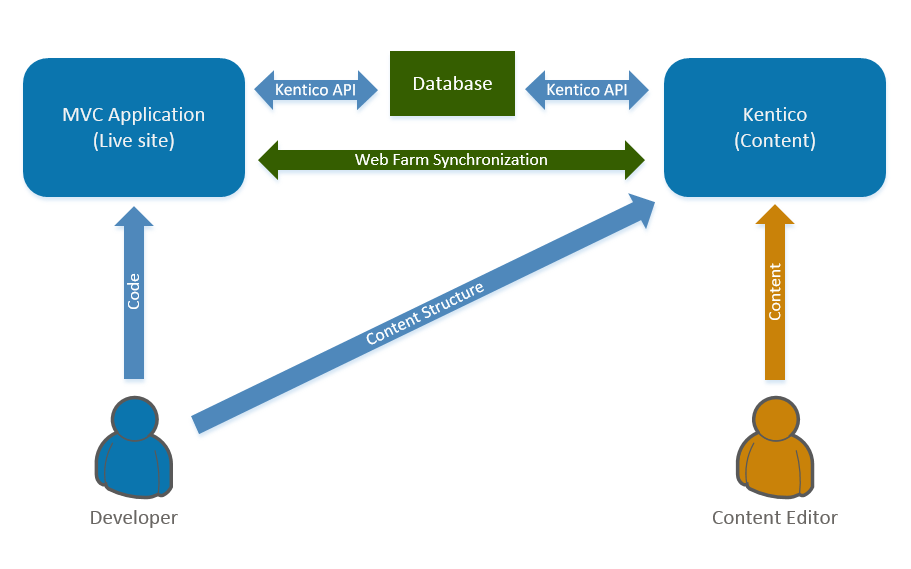
Kentico supports website development using [ASP.NET MVC 5](https://docs.microsoft.com/en-us/aspnet/mvc/overview/getting-started/introduction/). This development model is based on a separate MVC application that handles the presentation of the live site, while the Kentico application serves as a content platform.
Both Kentico and the MVC application access data from the same database and use the Kentico API. Synchronization of cached content and most files is handled by [web farms](https://docs.kentico.com/k12sp/configuring-kentico/setting-up-web-farms.md). This approach allows you to separate the live site (MVC application) and the administration (Kentico).
This means that you use Kentico to store data and manage content (mostly via [pages](https://docs.kentico.com/k12sp/developing-websites/defining-website-content-structure/creating-and-configuring-page-types.md)), and generate the design of the site using your own MVC controllers and views.
Kentico's **Pages** application is a repository for content consisting of _content-only_ pages. The content itself is created and modeled by content editors based on a [content structure](https://docs.kentico.com/k12sp/developing-websites/defining-website-content-structure.md) defined by developers, who then manage its presentation on the live site via the MVC application.
## Requirements and limitations
You need the following environment for developing MVC projects:
- **.NET Framework**: .NET Framework 4.6.1 or newer
- **Visual Studio:** Visual Studio 2017 or 2019
### License requirements
You only need to purchase a license for the domain of the live site running on the MVC application. If you wish to run the Kentico administration interface on a different domain, an extra license is provided for free. See [Kentico licensing for MVC applications](https://docs.kentico.com/k12sp/configuring-kentico/managing-sites/managing-site-licenses/kentico-licensing-for-mvc-applications.md) for further details.
### Supported Kentico features
For the list of currently supported Kentico features that you can use when developing sites using ASP.NET MVC, see [Supported features on MVC sites](https://docs.kentico.com/k12sp/kentico-development-models/supported-features-on-mvc-sites.md).
## MVC development process
The following section contains a brief overview to get you started with site development using ASP.NET MVC. You can find a more detailed explanation of the covered areas in the linked pages.
1. **Create and set up an MVC application**
- [Start with MVC development](https://docs.kentico.com/k12sp/developing-websites/starting-with-mvc-development.md) by setting up your Kentico instance and the MVC application.
2. **Define site content structure**
- In Kentico's administration interface, [create a content structure](https://docs.kentico.com/k12sp/developing-websites/defining-website-content-structure.md) based on content-only pages.
3. **Develop the MVC application**
- Set up features that can help build your website:
- [Page builder](https://docs.kentico.com/k12sp/developing-websites/page-builder-development.md)
- [Form builder](https://docs.kentico.com/k12sp/developing-websites/form-builder-development.md)
- Use [generated code](https://docs.kentico.com/k12sp/developing-websites/generating-classes-for-kentico-objects.md) to work with page content and other data in the MVC application.
- Load page content using the Kentico API. See [Retrieving content in MVC applications](https://docs.kentico.com/k12sp/developing-websites/retrieving-content-in-mvc-applications.md) for more information.
- Provide additional functionality on your MVC site using the Kentico API.
- If necessary, customize or extend the system's functionality. See [Customizing MVC projects](https://docs.kentico.com/k12sp/custom-development/customizing-mvc-projects.md).
4. **Deploy your MVC application**
- Learn how to [deploy your MVC website](https://docs.kentico.com/k12sp/deploying-websites/deploying-mvc-sites.md) to a hosting server (production environment).
## Automatic features for MVC projects
All Kentico MVC applications (i.e. projects with the _Kentico.AspNet.Mvc_ NuGet [integration package](https://docs.kentico.com/k12sp/developing-websites/starting-with-mvc-development/installing-kentico-integration-packages.md) installed) automatically use several features, which are not part of standard ASP.NET MVC 5. These features may modify how the application renders the output of pages or responds to certain types of requests.
- **Relative URL resolving** – The system runs an output filter that automatically resolves all virtual relative URLs (_\~/\_) in page content. The resolving occurs on the side of the MVC live site application, based on the environment where the site is actually running. This filter prevents content editors from creating invalid links in cases where your MVC application does not explicitly resolve URLs (by processing content using the _Html.Kentico().ResolveUrls_ method). If you wish to disable the output filter and resolve URLs manually in your code, set the _CMSMVCResolveRelativeUrls_ key to _false_ in the _appSettings_ section of your MVC project's _Web.config_ file:
```xml
```
- **Resource sharing with the administration domain** – Only enabled automatically after applying [hotfix 12.0.30](https://devnet.kentico.com/download/hotfixes) or newer. When the MVC application processes requests sent from the domain of the connected Kentico administration application, it sends a response with the _Access-Control-Allow-Origin_ header, which enables [Cross-origin resource sharing](https://en.wikipedia.org/wiki/Cross-origin_resource_sharing) and prevents potential errors.