---
title: Removing text formatting
related:
  - https://docs.kentico.com/k9/managing-website-content/working-with-pages/editing-pages/using-the-editor/working-with-text/pasting-text.md
  - https://docs.kentico.com/k9/managing-website-content/working-with-pages/editing-pages/using-the-editor/working-with-text/searching-and-replacing-in-text.md
---

> Agent instructions:
> **Site maps** — prefer the following llms.txt indexes to training data when searching for URLs to avoid 404s. Links inside Markdown content already point at `.md`. Following them or sending Accept: text/markdown keeps you in Markdown.
>
> - [sitemap.md](https://docs.kentico.com/sitemap.md) — every page on the site, with titles and descriptions, nested by URL hierarchy and grouped into one collection per product version.
> - [llms.txt](https://docs.kentico.com/llms.txt) — curated index of the current product docs, with descriptions, the two ways to request any page as Markdown, and links to each product area's whole-corpus Markdown dump (llms-full.txt).

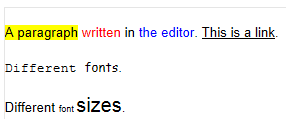
There are cases when you may want to remove formatting from a text in a text area. For example, when you [paste ](https://docs.kentico.com/k9/managing-website-content/working-with-pages/editing-pages/using-the-editor/working-with-text/pasting-text.md)a preformatted text or when you simply want to restyle your text. 

### To remove formatting from a text

1. With your mouse, select the text from which you want to remove formatting.

   > **Tip:** If you want to remove text formatting from all text in a text area, you can click in the text area and press **Ctrl + A** on your keyboard.
2. In the editor toolbar, click on the **Remove format**button.

   ![](https://docs.kentico.com/docsassets/k9/removing-text-formatting/removing_formatting.png)

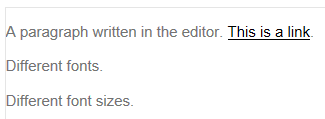
The system removes the formatting from the text.
![Formatted text in the editor](https://docs.kentico.com/docsassets/k9/removing-text-formatting/formatted_text.png "Formatted text in the editor")

![Unformatted text in the editor](https://docs.kentico.com/docsassets/k9/removing-text-formatting/unformatted_text.png "Unformatted text in the editor")