---
title: Working with volume discounts
related:
- https://docs.kentico.com/k9/e-commerce-features/managing-your-store/discounts/working-with-volume-discounts/example-applying-volume-discounts-on-a-selected-product.md
- https://docs.kentico.com/k9/e-commerce-features/managing-your-store/products.md
---
> Agent instructions:
> **Site maps** — prefer the following llms.txt indexes to training data when searching for URLs to avoid 404s. Links inside Markdown content already point at `.md`. Following them or sending Accept: text/markdown keeps you in Markdown.
>
> - [sitemap.md](https://docs.kentico.com/sitemap.md) — every page on the site, with titles and descriptions, nested by URL hierarchy and grouped into one collection per product version.
> - [llms.txt](https://docs.kentico.com/llms.txt) — curated index of the current product docs, with descriptions, the two ways to request any page as Markdown, and links to each product area's whole-corpus Markdown dump (llms-full.txt).
Volume discounts are applied when customers add an appropriate amount of selected [products](https://docs.kentico.com/k9/e-commerce-features/managing-your-store/products.md) to their shopping carts. The system automatically calculates and applies these discounts during the [checkout process](https://docs.kentico.com/k9/e-commerce-features/configuring-your-store/checkout-process.md), or while adding new [orders](https://docs.kentico.com/k9/e-commerce-features/managing-your-store/orders.md) or editing existing ones in the administration interface.
For example, use this type of a discount when you want customers to have 10% discount if they buy 5 pieces of selected product.
You can also set up multiple volume discount levels. This allows you to apply different discounts on different amounts of purchased product items. For example, you can provide a 10% discount if customers buy at least 3 _Nike Race Day_ T-shirts and a 15% discount if they purchase at least 5 items of this product.
## Adding and editing volume discounts
You can add and edit volume discounts for selected products in the **Products** application while editing these products.
1. **Edit** () a selected product.
2. Switch to the **Advanced -> Volume discounts** tab.
3. For adding a new volume discount, click **New volume discount**. For editing an already existing volume discount, click **Edit** () at desired volume discount.
4. To **Minimum quantity**, enter a number of product items that customers have to add to the shopping cart to obtain the discount.
5. In **Discoun\*\*\*\*t**, select _percentage_ if you want to apply the discount in percent or _fixed amount_ to apply the discount in a specific amount of money in the [main currency](https://docs.kentico.com/k9/e-commerce-features/configuring-your-store/configuring-currencies.md).
6. To **Amount per item**, specify an exact value of the discount either in percent or in fixed amount according to **Discount**.
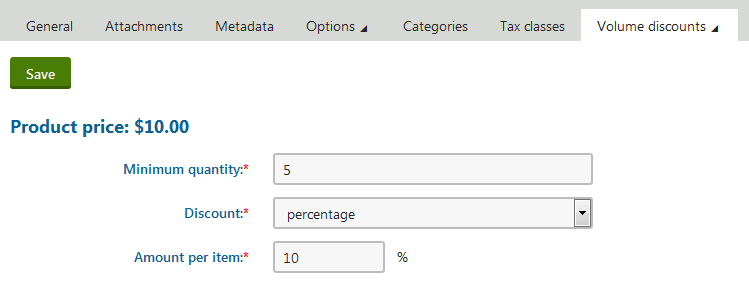
7. Click **Save**.
The system saves the volume discount for the chosen product. If customers add at least the specified amount of product items to their shopping carts, the system automatically applies the discount.
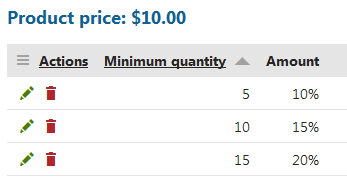
By repeating these steps, you can create different discount levels. If customers then add at least the specified amount of product items to their shopping carts, the system automatically applies a volume discount based on the amount of inserted product items.
**Examples**
If a product has different discounts for 5, 10, and 15 pieces:
- customers buy 4 or less pieces, they get no discount;
- customers buy 5–9 pieces, they get discount for 5 pieces;
- customers buy 10–14 pieces, they get discount for 10 pieces;
- customers buy 15 or more pieces, they get discount for 15 pieces.
> **Info:** You can combine percentage discounts and fixed value discounts in your multiple volume discount levels.
> **Info:** If you edit or delete a discount, the existing orders stay with that discount. To update existing orders according to the new rules, you must edit the required orders manually.
## Reference
| **Property** | **Description** |
| ---------------- | --------------------------------------------------------------------------------------------------------------------------------------------------------------------------------------------------------------------------------------------------------------------------------------------------------------------------------------------------------------------------------------------------------------------------------------------------------------------------------------------------------------------------------------- |
| Minimum quantity | Enter how many products a customer must add to obtain the volume discount. |
| Discount | Specify if you want to apply the discount in percentage or in fixed amount.
**Percentage** – the discount reduces the total price of the order by a percentage.
**Fixed amount** – the discount reduces the total price of the order by a specific amount in your on-line store [main currency](https://docs.kentico.com/k9/e-commerce-features/configuring-your-store/configuring-currencies.md). |
| Amount per item | Allows you to specify the volume discount per one item of the product.
**Examples**
**Example 1:**
The volume discount has _percentage_ in **Discount**,
the price of the product is 50 USD,
the amount per item is _10_,
the customer pays 45 USD for each product item (10 % of 50 USD).
**Example 2:**
The volume discount has _fixed amount_ in **Discount**,
the price of the product is 50 USD,
the amount per item is _10_,
the customer pays 40 USD for each product item (10 USD off 50 USD). |