---
title: Configuring SharePoint integration web part
related:
- https://docs.kentico.com/k9/integrating-3rd-party-systems/integrating-sharepoint/configuring-sharepoint-integration-connections.md
- https://docs.kentico.com/k9/integrating-3rd-party-systems/integrating-sharepoint/displaying-sharepoint-data-in-kentico.md
- https://docs.kentico.com/k9/developing-websites/developing-websites-using-the-portal-engine/using-and-configuring-web-parts.md
---
> Agent instructions:
> **Site maps** — prefer the following llms.txt indexes to training data when searching for URLs to avoid 404s. Links inside Markdown content already point at `.md`. Following them or sending Accept: text/markdown keeps you in Markdown.
>
> - [sitemap.md](https://docs.kentico.com/sitemap.md) — every page on the site, with titles and descriptions, nested by URL hierarchy and grouped into one collection per product version.
> - [llms.txt](https://docs.kentico.com/llms.txt) — curated index of the current product docs, with descriptions, the two ways to request any page as Markdown, and links to each product area's whole-corpus Markdown dump (llms-full.txt).
Besides specifying a [connection to the SharePoint server](https://docs.kentico.com/k9/integrating-3rd-party-systems/integrating-sharepoint/configuring-sharepoint-integration-connections.md), you need to configure the **SharePoint data source** [web part](https://docs.kentico.com/k9/developing-websites/developing-websites-using-the-portal-engine/using-and-configuring-web-parts.md) to be able to browse the contents of a SharePoint site in Kentico.
## Adding SharePoint integration web part
1. Open the **Pages** application.
2. Select a page in the content tree.
- You are selecting a page where the system will display the requested SharePoint data.
3. Switch to the **Design** tab.
4. [Add](https://docs.kentico.com/k9/developing-websites/developing-websites-using-the-portal-engine/using-and-configuring-web-parts.md) the **SharePoint data source** web part to the selected web part zone.
5. Configure the **SharePoint data source** web part.
### Configuring SharePoint integration web part
1. 1. Specify the SharePoint integration connection.
- **Connection**
2. Specify how the system retrieves the SharePoint data.
- **Retrieve** - indicates whether the system downloads all lists of the selected type (the **List type** property), or only items from a specified list (the **List name** property) of the selected type.
3. Specify the type of SharePoint data.
- **List type** - indicates whether the system downloads from the SharePoint server custom lists, picture libraries, or document libraries.
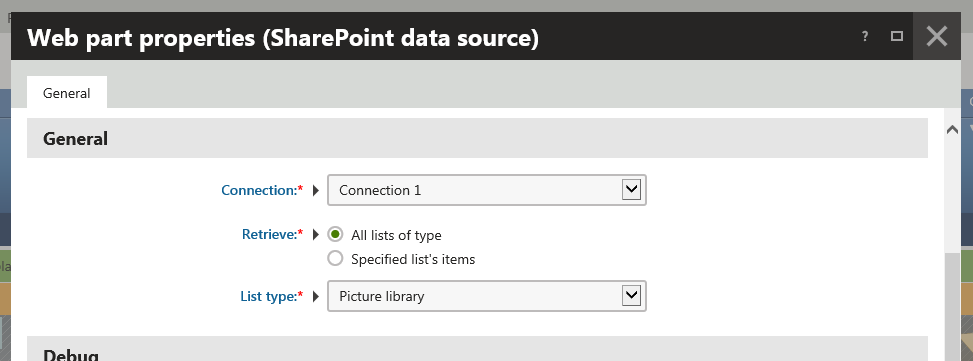
- Based on the selection of the data retrieval mode (the **Retrieve** property), the system offers other web part properties.
4. Specify other web part properties based on the selection of the data retrieval mode.
- **Retrieve: All lists of type**\
(Optional) You can specify web part properties in the **System settings** section. See [Configuring caching](https://docs.kentico.com/k9/configuring-kentico/optimizing-website-performance/configuring-caching.md) for more details.
- **Retrieve: Specified list's items**
| Section | Properties |
| --------- | ---------------------------------------------------------------------------------------------------------------------------------------------------------------------------------------------------------------------------------------------------------------------------------------------------------------------------------------------------------------------------------------------------------------------------------------------------------------------------------------------------------------------------------------------------------------------------------------------------------------------------------------------------------------------------------------------------------------------------------------------------------------------------------------------------------------------------------------------------------------------------------------------------------------------------------------------------------------------------------------------------------------------------------------------------------------------------------------------------------------------------------------------------------------------------------------------------------------------------------------------------------------------------------------------------------------------------------------------------------------------- |
| General | **List name** - specifies the name of the list or library on the SharePoint server from which the system loads the items. |
| Selection | **Field name**
**Field type**
**Field value****Info:** Properties in the **Selection** section allow you to specify which items the system retrieves from the SharePoint server. To achieve this, you can also use the **Query** property in the **Advanced** section.
Properties in the **Selection** section are optional. |
| Advanced | **Relative URL of listed folder** - allows you to specify the server-relative URL of the SharePoint folder within a list or library.
If blank, the system lists the root folder.
If the list or library does not support folders, keep blank.
**Retrieval mode** - allows you to specify whether the system retrieves files and folders, or only files. The system supports inclusion of subfolders.
Some lists and libraries do not support folders. In such case the listing of folders or inclusion of subfolders has no effect.
**Row limit** - allows you to specify the maximum number of items (data rows) that the system retrieves.
**Query** - allows you to enter a condition determining which items the system retrieves. You can use this property to change the items' order, too.**Info:** You need to enter an inner XML of CAML Query element. See a sample query:
` 1
`
**Retrieved fields** - allows you to specify SharePoint list or SharePoint library field names (internal names) that the system retrieves. Separate the names by semicolons, or keep blank to retrieve all fields.**Info:** Properties in the **Advanced** section are optional. |
(Optional) You can specify web part properties in the **System settings** section. See [Configuring caching](https://docs.kentico.com/k9/configuring-kentico/optimizing-website-performance/configuring-caching.md) for more details.
5. (Optional) Select the **Show debugging information** property available in the **Debug** section to display information suitable for debugging.
> **Info:** If selected, the system displays the SharePoint data in a table. The system informs you whether the data is retrieved from the SharePoint server, or from the system cache.
>
> **Debugging allows you to look for fields that contain valuable information, and are suitable for display purposes.**
6. Click **Save & Close**.
You have configured the SharePoint integration web part. Because this web part serves as a data source for the SharePoint data, to [display the data](https://docs.kentico.com/k9/integrating-3rd-party-systems/integrating-sharepoint/displaying-sharepoint-data-in-kentico.md), you now need to add a content displaying web part to the same page.
> **Info:** **How it works - API**
>
> The system uses the **SharePoint data source** web part to retrieve a data source object (DataSet), which contains a table with the requested SharePoint data. Another web part that uses the SharePoint web part as its data source, for example the **Basic repeater** web part, then displays the SharePoint data on the page through a selected transformation.
>
> Based on configuration of the **SharePoint data source** web part, the system loads the data using the corresponding SharePoint integration service.
>
> - SharePoint integration API uses the **CMS.SharePoint** namespace.
> - The system contains a factory class for each supported SharePoint version, implementing the **ISharePointServiceFactory** interface.
> - The system gets the factory object corresponding to the target SharePoint version using the **SharePointServiceFactoryProvider.Current.GetSharePointServiceFactory** method.
> - To create an instance of the required SharePoint service, the system calls the **GetImplementationFor** method of this factory object.