---
title: Displaying data on application tiles
related:
- https://docs.kentico.com/k9/using-the-kentico-interface.md
---
> Agent instructions:
> **Site maps** — prefer the following llms.txt indexes to training data when searching for URLs to avoid 404s. Links inside Markdown content already point at `.md`. Following them or sending Accept: text/markdown keeps you in Markdown.
>
> - [sitemap.md](https://docs.kentico.com/sitemap.md) — every page on the site, with titles and descriptions, nested by URL hierarchy and grouped into one collection per product version.
> - [llms.txt](https://docs.kentico.com/llms.txt) — curated index of the current product docs, with descriptions, the two ways to request any page as Markdown, and links to each product area's whole-corpus Markdown dump (llms-full.txt).
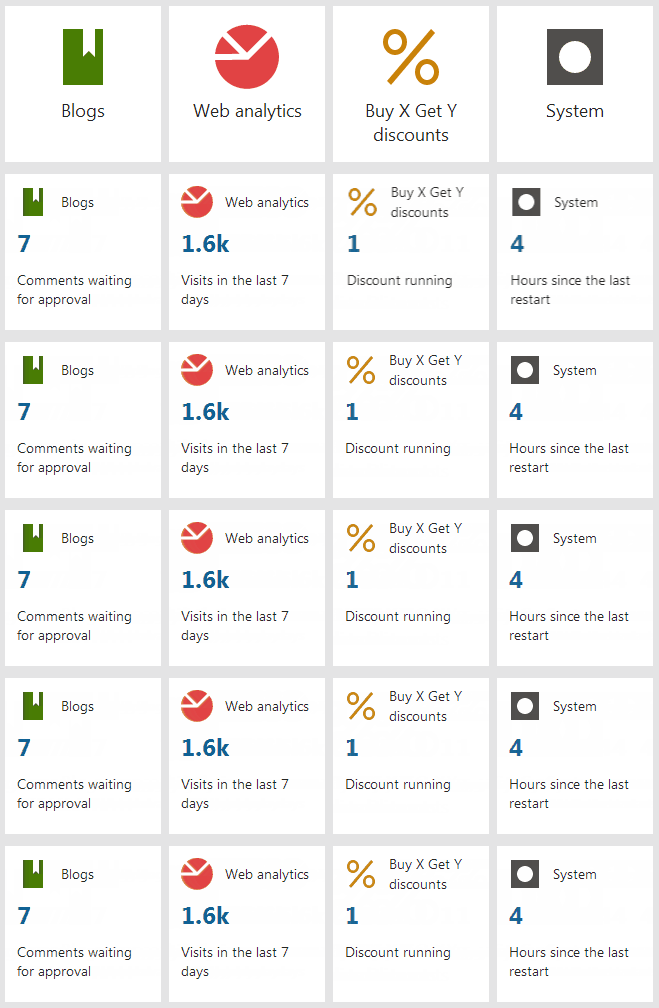
You can modify Kentico [application tiles](https://docs.kentico.com/k9/using-the-kentico-interface.md#using-the-application-dashboard) to display various data. Tiles that display application data are called _Live tiles._ Live tiles display a _numerical value_ and a _description_ of the numerical value.
**The following Kentico applications work as live tiles by default**
Content management
- **Blogs** - displays the number of comments on the site waiting for approval.
- **My blogs** - displays the number of comments waiting for the user's approval.
- **Forms** - displays the number of forms submitted by users in the last 7 days.
- **Pending pages** - displays the number of pages pending the user's approval.
- **Translations** - displays the number of translation submissions waiting for import.
On-line marketing
- **A/B tests** - displays the number of running A/B tests.
- **Contact management** - displays the number of new contacts in the last 7 days.
- **My pending contacts** - displays the number of contacts waiting for the user's action in a Marketing automation process.
- **Web analytics** - displays the number of site visits in the last 7 days.
E-commerce
- **Buy X Get Y discounts** - displays the number of running Buy X Get Y discounts.
- **Catalog discounts** - displays the number of running Catalog discounts.
- **Free shipping offers** - displays the number of running Free shipping offers.
- **Order discounts** - displays the number of running Order discounts.
- **Product coupons** - displays the number of available Product Coupons.
Configuration
- **Email queue** - displays the number of e-mails that could not be sent.
- **Licenses** - displays days left until license expiration.
- **System** - displays the time since the last application restart.
- **Users** - displays the number of registered users waiting for approval.
You can modify the existing Live tiles to display different data or make static tiles into Live tiles.
Ideally, Live tiles should display information that may require users' attention. By having certain information displayed directly on the application dashboard, users don't have to visit the application itself unless necessary.
1. Create a class that implements the _ILiveTileModelProvider_ interface.
2. Implement the logic of the class. The _GetModel_ method needs to return the data of the Live tile in one of the following formats:
1. _LiveTileModel_ object containing:
1. **Value** - the numerical value displayed on the Live tile
2. **Description** - the description of the numerical value
2. _Null_ - in cases when you want the application tile to stay static. For example, when the number of objects displayed by the tile is 0.
```csharp
using System;
using CMS.ApplicationDashboard;
using CMS.Core;
using CMS.Helpers;
using CMS.OnlineMarketing;
using CMS.SiteProvider;
using CMS.WebAnalytics;
public class ContactManagementLiveTileModelProvider : ILiveTileModelProvider
{
public LiveTileModel GetModel(LiveTileContext liveTileContext)
{
if (liveTileContext == null)
{
throw new ArgumentNullException("liveTileContext");
}
return CacheHelper.Cache(() =>
{
if (!ActivitySettingsHelper.OnlineMarketingEnabled(liveTileContext.SiteInfo.SiteName))
{
return null;
}
var newContactsCount = GetNewContactsCount(liveTileContext.SiteInfo);
return new LiveTileModel
{
Value = newContactsCount,
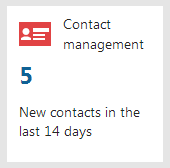
Description = "New contacts in the last 14 days",
};
}, new CacheSettings(2, "ContactManagementLiveTileModelProvider", liveTileContext.SiteInfo.SiteID));
}
///
/// Gets total number of new contacts from the last 14 days.
///
/// Contacts' site
/// Number of new contacts
private static int GetNewContactsCount(SiteInfo site)
{
return ContactInfoProvider.GetContacts()
.OnSite(site.SiteID)
.CreatedAfter(DateTime.Now.AddDays(-14))
.Count;
}
}
```
3. Register the live model provider via an assembly attribute using the _module code name_ and _UI element code name_ represented by the Live tile.
**Module and UI element code names**
Find the module _code name_ when editing the specific module in the **Modules** application. For Kentico modules, you can also use the constant defined in the _CMS.Core.ModuleName_ class.
Find the UI element _code name_ in **Modules -> UI elements** on the **General** tab of the UI element.
```csharp title="Registering a custom module"
[assembly: RegisterLiveTileModelProvider("CustomModuleCodeName", "UIElement", typeof(ContactManagementLiveTileModelProvider))]
```
```csharp title="Registering a Kentico module"
[assembly: RegisterLiveTileModelProvider(ModuleName.ABTEST, "ContactsFrameset", typeof(ContactManagementLiveTileModelProvider))]
```
**Note** that registering an existing live model provider overwrites the functionality. This way, you can change the behaviour of the default Live tiles.
```csharp
[assembly: RegisterLiveTileModelProvider(ModuleName.ONLINEMARKETING, "ContactsFrameset", typeof(ContactManagementLiveTileModelProvider))]
```
4. Save the file.
The Live tile now displays the number of contacts added to the site in the last 14 days.