---
title: OpenID authentication
---

> Agent instructions:
> **Site maps** — prefer the following llms.txt indexes to training data when searching for URLs to avoid 404s. Links inside Markdown content already point at `.md`. Following them or sending Accept: text/markdown keeps you in Markdown.
>
> - [sitemap.md](https://docs.kentico.com/sitemap.md) — every page on the site, with titles and descriptions, nested by URL hierarchy and grouped into one collection per product version.
> - [llms.txt](https://docs.kentico.com/llms.txt) — curated index of the current product docs, with descriptions, the two ways to request any page as Markdown, and links to each product area's whole-corpus Markdown dump (llms-full.txt).

OpenID is an open, decentralized standard for authenticating users. It is used by sites such as Yahoo!, AOL, Verisign and others. You can set up your Kentico site to allow authentication via credentials from sites or services that support **OpenID 2.0**.

## How to start using OpenID

To set up OpenID authentication, you do not need to register your site. Only take the following steps:

1. Set up Kentico for OpenID authentication - see [Settings - OpenID](https://docs.kentico.com/k82/configuring-kentico/managing-sites/configuring-settings-for-sites/settings-security-membership/settings-authentication/settings-openid.md).
2. Use one of the OpenID web parts on any page of your site for users to sign in - see [Web parts available for OpenID authentication](https://docs.kentico.com/k82/managing-users/user-registration-and-authentication/openid-authentication/web-parts-available-for-openid-authentication.md).

> **Note:** When a user signs in through a third-party authentication service for the first time, Kentico automatically creates a new user account for this user. Learn more about [managing users that sign in through a third-party authentication service](https://docs.kentico.com/k82/managing-users/user-registration-and-authentication/managing-users-coming-through-a-third-party-authentication-service.md).

## How OpenID works

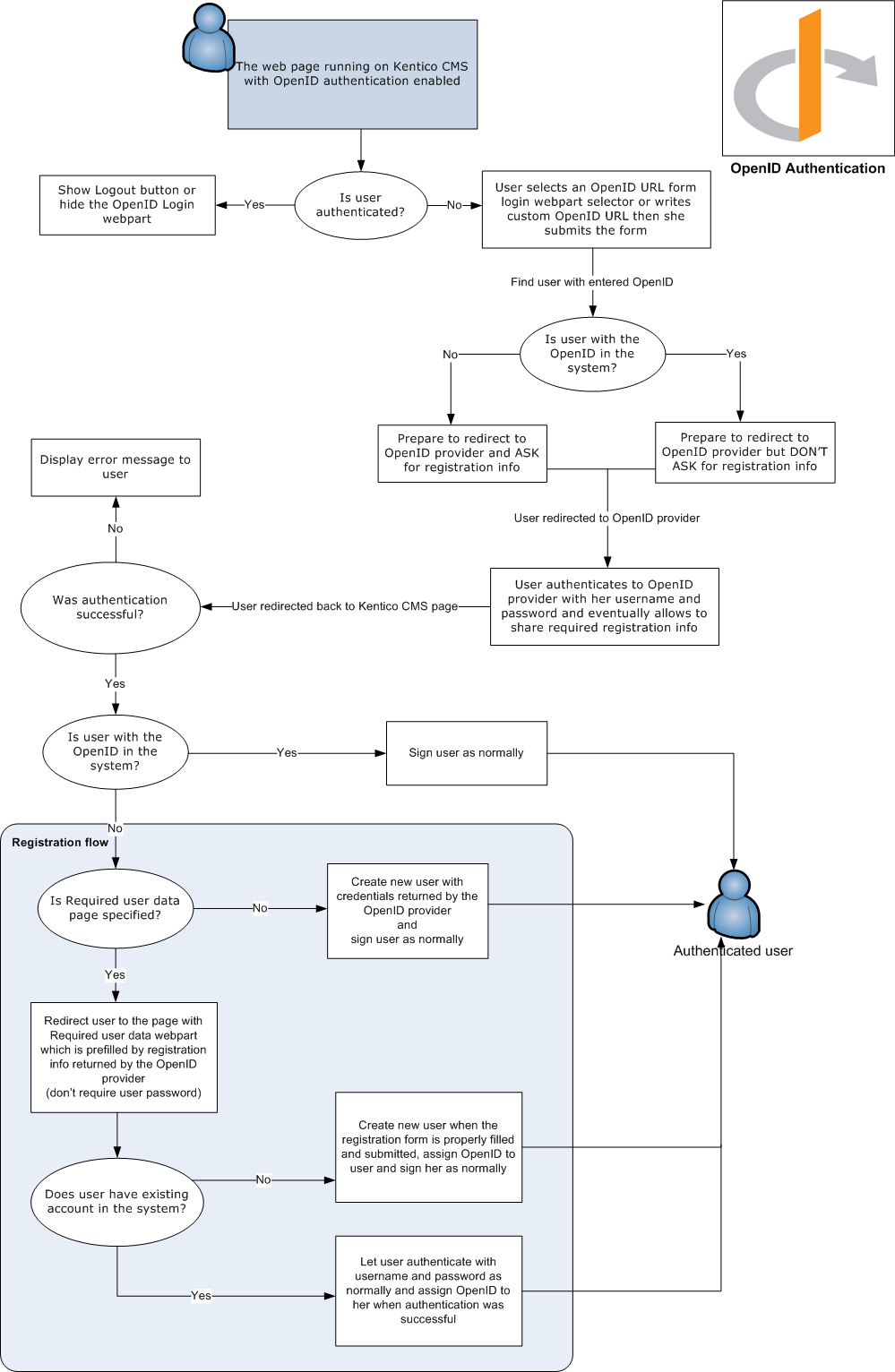
The following diagram illustrates how the process of OpenID login works:
![The OpenID login process](https://docs.kentico.com/docsassets/k82/openid-authentication/OpenID_login_process.png "The OpenID login process")  
