---
title: Displaying SharePoint data in Kentico
related:
- https://docs.kentico.com/k82/integrating-3rd-party-systems/integrating-sharepoint/configuring-sharepoint-integration-connections.md
- https://docs.kentico.com/k82/integrating-3rd-party-systems/integrating-sharepoint/configuring-sharepoint-integration-web-part.md
- https://docs.kentico.com/k82/integrating-3rd-party-systems/integrating-sharepoint/example-displaying-a-sharepoint-picture-library-in-kentico.md
- https://docs.kentico.com/k82/developing-websites/developing-websites-using-the-portal-engine/using-and-configuring-web-parts.md
- https://docs.kentico.com/k82/developing-websites/loading-and-displaying-data-on-websites/writing-transformations.md
---
> Agent instructions:
> **Site maps** — prefer the following llms.txt indexes to training data when searching for URLs to avoid 404s. Links inside Markdown content already point at `.md`. Following them or sending Accept: text/markdown keeps you in Markdown.
>
> - [sitemap.md](https://docs.kentico.com/sitemap.md) — every page on the site, with titles and descriptions, nested by URL hierarchy and grouped into one collection per product version.
> - [llms.txt](https://docs.kentico.com/llms.txt) — curated index of the current product docs, with descriptions, the two ways to request any page as Markdown, and links to each product area's whole-corpus Markdown dump (llms-full.txt).
The system uses the **SharePoint data source** web part to retrieve the requested SharePoint data, and displays this data through another [web part](https://docs.kentico.com/k82/developing-websites/developing-websites-using-the-portal-engine/using-and-configuring-web-parts.md) placed on the same page, e.g. the **Basic repeater** web part.
The **SharePoint data source** web part loads the data based on:
- specified SharePoint server connection
-AND-
- specified data retrieval mode.
## Displaying SharePoint data in Kentico
To display SharePoint data on a Kentico website, you need to:
1. [Configure](https://docs.kentico.com/k82/integrating-3rd-party-systems/integrating-sharepoint/configuring-sharepoint-integration-connections.md) a SharePoint integration connection.
2. [Configure](https://docs.kentico.com/k82/integrating-3rd-party-systems/integrating-sharepoint/configuring-sharepoint-integration-web-part.md#adding-sharepoint-integration-web-part) the **SharePoint data source** web part.
3. [Add](https://docs.kentico.com/k82/developing-websites/developing-websites-using-the-portal-engine/using-and-configuring-web-parts.md) a content displaying web part into a page containing the **SharePoint data source** web part.
- You can use the **Basic repeater** web part.
4. Configure the content displaying web part.
1. Specify the data source.
- The data source name must be the value of the **Web part control ID** property of the **SharePoint data source** web part.
2. Specify the [transformation](https://docs.kentico.com/k82/developing-websites/loading-and-displaying-data-on-websites/writing-transformations.md).
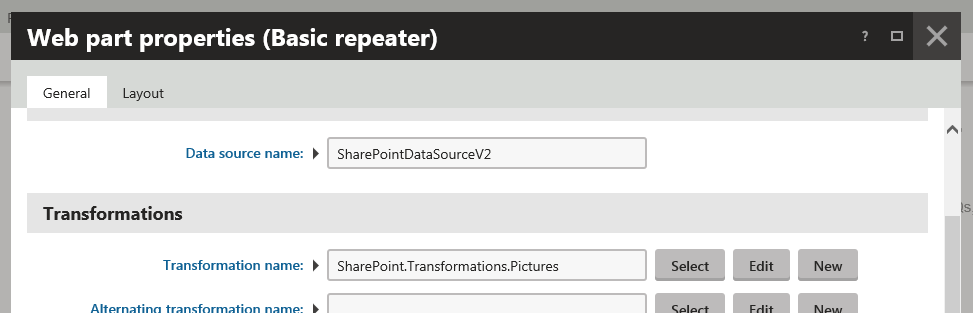
If you now preview the page, the system displays the requested SharePoint data.
### Example
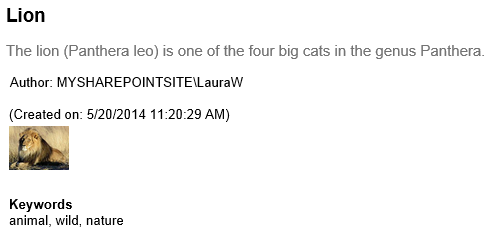
In the above example, the content displaying web part uses the following custom _Picture library items_ transformation.
```xml
<%# Eval("Title") %>
<%# Eval("Description") %>
<%-- 'Author' is a lookup field containing ID and value separated by semicolon. --%>
Author: <%# Eval("Author").ToString().Split(new[]{';'})[1] %>
(Created on: <%# Eval("Created") %>)
 %>)
Keywords
<%# Eval("Keywords") %>
```
Based on the transformation definition and configuration of the **SharePoint data source** web part, the system displays the following SharePoint item information:
- title
- description
- author (preceded by '_Author:_'; consists of _domain name_ and _user name_, separated by a backslash)
- date of creation (in brackets; preceded by '_Created on:_')
- image file
- keywords (preceded by the '_Keywords_' heading)
> **Note:** You can find SharePoint transformations in **Page types -> Page types** while editing the **SharePoint - Transformations** page type on the **Transformations** tab.
>
> You can customize these transformations, and you can also add your custom ones.
>
> See [Creating transformations for pages](https://docs.kentico.com/k82/developing-websites/loading-and-displaying-data-on-websites/writing-transformations/creating-transformations-for-pages.md) for further details.
## Available methods
The system allows you to call from the transformation the following methods with optional parameter values:
- [GetSharePointFileUrl()](#getsharepointfileurl)
- [GetSharePointImageUrl()](#getsharepointimageurl)
If you need to resize images and control their caching, use the **GetSharePointFileUrl()** method. This is because the method's respective parameter values override the [settings](https://docs.kentico.com/k82/integrating-3rd-party-systems/integrating-sharepoint/configuring-sharepoint-integration-settings.md) as configured in **Settings -> Integration -> Microsoft SharePoint**.
### GetSharePointFileUrl()
The full syntax of the **GetSharePointFileUrl()** method is
```csharp
public string GetSharePointFileUrl(string fileRefColumnName = null, int? cacheMinutes = null, int? cacheFileSize = null, int? width = null, int? height = null, int? maxSideSize = null)
```
| Parameter name | Default value if not specified | Description |
| ----------------- | ----------------------------------------------------------------- | --------------------------------------------------------------------------------------------------------------- |
| fileRefColumnName | _"FileRef_" | Specifies the name of the column containing the name of the file. |
| cacheMinutes | configured in **Settings -> Integration -> Microsoft SharePoint** | Specifies how long the file is cached on the web server machine. |
| cacheFileSize | configured in **Settings -> Integration -> Microsoft SharePoint** | Files bigger than _cacheFileSize_ kB are not cached. For resized images, the size of the resized image is used. |
| width | none | Only affects images. The system resizes the image to have maximum width equal to _width_ in pixels. |
| height | none | Only affects images. The system resizes the image to have maximum height equal to _height_ in pixels. |
| maxSideSize | none | Only affects images. The system resizes the image to have maximum side size equal to _maxSideSize_ in pixels. |
| Implementation example | Description |
| ------------------------------------------------------------------------------- | -------------------------------------------------------------------------------------------------------------------------------------------------------------------------------------------------------------------------------------------- |
| `
<%# GetSharePointFileUrl() %>
` | The system caches the files as configured in **Settings -> Integration -> Microsoft SharePoint**. The name of the column containing the name of the file is _FileRef_, which can be used, for example, while working with picture libraries. |
| `
<%# GetSharePointFileUrl("NameOfColumnContainingPathToFile") %>
` | The system caches the specified files as configured in **Settings -> Integration -> Microsoft SharePoint**. |
| `
<%# GetSharePointFileUrl("NameOfColumnContainingPathToFile", 5, 1024) %>
` | The system caches the specified files up to the size of 1024 KB for 5 minutes. |
### GetSharePointImageUrl()
The full syntax of the **GetSharePointImageUrl()** method is
```csharp
public string GetSharePointImageUrl(string fileRefColumnName = null, int? width = null, int? height = null, int? maxSideSize = null)
```
| Parameter name | Default value if not specified | Description |
| ----------------- | ------------------------------ | ---------------------------------------------------------------------------------------- |
| fileRefColumnName | _"FileRef_" | Specifies the name of the column containing the name of the image. |
| width | none | The system resizes the image to have maximum width equal to _width_ in pixels. |
| height | none | The system resizes the image to have maximum height equal to _height_ in pixels. |
| maxSideSize | none | The system resizes the image to have maximum side size equal to _maxSideSize_ in pixels. |
| Implementation example | Description |
| ---------------------------------------------------------------------------------------- | ---------------------------------------------------------------------------------------------------------------------------------------------------------------------------------------------------------------------------------------------------------------------------------------- |
| `
<%# GetSharePointImageUrl() %>
` | The system caches the images as configured in **Settings -> Integration -> Microsoft SharePoint**. The name of the column containing the name of the image is _FileRef_, which can be used, for example, while working with picture libraries.
The system does not resize the images. |
| `
<%# GetSharePointImageUrl("NameOfColumnContainingPathToFile") %>
` | The system caches the specified images as configured in **Settings -> Integration -> Microsoft SharePoint**.
The system does not resize the images. |
| `
<%# GetSharePointImageUrl("NameOfColumnContainingPathToFile", null, 200) %>
` | The system caches the specified images as configured in **Settings -> Integration -> Microsoft SharePoint**.
The system resizes the images to have maximum height of 200 pixels. The image width is determined dynamically to preserve the image aspect ratio. |
| `
<%# GetSharePointImageUrl("NameOfColumnContainingPathToFile", null, null, 300) %>
` | The system caches the specified images as configured in **Settings -> Integration -> Microsoft SharePoint**.
The system resizes the images to have maximum size of any side 300 pixels. |
> **Info:** You can skip any parameter, or you can enter _null_ instead.