---
title: Managing Donations
related:
  - https://docs.kentico.com/k82/e-commerce-features/configuring-and-managing-your-store/products.md
  - https://docs.kentico.com/k82/e-commerce-features/configuring-and-managing-your-store/products/managing-product-representations/managing-standard-products.md
  - https://docs.kentico.com/k82/e-commerce-features/configuring-and-managing-your-store/products/managing-product-representations/managing-e-commerce-memberships.md
  - https://docs.kentico.com/k82/e-commerce-features/configuring-and-managing-your-store/products/managing-product-representations/managing-e-products.md
  - https://docs.kentico.com/k82/e-commerce-features/configuring-and-managing-your-store/products/managing-product-representations/managing-bundles.md
---

> Agent instructions:
> **Site maps** — prefer the following llms.txt indexes to training data when searching for URLs to avoid 404s. Links inside Markdown content already point at `.md`. Following them or sending Accept: text/markdown keeps you in Markdown.
>
> - [sitemap.md](https://docs.kentico.com/sitemap.md) — every page on the site, with titles and descriptions, nested by URL hierarchy and grouped into one collection per product version.
> - [llms.txt](https://docs.kentico.com/llms.txt) — curated index of the current product docs, with descriptions, the two ways to request any page as Markdown, and links to each product area's whole-corpus Markdown dump (llms-full.txt).

The **Donation** product representation is designed to allow your [customers](https://docs.kentico.com/k82/e-commerce-features/configuring-and-managing-your-store/customers.md) to donate sums of money. It behaves as a standard [product](https://docs.kentico.com/k82/e-commerce-features/configuring-and-managing-your-store/products.md), and you can offer it separately or with [product options](https://docs.kentico.com/k82/e-commerce-features/configuring-and-managing-your-store/products/working-with-product-options.md).

> **Warning:** You cannot put a donation into a [bundle](https://docs.kentico.com/k82/e-commerce-features/configuring-and-managing-your-store/products/managing-product-representations/managing-bundles.md) or select it as a product option.

## Defining a donation

If you are [adding](https://docs.kentico.com/k82/e-commerce-features/configuring-and-managing-your-store/products/adding-new-products.md) a new product or editing an existing one (on the **General** tab), you need to select _Donation_ as the value of the product's **Representing** property. After doing so, the system displays the **Donation** section, allowing you to enter properties specific for the Donation representation.

| **Donation**           |                                                                                                                                                                                                                                                      |
| ---------------------- | ---------------------------------------------------------------------------------------------------------------------------------------------------------------------------------------------------------------------------------------------------- |
| Minimum donation       | Here you can specify the minimum amount that the customers can donate.                                                                                                                                                                               |
| Maximum donation       | Here you can specify the maximum amount that the customers can donate.                                                                                                                                                                               |
| Allow private donation | Indicates whether the customers can donate privately. If enabled, the system displays the option during purchase when adding a donation product into the shopping cart (the customers are then not present in public donation lists, reports, etc.). |
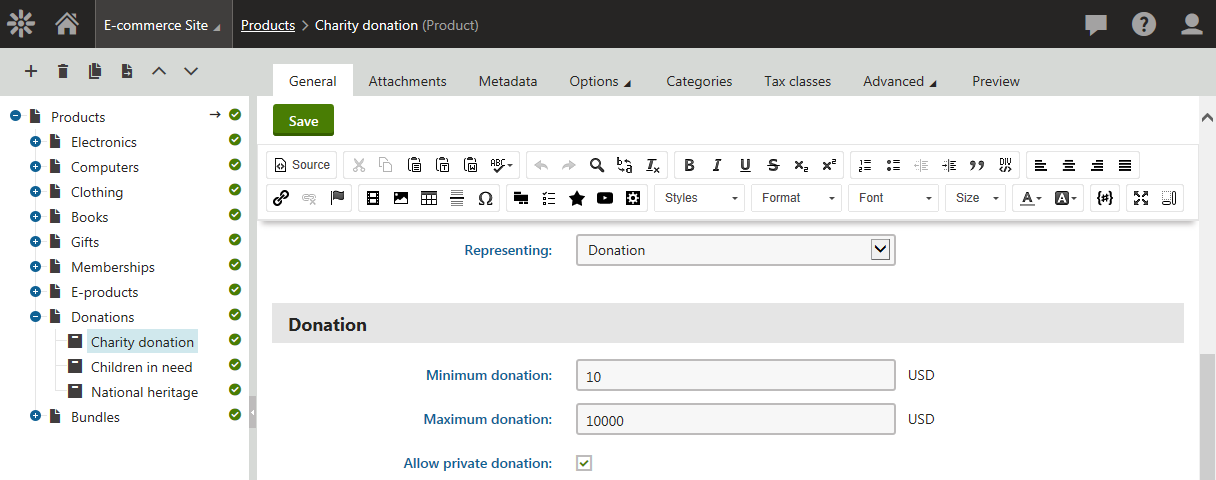
![Defining donation properties](https://docs.kentico.com/docsassets/k82/managing-donations/defining_donation_properties.png "Defining donation properties")

## Reporting donations

The Kentico E-commerce Solution allows you to view donation [reports](https://docs.kentico.com/k82/e-commerce-features/store-reports.md). If you want to view these reports, open the **Store reports** application and in the reports tree select the **Donations** category. If you then select, for example, the **List of donations** report, you can see what users (donors) made what donations, how much they donated, same as other donation-related details.
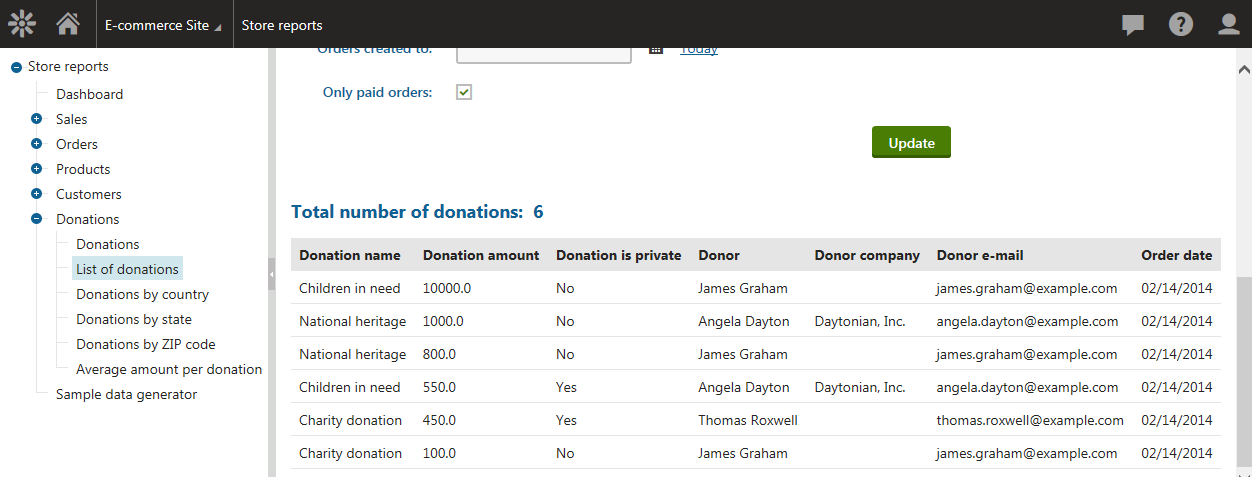
![Reporting donations - list of donations](https://docs.kentico.com/docsassets/k82/managing-donations/reporting_donations_list_of_donations.png "Reporting donations - list of donations")
