---
title: Working with free shipping offers
related:
  - https://docs.kentico.com/k82/e-commerce-features/configuring-and-managing-your-store/discounts/working-with-free-shipping-offers/example-redeeming-a-free-shipping-offer.md
  - https://docs.kentico.com/k82/e-commerce-features/configuring-and-managing-your-store/discounts/working-with-discount-coupons/use-order-coupons.md
  - https://docs.kentico.com/k82/e-commerce-features/configuring-and-managing-your-store/discounts/configuring-discount-rules.md
  - https://docs.kentico.com/k82/e-commerce-features/configuring-and-managing-your-store/discounts/configuring-discount-rules/example-adding-an-order-rule.md
  - https://docs.kentico.com/k82/e-commerce-features/configuring-and-managing-your-store/discounts/working-with-discount-coupons/use-order-coupons/use-a-coupon-code-to-receive-free-shipping.md
---

> Agent instructions:
> **Site maps** — prefer the following llms.txt indexes to training data when searching for URLs to avoid 404s. Links inside Markdown content already point at `.md`. Following them or sending Accept: text/markdown keeps you in Markdown.
>
> - [sitemap.md](https://docs.kentico.com/sitemap.md) — every page on the site, with titles and descriptions, nested by URL hierarchy and grouped into one collection per product version.
> - [llms.txt](https://docs.kentico.com/llms.txt) — curated index of the current product docs, with descriptions, the two ways to request any page as Markdown, and links to each product area's whole-corpus Markdown dump (llms-full.txt).

You can use free shipping offers to provide free shipping to your selected [customers](https://docs.kentico.com/k82/e-commerce-features/configuring-and-managing-your-store/customers.md).

For example, use this discount when you want to give free shipping:

- to customers who buy goods for more than a specific price, e.g., 100 USD;
- to customers who have their purchased products sent to somewhere where you want to increase sales, e.g., to Texas;
- because it is some special season, e.g., Christmas.

You can configure free shipping offers in detail to apply only if specified rules (macro conditions) are fulfilled. These rules use properties of the shopping cart, and can include shopping cart content, billing/shipping address, [order](https://docs.kentico.com/k82/e-commerce-features/configuring-and-managing-your-store/orders.md) currency, order amount, etc. You can also specify periods of validity for free shipping offers.

> **Info:** The system binds free shipping offers to specific sites, for example, to the sample _E-commerce Site_.
>
> If you run [multiple sites](https://docs.kentico.com/k82/e-commerce-features/configuring-and-managing-your-store/multisite-store.md) and want to use free shipping offers, you thus need to define dedicated free shipping offers for each site.

## Adding and editing free shipping offers

You can add or edit free shipping offers in the **Free shipping offers** application.

- [Free shipping offers limited by periods of validity](#free-shipping-offers-limited-by-periods-of-validity)
- [Free shipping offers targeted at selected customers](#free-shipping-offers-targeted-at-selected-customers)
- [Free shipping offers limited by conditions](#free-shipping-offers-limited-by-conditions)

> **Info:** You can combine the free shipping offer limitations.
>
> For example, you can provide free shipping to all your registered US customers who placed their orders throughout January.

### Free shipping offers limited by periods of validity

To add or to edit free shipping offers limited by periods of validity:

1. To add a new offer, click**New Free shipping offer**. To edit an existing offer, click **Edit** () at the desired offer.
2. Type a **Name** for the discount.
3. Enter the free shipping offer properties in the **Duration** category.
   - **Valid from** – specifies the start of the period of validity.
   - **Valid to** – specifies the end of the period of validity.
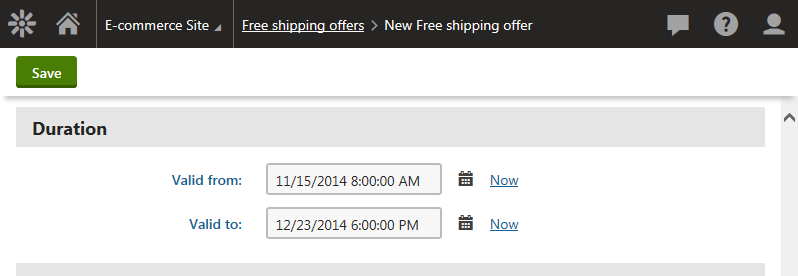
     ![Specifying properties in the Duration section](https://docs.kentico.com/docsassets/k82/working-with-free-shipping-offers/specifying_properties_duration_section.png "Specifying properties in the Duration section")

     > **Info:** Leave both fields empty for permanent validity.
4. Click **Save**.

The system saves the free shipping offer. The system now provides free shipping only during the offer's period of validity (if the offer is running).

### Free shipping offers targeted at selected customers

To add or to edit free shipping offers targeted at selected customers:

1. To add a new offer, click**New Free shipping offer**. To edit an existing offer, click **Edit** () at the desired offer.
2. Type a **Name** for the discount.
3. Change the value of the **Available for** property in the **Target customers** category

   - **All visitors** – all customers are eligible for the discount; the default option.
   - **Registered users** – only registered customers are eligible for the discount.
   - **Selected roles** – only customers in selected [roles](https://docs.kentico.com/k82/managing-users/role-management.md) are eligible for the discount.
4. Click **Save**.

The system saves the free shipping offer and returns you to the list of all free shipping offers. The system provides free shipping only to the selected customers.

> **Info:** If you need to add free shipping offers targeted at custom groups of customers, for example, on selected users, contact groups, etc., please refer to [Configuring discount rules](https://docs.kentico.com/k82/e-commerce-features/configuring-and-managing-your-store/discounts/configuring-discount-rules.md).

### Free shipping offers limited by conditions

To add or to edit basic free shipping offers limited by conditions:

1. To add a new offer, click**New Free shipping offer**. To edit an existing offer, click **Edit** () at the desired offer.
2. Type a **Name** for the discount.
3. Specify **Minimum order amount** in your on-line store [main currency](https://docs.kentico.com/k82/e-commerce-features/configuring-and-managing-your-store/currencies.md).
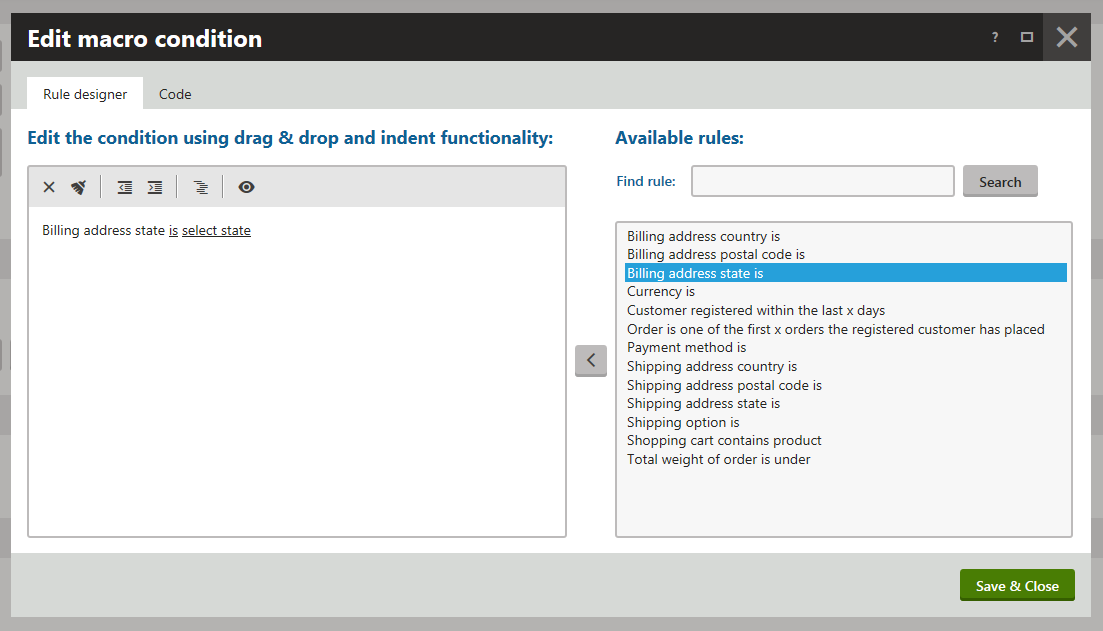
4. Click **Edit** to set the discount rules and their parameters
   1. In **Edit macro condition** dialog that opens, select the required rule in the right part of the dialog.
   2. Use drag & drop, or double-click, or click **Add rule** () button to add the rule.
   3. Click the underlined parts of the rule in the left part of the dialog to open the **Set parameter value** dialog.

      > **Note:** One rule can contain more parameters. That's why there can be more underlined words.
   4. Select the desired parameter.
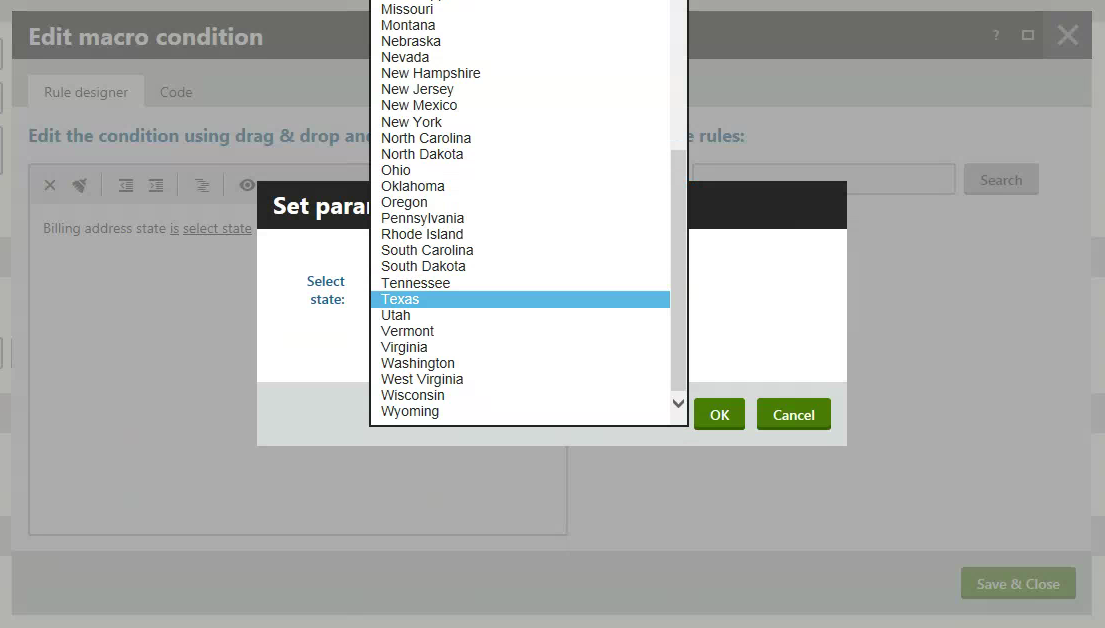
      ![Specifying the rule parameters](https://docs.kentico.com/docsassets/k82/working-with-free-shipping-offers/specifying_rule_parameters.png "Specifying the rule parameters")
   5. Click **OK**.
   6. (Optional) Repeat editing to set all discount rules and all their parameters you want.
   7. Click **Save & Close**.
5. Click **Save**.

The system saves the free shipping offer. The system now applies the offer only if the specified conditions are fulfilled (if the offer is running).

> **Info:** If you want to allow some other user to add or to edit discounts, see [Role management](https://docs.kentico.com/k82/managing-users/role-management.md) and [Configuring permissions](https://docs.kentico.com/k82/managing-users/configuring-permissions.md).
>
> | Permission           | Description                                                                                                                                                                                                                                                                                                                                                                     |
> | -------------------- | ------------------------------------------------------------------------------------------------------------------------------------------------------------------------------------------------------------------------------------------------------------------------------------------------------------------------------------------------------------------------------- |
> | Read discounts       | Allows users in selected roles to access discounts and free shipping offers.                                                                                                                                                                                                                                                                                                    |
> | Modify discounts     | Allows users in selected roles to create, modify and delete discounts and free shipping offers.                                                                                                                                                                                                                                                                                 |
> | Read configuration   | Allows users in selected roles to access E-commerce configuration, i.e. the on-line store [settings](https://docs.kentico.com/k82/e-commerce-features/configuring-and-managing-your-store/e-commerce-website-settings.md), [discount rules](https://docs.kentico.com/k82/e-commerce-features/configuring-and-managing-your-store/discounts/configuring-discount-rules.md), etc. |
> | Modify configuration | Allows users in selected roles to modify E-commerce configuration.                                                                                                                                                                                                                                                                                                              |

> **Info:** If you edit or delete a discount, the existing orders stay with that discount. To update existing orders according to the new rules, you must edit the required orders manually.

## Displaying the remaining amount to receive free shipping on pages

The Kentico E-commerce Solution allows you to configure the pages to display the amount that remains for the customers to receive free shipping for their orders (if eligible).

1. Open the **Pages** application.
2. Select the required page in the content tree.
3. Switch to the **Edit -> Design** tab.
4. Add the **Remaining amount for free shipping** [web part](https://docs.kentico.com/k82/developing-websites/developing-websites-using-the-portal-engine/using-and-configuring-web-parts.md) to the selected web part zone.
5. Enter the web part properties as required.

   > **Tip:** The web part's **Text for remaining amount** property allows you to specify text that the system displays if the customers need to spend more to receive free shipping.
   >
   > Use _{0}_ instead of the remaining amount, for example _Add product items for at least {0} to receive free shipping_.
6. Click **OK**.

The system adds the **Remaining amount for free shipping** web part into the page. If your customers add products to their shopping carts, the system informs them how much more they need to spend for the products to receive free shipping (if eligible).

## Displaying the shipping costs in the invoice

To display the total shipping costs in the [invoice](https://docs.kentico.com/k82/e-commerce-features/configuring-and-managing-your-store/invoices.md):

1. Open the **Store configuration** application.
2. Switch to the **Invoice** tab.
3. Add the following code into your invoice template:

   ```xml

   {%TotalShipping.Format(Currency.CurrencyFormatString)#%}

   ```
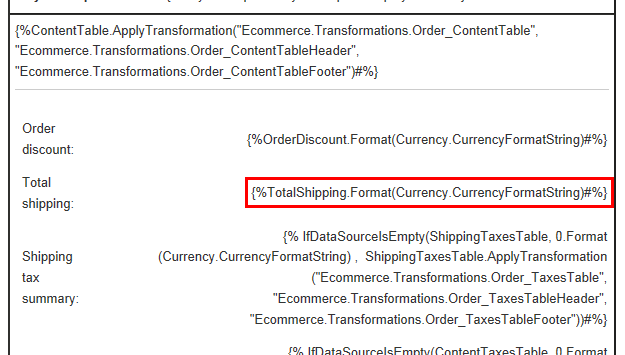
   ![Invoice template](https://docs.kentico.com/docsassets/k82/working-with-free-shipping-offers/invoice_template.png "Invoice template")
4. Click **Save**.

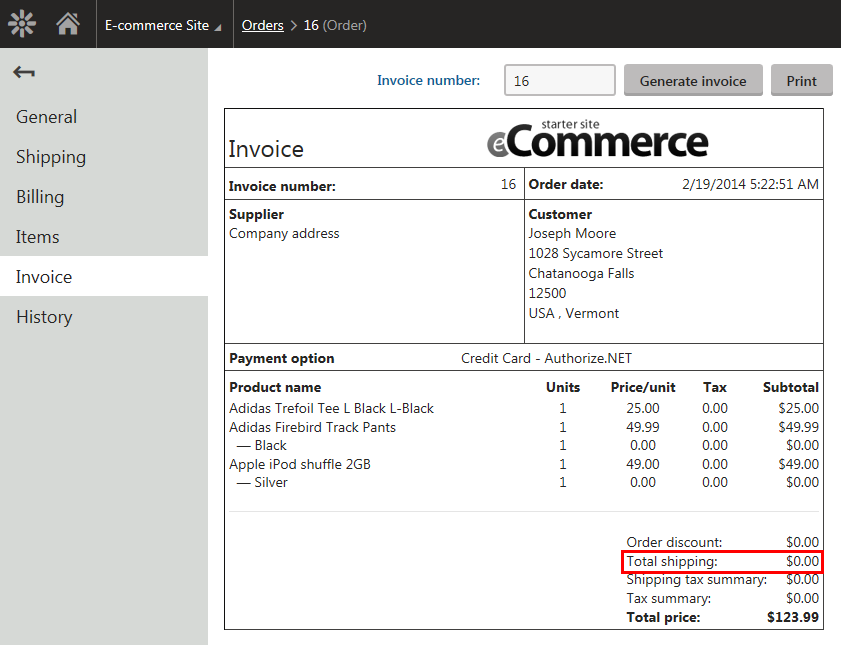
If you now review an existing order on the **Invoice** tab, you can see that the invoice includes information about the shipping costs. The value is _0_ if no shipping is charged for the selected shipping option, or if free shipping is provided to the customer.
![Invoice - free shipping offer applied](https://docs.kentico.com/docsassets/k82/working-with-free-shipping-offers/invoice_free_shipping_offer_applied.png "Invoice - free shipping offer applied")

## Reference

| **General**                                           |                                                                                                                                                                                                                                                                                                                                                                                                                                                                                                                                                                                                                                                                                                                                                                                                                                                                                                                                                                                                                                                                                                                                                                                                                                                                                                                                                                                         |
| ----------------------------------------------------- | --------------------------------------------------------------------------------------------------------------------------------------------------------------------------------------------------------------------------------------------------------------------------------------------------------------------------------------------------------------------------------------------------------------------------------------------------------------------------------------------------------------------------------------------------------------------------------------------------------------------------------------------------------------------------------------------------------------------------------------------------------------------------------------------------------------------------------------------------------------------------------------------------------------------------------------------------------------------------------------------------------------------------------------------------------------------------------------------------------------------------------------------------------------------------------------------------------------------------------------------------------------------------------------------------------------------------------------------------------------------------------------- |
| Name                                                  | The name of the free shipping offer used throughout the administration interface, e.g., in free shipping offers lists.                                                                                                                                                                                                                                                                                                                                                                                                                                                                                                                                                                                                                                                                                                                                                                                                                                                                                                                                                                                                                                                                                                                                                                                                                                                                  |
| Code name                                             | The unique identifier of the free shipping offer object used by developers in the code.<br>Unless there is a reason to set a particular value, you can leave the default _(automatic)_ option, and the system generates an appropriate code name automatically.                                                                                                                                                                                                                                                                                                                                                                                                                                                                                                                                                                                                                                                                                                                                                                                                                                                                                                                                                                                                                                                                                                                         |
| Description                                           | To make the free shipping offer easier to use and maintain, you can add an explanation about the scenarios for which the offer is intended, etc. The description doesn't have any functionality, it's just for better orientation.                                                                                                                                                                                                                                                                                                                                                                                                                                                                                                                                                                                                                                                                                                                                                                                                                                                                                                                                                                                                                                                                                                                                                      |
| Enabled                                               | Indicates if the free shipping offer is enabled in the system (if the offer is running).<br>While calculating the total price of the order, the system skips disabled free shipping offers.                                                                                                                                                                                                                                                                                                                                                                                                                                                                                                                                                                                                                                                                                                                                                                                                                                                                                                                                                                                                                                                                                                                                                                                             |
| **Free shipping conditions**                          |                                                                                                                                                                                                                                                                                                                                                                                                                                                                                                                                                                                                                                                                                                                                                                                                                                                                                                                                                                                                                                                                                                                                                                                                                                                                                                                                                                                         |
| Minimum order amount                                  | Specify minimum price of the order that customers need to make to be eligible for the free shipping offer.                                                                                                                                                                                                                                                                                                                                                                                                                                                                                                                                                                                                                                                                                                                                                                                                                                                                                                                                                                                                                                                                                                                                                                                                                                                                              |
| Further conditions                                    | You can enter further conditions that must be fulfilled for the system to apply the free shipping offer. By utilizing rules (user-friendly representations of macro expressions), you can write any condition according to your specific requirements.<br>Click **Edit** to open the **Edit macro condition** dialog, which allows you to add rules through a graphical interface.<br>![Selecting the discount rules](https://docs.kentico.com/docsassets/k82/working-with-free-shipping-offers/specifying_discount_rules.png "Selecting the discount rules")<br>Use drag & drop or double-click or **Add rule** button () to add a rule.<br>Click on a specific rule and click **Delete** () to delete the rule.<br>Click **Clear all rules** () to remove all rules in the current offer.<br>Click on underlined words in the condition part to change their options.<br>**Example**<br>_Shipping option is Shipping_<br>_and_<br>_Shipping address state is Texas_<br>The condition ensures that the free shipping offer is only applied if the customer selects shipping as shipping option, and have their purchased products sent to Texas.<br>You can also edit macros on the **Code** tab in the **Edit macro condition** dialog. For details about available macro options and syntax, please refer to [Macro expressions](https://docs.kentico.com/k82/macro-expressions.md). |
| **Coupons**                                           |                                                                                                                                                                                                                                                                                                                                                                                                                                                                                                                                                                                                                                                                                                                                                                                                                                                                                                                                                                                                                                                                                                                                                                                                                                                                                                                                                                                         |
| Customer has to redeem a coupon to get Free shipping: | If selected, only customers who type valid coupon code are able to apply the free shipping offer.<br>You can set coupons on the **Coupons** tab in the left menu. After enabling the field and saving the discount, you will be redirected there automatically.<br>More info about working with coupons is to be found in [separate page](https://docs.kentico.com/k82/e-commerce-features/configuring-and-managing-your-store/discounts/working-with-discount-coupons/use-order-coupons.md).                                                                                                                                                                                                                                                                                                                                                                                                                                                                                                                                                                                                                                                                                                                                                                                                                                                                                           |
| **Duration**                                          |                                                                                                                                                                                                                                                                                                                                                                                                                                                                                                                                                                                                                                                                                                                                                                                                                                                                                                                                                                                                                                                                                                                                                                                                                                                                                                                                                                                         |
| Valid from                                            | Specify from when the discount is running.**Info:** If you leave **Valid from** empty, the discount will be valid permanently till **Valid to**.                                                                                                                                                                                                                                                                                                                                                                                                                                                                                                                                                                                                                                                                                                                                                                                                                                                                                                                                                                                                                                                                                                                                                                                                                                        |
| Valid to                                              | Specify to when the discount is running.**Info:** If you leave **Valid to** empty, the discount will be valid permanently from **Valid from**.                                                                                                                                                                                                                                                                                                                                                                                                                                                                                                                                                                                                                                                                                                                                                                                                                                                                                                                                                                                                                                                                                                                                                                                                                                          |
| **Target customers**                                  |                                                                                                                                                                                                                                                                                                                                                                                                                                                                                                                                                                                                                                                                                                                                                                                                                                                                                                                                                                                                                                                                                                                                                                                                                                                                                                                                                                                         |
| Available for                                         | Choose [roles of users](https://docs.kentico.com/k82/managing-users/role-management.md) who are able to apply the discount:<br>**All visitors** – all customers are eligible for the discount.<br>**Registered users** – only registered customers are eligible for the discount.<br>**Selected roles** – only customers in selected roles are eligible for the discount. To add roles:<br>Click **Select roles** to open the **Select roles** dialog.<br>Select the required roles.<br>Click **Select**.**Tip:** You can enter roles directly by typing in their code names separated by semicolons, e.g., _\_authenticated\_;Members_.**Tip:** You can add registered customers to roles in the **Customers** application while editing a selected customer on the **Roles** tab.                                                                                                                                                                                                                                                                                                                                                                                                                                                                                                                                                                                                     |