---
title: Monitoring traffic from search engines
related:
- https://docs.kentico.com/k82/on-line-marketing-features/web-analytics/viewing-web-analytics-reports.md
- https://docs.kentico.com/k82/configuring-kentico/search-engine-optimization.md
---
> Agent instructions:
> **Site maps** — prefer the following llms.txt indexes to training data when searching for URLs to avoid 404s. Links inside Markdown content already point at `.md`. Following them or sending Accept: text/markdown keeps you in Markdown.
>
> - [sitemap.md](https://docs.kentico.com/sitemap.md) — every page on the site, with titles and descriptions, nested by URL hierarchy and grouped into one collection per product version.
> - [llms.txt](https://docs.kentico.com/llms.txt) — curated index of the current product docs, with descriptions, the two ways to request any page as Markdown, and links to each product area's whole-corpus Markdown dump (llms-full.txt).
Search engine tracking allows you to monitor the amount of page views received from visitors who found the website using a search engine. Since search engines are the most common type of referring websites, the system tracks them separately and with additional details.
## Viewing search engine statistics
To access the report containing search engine data:
1. Open the **Web analytics** application.
2. Select the **Traffic sources -> Search engines** report.
The report contains a graph displaying the total amount of page views generated by search engine traffic and a breakdown of the statistics for individual search engines.
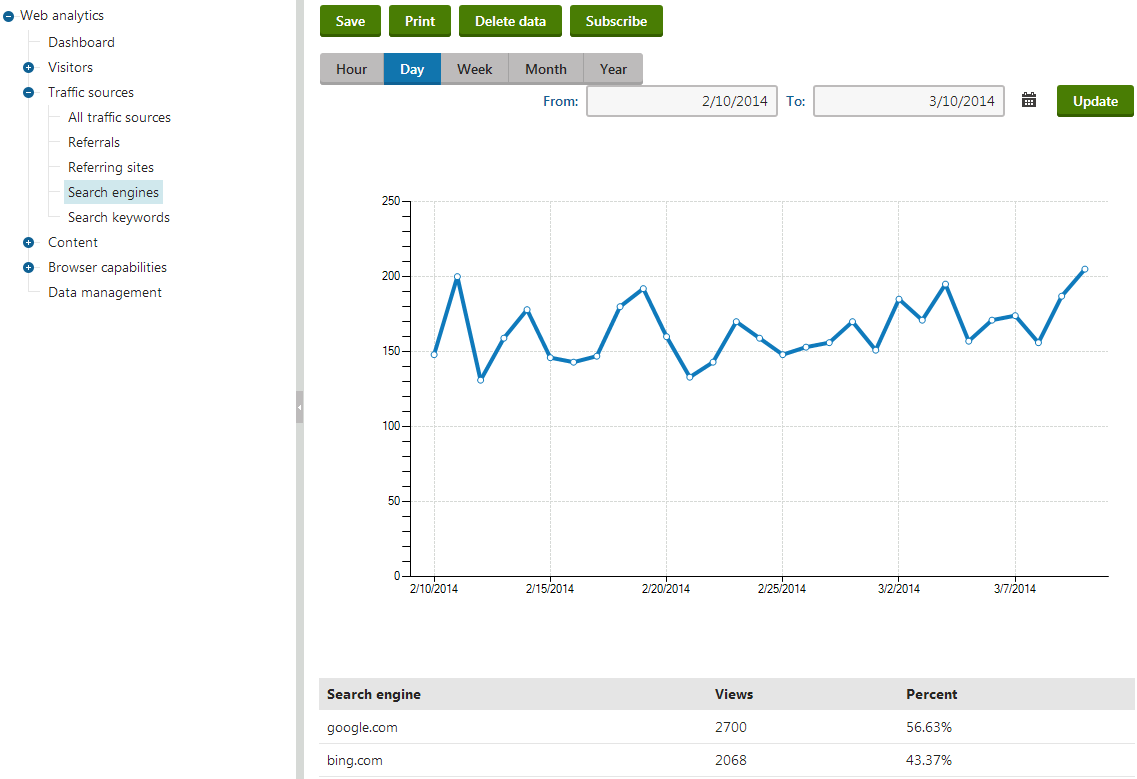
Additionally, you can view the exact keywords that were entered into the search engines using the **Search keywords** report (also located under the **Traffic sources** category).
Before they can provide search results that link users to your website, search engines index the site using web crawlers (robots). Web analytics are also capable of tracking crawlers on your website's pages. You can view the results in the **Visitors -> Search crawlers** report.
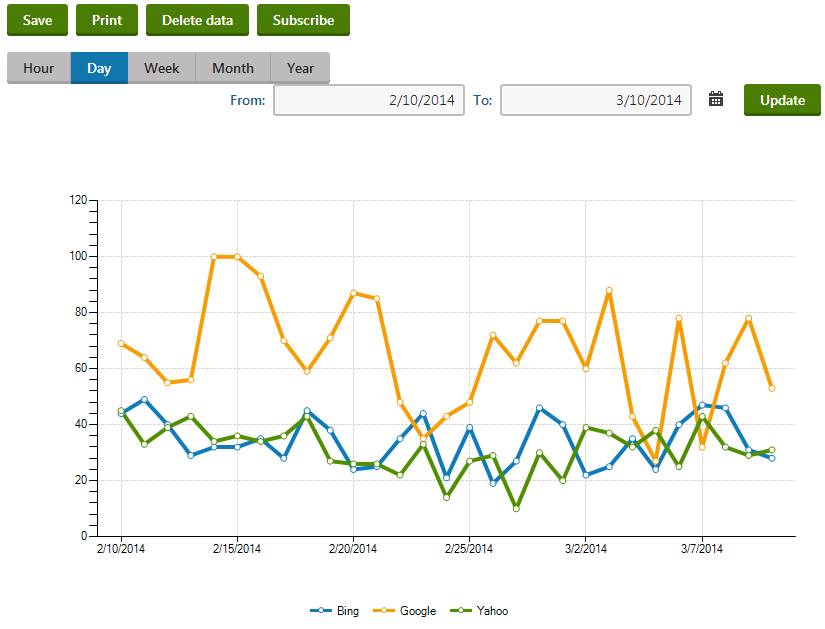
The data provided in the search crawlers report can be useful when performing [Search engine optimization](https://docs.kentico.com/k82/configuring-kentico/search-engine-optimization.md) of your website.
> **Tip:** **Tip**: You can also check search engine statistics for specific pages by selecting the corresponding page in the **Pages** application and viewing its **Traffic sources** reports on the **Analytics -> Reports** tab.
## Managing search engines
In order to correctly log incoming traffic from search engines, you need to define objects representing individual search engines. You can register search engines in the **Search engines** application. By default, the list contains some of the most commonly used search engines, but any additional ones that you wish to track must be added manually.
When creating or editing () a search engine object, you can specify the following properties:
| Property | Description |
| ----------------- | ---------------------------------------------------------------------------------------------------------------------------------------------------------------------------------------------------------------------------------------------------------------------------------------------------------------------------------------------------- |
| Display name | Sets the name of the search engine used in the administration and web analytics interface. |
| Code name | Sets a unique identifier for the search engine. You can leave the default (automatic) option to have the system generate an appropriate code name. |
| Domain rule | The system uses this string to determine whether website traffic originates from the given search engine. To work correctly, this string must always be present in the URL of the search engine's pages, for example **google.** for the Google search engine. |
| Keyword parameter | Specifies the name of the query string parameter that the given search engine uses to store the keywords entered when a search request is submitted. The system needs to know this parameter to log which search keywords visitors used to find your website. |
| Crawler agent | Sets the user agent value that identifies which web crawlers (robots) belong to the search engine.
Examples of common crawler agents are _Googlebot_ for Google, or _msnbot_ for Bing.
This property is optional and it is recommended to specify the crawler agent only for major search engines, or those that are relevant to your website. |
If the site is accessed from an external website, the system parses the URL of the page that generated the request. First, the URL is checked for the presence of a valid **Domain rule** that matches the value specified for a search engine object. Then the query string of the URL is searched for the parameter defined in the corresponding **Keyword parameter** property to confirm that the referring link was actually generated by search results, not by a banner or other type of link. This allows the system to accurately track user traffic that is gained from search engine results.
Whenever a page is accessed (indexed) by a web robot with a user agent matching the **Crawler agent** property of one of the search engines registered in the system, a hit is logged in the **Search crawlers** web analytics statistic.