
Quick installation on a local machine
This type of installation is the quickest way of installing Kentico on your machine. The only prerequisites are:
- The operating system: Windows 7 Service Pack 1 (both 32bit and 64bit) or Windows 8 (both 32bit and 64bit), or their corresponding server versions – Windows Server 2008 R2 Service Pack 1, 2012, 2012 R2
- Connection to the Internet
- Recommended resolution: 1920x1080 (also known as 1080p or Full HD)
Quick installation
All you need to do is:
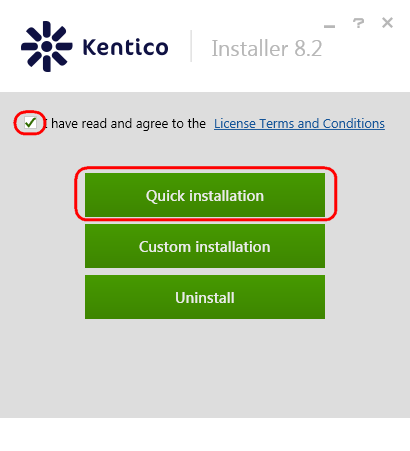
On the home page of the Installer, agree to the license terms.
Click Quick installation.
Choose the sample sites you wish to install. We recommend Dancing Goat, Corporate site and the E-commerce site. These sites utilize and present most of the functionality Kentico provides, and are therefore best suited for evaluation purposes.
License limitations for sample sites
Some of the sample sites use features that are only available in specific Kentico license editions. If you use a license edition lower than Kentico EMS, you may encounter problems when working with certain features (Content Personalization, for example). The initial trial license is equivalent to an EMS license.
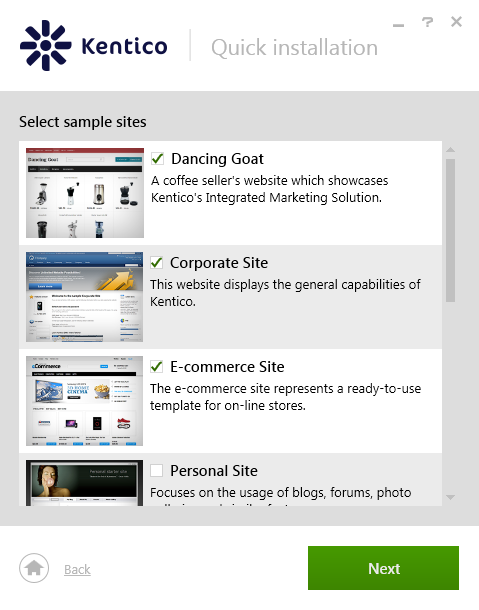
Click Next.
Decide whether to participate in the Kentico improvement program (via the Send anonymous usage records to Kentico checkbox).
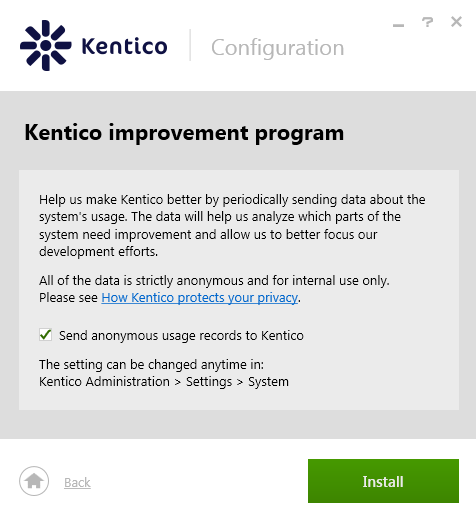
Click Install.
The installer now installs Kentico, including everything else needed for it to run.
Default configuration of the quick installation
If you choose the Quick installation option, the installer installs and configures the following items:
- .NET Framework 4.0
- Program files (in C:\Program Files (x86)\Kentico\8.2\)
- IIS Express (if you do not have IIS and all required components installed already) with Integrated mode of the application pool and with a virtual directory (http://localhost/Kentico8)
- SQL server native client
- SQL Server 2012 Express LocalDB
- Kentico database
- Kentico web site project (in C:\inetpub\wwwroot\Kentico82\)
- Kentico core files
- All available modules
- All sample site templates
- All available spell checker dictionaries
- All available UI Cultures
- Your chosen sample sites
- Trial license