---
title: Managing files in document libraries
related:
  - https://docs.kentico.com/k82/managing-website-content/working-with-files.md
---

> Agent instructions:
> **Site maps** — prefer the following llms.txt indexes to training data when searching for URLs to avoid 404s. Links inside Markdown content already point at `.md`. Following them or sending Accept: text/markdown keeps you in Markdown.
>
> - [sitemap.md](https://docs.kentico.com/sitemap.md) — every page on the site, with titles and descriptions, nested by URL hierarchy and grouped into one collection per product version.
> - [llms.txt](https://docs.kentico.com/llms.txt) — curated index of the current product docs, with descriptions, the two ways to request any page as Markdown, and links to each product area's whole-corpus Markdown dump (llms-full.txt).

This page explains how live site users can work with document libraries.

> **Info:** **Permissions for particular actions**
>
> All of the actions listed below are not always available. They are displayed based on document permissions granted to the current user or their roles. Please consult the [Configuring Document library security](https://docs.kentico.com/k82/intranet-features/document-library/configuring-document-library-security.md) page for more details.

When a new document library is created, there are no files in it, so live site users can only see the web part with the following buttons:

- **New document**
- **Library permissions**

Once files are uploaded in the document library, live site users can click **...** next to individual files to perform the following actions:

- **Edit** - only available if [WebDAV editing](https://docs.kentico.com/k82/managing-website-content/configuring-the-environment-for-content-editors/configuring-webdav.md) is enabled. Opens the document in its associated editing application.
- **Update** - replaces the document with another.
- **Localize** - available only if the website has multilingual content. Allows you to translate the document to a different language version.
- **Copy**
- **Delete**
- **Open**
- **Properties**
- **Permissions**
- **Version history**
- **Workflow actions** - only available if the document library is under a [workflow](https://docs.kentico.com/k82/managing-website-content/configuring-the-environment-for-content-editors/configuring-workflows/applying-workflows-to-pages.md). The actions allow you to approve or reject the document, or lock it for exclusive editing.
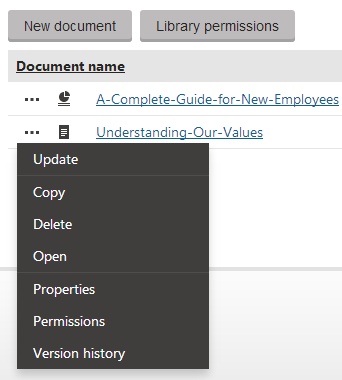
![Managing files in a document library](https://docs.kentico.com/docsassets/k82/managing-files-in-document-libraries/Document_Library_Actions.png "Managing files in a document library")
