
Project management
Project management provides a system that helps organize work and keep track of its progress. This is achieved by creating objects within Kentico called projects, that represent a certain segment of work with a specific goal, time frame, and set of conditions. Individual assignments called tasks, which are usually (but not necessarily) categorized under a certain project, can be given to users within the system.
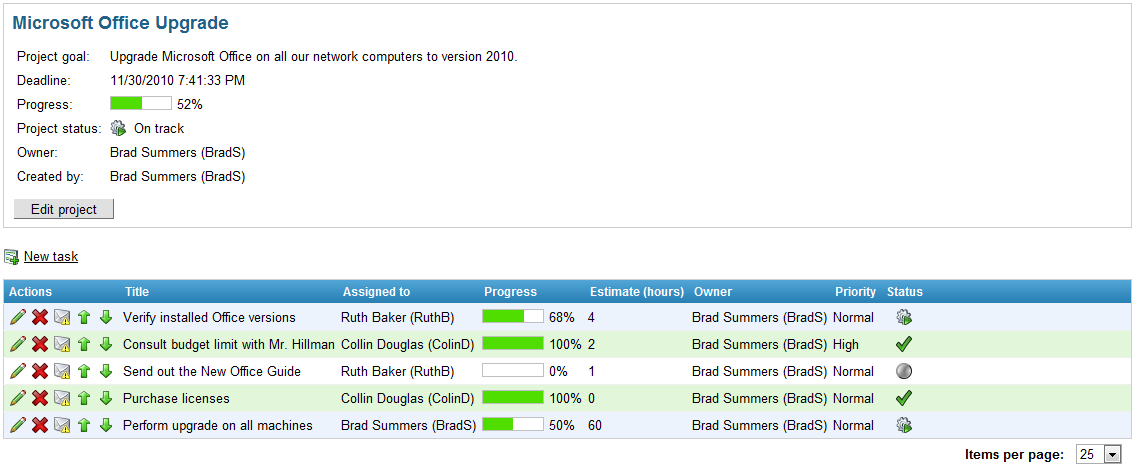
Projects can be created, monitored and managed on any page that contains the appropriate project management web parts. The page where a project is created is important, as the project is bound to that page and can only be viewed or edited on that specific page. This functionality can be used to categorize projects by having several different pages with project management web parts, which can then be individually configured.
All projects and their tasks can be administered in the Projects application, regardless of the page where they were created. Here, administrators can also implement custom priority and status options to be used by projects and tasks. More detailed information about administering and using projects and tasks is given in the Managing projects and tasks topic.
Group projects
Project management is also integrated into the Groups application. Group projects function just as described above, but they belong to a certain community group in addition to being bound to the specific group page where they were created. Group projects only operate within the scope of their group, which means that tasks can only be assigned to group members, project security settings can be configured for group roles instead of site‑related roles etc. This can be used to create groups for handling certain types of projects. Projects associated with a group are not displayed in the Projects interface. They can instead be managed by group or global administrators under the Projects tab when editing a group.
Users and projects
Users can manage tasks that they own or those that are assigned to them on pages containing specific project management web parts or widgets. Tasks are displayed without regard to the project they belong under or the page or group where they were created, the only thing that matters is that they are relevant to the current user (and that any permission requirements are fulfilled). If the displaying web part/widget is configured to do so, even tasks from other sites can be viewed. These web parts and widgets also allow users to create new personal tasks that aren’t categorized under any group or project.
To ensure that users are aware of task assignments or any changes in tasks related to them, project management uses a system of notification e‑mails based on templates, that are automatically sent when required.