
Autocomplete deactivation
Autocomplete is a feature, which remembers submitted user names in login forms and also all words submitted through any forms in the system. In this topic though, we will focus only on the autocomplete functionality in login forms:
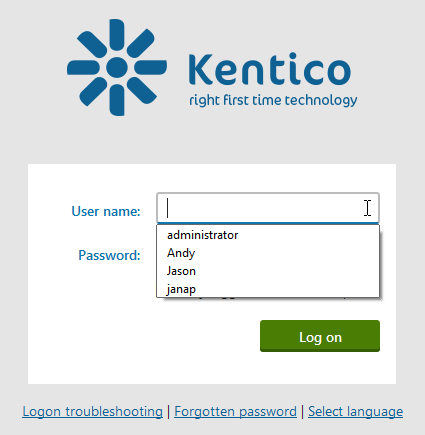
When users try to log in using a form, the autocomplete feature provides them with a list of already remembered user names. This is convenient for the users in many ways:
- The users do not have to type the whole user name every time they want to log in.
- If the users forget their user names, this feature can help them log in.
- It reduces discomfort of having to type the user names repeatedly on mobile devices.
However, using the autocomplete can pose a security risk. A malicious user who obtains user names from the autocomplete feature may gain access to the users’ accounts, for example using a dictionary attack. Thus, you should always consider the damage a malicious user can do to the users’ accounts. This threat mainly depends on the type of application you are creating and how this application will be used (on private computers only or in public places like schools, libraries, etc.).
You should disable autocomplete in applications working with:
- bank accounts,
- social media,
- sensitive information.
On the other hand, autocomplete can be useful in applications like:
- intranet,
- interest and hobby forums.
Disabling autocomplete
Autocomplete functionality can be disabled for the login forms using a HTML attribute:
<input name="Login1$UserName" class="LogonTextBox" id="Login1_UserName" type="text" maxlength="100" autocomplete="Off" />
In Kentico, you can use the following setting to disable autocomplete in login forms:
- In Settings -> Security & Membership -> Protection uncheck the Enable Autocomplete option.