Using site and global E-commerce settings
This group includes objects that you can use on a given site only separately, either as site-specific objects or as global objects. The following objects belong to the group:
- Tax classes
- Currencies
- Exchange rates
- Customers credit
- Order statuses
- Public statuses
- Internal statuses
- Invoice
Global objects
If you enable global settings for objects belonging to this group on a given site, the system lists only global objects.
Site-specific objects
If you don’t enable global settings for objects belonging to this group on a given site, the system lists only site-specific objects. The Copy from global action allows you to copy global settings for the given object.
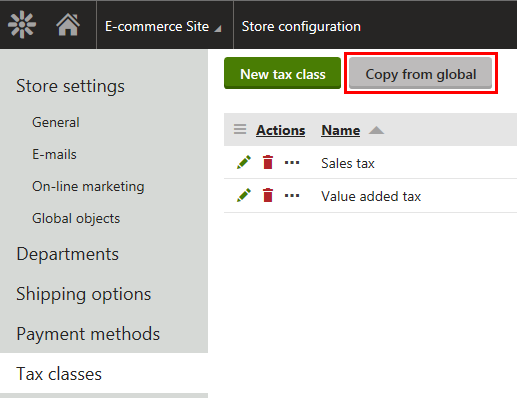
Copying from global settings
- If there is a site-specific object with the same code name like a corresponding global object, the system updates the site-specific object with global data.
- If a site-specific object has no such counterpart among global objects, the object is lost. However, only if there is no dependency on other objects in the system. If so, the object is disabled and remains in the system.
Exchange rates
You can apply the following combinations of currency and exchange rate settings while configuring your on-line store:
- Site settings for currencies + site settings for exchange rates
- Global settings for currencies + global settings for exchange rates
- Global settings for currencies + site settings for exchange rates
The system allows you to view prices in different currencies, both in the administration interface and on the live site. In order for this to be possible, the system performs one or two currency conversions based on your store configuration.
One currency conversion
The system performs one currency conversion from the main currency to other currencies, i.e. from the site-specific main currency to other site-specific currencies or from the global main currency to other global currencies. You can see one table in the administration interface.
This concerns the following configurations:
- You allowed no price-related global objects (i.e. global products, global product options, global product coupons or global taxes) on the site.
- You allowed at least one type of price-related global objects on the site and the system uses global settings for currencies on this site.
- You allowed at least one type of price-related global objects on the site and the system uses site-specific settings for currencies on this site. The global main currency and the site-specific main currency have the same code names.
This configuration doesn’t take effect if the price is converted from a global currency XY to a site-specific currency XY, and the site-specific currency XY is not the main currency on the given site (regardless of the currencies’ code names).
Two currency conversions
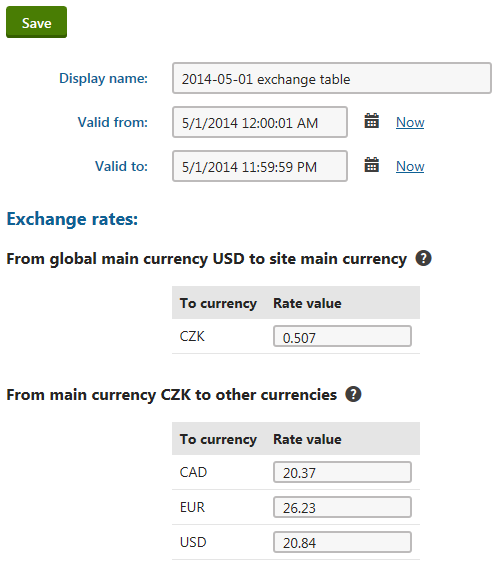
The system performs two currency conversions, the first from the global main currency to the site-specific main currency and the latter from the site-specific main currency to other site-specific currencies. You can see two tables in the administration interface.
This concerns the following configuration:
- You allowed at least one type of price-related global objects on a given site and the system uses site-specific settings for currencies on this site. The global main currency and the site-specific main currency don’t have the same code names.