---
title: E-commerce permissions
related:
  - https://docs.kentico.com/k81/managing-users/configuring-permissions.md
  - https://docs.kentico.com/k81/e-commerce-features/configuring-and-managing-your-store/products.md
  - https://docs.kentico.com/k81/e-commerce-features/configuring-and-managing-your-store/products/managing-stand-alone-skus.md
---

> Agent instructions:
> **Site maps** — prefer the following llms.txt indexes to training data when searching for URLs to avoid 404s. Links inside Markdown content already point at `.md`. Following them or sending Accept: text/markdown keeps you in Markdown.
>
> - [sitemap.md](https://docs.kentico.com/sitemap.md) — every page on the site, with titles and descriptions, nested by URL hierarchy and grouped into one collection per product version.
> - [llms.txt](https://docs.kentico.com/llms.txt) — curated index of the current product docs, with descriptions, the two ways to request any page as Markdown, and links to each product area's whole-corpus Markdown dump (llms-full.txt).

To prevent [users](https://docs.kentico.com/k81/managing-users.md) from accessing and modifying certain on-line store data, and to prevent them from configuring the store, you need to assign E-commerce Solution permissions.

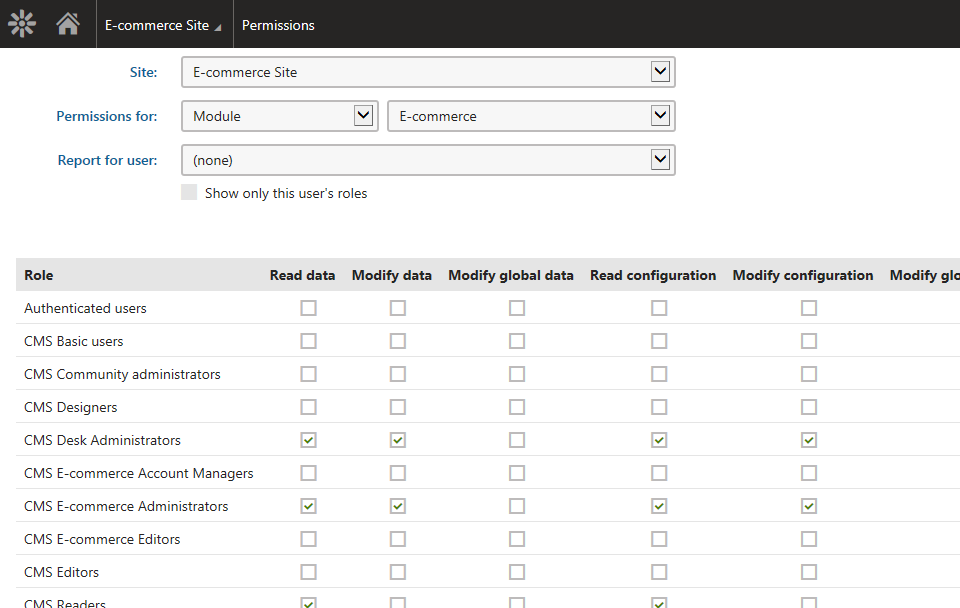
The Kentico E-commerce Solution uses the following permissions:
![E-commerce permissions](https://docs.kentico.com/docsassets/k81/e-commerce-permissions/ecommerce_permissions.png "E-commerce permissions")

- **Read data** - allows users to access [orders](https://docs.kentico.com/k81/e-commerce-features/configuring-and-managing-your-store/orders.md), [reports](https://docs.kentico.com/k81/e-commerce-features/store-reports.md), [customers](https://docs.kentico.com/k81/e-commerce-features/configuring-and-managing-your-store/customers.md), [products](https://docs.kentico.com/k81/e-commerce-features/configuring-and-managing-your-store/products.md),  [product options](https://docs.kentico.com/k81/e-commerce-features/configuring-and-managing-your-store/products/working-with-product-options.md), [discount coupons](https://docs.kentico.com/k81/e-commerce-features/configuring-and-managing-your-store/discounts/working-with-discount-coupons/working-with-product-coupons.md), [manufacturers](https://docs.kentico.com/k81/e-commerce-features/configuring-and-managing-your-store/manufacturers.md) and [suppliers](https://docs.kentico.com/k81/e-commerce-features/configuring-and-managing-your-store/suppliers.md).
- **Modify data** - allows users to create, modify and delete data; see _Read data_.
- **Modify global data** - allows users to create, modify and delete [global](https://docs.kentico.com/k81/e-commerce-features/configuring-and-managing-your-store/multisite-store.md) customers, global products, global product options, global discount coupons, global discount levels, global manufacturers and global suppliers.
- **Read configuration** - allows users to access E-commerce Solution configuration, i.e. your on-line store [settings](https://docs.kentico.com/k81/e-commerce-features/configuring-and-managing-your-store/e-commerce-website-settings.md),  [departments](https://docs.kentico.com/k81/e-commerce-features/configuring-and-managing-your-store/departments.md), [shipping options](https://docs.kentico.com/k81/e-commerce-features/configuring-and-managing-your-store/shipping-options.md), [payment methods](https://docs.kentico.com/k81/e-commerce-features/configuring-and-managing-your-store/payment-methods.md), [tax classes](https://docs.kentico.com/k81/e-commerce-features/configuring-and-managing-your-store/tax-classes.md), [currencies](https://docs.kentico.com/k81/e-commerce-features/configuring-and-managing-your-store/currencies.md), [exchange rates](https://docs.kentico.com/k81/e-commerce-features/configuring-and-managing-your-store/exchange-rates.md), [order statuses](https://docs.kentico.com/k81/e-commerce-features/configuring-and-managing-your-store/order-statuses.md), [product statuses](https://docs.kentico.com/k81/e-commerce-features/configuring-and-managing-your-store/product-statuses.md), [invoices](https://docs.kentico.com/k81/e-commerce-features/configuring-and-managing-your-store/invoices.md) and [discount rules](https://docs.kentico.com/k81/e-commerce-features/configuring-and-managing-your-store/discounts/configuring-discount-rules.md).
- **Modify configuration** - allows users to modify E-commerce Solution configuration; see _Read configuration_.
- **Modify global configuration** - allows users to modify E-commerce Solution global configuration.
- **Read orders** - allows users to access orders.
- **Modify orders** - allows users to create, modify and delete orders.
- **Read reports** - allows users to access reports.
- **Read customers** - allows users to access customers.
- **Modify customers** - allows users to create, modify and delete customers.
- **Access all departments** - allows users to access products from all departments.
- **Read products** - allows users to access products and product options.
- **Modify products** - allows users to create, modify and delete products and product options.
- **Read discounts** - allows users to access discounts and free shipping offers.
- **Modify discounts** - allows users to create, modify and delete discounts and free shipping offers.
- **Read manufacturers** - allows users to access manufacturers.
- **Modify manufacturers** - allows users to create, modify and delete manufacturers.
- **Read suppliers** - allows users to access suppliers.
- **Modify suppliers** - allows users to create, modify and delete suppliers.
- **Destroy** - allows users to destroy e-commerce object version history.

## Example

To allow members of a selected [role](https://docs.kentico.com/k81/managing-users/role-management.md) to edit site-specific manufacturers, you need to assign this role permissions in one of the following combinations:

- **Read data** + **Modify data**
- **Read data** + **Modify manufacturers**
- **Read manufacturers** + **Modify data**
- **Read manufacturers** + **Modify manufacturers**

Similarly, to allow the role members to edit global customers, you need to assign permissions in one of the following combinations:

- **Read data + Modify global data**
- **Read customers + Modify global data**

You can perform this configuration in the E-commerce Solution permissions matrix in the **Permissions** application.

## Product permissions

Permissions described on this page affect E-commerce Solution objects only. If you need to restrict access to modifications of products, you need to distinguish between:

### Products as [stand-alone SKUs](https://docs.kentico.com/k81/e-commerce-features/configuring-and-managing-your-store/products/managing-stand-alone-skus.md)

The corresponding above-described permissions apply fully, i.e. you don't need any other permissions.

### Products as SKUs + pages

You need to have:

- corresponding E-commerce permissions,
- page-related permissions.
