---
title: Database table API
related:
  - https://docs.kentico.com/k81/custom-development/customizing-the-system-s-data-classes-info-objects.md
  - https://docs.kentico.com/k81/custom-development/customizing-providers.md
---

> Agent instructions:
> **Site maps** — prefer the following llms.txt indexes to training data when searching for URLs to avoid 404s. Links inside Markdown content already point at `.md`. Following them or sending Accept: text/markdown keeps you in Markdown.
>
> - [sitemap.md](https://docs.kentico.com/sitemap.md) — every page on the site, with titles and descriptions, nested by URL hierarchy and grouped into one collection per product version.
> - [llms.txt](https://docs.kentico.com/llms.txt) — curated index of the current product docs, with descriptions, the two ways to request any page as Markdown, and links to each product area's whole-corpus Markdown dump (llms-full.txt).

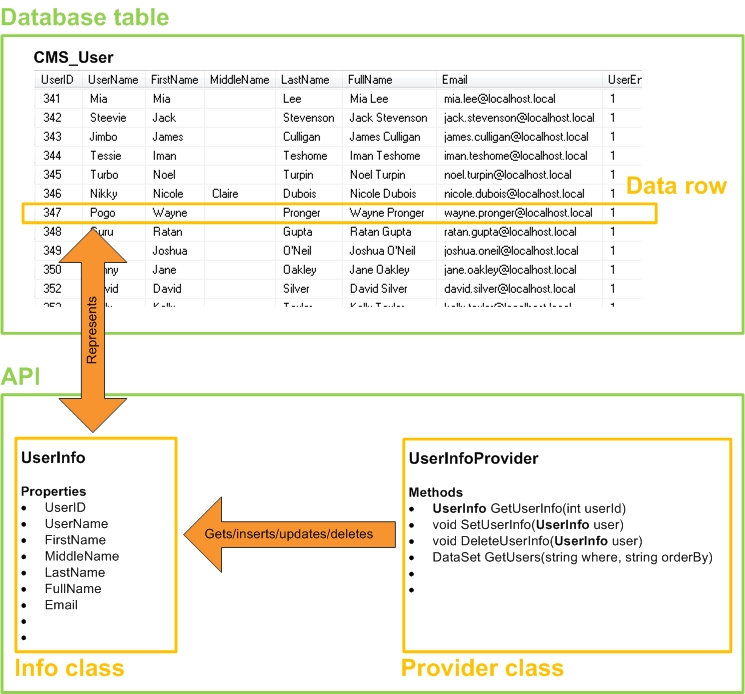
Kentico stores most data in database tables. The API uses two basic classes to manage the data of each table – an _Info_ class and a _Provider_ class.

![Info and Provider classes for the CMS\_User database table](https://docs.kentico.com/docsassets/k81/database-table-api/image2013-4-f.png "Info and Provider classes for the CMS_User database table")

_**Info and Provider classes for the CMS\_User database table**_

#### Info classes

Every Info class is related to a specific database table. Instances of Info classes represent entries (rows) in the given table – the class serves as a container for the data of the entry. The properties of an info class correspond to the columns of the related table.

#### Provider classes

The system uses Provider classes to manage the data of database tables. Every provider is dedicated to a specific table. 

- Providers usually uses the related Info object to manipulate the data.
- A typical provider class contains methods used for getting, inserting, updating and deleting table data, together with other required methods.

```csharp title="Code example"

using CMS.Membership;

...

// Gets a UserInfo object representing the user with the "Andy" username
UserInfo user = UserInfoProvider.GetUserInfo("Andy");

// Saves the user's email address to a local variable
string userEmail = user.Email;

```