---
title: Example - Logging activities
related:
  - https://docs.kentico.com/k81/on-line-marketing-features/contact-management/tracking-contact-activities/enabling-activity-tracking.md
---

> Agent instructions:
> **Site maps** — prefer the following llms.txt indexes to training data when searching for URLs to avoid 404s. Links inside Markdown content already point at `.md`. Following them or sending Accept: text/markdown keeps you in Markdown.
>
> - [sitemap.md](https://docs.kentico.com/sitemap.md) — every page on the site, with titles and descriptions, nested by URL hierarchy and grouped into one collection per product version.
> - [llms.txt](https://docs.kentico.com/llms.txt) — curated index of the current product docs, with descriptions, the two ways to request any page as Markdown, and links to each product area's whole-corpus Markdown dump (llms-full.txt).

> **Info:** **Kentico EMS required**
>
> Features described on this page require the **Kentico EMS** license.

The following example demonstrates how the system logs [activities](https://docs.kentico.com/k81/on-line-marketing-features/contact-management/tracking-contact-activities.md) for anonymous and registered users. You can try out the example on the sample **Corporate site**.

1. Visit the live website as an anonymous visitor (without logging in) and perform some actions, for example view the Home page and vote in the poll.
2. Sign in to Kentico as an administrator and open the **Contact management** application.
   - The system has created an anonymous [contact](https://docs.kentico.com/k81/on-line-marketing-features/contact-management/working-with-contacts.md).![An anonymous contact created by the system](https://docs.kentico.com/docsassets/k81/example-logging-activities/anonymous_contact.png "An anonymous contact created by the system")
3. **Edit** () the new contact and switch to the **Activities** tab.

   - You can see that the system logged the Home page visit and the poll voting activity.

![Activities performed by an anonymous contact](https://docs.kentico.com/docsassets/k81/example-logging-activities/anonymous_activities.png "Activities performed by an anonymous contact")

4. Sign out from Kentico to view the live site as an anonymous visitor again.
5. Go to the **My account** page and sign up as a new user, for example _Peter Chelmsford_.
6. View the Home page and vote in the poll again.

If you view the list of contact again, you can see that system has renamed original anonymous contact according to the entered registration data. Edit () the contact and open the **Activities** tab to view the updated activity log for the new user.
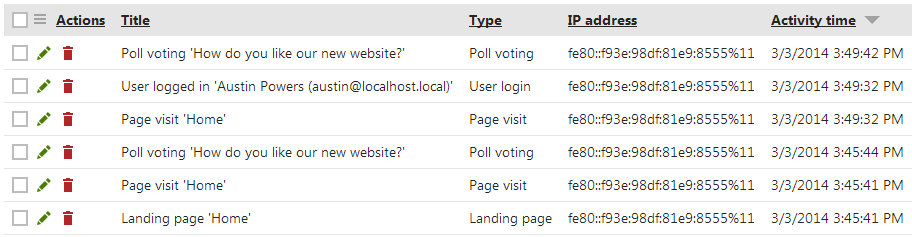
 ![Activities performed by a logged user](https://docs.kentico.com/docsassets/k81/example-logging-activities/logged_user_activities.png "Activities performed by a logged user")
