
Generate and refine website content with AIRA
The sample scenario in this material was prepared using our sandbox environment, Kbank. If you’d like to follow along, you can request the demo website here, choosing the Xperience by Kentico - Business Tutorial Kbank demo site option.
AIRA includes several AI-assisted features in Xperience by Kentico. This material focuses specifically on website content generation and refinements, which help you create and improve website copy directly in supported text fields.
For business users, the main value is speed and efficiency. Instead of starting from a blank field every time, you can use AIRA to generate a draft from the context already available in your content item, then refine that draft until it is clearer, shorter, stronger, and better aligned with your message.
This feature works best as a practical writing assistant inside your existing editing flow. It can help you move faster, but it does not replace editorial judgment. You still need to review the final copy for accuracy, tone, and fit before publishing.
What this guide helps you do
Use AIRA to create and improve website copy directly in your editing fields, faster and with better consistency.
- Generate first-draft content from your existing item context.
- Use custom prompts when you want more control over the output.
- Refine existing website copy for tone, clarity, brevity, and action.
- Apply a lightweight quality check before publishing.
When to generate content and when to refine it
Use content generation when you need a fresh starting point. This is especially useful when a field is empty, and you already have helpful context in the current item.
Use refinement when the field already contains text, and you want to improve it. This is the better choice when the message is mostly right, but needs editing.
A simple way to think about it is:
- Generate when you need a new draft.
- Refine when you need a better version of existing text.
In many real workflows, you will use both. Generate a starting point first, then refine it until it feels ready for review.
Before you start generating a website copy
Before you begin, make sure the feature is available and that the content item includes useful context.
- Confirm that your administrator has configured Content generation and refinements for relevant fields.
- Confirm at least one relevant source field is included as context and contains content.
- Optional: Set Tone of voice guidelines in AIRA settings.
AIRA can use several inputs when generating content for a field:
- The purpose of the target field.
- Instructions configured for that field.
- Text and other supported values from context fields in the same item.
- Tone guidance configured for AIRA, if your project uses it.
Better context produces better drafts. Include information like page goal, target audience, offer summary, key value, and CTA intent.
If the context field is left blank, generation from the current item into your target field will not work. In that case, you can still use a custom prompt in AIRA chat window.
Sample scenario: webinar landing page section on Kbank
Imagine you are creating copy for a landing page section that promotes a marketing webinar.
Use this sample scenario:
- Audience: marketing teams from mid-market organizations.
- Goal: webinar registrations.
- Offer: a practical webinar about improving content performance with less manual effort.
- CTA: Reserve your seat.
This scenario works well because it represents a common business task, like turning a page goal into clear, action-oriented website messaging.
Prepare the source content before you generate
AIRA performs best when the content item already contains key information.
Before you generate website copy, make sure the surrounding context gives AIRA enough direction, and prepare or verify these materials in the item:
- Page goal.
- Audience description.
- Core value proposition.
- CTA intent.
- Optional tone or style guidance.
- Any product, event, or promotional details that must remain accurate.
You do not need to overcomplicate the setup. A few clear and relevant inputs are usually more useful than a large amount of vague background text.
Example of useful source context for the webinar page
Here is an example of source information that can lead to a stronger first draft:
- Page goal: Drive webinar registrations for a webinar focused on content automation.
- Audience: Mid-market marketing teams looking to improve efficiency and content results.
- Value proposition: Learn practical ways to automate repetitive work and improve content performance.
- CTA intent: Encourage users to register now.
- Tone guidance: Clear, practical, confident, and easy to understand.
If your first draft feels generic, the problem may be a lack of or weak context, not the generation step itself.
Generate a first draft when the field is empty
When a supported field is empty, you can use the Generate content action, marked with the AIRA button. There are two main ways to generate content from an empty field.
Option 1: Generate using available context from the current item
Use this option when the content item already contains relevant context fields.
- Open the empty target text field in Page Builder or the relevant content editing view.
- Select the AIRA button to open Generate content.
- Choose the option that uses the available context from the current item.
- Review the generated draft inserted into the field.
This option is usually the fastest route when your item already contains enough useful information.
Option 2: Generate using a custom prompt
Use this option when you want more control, or when the current item does not contain enough context.
- Open the empty target text field.
- Select the AIRA button to open Generate content.
- Choose the custom prompt option.
- Describe what you want to generate in the AIRA chat.
- Copy the result from the chat back into the target field.
This option gives you more flexibility, but it is a bit more manual because you need to copy the output into the field yourself.
Use item-context generation for speed. Use a custom prompt when you need to guide the output more precisely.
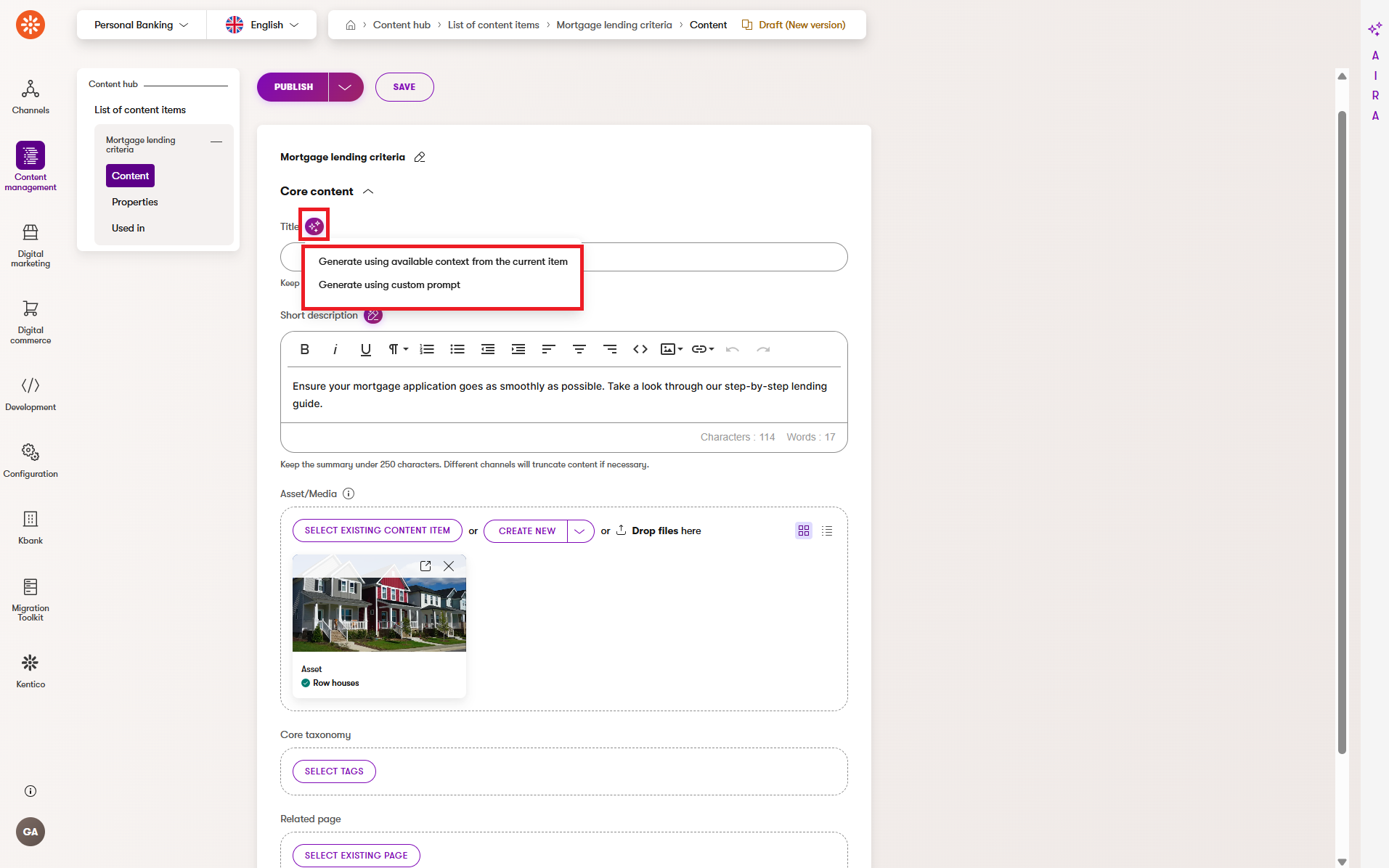
Review the first draft before you continue editing
At this stage, do not expect the final copy. Focus on whether the draft is useful and can be efficiently refined by AIRA, or by human editing.
Ask yourself:
- Does the copy reflect the right audience?
- Does it match the purpose of the page or section?
- Is the value proposition visible?
- Is the CTA clear, but catchy?
If the answer is mostly yes, move to refinement. If the answer is no, improve the context of the current content item, or try another draft.
Regenerate the draft when the direction is not right
When a field already contains text, you can use the Refine text action, marked with the AIRA button.
One of the available actions is Regenerate content.
The Regenerate content action completely rewrites the existing text in the field. If you want to keep an earlier version, copy it to a safe location before regenerating the content with AIRA.
Use Regenerate content when:
- The message focus is wrong.
- The structure does not fit the field purpose.
- The tone is not close enough.
- The draft is too generic and would take too much refining.
A good rule is this:
- If the draft has the right core idea, refine it.
- If the draft has the wrong core idea, regenerate it.
Because regeneration uses the available context from the item, you may get a better result if you improve the supporting context first.
Refine existing website copy in the whole field
When the field already contains text, you can use the AIRA button to open Refine text and choose from available refinement options.
Apart from regenerating the field’s content, the refinement options can help you:
- Make the text shorter.
- Improve clarity and readability.
- Improve spelling and grammar.
- Make the wording feel more natural.
- Enhance your draft with examples.
These refinements apply to the entire field.
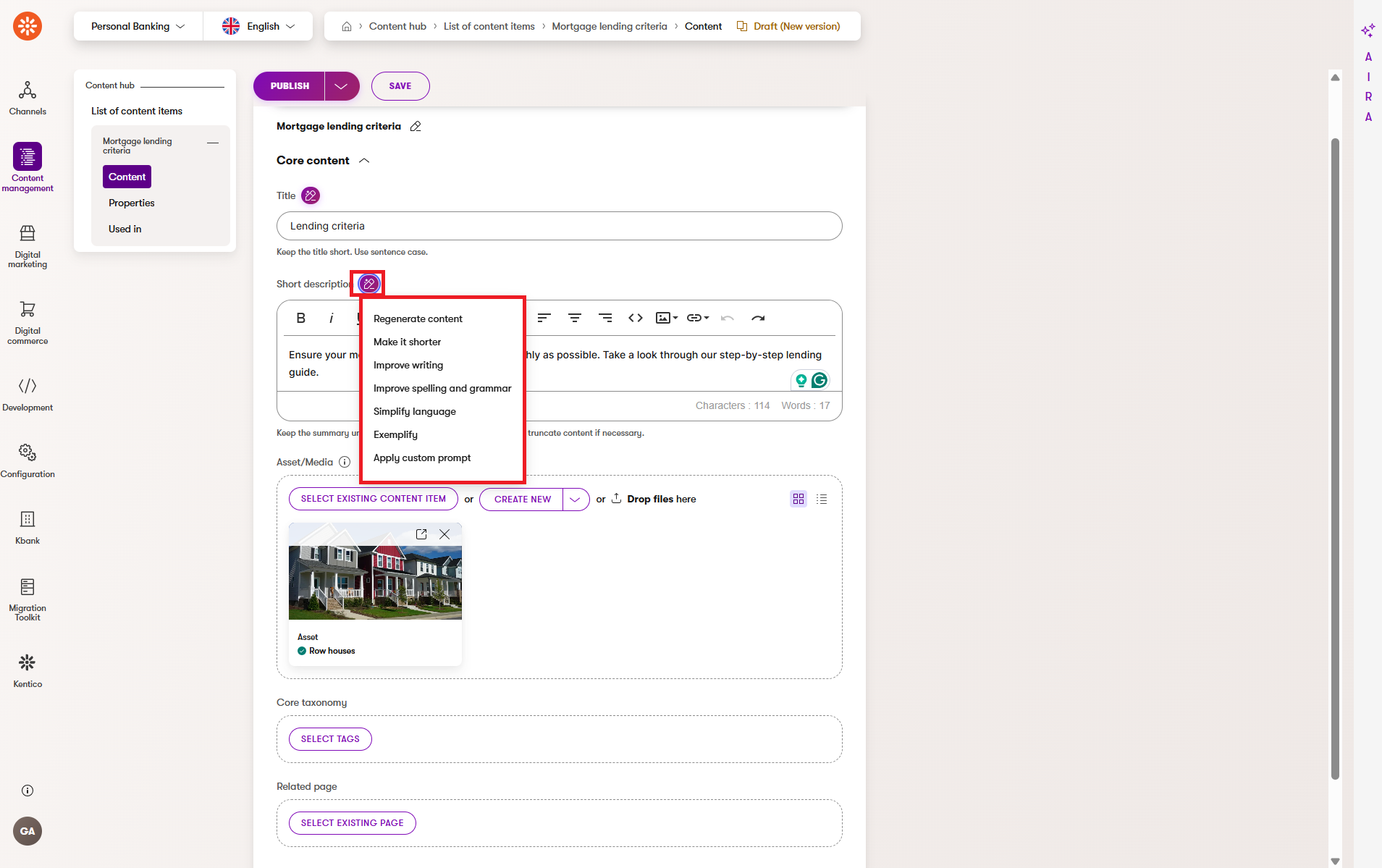
Practical refinement flow for website copy
A simple refinement flow for website content could look like this:
- Start with Make it shorter if your existing draft feels heavy or repetitive.
- Improve spelling and grammar if the copy needs cleanup.
- Simplify language if the message sounds too vague or contains too much jargon.
- Make final manual edits to strengthen the CTA and check brand fit.
This keeps the process efficient and prevents unnecessary rewriting.
Refine only part of the text in rich text editor fields
If rich text editor refinements are enabled, you will also be able to refine only a selected part of the text instead of the whole field.
This is especially useful when most of the content is already good, and you only want to improve one paragraph, sentence, or a few words.
The basic flow is:
- Select a block of text in the rich text editor.
- Select the Refine text option.
- Choose the refinement you want to apply.
- Review the updated text in place.
This can be helpful in Page Builder and other editing views that use rich text fields.
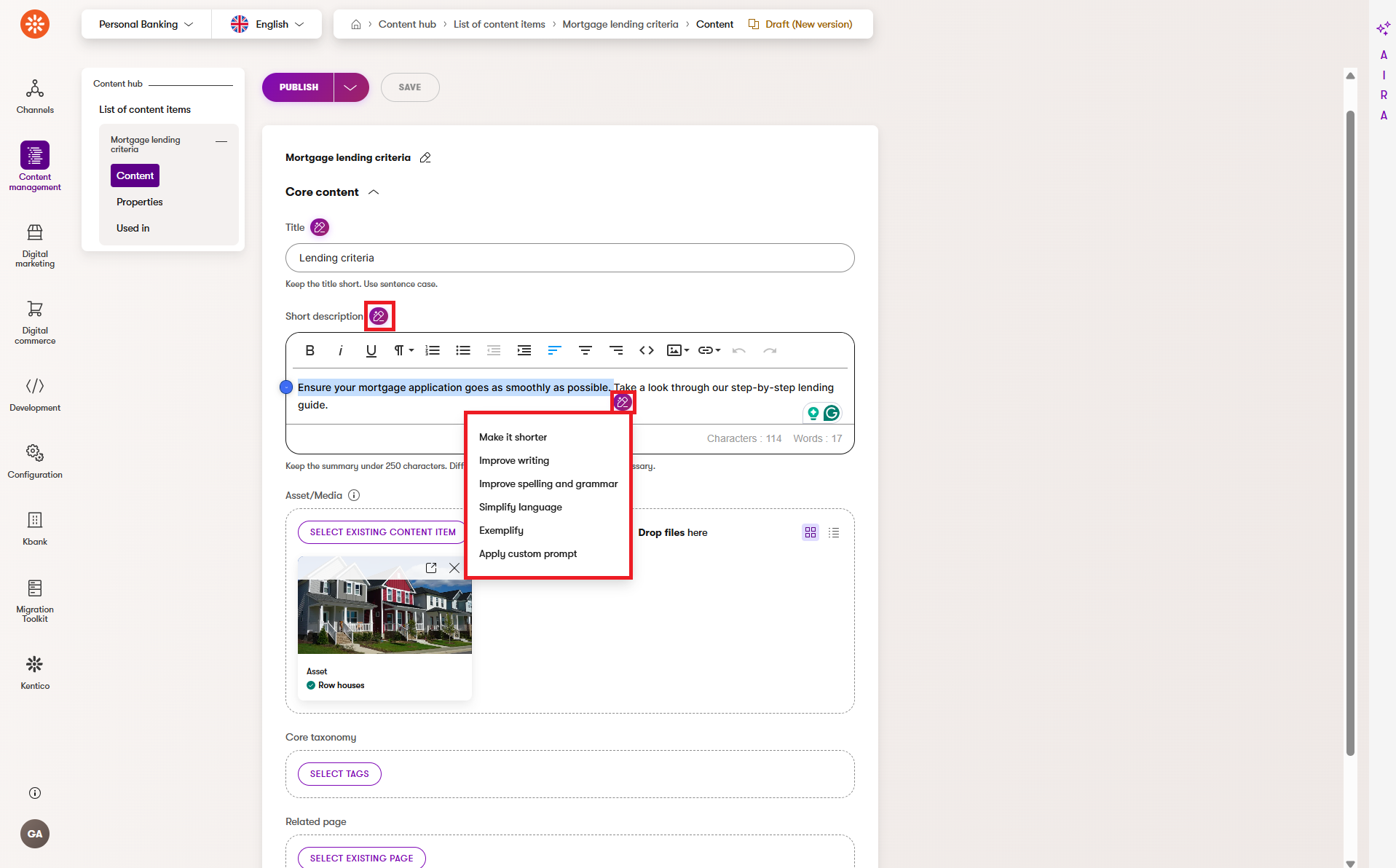
Whole-field refinements replace the full field content. Rich text editor refinements can help when you want a smaller, more targeted edit.
Use custom prompts when you need a more precise editorial change
Preset refinement actions are useful, but sometimes you need more control. In those cases, use Apply custom prompt.
With this option, you describe the desired change in the AIRA chat and then paste the result back into the field.
Custom prompts are especially helpful when you want to:
- Keep the meaning but change the tone.
- Simplify the wording for a broader audience.
- Emphasize a benefit or CTA.
- Remove jargon or filler.
- Improve scannability without changing the overall structure.
The most effective prompts are direct and specific. Tell AIRA what to keep, what to change, and what outcome you want.
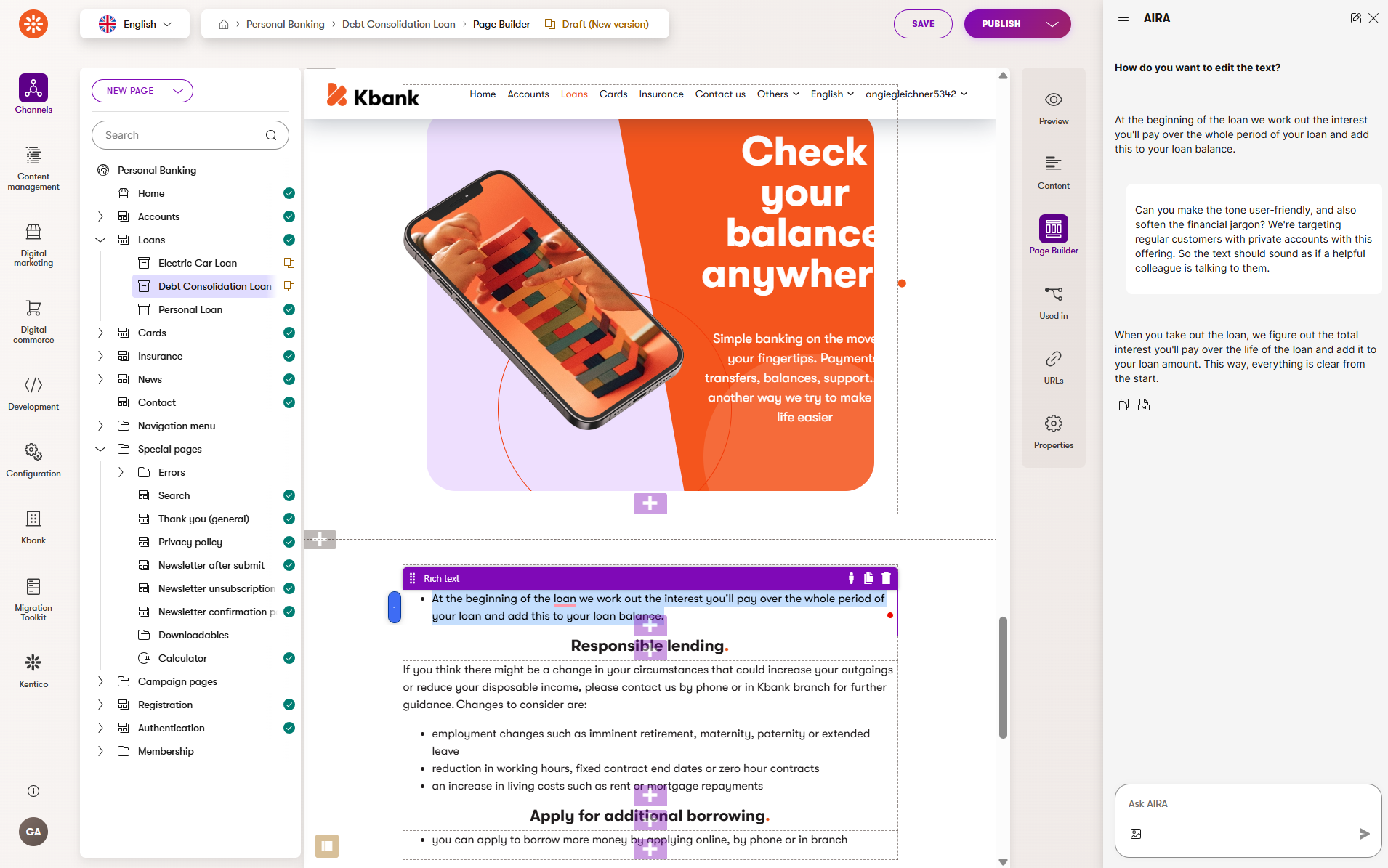
The custom prompt workflow is different from in-place refinements. You review the result in the AIRA chat and then copy it back into the field manually.
Copy-ready prompts for website content generation and refinement
To get you quickly on track, use the prompts below as a starting point in your project. Replace the bracketed placeholders with your own content, and use as is, or update the prompts as much as needed. Don’t be afraid to iterate on prompts that work for you to get the best results.
Strategy framing for a website draft
Write website copy for [audience]. Goal: [goal]. Key value: [value proposition]. CTA: [cta]. Tone: [tone]. Keep plain language and avoid buzzwords.
Use this when you want to shape the direction of a first draft.
Landing page headline options
Generate 8 landing page headline options for [audience] promoting [offer]. Focus on clarity and value. Keep each under [X] characters.
Use this prompt when you want to quickly compare several headline alternatives.
Short intro paragraph for a landing page section
Draft a short landing page intro for [audience] about [offer]. Include one key benefit and one clear CTA. Keep it concise and skimmable.
Use this for event pages, webinar pages, or feature highlights.
Refinement for brevity
Keep the meaning, but reduce this by about 30%. Use shorter sentences and preserve the CTA intent.
Use this when the message is correct but too long or too dense, and you want to control how much shorter you need it to be.
Refinement for clarity
Rewrite for clearer, simpler language at a broad business reading level. Keep the same message and tone.
Use this when the copy sounds abstract, formal, or hard to scan.
Refinement for stronger action
Keep the message the same, but make the CTA more specific and action-oriented. Avoid sounding pushy.
Use this when the text needs more momentum without becoming too aggressive.
Refinement for brand-safe tone
Keep the meaning, but make the wording more confident, practical, and professional. Remove vague claims and unnecessary hype.
Use this when the draft feels too generic or too promotional.
Example workflow: from rough draft to improved website copy
Let’s return to our demo scenario: a landing page with an invitation to a webinar. The example below shows how a rough message can become clearer and more useful through refinement.
Before the AIRA-powered refinements
Headline:
“Transform your organizational operational marketing outcomes with strategic automation.”
Intro:
“Our upcoming knowledge session provides an opportunity to gain numerous insights that can potentially improve several business outcomes in your organization.”
CTA:
“Learn more”
After the AIRA-powered refinements
Headline:
“Improve content results with smarter automation.”
Intro:
“Join our webinar to learn practical ways to improve content performance with less manual effort.”
CTA:
“Reserve your seat”
Why the refined version works better for the landing page
- The language is clearer and easier to understand.
- The value of the proposition is visible much faster.
- The message sounds more practical and less inflated.
- The CTA is more concrete and better matched to the page goal.
- The copy supports quick scanning.
Save and review your changes before publishing
Regeneration and in-place refinements change the content in the field, but the changes are permanent only after you publish the item. That means your final workflow before publishing should always include these last steps:
- Save the item in case you perform any editorial changes on your draft before using AIRA refinements or regeneration.
- Refine or regenerate the text using AIRA.
- Review the version before publishing.
This is a good moment to make sure nothing important was lost during generation or refinement.
The system keeps changes only after you save the item – including changes you manually make to an existing draft. Regeneration and refinements overwrite the existing field content.
If you worked on a draft, saved your manual changes before you made any AIRA-powered refinements, and now want to return the item to the version before AIRA refinements, you can still do so by using the Revert to published option.
However, if you make manual changes on an existing draft and do not save them before refinement or regeneration, the AIRA-powered refinements will fully overwrite your manual changes, and you will not be able to restore them.
Perform a final review before you publish
Even when the output looks great, you should still perform a final human review before publishing. This is an important part of the workflow, not an optional extra step. As with any AI-assisted workflow, human signoff improves the accuracy of the content as well it’s natural flow.
Before you publish, check the final copy for:
- Brand voice consistency.
- Relevance to your audience.
- One clear CTA.
- Accuracy of claims and product details.
- Plain, natural language.
- Unnecessary repetition.
- Formatting or field-length issues.
Length limits guide AIRA during generation, but your review and final edits ensure the content is publication‑ready.
Other simple website scenarios you can use with the same workflow
Once you get to try the sample workflow, you can apply it to other daily tasks related to website content creation.
Examples include:
- Creating a hero section for a product update page.
- Drafting a short introduction for an event page.
- Improving CTA copy in a landing page section.
- Simplifying dense text in a product or solution overview.
These scenarios use the same pattern: prepare context, let AIRA generate a draft and refine the result, and then review the final copy before you publish it.
When not to use generated website copy as-is
Generated copy can speed up drafting, but some content types need extra care. Do not publish the generated website text without closer review when it includes:
- Factual product claims.
- Pricing, legal, or compliance-sensitive wording.
- Industry-specific terminology that must be exact.
- Highly brand-sensitive promotional messaging.
- Customer-facing promises that require approval.
- Strategic headlines or taglines that carry strong brand weight.
In these cases, use AIRA to accelerate the first draft or improve wording, but keep human review and approval firmly in the process.
AIRA-generated output should always be treated as a draft. Final responsibility for accuracy, clarity, and brand fit stays with your team.
Known limitations and how to work around them
AIRA saves time during first drafts and refinements of existing content. But it works best when you understand what affects the output quality and how you can help improve it.
Draft quality depends on context
If the surrounding item does not contain useful information, the generated text may feel generic or incomplete.
To improve results:
- Add clearer source fields.
- Make the audience and goal more specific.
- Include the value proposition before generating an output.
Output length may still need manual editing
Generated copy may be longer than ideal for the field or page layout.
To improve results:
- Use a refinement option, such as Make it shorter.
- Use a custom prompt for a maximum length limit when needed.
- Trim the final version manually if necessary.
The first result may not be the best result
Sometimes you need one or two additional iterations before the text feels right. Don’t be afraid to experiment to find an approach that works best for your project and your audience.
To improve results:
- Regenerate when the direction is wrong.
- Refine when the direction is right, but the wording still needs some work.
- Make iteration a part of your regular workflow.
Privacy note for business users
AIRA interactions are commercially protected. Customer data inputs, prompts, and generated responses are discarded after each interaction and are not used to train the underlying models.
That being said, you should still follow any internal rules about sensitive content and review your content carefully before publishing.
Quick quality checklist for website content before publishing
Use this list of final checks before you publish website copy that was created or refined with AIRA.
- The message matches the audience and page goal.
- The value proposition is visible early.
- The CTA is distinct and clear.
- The tone of voice fits your brand.
- The claims are accurate and approved.
- The copy is concise and easy to scan.
- The wording is clear and accessible.
- The final version fits the field limitations and page layout.
- The latest version has been saved.
Wrap-up on website content generation
AIRA can help you move from blank fields to usable website copy much faster, especially when you already know your audience, goal, and core message. The strongest results usually come from a simple workflow:
- Prepare meaningful context.
- Generate a draft.
- Refine what needs polishing.
- Save your changes.
- Review the final copy before publishing.
For marketers and content editors, AIRA helps reduce manual effort, improve consistency, and deliver stronger website copy faster, while preserving space for human judgment and final decisions.
If you use AIRA this way, content generation and refinements becomes an organic part of your workflow for landing pages, webinar pages, product messaging, and other everyday website tasks.
Next steps with AIRA
Eager to get more out of AIRA’s AI-powered capabilities?
- Explore a set of specialized AI agents with AIRA Agentic Marketing Suite.
- Or browse our AIRA-related documentation to uncover and leverage its full potential.