---
title: Model a reusable Product SKU
---
> Agent instructions:
> **Site maps** — prefer the following llms.txt indexes to training data when searching for URLs to avoid 404s. Links inside Markdown content already point at `.md`. Following them or sending Accept: text/markdown keeps you in Markdown.
>
> - [sitemap.md](https://docs.kentico.com/sitemap.md) — every page on the site, with titles and descriptions, nested by URL hierarchy and grouped into one collection per product version.
> - [llms.txt](https://docs.kentico.com/llms.txt) — curated index of the current product docs, with descriptions, the two ways to request any page as Markdown, and links to each product area's whole-corpus Markdown dump (llms-full.txt).
> **Info:** **Understand the two approaches to modeling products**
>
> XbyK allows you to model both **sellable products** and **non‑sellable offerings**. The correct approach depends on whether the product takes part in ecommerce flows.
>
> - Use [Model reusable Product SKU](https://docs.kentico.com/guides/architecture/content-modeling/model-reusable-content/model-a-reusable-product-sku.md) (**this material**) when the product requires commerce capabilities, such as SKU, pricing, inventory, fulfillment, or checkout.
> - Use [Model reusable Product](https://docs.kentico.com/guides/architecture/content-modeling/model-reusable-content/model-a-reusable-product.md) when the product does not require SKU-level handling. This approach is ideal for services, informational offerings, or items meant to be displayed or described but not purchased directly.
>
> Choosing the right model ensures a clean, efficient catalog and prevents unnecessary ecommerce attributes for products that don’t need them.
Modeling commerce products in Xperience by Kentico requires careful planning. As an architect, you need to balance flexibility with structure, reusability with specificity, and editorial simplicity with technical needs.
The way you structure products impacts how easily editors can manage them, whether for a simple catalog or a complex multi-channel experience.
This material focuses on modeling product SKUs in Xperience by Kentico (XbyK) specifically for commerce flows. It helps you build a _Product SKU_ content type that aligns with business goals and is simple to maintain and scale.
After completing this material, you'll be able to:
- Decide whether to store products in Content hub or a website channel, and understand the organizational implications of each approach.
- Design a flexible **Product SKU** content type using _reusable field schemas_ and dedicated content type fields.
- Define **Product SKU** identifiers as reusable components that work across different product types and content items.
- Compose related content such as _manufacturers_, product _categories_, and _taxonomies_ to support the project's business needs.
- Choose from three different approaches to modeling product variants, understanding the trade-offs of each.
## Prerequisites
To get the most out of this material, you need to understand your organization's commerce requirements, product catalog structure, and channel strategy. You should have basic knowledge of [content modeling principles](https://docs.kentico.com/guides/architecture/content-modeling/content-modeling-guide.md). Understanding how [reusable field schemas](https://docs.kentico.com/documentation/developers-and-admins/development/content-types/reusable-field-schemas.md) work is also beneficial.
## Who should read this guide
This material is intended for solution architects and content modeling experts. It focuses on designing the content model for commerce implementations in Xperience by Kentico. While the guide includes technical considerations, it focuses on modeling decisions rather than implementation details. Developers looking for code-specific guidance can find examples in documentation, namely how to [model a product catalog](https://docs.kentico.com/documentation/developers-and-admins/digital-commerce-setup/model-product-catalog.md).
## Understand commerce requirements before creating your content model
Before defining content types and fields in Xperience, ensure you understand your project’s requirements. You may need to do a content audit and business analysis to gather the exact details you’ll use for your content model.
Begin by looking at your current product data. What information do you already store? How is the product content organized? What challenges do editors face when they work with product data?
Identify the business scenarios your product catalog must support. These may include catalog listing pages, detailed product pages, cross-channel commerce experiences, mobile apps, or headless storefronts that deliver product data via APIs.
List organizational needs, including product hierarchies, multi-brand catalogs, and international requirements like multi-currency pricing or region-specific availability.
Refer to [Schema.org](https://schema.org)'s [Product](https://schema.org/Product) schema for guidance on structuring your product data in ways that search engines and third-party integrations can understand.
While you don’t have to include every _Schema.org_ property in your content types, understanding the standard helps you prioritize the fields most relevant to your business. This increases the chance that search engines display rich results, such as prices, availability, ratings, and images, directly in search listings. Many third‑party integrations, including marketplaces, comparison engines, and product feeds, expect product data in a predictable format. This format is often based on [Product](https://schema.org/Product) schema and includes fields like _description_, _image_, _brand_, and _SKU_, along with additional properties for _reviews_ and _ratings_.
Validate your product content model against standards before you finalize it. This helps make sure you’ve included all the needed properties and configured them up correctly.
## The use case: Pawsome Pets product catalog
We’ll use **Pawsome Pets**, a fictional pet store selling live animals and accessories, as our example. This will help show the _modeling decisions and patterns_ in each section.
Also, a similar **Product SKU** model will be featured in the upcoming _commerce training materials_ for [developers](https://docs.kentico.com/guides/development.md). Stay tuned and follow [documentation updates](https://docs.kentico.com/changelog/documentation-updates.md) to find out when we release the materials.
### Pawsome Pets' requirements
- Sell multiple product categories: live pets, for example, dogs, cats, birds, fish, pet food, toys, accessories, and grooming supplies.
- Display products on their main commerce website (modeling website pages and widgets will be covered in other guides).
- Display product information to mobile apps and marketplace channels.
- Support product variants, such as sizes, colors, flavors.
- Show manufacturer information and warranty details.
- Manage stock across multiple store locations.
- Handle multilingual content as they are expanding into international markets.
- Ship specific products to multiple countries.
This example highlights common scenarios you may face when modeling products in Xperience. You can apply these patterns and decisions used for _Pawsome Pets_ to various industries, including pet supplies, equipment, fashion, and manufactured products.
### Pawsome Pet's product requirements
Before creating all the required fields in Xperience, take time to understand what information your products need to capture. _Pawsome Pets_, we've identified these core requirements through discussions with stakeholders:
From the merchandising team:
- Provide a clear name and SKU for identification.
- Include short descriptions for listing pages and emails.
- Add long descriptions for detail pages.
- Upload multiple product images (primary image plus gallery).
- Specify price information.
- Tag products with taxonomy tags for filtering and search.
From the marketing team:
- Highlight promotional messaging and special offers.
- Recommend products and cross-sells.
- Indicate product availability status.
From the SEO team:
- Structured data markup for search engines (SEO) and social networks (Open Graph).
- Product metadata that works across channels.
From the development team:
- Add structured data markup for search engines (SEO) and social networks (Open Graph).
- Provide product metadata that works across channels.
## Prototype the content model with Content modeling MCP server
Before we dive into the details of modeling **Product SKUs**, let’s start by prototyping the content type using Xperience’s [Content modeling MCP server](https://docs.kentico.com/guides/architecture/content-modeling/content-modeling-mcp.md).
The MCP server provides an _end-to-end guided process_ for gathering content type requirements, designing widgets, and creating the foundation of our **Product SKU** content type. We'll refine this foundation to meet the specific needs of _Pawsome Pets_.
### Gather project requirements
The process begins by gathering project requirements through a series of steps. Information like your industry, target markets, marketing channels, and editor experience helps the agent suggest a content model that fits your needs.
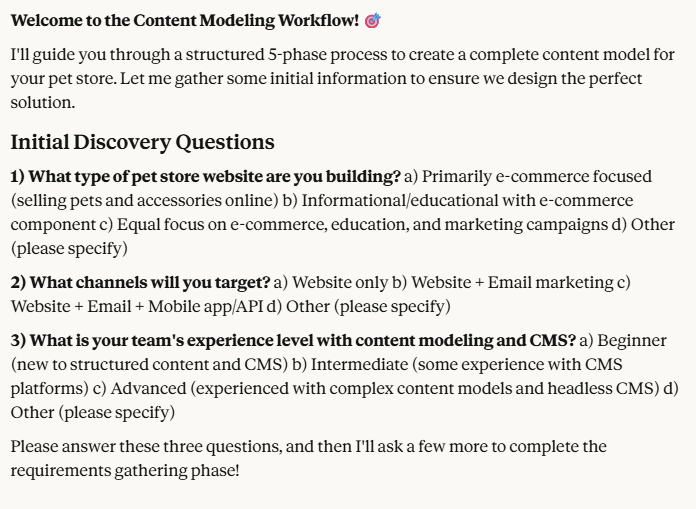
Additional details, such as the number of websites, channels, content volume, and reuse strategy, help the MCP agent design an appropriate content model.
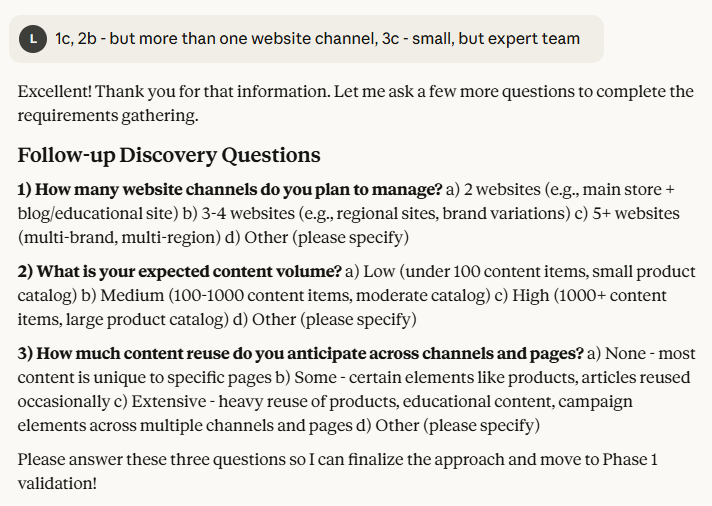
After collecting all the details, the server summarizes the results and proceeds to the next phase.
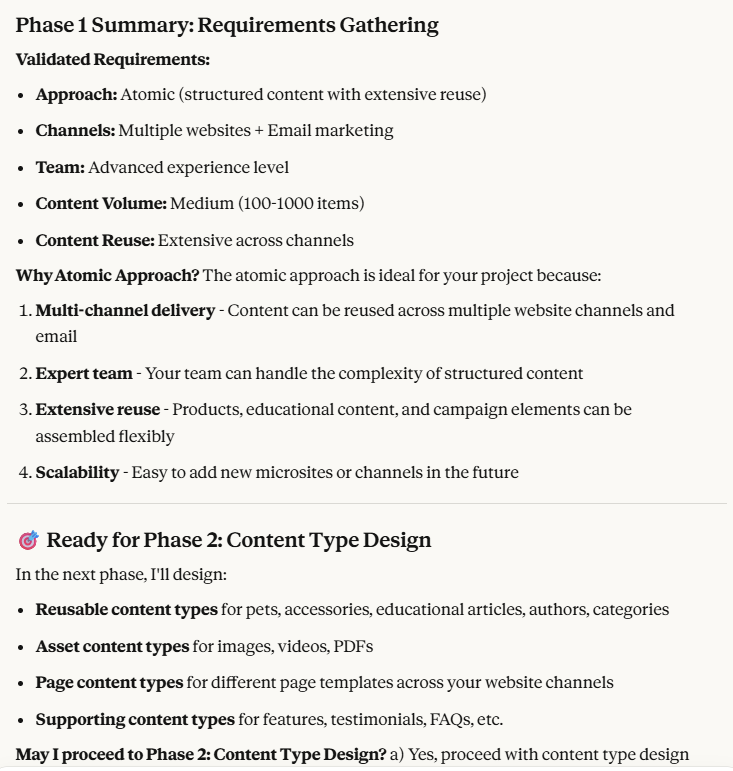
### Design content types
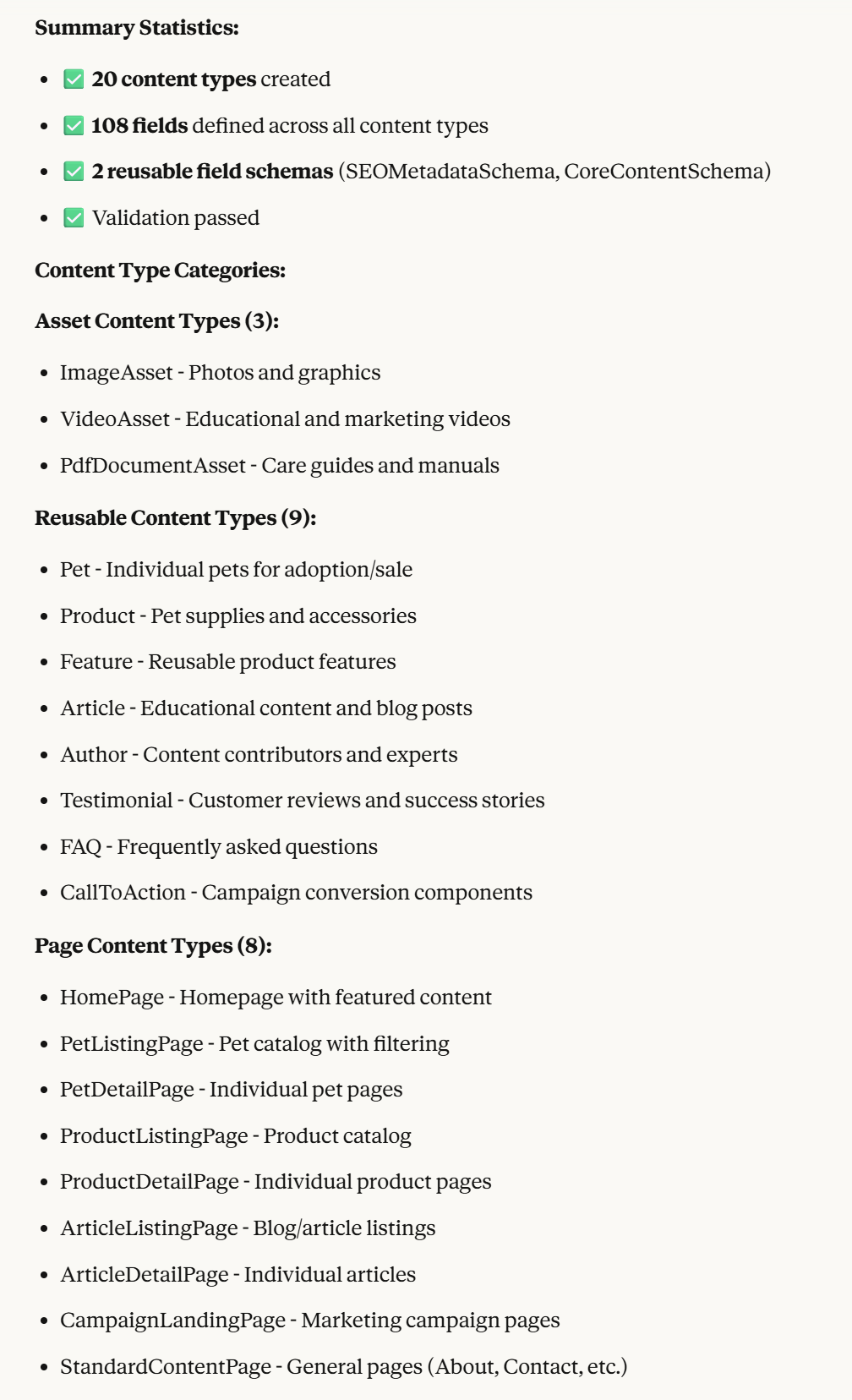
The MCP server uses your input and Kentico’s [best practices](https://docs.kentico.com/guides/architecture/content-modeling/content-modeling-guide.md) to create content types tailored to your business and website. These include reusable content for _pets_, _accessories_, _articles_, _FAQs_, and _customer testimonials_. The server also suggests webpage content types, such as _HomePage_, _PetDetailPage_, anc _PetListingPage_ to display product data.
### Use your agent to analyze the prototypes
For this material, let’s look at how the _Content modeling MCP server_ created prototypes for the _Pet_ and _Product_ content types.
Both content types use _CoreContentSchema_ built with [reusable field schema](https://docs.kentico.com/documentation/developers-and-admins/development/content-types/reusable-field-schemas.md) feature. This schema includes a _title_, _summary_, _thumbnail image_ and _category_.
Unlike the _ProductSKU_ content type, which covers all accessories _Pawsome Pets_ sells, the _Pet_ content type represents animals. It doesn't include a [Stock Keeping Unit](https://www.shopify.com/blog/what-is-a-sku-number).
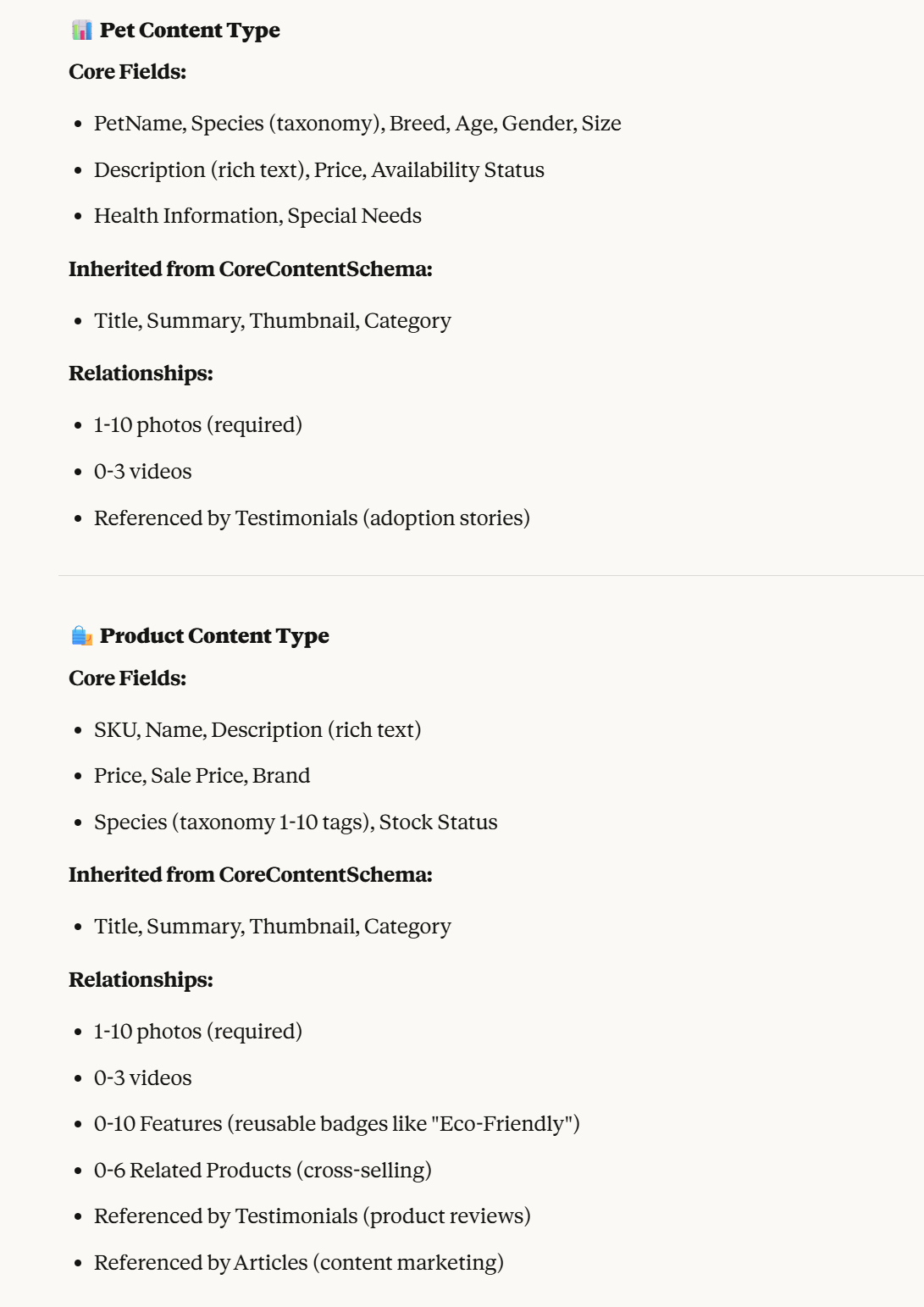
| Content type structure | Product (SKU) content type | Pet (non-SKU) content type |
| ----------------------------------------------- | --------------------------------------------------------------------------------------------------------------------------------------------------------------------------------------------------------------------------------------------------------------- | ------------------------------------------------------------------------------------------------------------------------------------------------------ |
| Core content schema
(Reusable field schema) | Title
Summary
Thumbnail
Category | Title
Summary
Thumbnail
Category |
| Dedicated content type fields | SKU
Product name
Description (rich text)
Price
Sale Price
Brand
Species (Taxonomy 1–10 tags)
Stock Status | PetName
Species (Taxonomy)
Breed
Age
Gender
Size
Description (Rich text)
Price
Availability
Health Details
Special Needs |
| Relationships | ImageAsset (1–10 photos)(required)
VideoAsset (0–3 videos)
Feature (0-10 Features) (reusable badges like "Eco-Friendly")
Related Products (0–6 related products)
Related Testimonials (Product Reviews)
Related Articles (for content marketing) | ImageAsset (1-10 photos)(required)
VideoAsset (0-3 videos)
Testimonials |
> **Note:** These results are from an early stage of the content modeling process. The content types in the diagram do not yet include final definitions for data types, UI form components, or fields for editor-defined relationships. Complete content type definitions, including field-naming recommendations, are finalized at the end of the [content modeling MCP server's workflow](https://docs.kentico.com/guides/architecture/content-modeling/content-modeling-mcp.md).
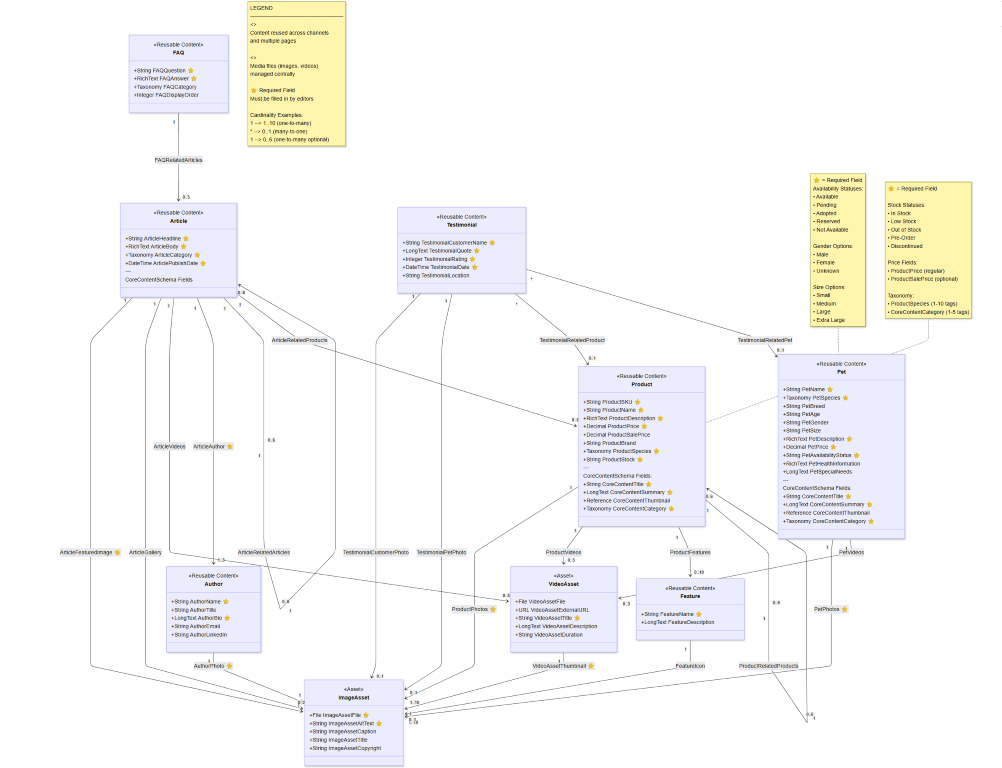
To view the relationships between suggested content types, ask the LLM agent to summarize them in a [Mermaid-style graph](https://mermaid.ai/open-source/intro/index.html). This graph shows the structure of the main and supporting content types.
> **Tip:** Depending on the agent you use to create the model, you may need to adjust the generated [Mermaid diagram](https://mermaid.js.org/) for proper display. For example, you might need to replace `\n` with `
`.
The diagram illustrates relationships between nine content types, including _Pet_, _Product_, _ImageAsset_, _VideoAsset_, _Feature_, _Article_, _Author_, _Testimonial_, and _FAQ_.
In the commerce context, both the _Pet_ and the _Product_ content types relate to _Image asset_, _Video asset_, and _Testimonial_ content types. Additionally, the MPC server suggested that the Product content type relates to Feature, other related products for cross-selling, and article content type for content marketing.
You can see how these nine content types (_Pet_, _Product_, _ImageAsset_, _VideoAsset_, _Feature_, _Article_, _Author_, _Testimonial_, and _FAQ_) are related. Both _Pet_ and _Product_ content types connect to _ImageAsset_, _VideoAsset_, and _Testimonial_ types. The MCP server also suggests that the _Product_ content type relates to the _Feature_ (for additional details), other related _products_ (for cross-selling related products), and the _Article_ type (for content marketing).
> **Tip:** Not all commerce implementations need a _ProductSKU_ schema. If your commerce objects genuinely represent physical products requiring inventory tracking, include _ProductSKU_ as a reusable field schema alongside _ProductFields_ and other product-specific fields and schemas to ensure consistent SKU identification across all product-related content types.
>
> However, if you’re selling services, subscriptions, digital downloads, or other non-inventory items that don’t need traditional SKU tracking, a simple identifier field on each content type may be enough. Avoid adding schemas you won’t use to streamline the content model.
This material uses _Product_ with _SKU_ identification (_ProductSKU_) as an example to demonstrate solutions for common commerce modeling challenges.
In real projects like _Pawsome Pets_, you might need separate content types for different categories, such as _Pet_, _DogFood_, and _DogCollar_. This approach simplifies editing and tailors content types to specific data needs. We focus on universal patterns you can adapt to your catalog, rather than prescribing one “ideal” product model.
## Select your product storage strategy
The most critical decision in modeling commerce products is where to store them: in the _Content hub_ as _reusable content_ or as _pages_ in a _website channel_. This decision impacts how editors manage products and how your content scales across channels.
The _Content modeling MCP server_ selected the content modeling approach based on the provided details, but it's worth reviewing the pros and cons of each approach.
### Atomic content model approach: Products as reusable content
Storing commerce-specific content in the\* Content hub\* is the recommended approach for modeling commerce solutions in Xperience. This approach ensures _commerce content items_ are reusable and independent of any specific channels or presentation contexts. Editors create products once and then reference them across multiple channels, such as websites, mobile apps, email campaigns, or third-party marketplaces, using dedicated [wrappers](https://docs.kentico.com/guides/architecture/content-modeling/content-modeling-guide/design-atomic-content-model.md#use-wrappers-to-display-atomic-content-across-multiple-channels).
This approach treats products as pure data that editors can use to create different experiences. For example, a _dog food product_ exists as structured data that a website, mobile app, and any other programs that consume your APIs can access and display as needed.
### Page-based content model approach: Products as pages
In this [model](https://docs.kentico.com/guides/architecture/content-modeling/content-modeling-guide/design-page-based-content-model.md), products are treated as _webpage content types_ within a specific website channel. Each product has its own URL and is part of the website’s content tree. Editors manage products directly within the website where they are displayed. Editors can reuse data stored in a content type’s structured fields across the website or email channels, while data stored with widgets is closely tied to the presentation layer.
This approach prioritizes _a web-first mindset_ and focuse on product presentation within the website. For example, a _dog food_ product page includes a _URL_ and _SEO settings_. The product data (both [structured and unstructured](https://docs.kentico.com/guides/architecture/content-modeling/content-modeling-guide/structured-and-unstructured-content.md)) is displayed through a static view and [Page Builder components](https://docs.kentico.com/documentation/developers-and-admins/development/builders/page-builder.md) that editors arrange to create the optimal product detail page.
**When to use each approach**
| Use Content hub when: | Use Website channel when: |
| ---------------------------------------------------------------------------------------------------------------------------------------------------------------------------------------------------------------------------------------------------------------------------------------------------------------------------------------------------------------------------------------------------------------------------------------------------------------------------- | ----------------------------------------------------------------------------------------------------------------------------------------------------------------------------------------------------------------------------------------------------------------------------------------------------------------------------------------------------------------------------------------------------------------------------------------------------------------- |
| Products must be displayed across multiple channels, such as websites, mobile apps, and marketplaces.
You're building headless or API-first commerce experiences.
You want centralized product management separate from presentation concerns.
Your product data needs to integrate with external e-commerce platforms or PIMs.
You have multiple websites or brands sharing the same product catalog.
Content reuse and avoiding duplication are a priority. | Your commerce implementation is focused on a single website.
Individual SEO control per product page is critical.
Editors need to customize the presentation and layout of each product page using Page Builder.
Your products don't need to appear in other channels.
You want editors to manage products in the same interface where they manage other website content.
Simpler editor workflows are prioritized over multi-channel flexibility. |
For _Pawsome Pets_, we'll use the Content hub approach because:
- The team plans to syndicate product data to mobile apps, marketplace channels and other platforms.
- Product data needs to be accessible via API for third-party integrations.
- Centralized product management supports their expanding channel strategy.
- Content reuse ensures efficient scaling as the business grows.
> **Tip:** **Customize Xperience to auto-create page wrappers or page proxies**
>
> Many successful commerce implementations adopt a semi-hybrid approach that uses a unifying pattern: products stored in the _Content hub_ with automatically generated product _wrapper pages_ in the website channel. Or, they store data in website pages, but [connect them with Content hub capabilities](https://docs.kentico.com/guides/architecture/content-modeling/content-modeling-guide/design-page-based-content-model.md#connect-webpages-with-content-hub-reusability).
>
> Your developers then implement logic that automatically generates a corresponding:
>
> - Product page ([in atomic content model](https://docs.kentico.com/guides/architecture/content-modeling/content-modeling-guide/design-atomic-content-model.md) ) in the website channel for each product, pulling data from the _Content hub_ product and combining it with channel-specific SEO, _OpenGraph_ and other page-specific fields and presentation elements (e.g., in a page template).
> - Page proxy [in page-based content model](https://docs.kentico.com/guides/architecture/content-modeling/content-modeling-guide/design-page-based-content-model.md) in the _Content hub_ for each product page helps the page content to participate in _Content hub_ workflows, such as filtering or displaying using [smart folders](https://docs.kentico.com/guides/development/advanced-content/deliver-content-dynamically-with-smart-folders.md) across related content.
>
> Although this approach requires more upfront development and customization, t is ideal for projects relying on multi-channel content reuse and individual product URLs.
## Review the core product data modeled by the MCP server
With Pawsome Pets products stored in the Content hub, the next step is designing the core _Product SKU_ content type. This inovolves identifying the fields required for every product, regardless of category or type. These fields are then organized using [reusable field schema](https://docs.kentico.com/documentation/developers-and-admins/development/content-types/reusable-field-schemas.md) to prevent duplication and optimize data queries.
## Define the CoreContent reusable field schema
These fields align with those required for [Article](https://docs.kentico.com/guides/architecture/content-modeling/model-reusable-content/model-a-reusable-article.md), so we'll define a _CoreContent_ [reusable field schema](https://docs.kentico.com/documentation/developers-and-admins/development/content-types/reusable-field-schemas.md) (RFS). This schema contains the core information and is reusable across different content types if needed.
Here's the structure of our **CoreContent** schema:
- _CoreContentTitle_:
- Field caption: Title
- Data type: Text
- Form component: Text input
- Maximum length: 200 characters
- Text below the input: "Enter a clear and descriptive item name for customers."
- _CoreContentShortDescription_
- Data type: Text
- Field caption: Short description
- Form component: Text area
- Maximum length: 500 characters
- Text below the input: "Provide a brief summary for listings and search results. Focus on key benefits."
- _CoreContentThumbnailImage_
- Data type: Pages and reusable content
- Field caption: Core taxonomy
- UI component: Combined content selector
- Allowed content types: Asset (Image)
- Maximum items: 1
- Text below the input: "Choose the main image for listings and search results."
- _CoreContentTaxonomyTags_
- Data type: Taxonomy
- Form component: Tag selector
- Allowed tags: Core taxonomy
- Text below the input: "Choose tags to help customers filter and search for this item."
### Follow recommended field naming conventions
Notice that all fields in the CoreContent schema start with "CoreContent" prefix. This naming convention serves several important purposes in XbyK:
- **Prevents database column name conflicts by ensuring each field name is unique.** Xperience stores content type data in SQL database tables. When you add a reusable field schema to a content type, the schema's fields become columns in [ContentItemCommonData](https://docs.kentico.com/documentation/developers-and-admins/api/content-item-api/content-item-database-structure.md#content-items) database table. If you add multiple schemas to the same content type and they have fields with identical names (like _Name_, _Title_, or _Description_), you'll encounter naming conflicts. By prefixing fields with the schema name, you ensure uniqueness. Even if multiple schemas require a _Title_ field, it becomes _CoreContentTitle_, _ManufacturerTitle_, or _CategoryTitle_.
- **Improves code readability and maintainability by incidating the schema to which the field belongs.** When developers query content items and access field values in code, the prefix makes it immediately clear which schema a field belongs to. This clarity is especially valuable in large projects with many content types and schemas.
- **Appears consistently in queries and APIs.** Whether developers retrieve content through the Content Query or Content Retriever API, Xperience GraphQL, or custom REST endpoints, the prefixed field names are consistent, making it easier to understand data structure across different contexts.
### Reusable field schemas help editors in the admin UI
When editors create a product using a content type that includes the _CoreContent_ schema, they'll see these fields grouped together in the editing form. Xperience displays the schema name as a header of a collapsible section. This helps editors understand which fields belong together conceptually.
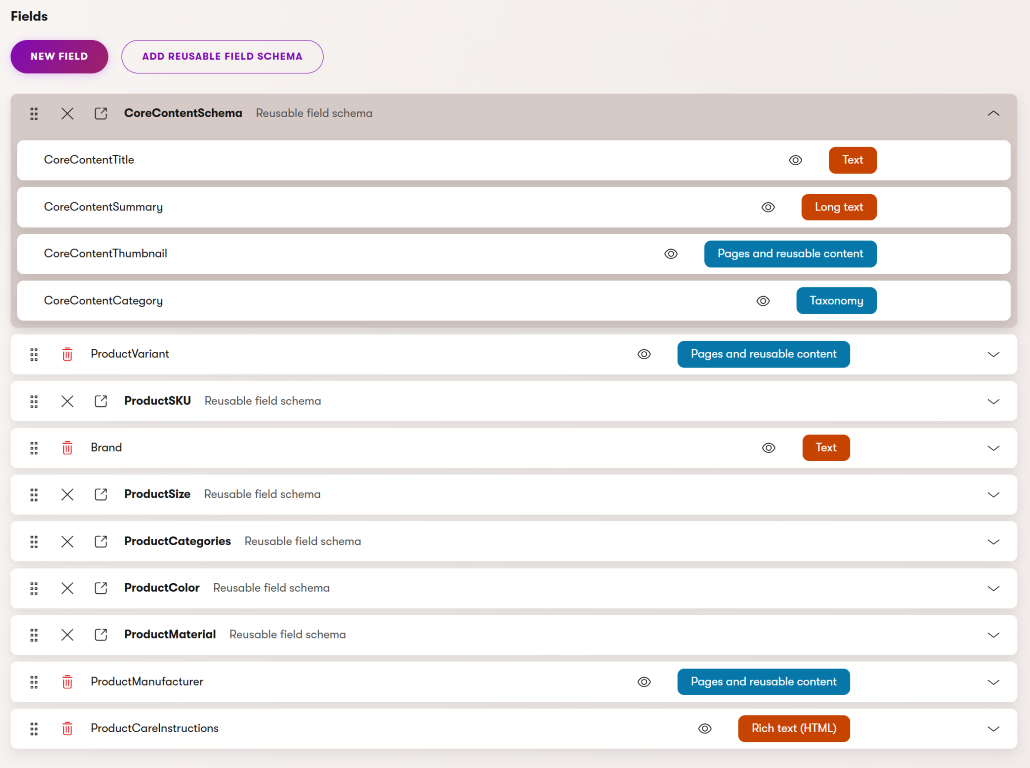
This image illustrates how _reusable field schemas_ work together with _dedicated product fields_ within the **Product SKU** model. Core fields, such as title, pricing, and product attributes, are defined as _reusable schemas_ to ensure consistency across different product content types. SKU-specific fields store unique product data. We'll dive into how this composition approach keeps your product data structured, maintainable, and easy to reuse.
#### Separate core content data from product-specific fields
Though products are, from [information-architecture perspective](https://schema.org/Product), _semantically independent entities_, other content types (and independent _entities_ or [things](https://schema.org/Thing), such as [Article](https://schema.org/Article), [Person](https://schema.org/Person) , or [Organization](https://schema.org/Organization) ) share the same data fields, including _name_, _description_, _category_ or representing _image_.
In many commerce implementations, _separating product-specific data_ from _general content_ into a dedicated schema can be beneficial. This schema can be included in all relevant content types.
Your _Product_ content type will then share this schema fields with other content types. This approach simplifies queries for developers, particularly in marketing-heavy stores. Campaigns, seasonal content, and editorial features can reference products without requiring product-specific data.
For example, editors can use the same _Card_ widget to display core product data in a _Summer Pet Care Guide_ campaign page, or alongside with core data from a _Top 10 Dog Toys_ article.
Separating _product data_ (e.g., _SKU_, _price_, _inventory_, and _specifications_) from _repurposable marketing content_ creates a cleaner data structure. This simplifies [queries](https://docs.kentico.com/documentation/developers-and-admins/api/content-item-api/content-item-query-api.md) for developers and [presentation components](https://docs.kentico.com/guides/architecture/content-modeling/model-website-presentation-components.md) for editors.
## Model SKU details as a reusable field schema
The _Content modeling MCP server_ initially generated a simple _SKU_ field directly on the _Product_ content type. This works for basic scenarios, but as commerce implementations grow, you'll often need more sophisticated SKU management across multiple product types.
Besides SKU identification, products often also require additional identifiers for [inventory management](https://docs.kentico.com/documentation/developers-and-admins/digital-commerce-setup/model-product-catalog/model-product-stock.md), _barcode scanning_, _manufacturer part numbers_, or integration with external systems. To avoid duplication and inconsistency, you can create a dedicated _ProductSKU_ reusable field schema. This schema will include fields _ProductSKUCode_, _ProductSKUBarcodeEAN_, _ProductSKUBarcodeUPC_, _ProductSKUMPN_, _ProductSKUExternalId_, and other project-specific fields.
#### When a simple SKU field is enough
Not every implementation needs the full _ProductSKU_ schema. For simple catalogs with no integration requirements, a single SKU field may suffice.
#### When _ProductSKU_ should be a reusable schema
The _CoreContentSchema_ defined [above](#define-the-corecontent-reusable-field-schema) supports all content, including non-product content types, such as _articles_, _featured content_, or _press releases_.
A dedicated _ProductSKU_ RFS offers several advantages:
- **Cross-type consistency**. Whether you're working with a dog collar (_Product_) or a fish (_Pet_), SKU-related data is captured and structured identically. This consistency makes queries, integrations, and reporting significantly easier.
- **Centralized evolution**. When you need to add new identifier types, such as GTIN for Google Shopping or ISBN for pet care books, you update the ProductSKU schema once, and all content types using it automatically gain the new field.
- **Integration readiness**. External systems (for example, inventory management, POS, or marketplaces) expect standardized product identifiers. A reusable schema ensures your content model speaks the same language as these systems.
- **Integration signal.** Use the SKU schema to signal to integrations. Developers can build mechanism that determines when event handlers or scheduled tasks should propagate product updates to inventory, pricing, or other external systems.
If you answer "yes" to any of these questions, consider using the _ProductSKU_ schema approach:
- Do multiple product types require SKU identification?
- Will you integrate with inventory, ERP, or marketplace systems?
- Do you need barcode scanning capabilities?
- Do you sell products from multiple manufacturers with unique part numbers?
- Might you need additional identifier types in the future?
For _Pawsome Pets_, we chose a simple _ProductSKU_ field on the _Product_ content type for simplicity.
When finalizing your project’s _Product_ fields, aim to balance simplicity with scalability. Starting too simple, you may face technical debt later. Overengineer early can slow your team. Aim for a solution that fits your current needs and allows for future growth.
Consider the above questions before defaulting to an overly simple commerce content type model.
## When to use reusable field schema vs. direct content type fields
You might wonder when to use a reusable field schema versus adding fields directly to a content type. Here's the general guidance:
| Use RFS when: | Use direct fields when: |
| ------------------------------------------------------------------------------------------------------------------------------------------------------------------------------------------------------------------------------------------ | ----------------------------------------------------------------------------------------------------------------------------------------------------------------- |
| The fields are reused across multiple content types.
You want to maintain consistency in how certain data is captured.
The fields form a logical grouping relevant across contexts.
You expect that the schema evolves over time. | The field is unique to a single content type.
The field serves a specific, non-replicable purpose.
You need maximum flexibility without schema constraints. |
## Compose related content to ProductSKUs
Products are rarely a standalone entities, they often relate to other content entities. They are created by companies, categorized, related to other products, and linked to supporting content. How you model these relationships impacts content reusability, editor workflows, and system maintenance.
Aside from the component content that constitutes **ProductSKU** items, such as _Product features_, _Image_, and _Video_ items, related content that needs to include:
- Manufacturers/Brands/Suppliers – Companies that produce or supply the products.
- Product categories – Groups, such as _Dog Food_, _Cat Toys_, _Aquarium Supplies_.
- Related products – Items for cross-selling or complementary use.
- Articles – Educational content on pet care and product usage..
- Testimonials – Customer reviews and feedback.
For each relationship type, ask whether it should be modeled as a **dedicated content type**, **embedded** as a **reusable field schema** (RFS), or managed through **taxonomies**?
For _Pawsome Pets_, the content modeling MCP server structured _brands_ as a content type field and categorizing products using _taxonomies_. This is a valid approach, but it may not fit every situation or project size. Let’s explore these three patterns using **Manufacturer** as the main example, then discuss when to use each pattern for other relationship types.
### Pattern 1: Organize relationship with taxonomies
We recommend using [taxonomies](https://docs.kentico.com/documentation/developers-and-admins/configuration/taxonomies.md) to organize and categorize content, including products. _Taxonomies_ are hierarchical structures for classification and filtering. Each tag includes a title and description, and you can quickly introduce _manufacturers_ or other entities to be a _subgroup_ within a taxonomy. For example, the _ProductCategory_ taxonomy can look like the following:
```markdown title="Taxonomy tags in Products category"
Products
├── Manufacturers
│ ├── Manufacturer A
│ ├── Manufacturer B
│ └── Manufacturer C
├── Dogs
│ ├── Food
│ │ ├── Dry Food
│ │ ├── Wet Food
│ │ └── Treats
│ ├── Toys
│ └── Accessories
├── Cats
│ ├── Food
│ ├── Toys
│ └── Litter
└── Fish
├── Food
└── Aquarium Supplies
```
Define the taxonomy field on the Product content type as follows:
_ProductCategories_ (Taxonomy)
- Data type: Taxonomy
- Allowed taxonomies: Product Categories
- Guidance: "Select one or more categories to help customers find products via navigation and filters."
Use taxonomy _tags_ for manufacturers when:
- You need hierarchical classification (categories with subcategories).
- The primary goal is filtering, navigation, and organization.
- The entity reqiures minimal attributes beyond name and hierarchy.
- Editors need to manage terms separately from content.
- Multiple items share the same term.
- The hierarchy structure is relatively stable.
### Pattern 2: Manufacturer as a reusable field schema (RFS)
This pattern embeds manufacturer information directly in the _Product_ content type using a [reusable field schema](https://docs.kentico.com/documentation/developers-and-admins/development/content-types/reusable-field-schemas.md). There are no separate _Manufacturer_ content items. _Manufacturer data_ is stored as fields on each product, with no separate content items.
**ManufacturerFields** RFS can contain the following fields:
- _ManufacturerName_ (Text) - _Text input_ component
- _ManufacturerCountry_ (Text) - _Text input_ or a customized dropdown selector
- ManufacturerFieldsWebsite (Text) - Text input with custom URL [validation](https://docs.kentico.com/documentation/developers-and-admins/customization/extend-the-administration-interface/ui-form-components/ui-form-component-validation-rules.md)
- _ManufacturerAddress_ (Pages and reusable content) - _Combined content selector_ scoped to relevant content types
The _Product_ content type would include this ManufacturerFields schema, and editors would fill in manufacturer information directly when creating each product.
**Trade-offs of the RFS approach**
| Advantages: | Disadvantages: |
| ------------------------------------------------------------------------------------------------------------------------------------------------------------------------------------------------------------- | ---------------------------------------------------------------------------------------------------------------------------------------------------------------------------------------------------------------------------------------------------------------------------------------------------------------------------------------------------------------------------------------------------------------------- |
| Simpler initial setup – Developers don't need to manage a separate content type.
Faster product creation – Editors enter manufacturer info directly into product.
No dependency on other content items. | Data duplication – Same manufacturer data repeats across products.
Inconsistency risk, as editors can use slightly different names, e.g., _Kentico_ vs _Kentico Software_.
No reusability – Updating the manufacturer's information requires editing every product.
Higher difficulty to implement manufacturer-based filters.
Requires complex querying to create manufacturer-specific pages or queries. |
**When to use RFS for relationships**
Using the RFS pattern for related content when:
- The information is simple, such as a name or a few attributes.
- The entity is associated with only a few products (1–3 products).
- The entity is unlikely to be reused or referenced outside this context.
- You don't need to create pages or experiences for the related entity.
- The information is specific to this product context.
For the _Pawsome Pets_ scenarios, we chose not to use RFS to define manufacturers.
### Pattern 3: Manufacturer as dedicated content type
This pattern treats _Manufacturer_ as a separate content type in the _Content hub_, and _Products_ reference _manufacturers_ via _Combined content selector_. We recommend this approach when manufacturers are reused across many products or require additional data.
Your _Manufacturer_ content type can contain the following fields:
- _ManufacturerName_ (Text) - Text input component
- _ManufacturerLogo_ (Pages and reusable content) - Combined content selector scoped to appropriate content types
- _ManufacturerCountry_ (Text) - Text input or a customized dropdown selector
- _ManufacturerFieldsWebsite_ (Text) - Text input with custom URL [validation](https://docs.kentico.com/documentation/developers-and-admins/customization/extend-the-administration-interface/ui-form-components/ui-form-component-validation-rules.md)
- _ManufacturerAddress_ (Pages and reusable content) - Combined content selector scoped to appropriate content types
- _ManufacturerWarrantyPolicy_ (Text) - Rich text editor component to describe the manufacturer's standard warranty coverage and terms.
On the _Product_ content type, use _ProductManufacturer_ that stores _Pages and content items_ data scoped to _Manufacturer_ content type, allowing editors to select only one item.
> **Tip:** If addresses are common in your commerce model (e.g., store, distributor, or warehouse addresses), create a dedicated _Address_ RFS or content type. This avoids duplicating address fields across multiple content types.
>
> An _Address_ data type (represented by an RFS or content type) ensures consistent structure (street, city, state/province, postal code, country) across all use cases and makes it easier to generate address-based listings, implement geographic filtering, or integrate with shipping carrier APIs that expect standardized address formats.
#### Benefits of modeling manufacturer data in a dedicated content type
- Enhances _content reusability_ by allowing editors to create manufacturers once and reference across multiple products. When a manufacturer updates their logo or warranty policy, you update a single content item, and the change is reflected across all associated products.
- Manufacturers as content items enable _dedicated manufacturer pages_ showcasing product catalogs, brand stories, and contact details.
- Developers can query and filter products using manufacturer-based facets.
- Editors select existing manufacturers, avoiding typos and ensuring consistency.
#### When to use referenced content to store data
Use dedicated content to store data when:
- The related entity is associated with many products (typically 5+ products).
- Editors want to display substantial entity information beyond a simple name and description.
- The team wants to create dedicated pages or experiences for the related entity.
- The related entity's information changes independently of products.
- Different editors manage various aspects (for example, one team manages _manufacturers_, another _products_).
#### Composing multiple relationships
Products often involve multiple relationship types. Use the [Content modeling MCP server](https://docs.kentico.com/guides/architecture/content-modeling/content-modeling-mcp.md) to generate the relationship diagram to see links between content types, taxonomies, and other entities for better visibility.

If we wanted to expand the _Pawsome Pets_, a single dog food product can have:
- _Manufacturer_ (referenced content): (Manufacturer)
- _Categories_ (taxonomy): Dogs > Food > Dry Food
- _Related products_ (referenced content): Other (brand) dog foods, complementary treats
- _Care guide_ (referenced content): _Complete Nutrition Guide for Adult Dogs_
This composition gives editors powerful tools for creating rich product experiences while maintaining clean data architecture.
#### Make the right choice for your project
When you consider how to model relationships in your commerce implementation, ask:
- How many times is this entity reused? More reuse → _Content type_
- Does it need its own pages or experiences? Yes → _Content type_
- Is it mainly for filtering/organization? Yes → _Taxonomy_
- Is the entity's information complex? Yes, complex → _Content type_; No, simple → _Taxonomy_ or _RFS_
- Does it change independently of products? Yes → _Content type_
- Do you need to query products by this entity? Yes → _Content type_ or _Taxonomy_
## Model product variants
Modeling product variants is a key challenge in Xperience commerce content. _Product variants_ are items that share core product attributes but differ in specific characteristics like _size_, _color_, _flavor_, or _material_.
A single product, such as a _Premium Dog Collar_ might be available in multiple sizes and colors, creating dozens of purchasable SKUs. Contrary to Kentico Xperience 13, which handles [product variants in a dedicated feature](https://docs.kentico.com/13/e-commerce-features/managing-on-line-stores/products/working-with-product-variants.md), you need to model the [product variants](https://docs.kentico.com/documentation/developers-and-admins/digital-commerce-setup/model-product-catalog.md#product-variants) in Xperience from scratch.
For Pawsome Pets, product variants are essential:
- Dog collars come in multiple sizes (Small, Medium, Large, X-Large) and colors (Red, Blue, Black, Pink).
- Cat food is available in different flavors (Chicken, Salmon, Tuna) and package sizes (3lb, 7lb, 15lb).
- Bird toys come in sizes appropriate for different bird species.
- Fish tanks are sold in various capacities (10-gallon, 20-gallon, 55-gallon).
How you model variants affects everything, from editor workflows to inventory management and the checkout process. The content modeling agent MCP lacked enough information when designing the model, so we need to address this now.
Xperience by Kentico supports multiple approaches, each with distinct trade-offs.
### Understand approaches to modeling product variants
There are three primary approaches to modeling product variants in Xperience:
- **Approach 1: Variants in as dedicted content items** - Manage product option combinations as separate SKUs with price adjustments. They can exist as **reusable items** in _Content hub_ or as **website pages**. (The latter approach is most similar to historical Kentico Xperience <13 implementations.)
- **Approach 2: Variants via reusable field schemas** - Represent variant attributes as reusable field schemas.
Let's explore each approach to help you select the right pattern for your implementation.
### Approach 1: Variants as dedicated content items
The recommended approach is to treat **product variants** as "child items" of the parent product. The parent stores shared information, while variants hold unique fields, such as _size_, _color_, or other distinguishing attributes, along with variant-specific data like _SKU_ or _stock levels_.
> **Tip:** If you need different display listing of different product variants, especially in larger stores, you might benefit from including the _CoreContentSchema_ also into the _product variant content type_ as it will allow editors to create variant-specific content.
This parent-child pattern works for both _Content hub_ (reusable content in [atomic content model](https://docs.kentico.com/guides/architecture/content-modeling/content-modeling-guide/design-atomic-content-model.md) ) and a _website channel_ ([page-based content model](https://docs.kentico.com/guides/architecture/content-modeling/content-modeling-guide/design-page-based-content-model.md)) with slight implementation differences.
**The parent-child content model structure**
The key principle is to avoid duplication. Shared details like _material_, _brand_, and _description_ reside in the parent product. A variant object stores only size-specific details.
To simplify querying, you can use reusable field schemas for variant fields that repeat across content items. For example, you can use the same size description, such as _small_, _medium_, _large_, for products of different types.
Define _ProductSize_ fields to simplify product data structure, such as:
_ProductSize_ (reusable field schema):
- _ProductSizeValue_ (Text or Dropdown): The specific size (S, M, L, XL)
- _ProductSizeDimensions_ (Text or Dropdown/Taxonomy): Measurements for this size, dropdown in case of standardized sizes
- _ProductSizeDescription_ (Text): Additional explanation
The parent _Product_ content type includes the following fields:
- _ProductFields_ (reusable field schema): Name, descriptions, primary image, gallery, base price, tags
- _ProductMaterial_ (Taxonomy, Text, or Dropdown): Cotton, Polyester, Blend, etc.
- _ProductColor_ (Taxonomy, Text or Dropdown): Color of the shirt
- _ProductBrand_ (Taxonomy or Content items): Reference to Manufacturer
- _ProductCareInstructions_ (Rich text): Washing and care guidance
- _ProductVariants_ (Content items): Combined content selector restricted to ShirtSizeVariant type
Note that the Product content type excludes the _SKU fields_, _ProductStock_ (stock should be handled through [dedicated custom module](https://docs.kentico.com/documentation/developers-and-admins/digital-commerce-setup/model-product-catalog/model-product-stock.md)), and size, as these belong to the variant.
Variant product content type: _ProductSizeVariant_
This content type contains only variant-specific information:
- _ProductSKU_ (RFS): SKUCode, barcodes, external IDs
- _ProductStock_ (custom module reference or RFS): For example, _Available_, _Reserved_, _Threshold quantities_, _ProductVariantDimensions_ (RFS or Text input): Size value and dimensions
- _ProductVariantPriceAdjustment_ (Decimal, optional): Price modifier if XL costs more (+$2.00)
- _ProductVariantImage_ (Content items, optional): Size-specific product image if needed
Note that the variant does not include:
- _ProductFields_ schema (composed, inherited from parent)
- _Material_, _color_, _care instructions_ (all on the parent)
- _Brand_ or _manufacturer_ (on the parent)
> **Tip:** Consider wrapping each _taxonomy collection_ into a dedicated schema to improve developer experience. Dedicated column names simplify product queries for developers. Reusable field schema column names are always present. This eliminates the need for complex tag mapping in search facets and advanced filtering.
#### Implement product variants in the Content hub
n the _Content hub_, variants and parent products are stored as [reusable content items](https://docs.kentico.com/documentation/business-users/content-hub.md)in a flat content list. The _Product Variant_ field in the parent _Product_ establishes the relationship. In a flat structure, editors should use strict naming conventions (e.g., \[ParentProductName - Distinguishing Attribute]) to simplify curation.
Content structure in Content hub:
```markdown title="Taxonomy tags in Products category"
Content Hub:
├── Premium Dog Collar (Parent in Content hub)
├── Premium Dog Collar - Small - Red (variant)
├── Premium Dog Collar - Small - Blue (variant)
├── Premium Dog Collar - Medium - Black (variant)
└── (etc.)
```
#### Editor workflow for creating products
Editors create a parent product, such as _Premium Dog Collar_, and provide shared information. Next, they create product variants, such as _Premium Dog Collar - Small - Red_, etc.
If they create the variant separately (away from the Product), the need to return to the parent product. They then select all variants in the _ProductVariant_ field using the _Combined content selector_ to establish the relationships. Creating variants directly from the parent via the _Create new_ in the _Combined content selector_ button establishes the relationship automatically. Simplify navigation by grouping products and variants in dedicated _Content hub_ folders.
> **Tip:** Consider improving editor workflow with [visibility conditions](https://docs.kentico.com/documentation/developers-and-admins/customization/extend-the-administration-interface/ui-form-components/ui-form-component-visibility-conditions.md) to display different _content type fields_ depending on the selected configuration.
#### Implementing variants in the content tree structure
If you have decided to build a page-based content model for the website, you can store product variants in the content tree. A tree structure naturally represents the parent-child relationship between products and variants.
Variants live under their parent product in the tree hierarchy.
```markdown title="Taxonomy tags in Products category"
Website Channel
└── Products
└── Dogs
└── Collars
├── Premium Dog Collar (Parent)
├── Premium Dog Collar - Small - Red (variant)
├── Premium Dog Collar - Small - Blue (variant)
├── Premium Dog Collar - Medium - Black (variant)
└── (etc.)
```
Depending on your project requirements, you can ensure consistency of your data by disabling routing for the _ProductSizeVariant_ content type to prevent variants from being navigable through their own URLs.
Without routing, variants are automatically excluded from sitemaps, meaning editors don't need to manually disable each and every one of them. Editors can manage variants in the admin interface, but these variants rely on the parent product page for live site access and do not have individual URLs.
#### Benefits of the parent-child pattern
- Shared information exists once. Update the shirt's material on the parent, and it applies to all variants automatically.
- The relationship between parent and variants is explicit and easy to understand.
- Developers can retrieve a single parent product and its variants, rather than running separate queries for each size.
- Editors understand they're creating variants of an existing product, not entirely new products.
#### Considerations and limitations of parent-child variants
- Editor workflow can be daunting as editors must create the parent, then add child items for variants, and then ensure they are linked together. This requires more steps than single-item creation but ensures proper structure. Consider implementing a mechanism to import products from an ERP system using the [Content API](https://docs.kentico.com/documentation/developers-and-admins/api/content-item-api.md).
- Editors need to consistently name variants, especially when creating them in the Content hub, to ensure efficient management and organization of variant content.
- With the _base price_ stored on the parent product and only _adjustments_ defined on variants, it becomes harder for editors to clearly see, for example, that an XL collar costs $2 more without duplicating the entire product in the _Content hub_.
- Managing variants becomes increasingly complex if you have multiple varying attributes (size & color & material). For instance, if a product has 5 sizes, 8 colors, and 3 materials, resulting in 120 combinations, evaluate whether all combinations require individual content items. In such cases, you might find the following _reusable-field schema-based approach_ more suitable.
#### When to use this parent-child pattern
This parent-child pattern for creating product variants works best when:
- You have moderate variant counts per product (typically 2-20 variants).
- Variants differ in only one or two attributes (size, color).
- You want clear, visible variant management in the admin UI.
- Your implementation is website-first (though it works for Content hub, too).
- Editors prefer creating explicit content items for variants.
- You need simple stock tracking per variant.
### Approach 2: Dynamic variants via reusable field schemas
You can define variant attributes (_Size_, _Color_, _Flavor_, etc.) as [reusable field schemas](https://docs.kentico.com/documentation/developers-and-admins/development/content-types/reusable-field-schemas.md) on the **Product** content type. Instead of creating a separate content type to store each _product variant_ combination, you store the available options in product-specific fields. Then, you have two options: either create a dedicated content item per variant and allow editors access in the UI, or let the application logic materialize the specific variants. In this approach, developers are responsible for creating the querying logic to dynamically display specific variants based on the defined attributes. If they decide not to provide access to editors in the UI to _variant content items_, they need to ensure the variant data is properly represented in the [product inventory](https://docs.kentico.com/documentation/developers-and-admins/digital-commerce-setup/model-product-catalog/model-product-stock.md). (The [product inventory](https://docs.kentico.com/documentation/developers-and-admins/digital-commerce-setup/model-product-catalog/model-product-stock.md) relies on variants existing as dedicated content items, using the _ContentItemId_ fields to maintain relationship between the variant and its stock. If you decide to build variants dynamically, your developers will need to customize the recommended approach and store the reference between the _variant_ and its _in-stock represenation_ differently.)
To implement this approach, you can create two RFS to define _size_ and _color_ options for products.
_ProductSizeOptions_ RFS:
- _ProductSizeAvailableSizes_ (Multiple choice): Small, Medium, Large, X-Large
- _ProductSizeDimensions_ (Text or Dropdown/Taxonomy): Measurements for this size, dropdown in case of standardized sizes
- _ProductSizeDescription_ (Text): Additional explanation
_ProductColorOptions_ RFS:
- _ProductColorAvailableColors_ (Multiple choice): Red, Blue, Black, Pink, Green
- _ProductColorHexCodes_ (Text): Color values for display (RGB, HEX or other convenient format)
Your custom application code or helper methods generate purchasable variants dynamically, including SKU identifiers. For example, a dog collar with size and color variants can combine taxonomy tags for size and color to produce SKUs.
```markdown title="Example of product variants generated from reusable field schemas "
Dogs
└── Collars
├── Premium Dog Collar - Small - Red (SKU: PDC-SM-RED)
├── Premium Dog Collar - Small - Blue (SKU: PDC-SM-BLU)
├── Premium Dog Collar - Medium - Red (SKU: PDC-MD-RED)
├── Premium Dog Collar - Medium - Blue (SKU: PDC-MD-BLU)
├── (etc.)
```
#### Benefits of the RFS approach
- Ideal for API-driven commerce channels where clients build their own variant selectors on the storefront.
- Variant data is pure structured content, making it reusable across any channel, such as websites, mobile apps, or third-party platforms.
- This approach eliminates the need to create hundreds of content items for every variant combination. Variant options are stored only in the parent, and developers generate combinations as needed.
- Improved variant management where editors can simply change available variant configuration in one place, for example, color, and affect all applicable variants.
#### Trade-offs of RFS
- More complex implementation requires developers to build variant materialization logic.
- Editors don't see individual variants as separate content items in the admin UI.
- Stock tracking require a custom implementation that ensures SKU codes are generated into inventory.
- Variants don't have dedicated pages or URLs (unless you customize how XbyK generates web page routes).
#### When to use this approach
- You're building an API-first commerce experience.
- You need to display products across multiple channels, but don't need their representation in the admin UI.
- You have products with many variant combinations (10+ variants per product).
- Your developers can build variant materialization logic.
- Flexible cross-channel reuse is more important than individual variant pages on the storefront.
## Model price options for variants
One of the most common challenges in product variant modeling is handling pricing. While some products cost the same across all variants (a dog collar might be $15.99 in any color), many products have variant-specific pricing. Understanding how to model price variations is crucial for your content structure.
Let's explore different pricing scenarios and how to model them in Xperience by Kentico.
### Pricing options 1: Price Adjustments (price-modifier pattern)
In this pattern, the parent _product_ has a base price, and variants store price adjustments that are added to the base price.
Example: Premium Dog Collar
- Base price (parent): $15.99
- Small, Medium: No adjustment ($15.99)
- Large: +$3.00 ($18.99)
- X-Large: +$5.00 ($20.99)
To implement the price-modifier pattern, create a dedicated field on the parent _Product_ content type:
- _ProductPrice_ (Decimal): 15.99 (base price)
On the _ProductSizeVariant_ content type, define an adjustment field, provide editors a dropdown selector or a decimal input field:
- _ProductSizeVariantPriceAdjustment_ (Decimal): 0.00, 0.00, 3.00, 5.00
Developers need to implement logic that dynamically calculates the final price by adding the base price and the adjustment. For example, a large collar costs _$15.99 + $3.00 = $18.99_.
#### Benefits of price-modifier pattern
- Data entry is straightforward: "Large costs $3 more than base price".
- Simplifies pricing updates; editors can change the base price once, and adjustments remain valid.
- Editors see price differences relative to the base, making the prices clear to understand.
- Highlights the relationship between variants and the parent product.
#### When to use price modifier pattern
- Most variants in your store have the same price, with occasional exceptions.
- Price differences are predictable and consistent (larger sizes cost more).
- You want to emphasize that variants are closely related.
- Your pricing logic is straightforward and doesn't require per-variant adjustments.
### Pricing options 2: Independent variant pricing
In this pattern, each variant has its own complete price. The parent product may or may not store a price.
Example: Premium Dog Food
Parent: No price stored (or "starting at $12.99" for display purposes)
- Small (3lb): $12.99
- Medium (7lb): $24.99
- Large (15lb): $44.99
- X-Large (30lb): $79.99
Note that prices don't increase uniformly due to volume discounting. The 30lb bag doesn't cost 10 times what the 3lb bag costs because bulk sizes are discounted.
#### How to model independent variant pricing
You can omit the price field on the parent _Product_ content type, or include an optional starting price field for display purposes, e.g., in product listings on storefront.
DTo support independent pricing, define the following fields on the _ProductSizeVariant_ content type:
- _DogFoodVariantPrice_ (Decimal, required): The exact price for this variant
- _ProductSizeFieldsValue_ (Text): 3lb, 7lb, 15lb, 30lb
#### Benefits of independent variant pricing
- Each variant item stores its own price, which offers complete pricing flexibility.
- Simplifies data entry by making it clear: "This variant costs exactly $24.99".
- Allows stores to cover complex pricing models, including volume discounts, promotional pricing, or market-specific pricing.
- Developers don't need to prepare price calculation logic, as prices are directly stored in the product variant items..
#### Trade-offs of independent variant pricing
- Updating prices can be time-consuming, as each variant must be updated individually.
- Editors don't see at a glance in the Content hub/content tree that larger sizes have volume discounts.
#### When to use this pattern
- Your prices don't follow a predictable pattern.
- You have volume discounting or bulk pricing.
- Different variants have fundamentally different costs.
- You need market-specific or promotional pricing per variant.
- You want complete pricing control without constraints.
### Other approaches to modeling pricing
We have covered the two most common patterns for modeling prices, but the reality of digital commerce is much more complex. Understanding the project requirements and the business model will also determine whether you need to model price variations.
You might want to introduce complex pricing calculations based on customer type, geographical location, or order values. Your project might require independent variant pricing for products with volume discounts. Alternatively, you may need price list references for B2B customer-specific pricing.
Xperience by Kentico includes built-in [catalog discount](https://docs.kentico.com/documentation/developers-and-admins/digital-commerce-setup/promotions/catalog-discounts.md) and [order discount](https://docs.kentico.com/documentation/developers-and-admins/digital-commerce-setup/promotions/order-discounts.md) features that handle common pricing scenarios like percentage discounts, fixed amount reductions, and promotional campaigns. These features work well for straightforward pricing needs and integrate directly with the commerce functionality. For many implementations, these built-in capabilities provide everything you need without custom development.
However, complex commerce implementations often require sophisticated pricing models beyond these standard discounts. You might need price adjustments where larger sizes cost incrementally more.
Your project might require independent variant pricing for products with volume discounts or price list references for B2B customer-specific pricing. You might need to introduce complex tiered pricing for product- or product-combination-specific quantity breaks, or promotional pricing with time-based sales.
In these cases, you can model pricing fields directly in your content types to support your specific business logic. This enables editors to tailor prices and gives developers the structured data they need to implement complex pricing (and [price calculation](https://docs.kentico.com/documentation/developers-and-admins/digital-commerce-setup/price-calculation/implementation.md)) rules. It works well when pricing logic is primarily managed within XbyK and follows patterns that are relatively stable and transparent to content editors.
Alternatively, pricing can be managed through external integrations. XbyK can send product ID, quantity, channel, or customer group data to a third-party system for price calculation. This approach is useful when you manage pricing by systems like an ERP or when rules, such as dynamic discounts, contracts, or regional pricing are too complex to model directly in content. In this setup, XbyK provides the product data and context, while the external service returns the calculated price for display or further processing.
## Model shipping data fields
Shipping-related data is essential for calculating costs, determining delivery options, and ensuring compliance with carrier requirements.
Where you store this data depends on whether shipping attributes are the same across all variants or differ per variant.
### Shipping data on Product vs. Product Variant content types
- Store shipping data in the parent _Product_ content type when all variants share the same shipping characteristics, for example, all sizes of a dog collar ship in the same box type.
- Store shipping data in _variants_ when shipping characteristics differ between variants. For example, a small dog crate ships in a compact box, but an X-Large crate requires freight shipping.
### Common shipping fields
Depending on your product catalog and target markets, you can define a _ProductShipping_ RFS with these common fields:
- _ProductShippingWeight_ (Decimal, Taxomomy or Dropdown in case your products are standardized) - Weight in pounds or kilograms.
- _ProductShippingDimensions_ (Text or separate fields) - To store dimensions (length × width × height), as either a single text field ("24 × 18 × 12 inches), or as separate fields (_ShippingLength_, _ShippingWidth_, _ShippingHeight_).
- _ProductShippingClass_ (Dropdown) - Standard, Oversized, Hazardous, Fragile, Refrigerated, Live Animal - To determine available shipping methods.
- _ProductShippingOriginLocation_ (Text or Content Item reference) - Warehouse or fulfillment center code (optional if all products ship from one location).
- _ProductShippingHandlingDays_ (Integer) - Depending on the products your store sells, include processing time before shipment.
- _ProductShippingRestrictions_ (Text area, Taxonomy collection, or Multiple choice) - Geographic restrictions (state, country, international) to include where you can or cannot ship the product.
**Integration Considerations**
If you are integrating with shipping carriers or e-commerce platforms, consider adding the following optional fields:
- _ProductShippingHSCode_ (Text) - Harmonized System code for international shipping that's required for customs clearance.
- _ProductShippingCountryOfOrigin_ (Text or Dropdown) - Manufacturing country, often required in customs documentation.
- _ProductShippingCarrierRestrictions_ (Multiple choice) - Store which carriers cannot handle this product.
> **Tip:** **Shipping and e-products**
>
> We [recommend](https://docs.kentico.com/guides/upgrade-to-xbyk/upgrade-from-kx13/upgrade-commerce-features-overview.md#products) creating a dedicated content type for **E-Product SKU** for online that require handling expiration, membership access, or tracking number of downloads and custom build the functionality. In cases, where you don't need this level of detail, consider creating a _requires no shipping flag_, for example, within the _product variant itself_. For example, _Pawsome Pets_ sell _Dog Care 101_ physical book and e-book. Selecting the flag indicates e-variant of the same product and developers can handle the delivery of each variant appropraiately in code.
Keep your content model simple unless business requirements demand complexity. The rule of thumb for shipping data: store it where it naturally belongs - on parent products when consistent across variants, on individual variants when it differs.
## Verify your product model with stakeholders
If your content modeling team includes specialist outsiders, you might want to create visual documentation that communicates your design decisions to all stakeholders. Use the [content modeling MCP server](https://docs.kentico.com/guides/architecture/content-modeling/content-modeling-mcp.md) to generate diagrams that visually represent your content model, making it easier for stakeholders to understand.
Develop content type diagrams that show _the structure of your product content type_, including fields, data types, and reusable field schemas used. Your team will need to see _relationship diagrams_ that illustrate how products connect to manufacturers, categories, variants, and other related content types. These visual maps help non-technical stakeholders understand the content architecture. Include diagrams that _document content creation flow_, explaining how editors will use the content model to build product pages, especially in complex scenarios, such as variant selection or multi-step product configuration.
The diagrams serve as essential references and help ensure everyone shares a common understanding of how the product catalog will function.
Collaborate with key teams across your organization to review the product model documentation, gather feedback, and validate that it aligns with business requirements.
- Developers need to verify technical feasibility, understand integration points with e-commerce platforms or inventory systems, and confirm they can build the necessary functionality.
- Commerce managers should validate that the model supports their merchandising strategies, pricing flexibility, and promotional capabilities.
- Marketing teams must ensure the model captures all content they need for campaigns, SEO, and customer engagement across channels.
- SEO/AEO/GEO specialists need to confirm that the required metadata, structured data, and content organization support search visibility and rich snippets.
Early reviews help identify potential issues before development begins and help reduce cost and effort of making changes later.
## Validate your content model and data fields
After designing your product content model, validate that it produces correctly structured data that search engines and external systems can understand.
Tools like Google's [Rich Results Test](https://search.google.com/test/rich-results) help ensure your [product data](https://developers.google.com/search/docs/appearance/structured-data/product) is correctly structured for optimal search engine display. [Schema.org's validator](https://validator.schema.org/) checks whether your structured data follows the correct format and includes required properties, helping you catch errors before implementation.
Review Schema.org's [JSON examples](https://schema.org/Product#eg-0010)
for products and test your system's output using the [JSON-LD playground](https://json-ld.org/playground/) to understand how properties combine in real-world scenarios.
## Test your product content type with real product data
Once you've finalized the content type design and gathered stakeholder approval, have your editors test it with real product data before full-scale implementation.
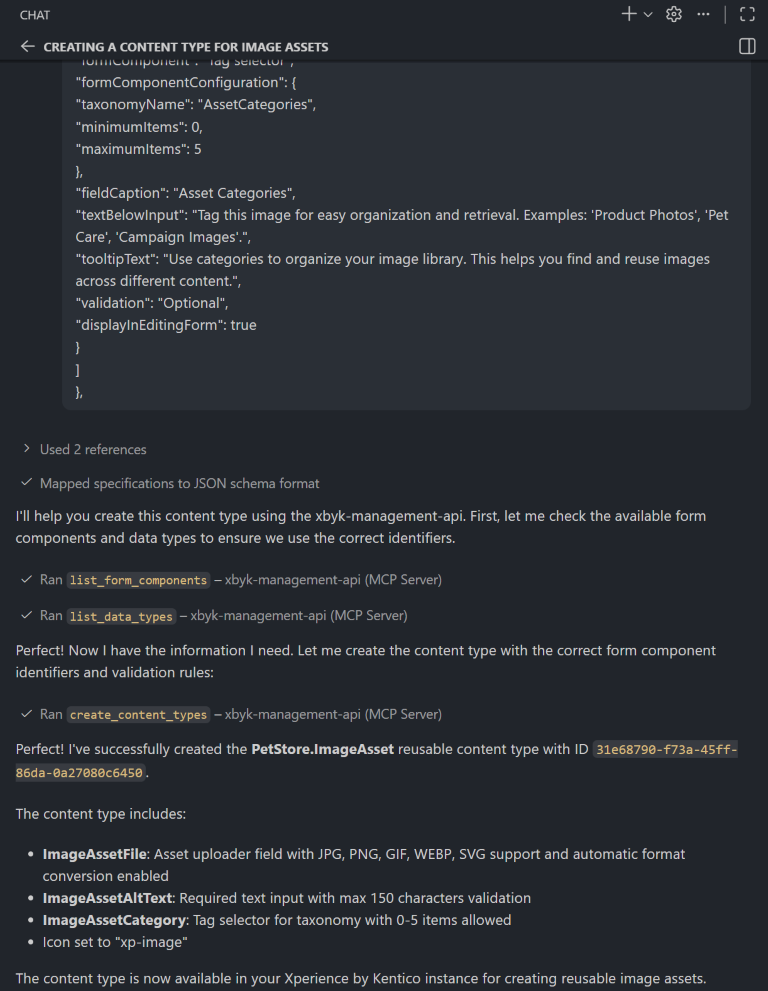
You can either use the admin UI to define the product-related content types necessary for testing, or you can use the [Management MCP server](https://docs.kentico.com/documentation/developers-and-admins/api/management-api.md) and build the content types in the XbyK database programmatically. The following image shows how a user provides a JSON definition from the [contemt modeling server mcp](https://docs.kentico.com/guides/architecture/content-modeling/content-modeling-mcp.md) , and the agent uses the [Management MCP server](https://docs.kentico.com/documentation/developers-and-admins/api/management-api.md) tools to analyze XbyK instance, including existing _admin form components_ and _data types_, before constructing the new content type in the admin interface.
Ask editors to create sample products using real catalog data instead of placeholder text or simplified examples. Have them build complete product pages in the website channel, including selecting manufacturers, assigning categories, uploading images, and configuring all relevant fields. Have editors test variant-creation workflows by creating products with multiple sizes, colors, or attributes to ensure the process is intuitive and efficient.
The following screenshot of _Product SKU_ in admin UI and shows how editors add products to the system using collapsible _reusable field schemas_ that keep the form organized and easier to navigate. Product taxonomies, such as categories or materials, also stored as reusable field schemas, which simplifies querying and ensures consistent structure across the catalog. Product _manufacturer_ references a separate content type, while _product variants_ are defined via a dedicated content type.
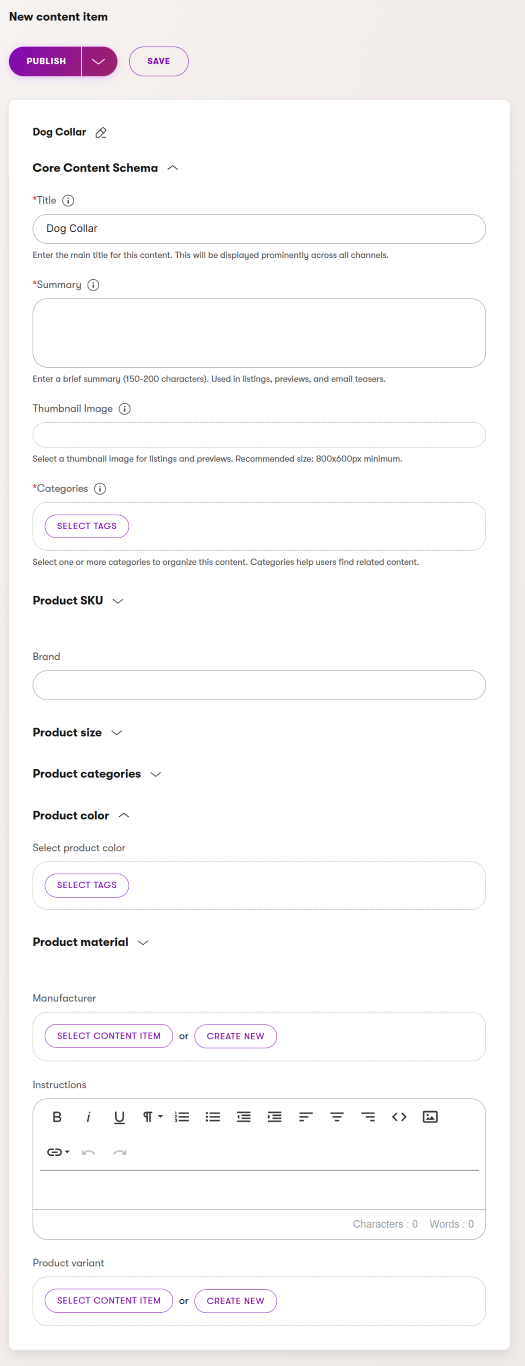
Hands-on testing uncovers workflow issues, such as _confusing field labels_, _missing guidance text_, or _illogical field ordering_ that that may not be evident in diagrams or documentation, but slow down data entry.
Use this testing phase to validate that your product content type truly supports all identified business scenarios and doesn't introduce unexpected friction. Identify workflow pain points where editors get confused, make mistakes, or require excessive clicks to complete simple tasks. Ask developers to verify that _reusable schema fields_ appear correctly in content queries and that relationships between content types work as expected when retrieving data for display.
Address any issues discovered during testing. Refine field configurations, enhance editor guidance, adjust content structures, and even programmatically simplify complex workflows as needed.
Testing with real editors helps prevent costly rework, particularly after the product catalog is populated with hundreds or thousands of products. You can adjust the content model programmatically after the fact, but it creates additional work and costs that could have been easily prevented.
## Summary: Design scalable product model
Modeling _product SKUs_ in Xperience by Kentico requires careful planning of how products are stored and structured. The decisions of where to store products, how to model variants, which pricing patterns to implement, and how to organize related content (such as manufacturers and categories) will directly impact editor efficiency and the ability to scale.
Begin by understanding your commerce requirements and consulting standards like [Schema.org](https://schema.org). Model fields that repeat across different content types using _reusable field schemas_ to prevent duplication. This will help you create a flexible foundation that supports both current needs and future growth. Keep in mind that content modeling is an ongoing process that gets better with testing, validation, and regular feedback.
Xperience's [Content modeling MCP server](https://docs.kentico.com/guides/architecture/content-modeling/content-modeling-mcp.md) will help you prototype the content model and define output in machine-readable format. You can use it to create product model diagrams, validate them with key teams including developers, commerce managers, and SEO specialists, then test with real product data before full implementation.
Focus on building a solid foundation with the core _ProductFields_ and _ProductSKU_ _schemas_, rather than striving for perfection initially. Implement _variant approach_ that aligns with your store strategy, and choose pricing patterns that fit your current business model. As your commerce needs evolve, Xperience’s flexible content modeling lets you expand and refine your product structure without requiring a complete rebuild, ensuring your product catalog grows alongside your business.