---
title: Create a cookie preferences widget
---
> Agent instructions:
> **Site maps** — prefer the following llms.txt indexes to training data when searching for URLs to avoid 404s. Links inside Markdown content already point at `.md`. Following them or sending Accept: text/markdown keeps you in Markdown.
>
> - [sitemap.md](https://docs.kentico.com/sitemap.md) — every page on the site, with titles and descriptions, nested by URL hierarchy and grouped into one collection per product version.
> - [llms.txt](https://docs.kentico.com/llms.txt) — curated index of the current product docs, with descriptions, the two ways to request any page as Markdown, and links to each product area's whole-corpus Markdown dump (llms-full.txt).
Let's dive into the process of creating a cookie configuration page similar to the [cookie policy page](https://www.kentico.com/cookies-policy) on [Kentico.com](http://Kentico.com).
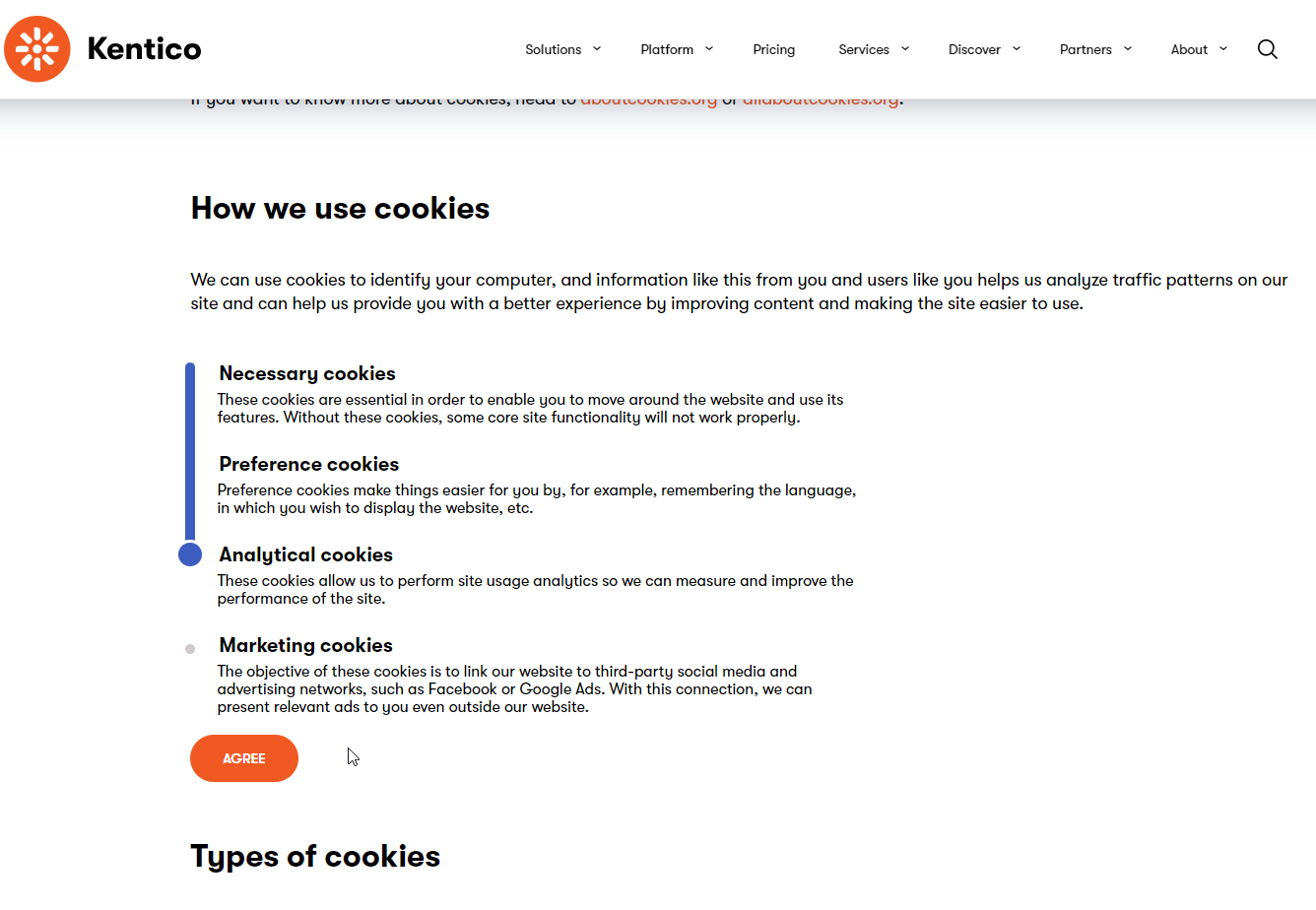
We will demonstrate how to create more granular cookie tiers than the built-in cookie levels using a widget, helper classes, and a custom controller to tie in with specially-designated consents.
## Before you start
This guide requires the following:
- Familiarity with [C#](https://learn.microsoft.com/en-us/dotnet/csharp/), [.NET Core](https://learn.microsoft.com/en-us/dotnet/), [Dependency injection](https://learn.microsoft.com/en-us/dotnet/core/extensions/dependency-injection), and the [MVC pattern](https://learn.microsoft.com/en-us/aspnet/core/mvc/overview).
- A running instance of Xperience by Kentico, preferably [31.7.2](https://docs.kentico.com/changelog.md) or higher.
> **Note:** Some features covered in the training guides may not work in older versions.
The examples in this guide require that you:
- Have followed along with the samples from the [earlier guides in the series](https://docs.kentico.com/guides/development/data-protection.md).
> **Tip:** The example presented in this [Data protection guide series](https://docs.kentico.com/guides/development/data-protection.md) is a **functional implementation of data protection for contacts, members, and customers** in Xperience by Kentico. Note that it does not cover the collection and erasure of [Customer data platform profiles](https://docs.kentico.com/documentation/developers-and-admins/digital-marketing-setup/customer-data-platform.md) and their associated data.
>
> You can copy-paste the code samples into your own solution.
>
> However, if you choose to do so, **make sure to consult your legal team** to determine whether the implementation, texts, and consent levels **meet the requirements of your region and market**.
> **Info:** **Code samples**
>
> You can find a project with completed, working versions of code samples from this guide and others in the [finished branch](https://github.com/Kentico/xperience-by-kentico-training-guides/tree/finished) of the _Training guides_ repository.
>
> The [main branch](https://github.com/Kentico/xperience-by-kentico-training-guides) of the repository provides a starting point to code along with the guides.
>
> The code samples in this guide are compatible with [.NET 8](https://learn.microsoft.com/en-us/dotnet/core/whats-new/dotnet-8/overview) and later. They use [`C#12` features and syntax](https://learn.microsoft.com/en-us/dotnet/csharp/whats-new/csharp-12) , but they do not depend on any features introduced in later C# versions.
>
> They come from a project that uses [implicit using directives](https://learn.microsoft.com/en-us/dotnet/core/project-sdk/overview#implicit-using-directives). You may need to add additional `using` directives to your code if your project does not use this feature.
## Define the widget properties and view model
1. Create the following folder structure in _TrainingGuides.Web_ project: _Features/DataProtection/Widgets/CookiePreferences_.
2. Create a `CookiePreferencesWidgetProperties` class that inherits from `IWidgetProperties`, as outlined in the [widget documentation](https://docs.kentico.com/documentation/developers-and-admins/development/builders/page-builder/widgets-for-page-builder/widget-properties.md).
3. Add properties to hold the header and description for the essential cookie level and the text for the submit button, and assign appropriate form components to each.
```csharp title="CookiePreferencesWidgetProperties.cs"
using Kentico.PageBuilder.Web.Mvc;
using Kentico.Xperience.Admin.Base.FormAnnotations;
namespace TrainingGuides.Web.Features.DataProtection.Widgets.CookiePreferences;
public class CookiePreferencesWidgetProperties : IWidgetProperties
{
///
/// Essential cookie header.
///
[TextInputComponent(
Label = "Essential cookie header",
Order = 10)]
public string EssentialHeader { get; set; } = string.Empty;
///
/// Essential cookie description.
///
[TextInputComponent(
Label = "Essential cookie description",
Order = 20)]
public string EssentialDescription { get; set; } = string.Empty;
///
/// Button text.
///
[TextInputComponent(
Label = "Button text",
Order = 30)]
public string ButtonText { get; set; } = string.Empty;
}
```
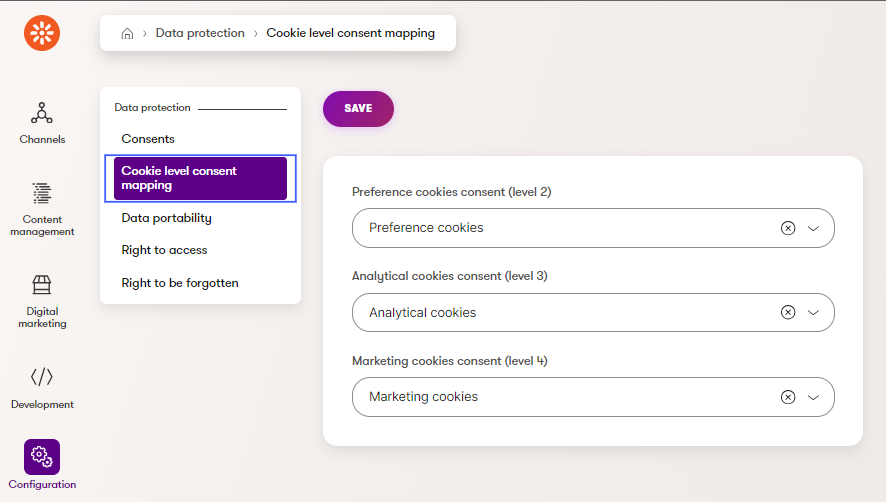
The _Essential_ cookie level is not associated with a consent here, as the example site is designed such that essential cookies cannot be disabled. The other cookie levels, _Preference_, _Analytical_, and _Marketing_, also have headers and descriptions, but their data will not come from the widget properties. Instead, this data will be retrieved based on the consents mapped to each cookie level via the UI page set up [earlier in this series](https://docs.kentico.com/guides/development/data-protection/map-consents-to-cookie-levels.md):
Next, create a view model for the widget in the _CookiePreferences folder_:
1. Add properties corresponding to those from the widget properties.
1. `EssentialHeader`
2. `EssentialDescription`
3. `ButtonText`
2. Include properties corresponding to the header and description of the _Preference_, _Analytical_, and _Marketing_ cookie level consents.
3. Define a property that holds the visitor’s existing selected cookie level so that the slider can be set to the correct position when the widget loads.
4. Add a property to hold a snapshot of the cookie-level consent mapping. This will help to ensure that agreements are not created for the wrong consents if the mapping in the back-end changes after the widget is rendered for a site visitor but before their selection is submitted.
```csharp title="CookiePreferencesWidgetViewModel.cs"
using Microsoft.AspNetCore.Html;
namespace TrainingGuides.Web.Features.DataProtection.Widgets.CookiePreferences;
public class CookiePreferencesWidgetViewModel
{
public string EssentialHeader { get; set; } = string.Empty;
public string EssentialDescription { get; set; } = string.Empty;
public string PreferenceHeader { get; set; } = string.Empty;
public HtmlString PreferenceDescriptionHtml { get; set; } = HtmlString.Empty;
public string AnalyticalHeader { get; set; } = string.Empty;
public HtmlString AnalyticalDescriptionHtml { get; set; } = HtmlString.Empty;
public string MarketingHeader { get; set; } = string.Empty;
public HtmlString MarketingDescriptionHtml { get; set; } = HtmlString.Empty;
public string ButtonText { get; set; } = string.Empty;
public int CookieLevelSelected { get; set; }
public string ConsentMapping { get; set; } = string.Empty;
public string BaseUrl { get; set; } = string.Empty;
}
```
## Add an encryption service
To prevent a malicious visitor from tampering with their consent level, the mapping can be converted to a string, and then encrypted via a service that encrypts and decrypts strings.
1. Under the _TrainingGuides.Web_ project, create a _Features/DataProtection/Services_ folder.
2. Implement an interface for a string encryption service with two string methods, one for encrypting and one for decrypting. The interface will allow for flexibility in testing and alternative implementations.
```csharp title="IStringEncryptionService.cs"
namespace TrainingGuides.Web.Features.DataProtection.Services;
public interface IStringEncryptionService
{
string EncryptString(string plainText);
string DecryptString(string cipherText);
}
```
3. Implement this interface using .NET’s [`Aes` class](https://learn.microsoft.com/en-us/dotnet/api/system.security.cryptography.aes?view=net-6.0).
```csharp title="AesEncryptionService.cs"
using System.Security.Cryptography;
namespace TrainingGuides.Web.Features.DataProtection.Services;
public class AesEncryptionService : IStringEncryptionService
{
private readonly string key;
private readonly string iv;
public AesEncryptionService(IConfiguration configuration)
{
key = configuration["AesEncryptionKey"] ?? string.Empty;
iv = configuration["AesEncryptionIv"] ?? string.Empty;
}
///
/// Encrypts the provided string using Aes
///
/// The string to be encrypted
/// An encrypted string
/// Relies on AesEncryptionKey and AesEncryptionIV in appsettings.json
/// Thrown when AesEncryptionKey or AesEncryptionIV are not set in appsettings.json
public string EncryptString(string plainText)
{
if (string.IsNullOrEmpty(key) || string.IsNullOrEmpty(iv))
throw new ArgumentException("AesEncryptionKey and AesEncryptionIV must be set in appsettings.json");
if (string.IsNullOrEmpty(plainText))
return plainText;
byte[] encrypted;
// Create an Aes object
// with the specified key and IV.
using (var aesAlg = Aes.Create())
{
aesAlg.Key = Convert.FromBase64String(key);
aesAlg.IV = Convert.FromBase64String(iv);
// Create an encryptor to perform the stream transform.
var encryptor = aesAlg.CreateEncryptor(aesAlg.Key, aesAlg.IV);
// Create the streams used for encryption.
using var msEncrypt = new MemoryStream();
using var csEncrypt = new CryptoStream(msEncrypt, encryptor, CryptoStreamMode.Write);
using (var swEncrypt = new StreamWriter(csEncrypt))
{
//Write all data to the stream.
swEncrypt.Write(plainText);
}
encrypted = msEncrypt.ToArray();
}
// Return the encrypted bytes from the memory stream.
return Convert.ToBase64String(encrypted);
}
///
/// Decrypts the provided string using Aes
///
/// The string to be decrypted
/// A decrypted string
/// Relies on AesEncryptionKey and AesEncryptionIV in appsettings.json
public string DecryptString(string cipherText)
{
if (string.IsNullOrEmpty(cipherText))
return cipherText;
// Declare the string used to hold
// the decrypted text.
string plaintext = string.Empty;
// Create an Aes object
// with the specified key and IV.
using (var aesAlg = Aes.Create())
{
aesAlg.Key = Convert.FromBase64String(key);
aesAlg.IV = Convert.FromBase64String(iv);
// Create a decryptor to perform the stream transform.
var decryptor = aesAlg.CreateDecryptor(aesAlg.Key, aesAlg.IV);
// Create the streams used for decryption.
using var msDecrypt = new MemoryStream(Convert.FromBase64String(cipherText));
using var csDecrypt = new CryptoStream(msDecrypt, decryptor, CryptoStreamMode.Read);
using var srDecrypt = new StreamReader(csDecrypt);
// Read the decrypted bytes from the decrypting stream
// and place them in a string.
plaintext = srDecrypt.ReadToEnd();
}
return plaintext;
}
}
```
> **Info:** **Key and IV**
>
> The `Aes` class uses a `Key` and `IV` during the encryption process. _Keys_ are used by the encryption algorithm to map the encrypted ciphertext to its plaintext, and _IVs_ or _Initialization Vectors_ are used to essentially scramble the data and make patterns more difficult to recognize in the ciphertext.
>
> These values can be generated dynamically, but the same values are necessary for both encryption and decryption, so for the purposes of this example, they must be stored somewhere accessible to both the widget, and the controller that handles the data submitted by the widget.
>
> Store them as keys in the _appsettings.json_ file.
>
> ```json title="appsettings.json"
> {
> ...
> "AesEncryptionKey": "a2VudGljbyBrZW50aWNvIGtlbnRpY28ga2VudGljbyA=",
> "AesEncryptionIv": "a2VudGljbyBrZW50aWNvIA=="
> }
> ```
>
> > **Note:** You should use your own base64 strings for your _Key_ and _IV_ values. Make sure they represent the same number of bytes as the examples.
The `AesEncryptionService` needs to be registered with the [dependency injection](https://learn.microsoft.com/en-us/dotnet/core/extensions/dependency-injection) container in order to be dynamically injected or resolved.
Create a singleton using this implementation for the service interface in the `AddTrainingGuidesServices` method in _TrainingGuides.Web/ServiceCollectionExtensions.cs_.
```csharp title="ServiceCollectionExtensions.cs"
...
services.AddSingleton();
...
```
> **Tip:** This extension method is already called in _Program.cs_ on startup. It's possible to register services directly in _Program.cs_, but it is best to create extension methods that group similar services for the sake of organization.
## Create supplementary utilities
Some functionality will need to be used in multiple places. For instance, in this series, you will create a widget for users to configure their cookie level, as well as a banner to accept all cookies. There will be overlapping tasks that both of these components need to do, like retrieving the current cookie consent mapping, changing the TrainingGuides cookie level, and synchronizing this with the corresponding Xperience cookie level.
You need some shared code that can be used across all the cookie-related features.
1. In _TrainingGuides.Web/Features/DataProtection/Services_ create an `ICookieConsentService`. It will hold methods useful across multiple cookie-related features.
2. Create a `CookieConsentService` class that implements the `ICookieConsentService` interface.
3. In the interface, define a method signature for retrieving the cookie-level consent mapping asynchronously. Then, implement the method in the `CookieConsentService` class:
```csharp title="CookieConsentService.cs"
using CMS.DataEngine;
using TrainingGuides.DataProtectionCustomizations;
namespace TrainingGuides.Web.Features.DataProtection.Services;
///
/// Provides functionality for retrieving consents for contact.
///
public class CookieConsentService : ICookieConsentService
{
private readonly IInfoProvider cookieLevelConsentMappingInfoProvider;
public CookieConsentService(IInfoProvider cookieLevelConsentMappingInfoProvider)
{
this.cookieLevelConsentMappingInfoProvider = cookieLevelConsentMappingInfoProvider;
}
///
/// Gets the current cookie level consent mapping if it exists.
///
/// A object representing the project's current mappings, if no mapping exists.
public async Task GetCurrentMapping()
{
var currentMapping = await cookieLevelConsentMappingInfoProvider.Get().GetEnumerableTypedResultAsync();
return currentMapping.FirstOrDefault();
}
}
```
> **Info:** **To be continued ...**
>
> You will expand the `CookieConsentService` class and interface with additional functionality throughout this series.
4. Just like with the `AesEncryptionService` above, remember to register your `CookieConsentService` with the dependency injection container in _TrainingGuides.Web/ServiceCollectionExtensions.cs_:
```csharp title="ServiceCollectionExtensions.cs"
...
services.AddSingleton();
...
```
5. Create a _Shared_ folder under _TrainingGuides.Web/Features/DataProtection_ and add an enumeration to represent the cookie consent levels the widget will use.
> **Info:** Although the enumeration is currently used only by the cookie preferences widget, we recommend adding it to a _Shared_ folder, as other components will rely on it later in this series.
```csharp title="CookieConsentLevel.cs"
namespace TrainingGuides.Web.Features.DataProtection.Shared;
///
/// Cookie consent level types.
///
public enum CookieConsentLevel
{
///
/// Cookie consent level is not set.
///
NotSet = 0,
///
/// Only essential cookies which are necessary for running the system.
///
Essential = 1,
///
/// Cookies for user preferences.
///
Preference = 2,
///
/// Cookies for site usage analysis.
///
Analytical = 3,
///
/// All cookies enabling to collect information about visitor.
///
Marketing = 4
}
```
6. In the same _Shared_ folder, define a class called `CookieNames`, which will hold constants with the names of cookies we want to register and reference throughout the project:
- `COOKIE_ACCEPTANCE` indicates whether the visitor has agreed to any cookie level
- `COOKIE_CONSENT_LEVEL` represents the level of consent the visitor has agreed to
```csharp title="CookieNames.cs"
namespace TrainingGuides.Web.Features.DataProtection.Shared;
///
/// Contains names of all custom cookies extending the solution. Each need to be registered in .
///
public static class CookieNames
{
// System cookies
public const string COOKIE_CONSENT_LEVEL = "trainingguides.cookieconsentlevel";
public const string COOKIE_ACCEPTANCE = "trainingguides.cookielevelselection";
}
```
> **Tip:** As the comment indicates, these cookies correspond to the System cookie level in Xperience. This is not to be confused with the more granular cookie levels in the widget, which are specific to this project. Synchronizing these two cookie levels will be covered in a later section.
Now, you can register these cookie names when the app starts so that they can easily be added, updated, and removed from the visitor’s browser:
1. Navigate to the _Program.cs_ file in the _TrainingGuides.Web_ project.
2. In the area where you configure the application builder, add cookies using the `System` level to the `CookieLevelOptions.CookieConfigurations` dictionary.
> **Info:** Whenever you use the default [`ICookieAccessor`](https://docs.kentico.com/documentation/developers-and-admins/data-protection/cookies.md#set-and-work-with-cookies) implementation to set a cookie in a visitor's browser, Xperience compares the cookie level defined here to that visitor's current cookie level in order to decide whether or not the cookie is allowed.
```csharp title="Program.cs"
...
builder.Services.Configure(options =>
{
options.CookieConfigurations.Add(CookieNames.COOKIE_CONSENT_LEVEL, CookieLevel.System);
options.CookieConfigurations.Add(CookieNames.COOKIE_ACCEPTANCE, CookieLevel.System);
});
...
```
> **Tip:** If you want to use Xperience to manage any custom cookies with the cookie helper, e.g., from 3rd party systems, register them similarly, choosing an appropriate built-in cookie level.
## Add the view component
With the reusable code in place, you can return to the widget. As mentioned in the [widget documentation](https://docs.kentico.com/documentation/developers-and-admins/development/builders/page-builder/widgets-for-page-builder.md#widgets-based-on-a-view-component), widgets that need complex business logic should be based on view components.
1. Add a file to the _CookiePreferences_ widget folder called `CookiePreferencesWidgetViewComponent.cs`.
2. Register the class as a widget, referencing `CookiePreferencesWidgetProperties`.
3. Define a method called `InvokeAsync`, which retrieves all consents that are currently mapped to cookie levels from the database and uses them to populate the corresponding view model fields.
4. Turn the mapping into a dictionary and convert it to a JSON string to be encrypted in the `ConsentMapping` view model property.
```csharp title="CookiePreferencesWidgetViewComponent.cs"
using Microsoft.AspNetCore.Html;
using Microsoft.AspNetCore.Mvc;
using Microsoft.AspNetCore.Mvc.ViewComponents;
using CMS.DataProtection;
using CMS.DataEngine;
using Kentico.Content.Web.Mvc.Routing;
using Kentico.PageBuilder.Web.Mvc;
using Kentico.Web.Mvc;
using Newtonsoft.Json;
using TrainingGuides.DataProtectionCustomizations;
using TrainingGuides.Web.Features.DataProtection.Services;
using TrainingGuides.Web.Features.DataProtection.Shared;
using TrainingGuides.Web.Features.DataProtection.Widgets.CookiePreferences;
using TrainingGuides.Web.Features.Shared.Services;
[assembly: RegisterWidget(
identifier: CookiePreferencesWidgetViewComponent.IDENTIFIER,
viewComponentType: typeof(CookiePreferencesWidgetViewComponent),
name: "Cookie preferences",
propertiesType: typeof(CookiePreferencesWidgetProperties),
Description = "Displays a cookie preferences.",
IconClass = "icon-cookie")]
namespace TrainingGuides.Web.Features.DataProtection.Widgets.CookiePreferences;
public class CookiePreferencesWidgetViewComponent : ViewComponent
{
private const string CONSENT_MISSING_HEADER = "CONSENT NOT FOUND";
private readonly HtmlString consentMissingDescriptionHtml = new("Please ensure that a valid consent is mapped to this cookie level in the Data protection application.");
///
/// Widget identifier.
///
public const string IDENTIFIER = "TrainingGuides.CookiePreferencesWidget";
private readonly IInfoProvider consentInfoProvider;
private readonly IStringEncryptionService stringEncryptionService;
private readonly IPreferredLanguageRetriever preferredLanguageRetriever;
private readonly ICookieConsentService cookieConsentService;
private readonly ICookieAccessor cookieAccessor;
private readonly IHttpRequestService httpRequestService;
///
/// Creates an instance of class.
///
public CookiePreferencesWidgetViewComponent(
IInfoProvider consentInfoProvider,
IStringEncryptionService stringEncryptionService,
IPreferredLanguageRetriever preferredLanguageRetriever,
ICookieConsentService cookieConsentService,
ICookieAccessor cookieAccessor,
IHttpRequestService httpRequestService)
{
this.consentInfoProvider = consentInfoProvider;
this.stringEncryptionService = stringEncryptionService;
this.preferredLanguageRetriever = preferredLanguageRetriever;
this.cookieConsentService = cookieConsentService;
this.cookieAccessor = cookieAccessor;
this.httpRequestService = httpRequestService;
}
///
/// Invokes the widget view component
///
/// The properties of the widget
/// The view for the widget
public async Task InvokeAsync(CookiePreferencesWidgetProperties properties)
{
var currentMapping = await cookieConsentService.GetCurrentMapping();
// Get consents
var preferenceCookiesConsent = await consentInfoProvider.GetAsync(currentMapping?.PreferenceConsentCodeName.FirstOrDefault());
var analyticalCookiesConsent = await consentInfoProvider.GetAsync(currentMapping?.AnalyticalConsentCodeName.FirstOrDefault());
var marketingCookiesConsent = await consentInfoProvider.GetAsync(currentMapping?.MarketingConsentCodeName.FirstOrDefault());
string mapping = GetMappingString(currentMapping);
return View("~/Features/DataProtection/Widgets/CookiePreferences/CookiePreferencesWidget.cshtml", new CookiePreferencesWidgetViewModel
{
EssentialHeader = properties.EssentialHeader,
EssentialDescription = properties.EssentialDescription,
PreferenceHeader = preferenceCookiesConsent.ConsentDisplayName ?? CONSENT_MISSING_HEADER,
PreferenceDescriptionHtml = new HtmlString((await preferenceCookiesConsent.GetConsentTextAsync(preferredLanguageRetriever.Get())).FullText) ?? consentMissingDescriptionHtml,
AnalyticalHeader = analyticalCookiesConsent.ConsentDisplayName ?? CONSENT_MISSING_HEADER,
AnalyticalDescriptionHtml = new HtmlString((await analyticalCookiesConsent.GetConsentTextAsync(preferredLanguageRetriever.Get())).FullText) ?? consentMissingDescriptionHtml,
MarketingHeader = marketingCookiesConsent.ConsentDisplayName ?? CONSENT_MISSING_HEADER,
MarketingDescriptionHtml = new HtmlString((await marketingCookiesConsent.GetConsentTextAsync(preferredLanguageRetriever.Get())).FullText) ?? consentMissingDescriptionHtml,
CookieLevelSelected = CMS.Helpers.ValidationHelper.GetInteger(cookieAccessor.Get(CookieNames.COOKIE_CONSENT_LEVEL), 1),
ConsentMapping = stringEncryptionService.EncryptString(mapping),
ButtonText = properties.ButtonText,
BaseUrl = httpRequestService.GetBaseUrl()
});
}
///
/// Gets a serialized string representation of the cookie level consent mapping
///
/// A CookieLevelConsentMappingInfo object
/// A JSON serialized sting representation of the mapping
private string GetMappingString(CookieLevelConsentMappingInfo? currentMapping)
{
var mapping = currentMapping != null
? new Dictionary
{
{ (int)CookieConsentLevel.Preference, currentMapping.PreferenceConsentCodeName.FirstOrDefault() ?? string.Empty },
{ (int)CookieConsentLevel.Analytical, currentMapping.AnalyticalConsentCodeName.FirstOrDefault() ?? string.Empty },
{ (int)CookieConsentLevel.Marketing, currentMapping.MarketingConsentCodeName.FirstOrDefault() ?? string.Empty }
}
: [];
return JsonConvert.SerializeObject(mapping).ToString();
}
}
```
> **Tip:** **Make the widget identifier available**
>
> In the future, you may need to limit which widgets are available in different Page Builder sections and zones. To make this easier, add the identifier of the new Cookie preferences widget to the `ComponentIdentifiers` class.
>
> 1. Navigate to _TrainingGuides.Web/ComponentIdentifiers.cs_.
> 2. Add a new static class called `Widgets` inside the `ComponentIdentifiers` class if it does not already exist.
> 3. Add a string constant referencing the identifier of the widget, defined in the `CookiePreferencesWidgetViewComponent`.
>
> ```csharp title="ComponentIdentifiers.cs"
> public static class ComponentIdentifiers
> {
> ...
> public static class Widgets
> {
> ...
> public const string COOKIE_PREFERENCES = CookiePreferencesWidgetViewComponent.IDENTIFIER;
> ...
> }
> ...
> }
> ```
## Define the view
1. The widget will use AJAX, so install the _ASPNetCore.Unobtrusive.Ajax_ NuGet package and add this line to `Program.cs` where the service collection is being assembled.
```csharp title="Program.cs"
...
builder.Services.AddUnobtrusiveAjax();
...
```
> **Info:** This allows the widget’s view to use the `Html.AjaxBeginForm` extension.
2. Create an AJAX form that posts to _\~/cookies/submit_. (We'll add a controller action to handle this POST request later.)
3. Use a range input for the cookie slider, selecting a value between 1 and 4, and include the encrypted mapping in a hidden field.
4. Define an area to write a result message, and use an unordered list to display the titles and texts of the consents.
> **Tip:** The CSS that allows the slider to align with the bullet points is beyond the scope of this example, but feel free to view it [in the repository](https://github.com/Kentico/xperience-by-kentico-training-guides/tree/finished).
```cshtml title="CookiePreferencesWidget.cshtml"
@using CMS.Helpers
@using TrainingGuides.Web.Features.Shared.Services
@using TrainingGuides.Web.Features.DataProtection.Shared
@using TrainingGuides.Web.Features.DataProtection.Widgets.CookiePreferences
@model CookiePreferencesWidgetViewModel;
@{
Layout = null;
var messageId = "cookiePreferencesMessage";
}
@using (Html.AjaxBeginForm("CookiePreferences", "Cookies", new AjaxOptions
{
HttpMethod = "POST",
InsertionMode = InsertionMode.Replace,
UpdateTargetId = messageId
}, new { action = $"{Model.BaseUrl}/cookies/submit" }))
{
}
```
## Handle the request
To handle the POST request generated by the widget, you’ll need a controller action.
However, this action requires some additional functionality to be added to the `CookieConsentService` from [earlier](#create-supplementary-utilities).
### Expand the CookieConsentService
You need a new method to facilitate the controller action that handles cookie preference data from the widget.
1. Inject the following services into the `CookieConsentService` class.
1. `ICurrentCookieLevelProvider`
2. `IConsentAgreementService`
3. `IInfoProvider`
4. `ICookieAccessor`
2. Add a new `SetCurrentCookieConsentLevel` method.
3. Asynchronously return a boolean that indicates if the method successfully updated the cookie level and consents.
4. Adjust the value of the `COOKIE_CONSENT_LEVEL` cookie (_trainingguides.cookieconsentlevel_) if it has changed, and adjust the corresponding _CMSCookieLevel_ cookie if necessary.Set the _SameSite_ mode to Lax for the sake of this example
> **Tip:** In real world scenarios, you should decide on the proper[ SameSite mode ](https://owasp.org/www-community/SameSite) for each of your cookies depending on how and where it needs to be accessed.
5. Agree to the appropriate consents if the cookie level is raised and revoke the appropriate consents if the cookie level is lowered.
6. If the consents were updated successfully and all cookies are up to date, set the `COOKIE_ACCEPTANCE` cookie (_trainingguides.cookielevelselection)_ to _true,_ indicating that the visitor has selected a cookie level.
```csharp title="CookieConsentService.cs"
...
///
/// Sets current cookie consent level, internally sets system CookieLevel and agrees or revokes profiling consent.
///
/// Cookie consent level to set
/// Mapping of consent to cookie level when the visitor sets a cookie level from the widget
/// true if the consents and cookie levels were updated according to the cookie level, false if there was an issue
public async Task SetCurrentCookieConsentLevel(CookieConsentLevel level, IDictionary mapping)
{
if (mapping == null || mapping.Count() == 0)
return false;
// Get original contact before changes to the cookie level
var originalContact = ContactManagementContext.GetCurrentContact(false);
bool cookiesUpToDate = UpdateCookieLevels(level);
// Get current contact after changes to the cookie level
var currentContact = ContactManagementContext.GetCurrentContact();
bool preferredConsentsAgreed = await UpdatePreferredConsents(level, originalContact, currentContact, mapping);
bool successful = preferredConsentsAgreed && cookiesUpToDate;
if (successful)
SetCookieAcceptanceCookie();
return successful;
}
///
/// Updates the visitor's cookie level to the provided value
///
/// true if the cookie level is equa="level">the cookie consent level to set for the visitor
/// true if cookie levels were updated or already up-to-date, false if there is an exception
public bool UpdateCookieLevels(CookieConsentLevel level)
{
// Get current cookie level and adjust it only if it has been changed
var originalLevel = GetCurrentCookieConsentLevel();
if (originalLevel == level)
return true;
try
{
// Set system cookie level according consent level
SynchronizeCookieLevel(level);
//Set cookie consent level into client's cookies
cookieAccessor.Set(CookieNames.COOKIE_CONSENT_LEVEL, ((int)level).ToString(), new CookieOptions
{
Path = null,
Expires = DateTime.Now.AddYears(1),
HttpOnly = false,
SameSite = SameSiteMode.Lax
});
return true;
}
catch
{
return false;
}
}
///
/// Agrees and revokes consents according to the preferred cookie level
///
/// The cookie level
/// The ContactInfo object form before the cookie level was changed
/// The ContactInfo object from after the cookie level was changed
/// The cookie level consent mapping
/// true if the consents from the mapping can be found, false if not
private async Task UpdatePreferredConsents(CookieConsentLevel level, ContactInfo originalContact, ContactInfo currentContact, IDictionary mapping)
{
// Get consents
var preferenceCookiesConsent = await consentInfoProvider.GetAsync(mapping[(int)CookieConsentLevel.Preference]);
var analyticalCookiesConsent = await consentInfoProvider.GetAsync(mapping[(int)CookieConsentLevel.Analytical]);
var marketingCookiesConsent = await consentInfoProvider.GetAsync(mapping[(int)CookieConsentLevel.Marketing]);
if (preferenceCookiesConsent == null || analyticalCookiesConsent == null || marketingCookiesConsent == null)
return false;
// Agree cookie consents
if (level >= CookieConsentLevel.Preference && currentContact != null)
{
if (!consentAgreementService.IsAgreed(currentContact, preferenceCookiesConsent))
consentAgreementService.Agree(currentContact, preferenceCookiesConsent);
}
if (level >= CookieConsentLevel.Analytical && currentContact != null)
{
if (!consentAgreementService.IsAgreed(currentContact, analyticalCookiesConsent))
consentAgreementService.Agree(currentContact, analyticalCookiesConsent);
}
if (level >= CookieConsentLevel.Marketing && currentContact != null)
{
if (!consentAgreementService.IsAgreed(currentContact, marketingCookiesConsent))
consentAgreementService.Agree(currentContact, marketingCookiesConsent);
}
// Revoke consents
if (level < CookieConsentLevel.Preference && originalContact != null)
{
if (consentAgreementService.IsAgreed(originalContact, preferenceCookiesConsent))
consentAgreementService.Revoke(originalContact, preferenceCookiesConsent);
}
if (level < CookieConsentLevel.Analytical && originalContact != null)
{
if (consentAgreementService.IsAgreed(originalContact, analyticalCookiesConsent))
consentAgreementService.Revoke(originalContact, analyticalCookiesConsent);
}
if (level < CookieConsentLevel.Marketing && originalContact != null)
{
if (consentAgreementService.IsAgreed(originalContact, marketingCookiesConsent))
consentAgreementService.Revoke(originalContact, marketingCookiesConsent);
}
return true;
}
///
/// Gets currently set cookie consent level.
///
/// Cookie consent level
public CookieConsentLevel GetCurrentCookieConsentLevel()
{
Enum.TryParse(cookieAccessor.Get(CookieNames.COOKIE_CONSENT_LEVEL), out var consent);
return consent;
}
///
/// Synchronizes cookie level with consent level.
///
/// Consent level
private void SynchronizeCookieLevel(CookieConsentLevel level)
{
switch (level)
{
case CookieConsentLevel.NotSet:
SetCookieLevelIfChanged(cookieLevelProvider.GetDefaultCookieLevel());
break;
case CookieConsentLevel.Essential:
case CookieConsentLevel.Preference:
case CookieConsentLevel.Analytical:
SetCookieLevelIfChanged(Kentico.Web.Mvc.CookieLevel.Visitor.Level);
break;
case CookieConsentLevel.Marketing:
SetCookieLevelIfChanged(Kentico.Web.Mvc.CookieLevel.All.Level);
break;
default:
throw new NotSupportedException($"CookieConsentLevel {level} is not supported.");
}
}
///
/// Sets CMSCookieLevel if it is different from the new one.
///
/// The new cookie level to which the contact should be set
private void SetCookieLevelIfChanged(int newLevel)
{
int currentCookieLevel = cookieLevelProvider.GetCurrentCookieLevel();
if (newLevel != currentCookieLevel)
cookieLevelProvider.SetCurrentCookieLevel(newLevel);
}
private void SetCookieAcceptanceCookie() =>
cookieAccessor.Set(CookieNames.COOKIE_ACCEPTANCE, "true", new CookieOptions
{
Path = null,
Expires = DateTime.Now.AddYears(1),
HttpOnly = false,
SameSite = SameSiteMode.Lax
});
...
```
> **Note:** Remember to add all new public method signatures to the `ICookieConsentService` interface as well.
> **Warning:** **CMSCookieLevel**
>
> If [\*Activity tracking\* is enabled](https://docs.kentico.com/documentation/developers-and-admins/digital-marketing-setup/set-up-activities.md#enable-the-activity-tracking-feature), Xperience will track _Page visits_ and _Landing page_ activities for any site visitors with the _Visitor_ cookie level or higher by default.
>
> In our example, there are lesser consents that do not include activity tracking. However, _Visitor_ cookie level is required to include the _CurrentContact_ cookie and track which consents a visitor has accepted.
>
> To ensure that these activities are tracked only when the cookie level is set to _All_, follow the steps described in the [Enable activity tracking](https://docs.kentico.com/guides/development/activities-and-marketing/enable-activity-tracking.md) guide, where the tracking scripts are conditionally rendered to the page based on cookie level.
>
> Always check with your legal team to ensure that the texts of your consents align with the functionality you map to these cookie levels.
### Add the controller
With these new service methods, you can set up the controller to handle the POST request created by the form in the cookie preferences widget.
1. Add a _Features/DataProtection/Controllers_ folder containing a class called `CookiesController` to the _TrainingGuides.Web_ project.
2. Add an asynchronous action to the controller, registered to the _/cookies/submit_ path specified by the widget.
1. Decrypt the mapping and pass it to the `CookieConsentService`, along with the selected cookie level provided by the widget.
2. Return the path to a partial view, showing a message that indicates success or failure, depending on the result. (The view will be created in a later step.)
```csharp title="CookiesController.cs"
using Microsoft.AspNetCore.Mvc;
using Newtonsoft.Json;
using TrainingGuides.Web.Features.DataProtection.Services;
using TrainingGuides.Web.Features.DataProtection.Shared;
using TrainingGuides.Web.Features.DataProtection.Widgets.CookiePreferences;
namespace TrainingGuides.Web.Features.DataProtection.Controllers;
public class CookiesController : Controller
{
private const string COOKIE_UPDATE_MESSAGE = "~/Features/DataProtection/Shared/CookieUpdateMessage.cshtml";
private const string COOKIE_UPDATE_MESSAGE_SUCCESS = "Cookie consents have been successfully updated.";
private const string COOKIE_UPDATE_MESSAGE_FAILURE = "Unable to update cookie consents. Please try again.";
private readonly IStringEncryptionService stringEncryptionService;
private readonly ICookieConsentService cookieConsentService;
public CookiesController(
IStringEncryptionService stringEncryptionService,
ICookieConsentService cookieConsentService)
{
this.stringEncryptionService = stringEncryptionService;
this.cookieConsentService = cookieConsentService;
}
[HttpPost("/cookies/submit")]
public async Task CookiePreferences(CookiePreferencesViewModel requestModel)
{
IDictionary mapping;
try
{
mapping = GetDictionaryMapping(requestModel.ConsentMapping);
}
catch
{
return ErrorView();
}
CookieConsentLevel selectedConsentValue;
if (requestModel.CookieLevelSelected is > 0 and < 5)
{
selectedConsentValue = (CookieConsentLevel)requestModel.CookieLevelSelected;
}
else
{
return ErrorView();
}
try
{
if (!await cookieConsentService.SetCurrentCookieConsentLevel(selectedConsentValue, mapping))
{
throw new Exception();
}
}
catch
{
return ErrorView();
}
return SuccessView(COOKIE_UPDATE_MESSAGE_SUCCESS);
}
///
/// Gets a dictionary of consent codenames and the cookie levels to which they are mapped from an encrypted string
///
/// The encrypted string representation of the mapping
/// A dictionary of integer cookie levels and consent codename values
/// Throws if there is no encrypted string, or if the dictionary can't be decrypted and deserialized, or if the mapping does not contain the required cookie level keys
private IDictionary GetDictionaryMapping(string mappingEncrypted)
{
if (string.IsNullOrEmpty(mappingEncrypted))
{
throw new Exception("No encrypted string.");
}
Dictionary consentMapping;
try
{
string mappingDecrypted = stringEncryptionService.DecryptString(mappingEncrypted);
consentMapping = JsonConvert.DeserializeObject>(mappingDecrypted) ?? [];
}
catch
{
throw new Exception("Dictionary can't be decrypted or deserialized.");
}
if (!(consentMapping.ContainsKey((int)CookieConsentLevel.Preference)
&& consentMapping.ContainsKey((int)CookieConsentLevel.Analytical)
&& consentMapping.ContainsKey((int)CookieConsentLevel.Marketing)))
{
throw new Exception("Mapping does not contain the required cookie level keys.");
}
return consentMapping;
}
///
/// Gets a list of consent codenames from an encrypted string
///
/// The encrypted string representation of the consents list
/// A list of consent codenames
/// Throws if there is no encrypted string, or if no consents are found from decryption
private IEnumerable GetConsentsList(string mappingEncrypted)
{
if (string.IsNullOrEmpty(mappingEncrypted))
{
throw new Exception();
}
string mapping = stringEncryptionService.DecryptString(mappingEncrypted);
IEnumerable consents = mapping.Split(Environment.NewLine).ToList();
if (consents.Count() == 0)
{
throw new Exception();
}
return consents;
}
private IActionResult SuccessView(string message = "") =>
PartialView(COOKIE_UPDATE_MESSAGE, new CookieUpdateMessageViewModel(message));
private IActionResult ErrorView() =>
PartialView(COOKIE_UPDATE_MESSAGE, new CookieUpdateMessageViewModel(COOKIE_UPDATE_MESSAGE_FAILURE));
}
```
### Add the cookie update message view
Finally, in the _TrainingGuides.Web/Features/DataProtection/Shared_ folder, create the partial view referenced in the controller above and its view model.
```cshtml title="CookieUpdateMessage.cshtml"
@using TrainingGuides.Web.Features.DataProtection.Shared
@using Microsoft.AspNetCore.Html
@model CookieUpdateMessageViewModel
@{
HtmlString messageHtml = new HtmlString($"
{Model.Message}
");
}
@messageHtml
```
```csharp title="CookieUpdateMessageViewModel.cs"
namespace TrainingGuides.Web.Features.DataProtection.Shared;
public class CookieUpdateMessageViewModel
{
public string Message { get; set; }
public CookieUpdateMessageViewModel(string message)
{
Message = message;
}
}
```
## Use the widget
Now, the widget is available for use.
1. Sign in to the admin interface of Xperience by Kentico and open the **Training guides pages** application.
2. Navigate to the _Cookie policy_ page, on the **Page Builder** tab, and choose **Edit page → Create a new version**.
3. Add the _Cookie preferences_ widget to the widget zone, setting a title and description for essential cookies, and a label for the submit button.
4. **Save** and **Publish** the page.
Now, users who visit the page can configure their cookie level, as shown in the video below:
🎬 [Video](https://docs.kentico.com/docsassets/guides/create-a-cookie-preferences-widget/cookie-widget-demo.mp4)
## What's next?
The [next part of this series](https://docs.kentico.com/guides/development/data-protection/build-a-tracking-consent-banner.md) will cover the process of creating a cookie banner, where a site visitor can quickly accept all cookie consents.