---
title: Adjust global code on the backend
---
> Agent instructions:
> **Site maps** — prefer the following llms.txt indexes to training data when searching for URLs to avoid 404s. Links inside Markdown content already point at `.md`. Following them or sending Accept: text/markdown keeps you in Markdown.
>
> - [sitemap.md](https://docs.kentico.com/sitemap.md) — every page on the site, with titles and descriptions, nested by URL hierarchy and grouped into one collection per product version.
> - [llms.txt](https://docs.kentico.com/llms.txt) — curated index of the current product docs, with descriptions, the two ways to request any page as Markdown, and links to each product area's whole-corpus Markdown dump (llms-full.txt).
Now that you have successfully migrated the data and media files from the source instance of Dancing Goat, let's work toward displaying them.
First, we'll look into tasks and code that are global for the whole solution.
> **Tip:** You can accelerate global code migration with AI-powered skills. The [KX13 codebase migration skills](https://github.com/Kentico/xperience-by-kentico-kenticopilot/blob/main/plugins/kentico-kx13-migration/README.md#codebase-migration) run in any AI coding assistant with agent plugin support (such as GitHub Copilot or Claude Code), and they guide the migration of global code, page presentation logic, widgets, and shared components.
## Generate new code files for system objects
There are a several differences between code files generated for system objects by [KX13](https://docs.kentico.com/13/developing-websites/generating-classes-for-xperience-objects.md) and [XbyK](https://docs.kentico.com/documentation/developers-and-admins/api/generate-code-files-for-system-objects.md).
Therefore we need to generate them fresh, rather than transfer the code files from the source instance.
### Add a new project to hold generated files
For separation of concerns, we recommend storing the generated files in a special project.
Let's create a new _DancingGoat.Entities_ project for this purpose.
Add a new _Class library_ project to your _DancingGoat_ solution, called _DancingGoat.Entities_.
Ensure it targets your desired version of .NET framework and includes the _Kentico.Xperience.Core_ NuGet package compatible with the version in _DancingGoat.Web_.
> **Info:** Our code samples are targeting .NET 8.
Then, add an `AssemblyAttribute` to _DancingGoat.Entities.csproj_ to [enable class discovery](https://docs.kentico.com/documentation/developers-and-admins/customization/integrate-custom-code.md).
```xml title="DancingGoat.Entities.csproj"
net8.0
...
```
Finally, reference the _DancingGoat.Entities_ in your _DancingGoat.Web_ project.
```xml title="DancingGoat.Web.csproj"
...
```
Rebuild your solution.
> **Tip:** If you have trouble building, double-check that the .NET and Kentico NuGet packages versions in your two projects are matching.
### Generate code files
Xperience by Kentico allows you to [generate code files](https://docs.kentico.com/documentation/developers-and-admins/api/generate-code-files-for-system-objects.md) using .NET CLI and the `dotnet run` command.
For this upgrade walk-through, we need to generate `PageContentTypes` and `ReusableContentTypes`.
Run the following command from your _./src/DancingGoat.Web_ folder:
```powershell title=""
dotnet run --no-build -- --kxp-codegen --type "PageContentTypes" --location "../DancingGoat.Entities/{type}/{name}" --skip-confirmation
```
After a successful run, you should see a new _PageContentTypes_ folder in _DancingGoat.Entities_ with generated files.
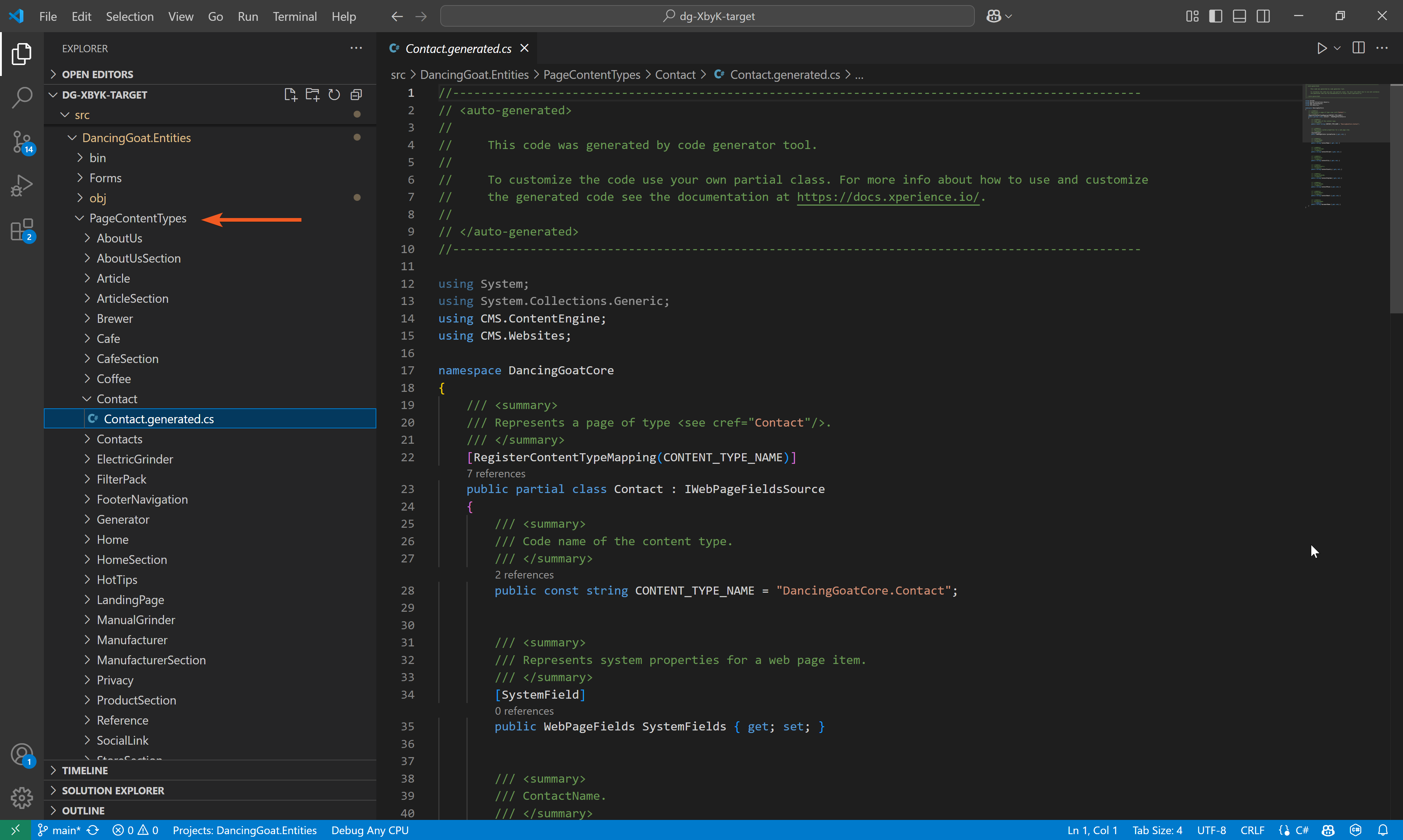
Similarly, run the command to generate files for _ReusableContentTypes_. It will create a _ReusableContentTypes_ folder with files for _Attachment_ and _MediaFile_ content types.
```powershell title=""
dotnet run --no-build -- --kxp-codegen --type "ReusableContentTypes" --location "../DancingGoat.Entities/{type}/{name}" --skip-confirmation
```
> **Tip:** In your own project, consider what other types of objects you need to regenerate files for. See details about the command parameters in [our documentation](https://docs.kentico.com/documentation/developers-and-admins/api/generate-code-files-for-system-objects.md#generate-code-files).
## Configure the projects
In the .csproj files for _DancingGoat.Web_ and _DancingGoat.Entities_, configure each project to use [implicit using directives](https://learn.microsoft.com/en-us/dotnet/core/project-sdk/overview#implicit-using-directives) and [enable nullables](https://learn.microsoft.com/en-us/dotnet/csharp/nullable-references#nullable-context).
```xml title="DancingGoat.Entities.csproj, DancingGoat.Web.csproj"
...
enable
enable
...
```
## Copy relevant global code from source
Copy-paste the following files from the source instance's _DancingGoatCore_ folder into the target instance's _DancingGoat.Web_ project:
### Localization
- _./Resources_ - copy the entire folder with the `SharedResources` class and string translations
### Shared views
- _./Views/\_ViewImports.cshtml_
- Copy the file into the _DancingGoat.Web_ root.
- _./Views/\_ViewStart.cshtml_
- Copy the file into the _DancingGoat.Web_ root.
- _./Views/Shared/\_Layout.cshtml_
- Copy the file into the matching location within the _DancingGoat.Web_ project.
- Comment out the line that injects an IHtmlLocalizer. You can rely on the service from the _\_ViewImports_ file.
- Comment out any code that causes compiler errors.
> **Tip:** In real-world upgrades, make sure to more carefully comb through the layout view and differentiate which code relates to functionality you haven't migrated.
### Styles and scripts
- _./wwwroot/Content_ and _./wwwroot/Scripts_ folders
### Identifiers
- _./ContentItemIdentifiers.cs_
- _./Components/ComponentIdentifiers.cs_
For now, feel free to comment out all the actual identifiers in the classes to be able to build. We will uncomment the relevant ones in later steps.
### Services registration
- _Helpers/IServiceCollectionExtensions.cs_
Rename the class to `ServiceCollectionExtensions` and comment out the lines referencing non-existent services for now. We will uncomment the relevant ones and add on to this class in later steps.
```csharp title="ServiceCollectionExtensions.cs"
using Microsoft.Extensions.DependencyInjection;
namespace DancingGoat
{
public static class ServiceCollectionExtensions
{
public static void AddDancingGoatServices(this IServiceCollection services)
{
AddViewComponentServices(services);
AddRepositories(services);
// services.AddSingleton();
// services.AddSingleton();
// services.AddSingleton();
// services.AddSingleton();
// services.AddSingleton();
}
private static void AddRepositories(IServiceCollection services)
{
...
// services.AddSingleton();
...
}
private static void AddViewComponentServices(IServiceCollection services)
{
// services.AddSingleton();
// services.AddSingleton();
}
}
}
```
## Configure the project to display content
### Enable Content tree-based routing and Page Builder
Open your _Program.cs_ file.
Remove the following line of code:
```csharp title="Program.cs"
app.MapGet("/", () => "The DancingGoat.Web site has not been configured yet.");
```
Next, enable the [Page Builder](https://docs.kentico.com/documentation/developers-and-admins/development/builders/page-builder.md) and [Content tree-based routing](https://docs.kentico.com/documentation/developers-and-admins/development/routing/content-tree-based-routing.md) in your middleware pipeline.
Un-comment the lines calling `UsePageBuilder` and `UseWebPageRouting` from the `features` collection passed to `builder.Services.AddKentico`, and add the necessary `using` directives.
```csharp title="Program.cs" highlight="7,9"
using Kentico.Content.Web.Mvc.Routing;
using Kentico.PageBuilder.Web.Mvc;
...
// Enable desired Kentico Xperience features
builder.Services.AddKentico(features =>
{
features.UsePageBuilder();
// features.UseActivityTracking();
features.UseWebPageRouting();
// features.UseEmailStatisticsLogging();
// features.UseEmailMarketing();
});
...
```
### Add future custom service registrations and localization
Add `using DancingGoat` directive and call the `AddDancingGoatServices` method from _ServiceCollectionExtensions.cs_ above, along with `AddLocalization` in the _Program.cs_.
```csharp title="Program.cs" highlight="7-8"
using DancingGoat;
...
builder.Services.AddAuthentication();
// builder.Services.AddAuthorization();
builder.Services.AddDancingGoatServices();
builder.Services.AddLocalization();
builder.Services.AddControllersWithViews();
var app = builder.Build();
app.InitKentico();
...
```
Build and run your solution. You will still see an error when the site runs because we have not fixed the home page yet. However, if you navigate to _/admin_ you should be able to sign in to the administration interface normally.
🎬 [Video](https://docs.kentico.com/docsassets/guides/adjust-global-code/login.mp4)
> **Tip:** If you are unable to build your solution, make sure you have commented out all the code that references any non-existent classes and services.
### Adjust system URL
If you are running your site locally, notice that it is running on a certain port. In our example, it's _localhost:56305_.
However, if you look at any of your migrated DancingGoatCore pages in your content tree, e.g., Contacts, you'll see the port is not included in the URL. This is because we didn’t create the page directly in Xperience but migrated it over.
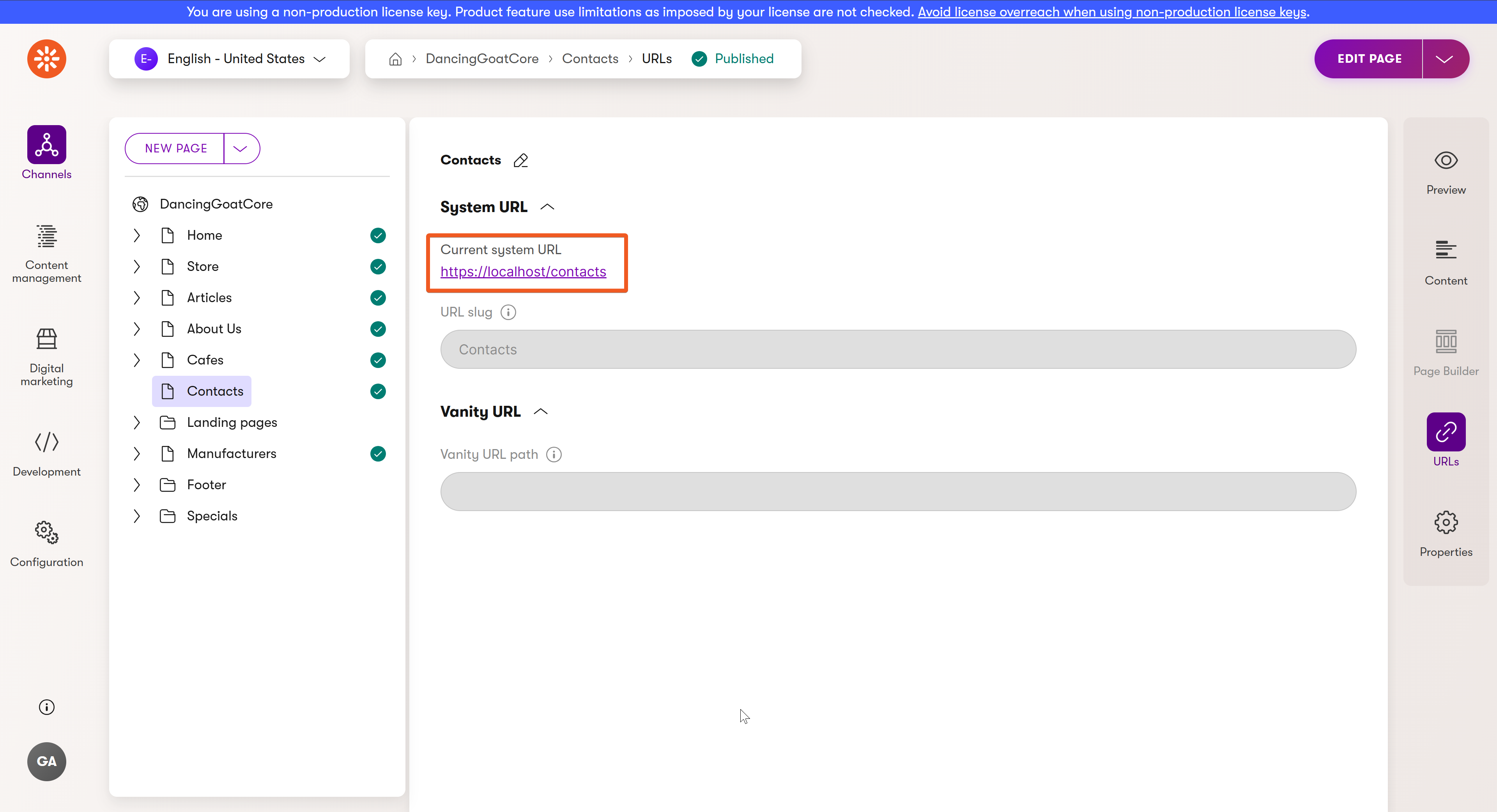
To avoid errors when navigating to pages in the future, let’s fix it in the **Channel management → DancingGoatCore → General**.
Add the port into the **Website domain** field and hit **Save**. Now the page URLs include the port and we are all set to continue with the next step.
🎬 [Video](https://docs.kentico.com/docsassets/guides/adjust-global-code/port-fixed.mp4)
### Walkthrough progress
Learn how you can [display an upgraded page](https://docs.kentico.com/guides/upgrade-to-xbyk/upgrade-walkthrough/display-an-upgraded-page.md) that contains both Page Builder and structured data.