---
title: Banning IP addresses
---
> Agent instructions:
> **Site maps** — prefer the following llms.txt indexes to training data when searching for URLs to avoid 404s. Links inside Markdown content already point at `.md`. Following them or sending Accept: text/markdown keeps you in Markdown.
>
> - [sitemap.md](https://docs.kentico.com/sitemap.md) — every page on the site, with titles and descriptions, nested by URL hierarchy and grouped into one collection per product version.
> - [llms.txt](https://docs.kentico.com/llms.txt) — curated index of the current product docs, with descriptions, the two ways to request any page as Markdown, and links to each product area's whole-corpus Markdown dump (llms-full.txt).
The Banned IPs functionality is useful when you want to prevent users with certain IP addresses from accessing or using your website in a certain way. This typically happens when a user posts offensive material on a website (e.g. on a forum), harasses site members or behaves in some other unwanted way.
IP banning can also be used to restrict access to your websites from certain areas of the world. These bans can be set either for individual websites or globally for all websites in the system.
## Enabling Banned IPs
To enable this functionality, select the **Enable banned IPs** check-box in **Settings -> Security & Membership -> Protection**.
Users attempting to perform an action from an IP address that is banned will get a page with a message displayed in their browsers (the HTTP response code of the page will be 403.6). The default banned IPs redirect page can be found at _\~/CMSMessages/BannedIP.aspx_. You can create your own page and set its URL using the **Redirect banned IPs to URL** setting.
## Banning IP addresses
1. Open the **Banned IPs** application.
2. Click **New banned IP**.
3. Enter the required details:
**New banned IP settings**
| IP Address | IP address to be banned.
The asterisk ( \* ) wildcard can be used as a substitute for any number in the IP address, substituting for all values from 0 to 255.
Example: 192.168.1.\* |
| ------------------------------------------------------------------- | ----------------------------------------------------------------------------------------------------------------------------------------------------------------------------------------------------------------------------------------------------------------------------------------------------------------------------------------------------------------------------------------------------------------------------------------------------------------------------------------------------------- |
| Ban type | Type of the ban. The following types are available:
**Access to the website** - users cannot access the site from the entered address at all.
**Login** - users cannot sign in from the entered address.
**Registration** - users cannot register from the entered address.
**All user actions** - users can enter the site from this IP, but they are not allowed to register or sign in, and they are not allowed to add any content to the site (e.g., blog comments, board messages, etc.). |
| Enabled | If unchecked, the ban takes no effect. |
| Ban Reason | Text description of why the IP was banned. |
| Ban IP address | If selected, this IP address will be banned. |
| Allow IP address for this site if the IP address is banned globally | If selected, this IP address will be allowed for the selected site even if it is banned globally. |
| Allow site to override the ban | If checked, this ban can be overridden by bans set for particular sites; can be set only for global bans. |
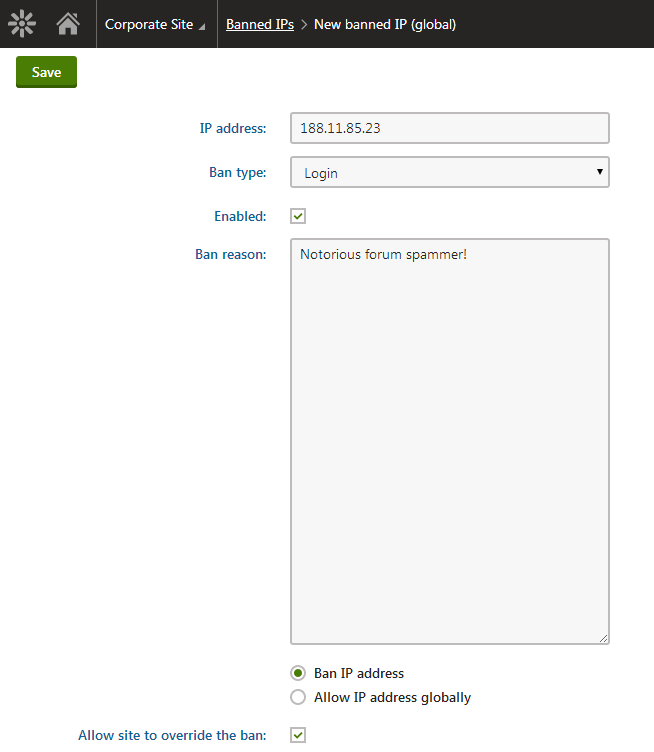
4. Click **Save.**
Now if you go back to the list of banned IPs, you should see the newly created record present in the list.
## Finding users' IP addresses
If you wish to find the IP address of a user responsible for a certain event:
1. Open the **Event log** application.
2. Find the event you are interested in.
- The IP address of the user who caused the event has its own column in the displayed table.
For example, if you want to find a user who often uses Bad words, enter _BADWORD_ into the **Event code** field of the event log filter and make sure **Contains** is selected. This displays a list of all Bad word violations and all relevant information including user names and their IP addresses.
To find the IP address used by a specific user when they last signed in:
1. Open the **Users** application.
2. Edit the user whose IP address you wish to find.
- You can find it on the **General** tab in the **Last sign-in information** field.
This can be useful if you get multiple abuse reports about some users and want to quickly find their IP address.