---
title: Page-level permissions (ACLs)
---
> Agent instructions:
> **Site maps** — prefer the following llms.txt indexes to training data when searching for URLs to avoid 404s. Links inside Markdown content already point at `.md`. Following them or sending Accept: text/markdown keeps you in Markdown.
>
> - [sitemap.md](https://docs.kentico.com/sitemap.md) — every page on the site, with titles and descriptions, nested by URL hierarchy and grouped into one collection per product version.
> - [llms.txt](https://docs.kentico.com/llms.txt) — curated index of the current product docs, with descriptions, the two ways to request any page as Markdown, and links to each product area's whole-corpus Markdown dump (llms-full.txt).
You can manage page-level permissions (i.e., permissions for a particular page or a particular website section) in the **Pages** application on the **Properties -> Security** tab. Select the appropriate user or role in the box and choose if the permissions are allowed or denied:
- **Allow** - the action is allowed for the user or role.
- **Deny** - the action is not allowed even if the user or role has the permission assigned on a global level — the _Deny_ option overrides settings for this permission on the other two levels.
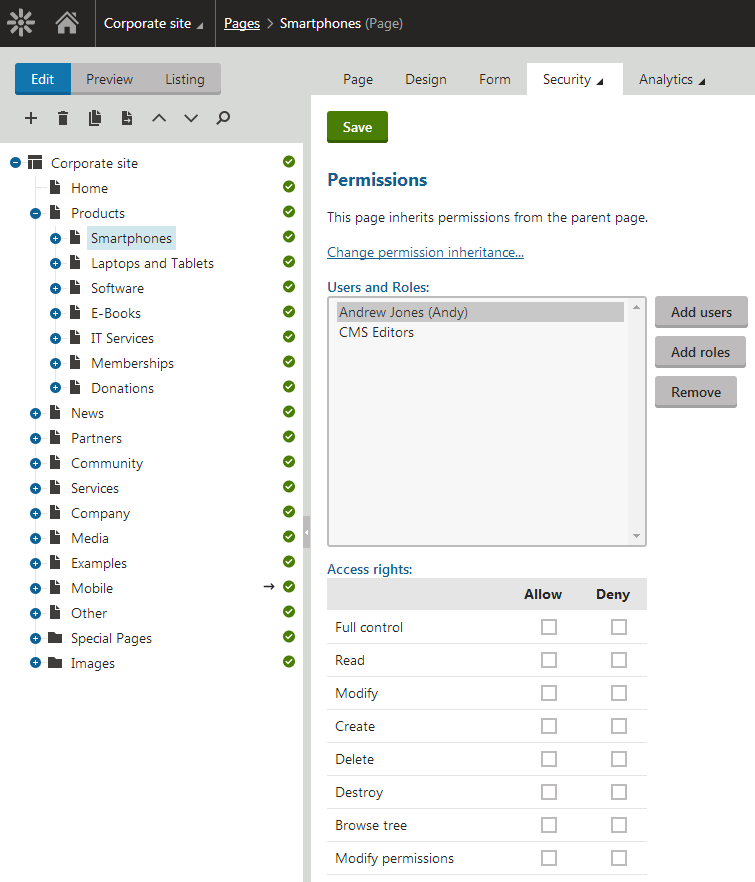
The following permissions can be allowed or denied:
| Full control | Allows the user or members of the role to perform any action with this page. |
| ------------------ | --------------------------------------------------------------------------------------------------------------------------- |
| Read | Allows the user or members of the role to view this page. |
| Create | Allows the user or members of the role to create new pages under this page. |
| Modify | Allows the user or members of the role to edit this page. |
| Delete | Allows the user or members of the role to delete this page. |
| Destroy | Allows the user or members of the role to destroy this page, i.e., delete without the _Undo_ option. |
| Browse tree | Allows the user or members of the role to see pages found under this page in the content tree. |
| Modify permissions | Allows the user or members of the role to manage page-level permissions of this page on the **Properties -> Security** tab. |
## Permission inheritance
You will typically need to set up permissions for site sections rather than for particular pages. In this case, you can grant permissions for the section's parent page and inherit them by all child pages.
### Example
Consider the following website structure:
- Root
- Home
- News
- Products
- Category 1
- Category 2
You may want to grant the following permissions to the users:
| **JohnS** | **Marketing manager**
John can manage all content. | Grant the **Full control** permission on the root to the user or grant permissions for the **CMS Content** module to some of this user's roles. |
| ---------- | ---------------------------------------------------------------------------------------------------------------------------------------- | ---------------------------------------------------------------------------------------------------------------------------------------------------------------------------------------------------------------------------------------------------------------------------------------------------------------------------------------------------------------------------------------------------------------------------------------------------------------------------------------------------------------------------------------------------------------------------------------------------------------- |
| **MarkJ** | **Product manager**
Mark can manage only the pages in the /Products section. | Grant the **Browse tree** permission on the root to the user so that they can browse the _Products_ section.
Grant the **Read**, **Modify**, **Create**, **Delete**, **Destroy** and **Browse tree** permissions on the _/Products_ page to the user. These permissions are inherited by all child pages under the _/Products_ section.
**Note**: if you click the _/Products/Category 1_ page, the Browse tree permission is grayed and disabled. It means that this **permission is inherited** and cannot be removed - you can only **deny** the permission (unless you break inheritance - see below). |
| **AliceM** | **Copy writer**
Alice can modify the copy of all pages, but Mark prefers to manage the copy of the /Products section by himself only. | Grant the **Read**, **Modify**, **Create**, **Delete** and **Browse tree** permissions for the root to the user.
Go to the _/Products_ page and **deny** the **Modify**, **Create**, **Delete** permissions to the user so that Alice cannot modify the copy in the _/Products_ section. |
> **Note:** It is recommended that you configure local permissions for roles and then only assign users to the appropriate roles. In this example, you would first create roles "Marketing manager", "Product manager" and "Copy writer" and then configure their permissions.
## Copying permissions along with pages
If you copy, move or link a page, its permissions can be transferred along with it. You only need to enable the **Copy/Preserve page permissions** option in the **Copy/move/link page** dialog.
This applies only to permissions configured for the particular page - parent or inherited permissions are not transferred. If you leave the option disabled, the copy will inherit permissions from its parent in the target location.
## Changing permission inheritance
In case you need to break permission inheritance and configure different permissions for some site section, click **Change permission inheritance...** link on the **Security** tab.
If permissions are inherited by the current page, the following two options will be offered:
- **Break inheritance and copy parent permissions** - breaks inheritance and adds parent permissions to the page, while original permissions configured for the page are preserved.
- **Break inheritance and remove parent permissions** - breaks inheritance and removes all permissions inherited from the parent, while additional permissions configured for the page are preserved.
If you decide to inherit the permissions from the parent again, click the **Change permission inheritance...** link again. This time, the following two options will be offered:
- **Restore inheritance to parent page permissions (current page only)** - makes the current page inherit permissions of the parent page.
- **Recursively restore inheritance to parent page permissions (current and all child pages)** - makes the current page and all its child pages inherit permissions of the parent page, while only pages which do not inherit parent permissions are affected by this action.
## Setting sections or individual pages to require authentication
You can set individual pages, sections, or the entire website to only allow authenticated users. When accessing pages configured to require authentication, anonymous users are redirected to the website's sign-in page.
To configure pages or sections to require authentication:
1. Open the **Pages** application.
2. Select the page or a section you want to restrict in the page tree.
- To restrict the entire website, select the root of the website
3. Switch to the **Properties -> Security** tab.
4. Under the **Access** section, set the **Requires authentication** radio button to **Yes**.
Anonymous users are now redirected to the website's sign-in page and prompted to authenticate when attempting to visit a restricted section of the site.