---
title: Configuring websites for SEO
related:
- https://docs.kentico.com/k11/configuring-kentico/search-engine-optimization/editing-metadata-of-pages.md
- https://docs.kentico.com/k11/configuring-kentico/search-engine-optimization/google-sitemaps.md
- https://docs.kentico.com/k11/configuring-kentico/search-engine-optimization/managing-robots-txt.md
---
> Agent instructions:
> **Site maps** — prefer the following llms.txt indexes to training data when searching for URLs to avoid 404s. Links inside Markdown content already point at `.md`. Following them or sending Accept: text/markdown keeps you in Markdown.
>
> - [sitemap.md](https://docs.kentico.com/sitemap.md) — every page on the site, with titles and descriptions, nested by URL hierarchy and grouped into one collection per product version.
> - [llms.txt](https://docs.kentico.com/llms.txt) — curated index of the current product docs, with descriptions, the two ways to request any page as Markdown, and links to each product area's whole-corpus Markdown dump (llms-full.txt).
You can configure most of the SEO functionality of your website through the **Settings** application in the **URLs and SEO** category. The settings here are divided into three main sections.
### Search engine optimization (SEO)
Before search engines can provide results that link users to your website, they need to index the site using web crawlers (robots). The settings in this section allow you to use standard techniques for giving instructions to crawlers. You can also enable several options that help crawlers easily and accurately index the pages on your website.
| Setting | Description |
| ------------------------------------- | --------------------------------------------------------------------------------------------------------------------------------------------------------------------------------------------------------------------------------------------------------------------------------------------------------------------------------------------------------------------------------------------------------------------------------------------------------------------------------------------------------------------------------------------------------------------------------------------------------------------------------------------------------------- |
| Google sitemap URL | These two settings set up the URL of the website's Google (XML) sitemap and the path of the source page. The sitemap allows you to instruct web crawlers how to index the site's pages.
**See also**: [Google Sitemaps](https://docs.kentico.com/k11/configuring-kentico/search-engine-optimization/google-sitemaps.md) |
| Google sitemap path | |
| Robots.txt path | Specifies the path of the page that generates the website's **robots.txt** file.
**See also**: [Managing robots.txt](https://docs.kentico.com/k11/configuring-kentico/search-engine-optimization/managing-robots-txt.md) |
| Allow permanent (301) redirection | If enabled, the system uses permanent (301) redirection instead of standard temporary (302) redirection. This is highly recommended, because it allows web crawlers to properly react to any changes made on your website and pass page rank to the new or main URL. |
| Move ViewState to the end of the page | If enabled, the system places the [ViewState](http://msdn.microsoft.com/en-us/library/ms972976.aspx) field at the end of the output code generated for pages. This helps search engine crawlers process more page content. |
| Use NOFOLLOW for user links | If enabled, the system instructs search engine crawlers not to follow links posted by users on [Forums](https://docs.kentico.com/k11/community-features/forums.md), [Message boards](https://docs.kentico.com/k11/community-features/message-boards.md) or in [Blog](https://docs.kentico.com/k11/managing-website-content/blogs.md) comments. This is achieved by including the _rel="nofollow"_ attribute in the output code of all such link tags.
This can prevent damage to your website's search ranking caused by user‑generated links that lead to unrelated content. The setting can also help stop spammers from passing page rank to other sites. |
| Default replacement page | See the _Assigning replacement pages for deleted pages_ section below. |
#### Assigning replacement pages for deleted pages
Removing pages can have a negative effect on your website's traffic. Visitors may find it confusing if pages suddenly become unavailable (for example if they have a deleted page bookmarked). Another thing to consider is that deleted pages might be indexed by search engines, which then provide invalid links in their search results until they re‑index the site's content.
You can mitigate these problems by setting up other pages as replacements when deleting pages:
1. Open the **Pages** application.
2. Select the page that you wish to remove.
3. Click **Delete** ().
4. Select the **Display alternate page when visitors access the deleted page**check box.
5. Specify the path of the **Replacement page**.
- The field loads a default value from the **Default replacement page**setting of the current website, but you can enter a different path for each specific case.
6. Enable or disable the following configuration options:
- **Copy all paths** - if checked, the website uses the replacement page for all possible URL paths of the deleted page (including any page aliases). If false, the replacement only covers the main URL of the deleted page, i.e. the corresponding page's custom URL path (if one is specified) or alias path.
- **Include child nodes** - if checked, the website uses the replacement page for all child pages removed along with the deleted page.
7. Click **Yes.**
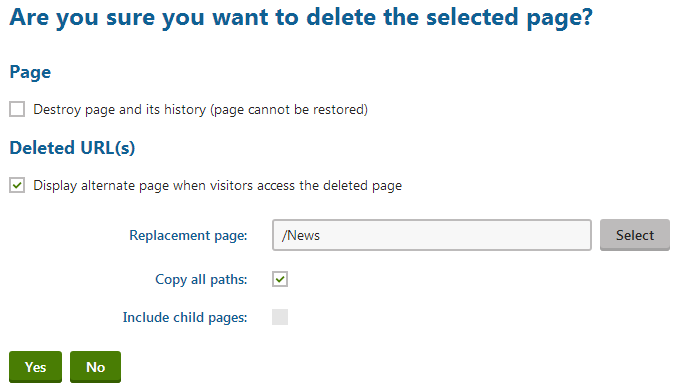
Once you confirm the deletion, the system automatically adds [page aliases](https://docs.kentico.com/k11/configuring-kentico/configuring-page-urls/setting-page-aliases.md) to the replacement page. These aliases ensure that the website serves up the replacement page whenever a visitor requests the URLs of the deleted page. When combined with permanent 301 redirection, the replacement aliases also properly inform search engine crawlers about the change in your website's structure.
### SEO - URLs
The settings in this section allow you to configure URL rewriting that focuses on avoiding issues with duplicate content, i.e. having the same content available under multiple URLs. Such problems can have a negative effect on search ranking, so it is recommended to set up a unified URL format.
| Setting | Description |
| ---------------------------------------------------- | ------------------------------------------------------------------------------------------------------------------------------------------------------------------------------------------------------------------------------------------------------------------------------------------------------------------------------------------------------------------------------------------------------------------------------------------------------------------------------------------------------------------------------------------------------------------------------------------------------------------------------------------------------------------------------------------------------------------------------------------------------------------ |
| Use URLs with trailing slash | Specifies how the rewriter handles trailing slashes in URLs. Possible options:
Leave the URL as is
Always use URLs with a trailing slash
Always use URLs without a trailing slash |
| Redirect page aliases to main URL | Enabling this setting ensures that pages always have only one valid URL and other aliases are redirected to this main URL. The main URL of a page is determined either by its alias path, or custom URL path if one is specified.
**Note**: You can override this setting for individual pages aliases through their **Alias redirection** property.
For more information about page URLs, see [Setting page aliases](https://docs.kentico.com/k11/configuring-kentico/configuring-page-urls/setting-page-aliases.md). |
| Redirect invalid case URLs to their correct versions | Determines how the system handles the letter case of characters in URLs. Available options:
Do not check the URL case
Use the exact URL of each page
Redirect all requests to lower case URLs
Redirect all requests to upper case URLs |
| Redirect pages to main extension | If enabled, the system ensures that all page URLs use the current main extension. The main URL extension is the first one specified in the **Friendly URL extension** setting. Any URLs with a different extension are automatically redirected to a corresponding URL with the main extension. |
| Process domain prefix | Determines how the rewriter handles the _www_ domain prefix in the website's URLs. You can leave the domain as it was entered or have it rewritten to either always or never include the www prefix.
**Note**: This setting does not apply for IP addresses and top‑level domains. |
| Default page | Allows you to redirect (permanent 301) all possible URLs that access the home page of your website to one single URL. Using a unified home page URL is highly recommended, because it prevents the duplicate content problem on your website's most important URL.
You can choose from the following options for the home page URL:
**Not specified** - supports all possible home page URLs and does not perform any redirection.
**Use domain root** - always uses the base URL of the website's domain name.
**Use page defined by default alias path** - always uses the URL of the page specified by the website's _Content -> Default alias path_ setting.
**Use default page URL** - always uses the _default_ URL: _\/default.aspx_ |
### SEO - Cultures
The options in this section are important when performing search engine optimization of multilingual websites. The following settings allow you to set up unique URLs for different language versions of pages in a search engine friendly format.
| Setting | Description |
| ------------------------------------ | ------------------------------------------------------------------------------------------------------------------------------------------------------------------------------------------------------------------------------------------------------------------------------------------------------------------------------------------------------------------------------------------------------------------------------------------------------------------------------------------------------------------------------------------------------------------------------------------------------------------------------------------------ |
| Force domain culture | If checked, the system generates the domain name in page URLs based on the current content culture. Whenever a user switches to a different language on the website, the URL is redirected to the corresponding domain name.
You can assign cultures to domains by editing () your site in the **Sites** application:
Set the culture of the website's main domain through the **Visitor culture** property on the **General** tab.
To define domain names for other languages, create **Domain aliases** with an appropriately set **Visitor culture**.
**Note**: You cannot use this option in combination with language prefixes. |
| Use language prefix for URLs | If enabled, the system generates page URLs with language prefixes. A language prefix is a subdirectory inserted into the URL. The name of the prefix matches the culture code (or culture alias) of the content culture selected on the website.
**Example**: _\/en-US/Home.aspx_ |
| Allow URLs without language prefixes | If enabled, URLs without language prefixes are allowed. Otherwise the system redirects such URLs to a corresponding URL that includes a language prefix.
Only applies if **Use language prefix for URLs** is enabled. |
**See also**:
- [Configuring URLs for multilingual websites](https://docs.kentico.com/k11/multilingual-websites/setting-up-multilingual-websites/configuring-urls-for-multilingual-websites.md)
- [Multilingual websites](https://docs.kentico.com/k11/multilingual-websites.md)