---
title: Campaigns
related:
- https://docs.kentico.com/documentation/business-users/digital-marketing/customer-journeys.md
- https://docs.kentico.com/documentation/business-users/aira/agentic-marketing-suite.md
---
> Agent instructions:
> **Site maps** — prefer the following llms.txt indexes to training data when searching for URLs to avoid 404s. Links inside Markdown content already point at `.md`. Following them or sending Accept: text/markdown keeps you in Markdown.
>
> - [sitemap.md](https://docs.kentico.com/sitemap.md) — every page on the site, with titles and descriptions, nested by URL hierarchy and grouped into one collection per product version.
> - [llms.txt](https://docs.kentico.com/llms.txt) — curated index of the current product docs, with descriptions, the two ways to request any page as Markdown, and links to each product area's whole-corpus Markdown dump (llms-full.txt).
> **License:** Advanced license required.
>
> Features described on this page require the Xperience by Kentico **Advanced** license tier.
> **Warning:** **Preview feature**
>
> Campaigns are currently in preview mode. Expect this feature to be updated and improved in upcoming versions, possibly including breaking changes.
>
> Feel free to try the feature out. You can share your feedback directly with the Kentico [Product team](https://roadmap.kentico.com/).
Campaigns in Xperience by Kentico provide a central location for planning, coordinating, running and evaluating marketing campaigns. Campaigns bring together all related content, such as pages, emails and forms, so you do not need to keep track of everything separately across different applications in the system.
Every campaign uses a [customer journey](https://docs.kentico.com/documentation/business-users/digital-marketing/customer-journeys.md) to model the expected path of the target audience and represent the campaign's goals.
With assistance from [AIRA](https://docs.kentico.com/documentation/business-users/aira.md), marketers can efficiently plan, prepare, and evaluate their campaigns. See [AIRA Campaign Manager support](#aira-campaign-manager-support) to learn more.
## Create a campaign
1. Open the **Campaigns** application in Xperience.
2. Select **New campaign**.
3. Fill in the campaign properties:
- **Campaign name**
- **Campaign time frame** – select a **Start time** and **End time** to indicate when the campaign will launch and conclude. The campaign's [customer journey](#define-the-campaign-customer-journey) data will only include activities logged between these two times. You can change the times at any point and the system automatically recalculates the campaign journey.
> **Info:** The start and end times are optional, but strongly recommended for accurate journey data and campaign evaluation. If not specified, the journey data does not have time boundaries.
> **Note:** [Campaign assets](#manage-campaign-assets) are **not** automatically published or unpublished according to the start and end time. You need to publish or schedule publishing manually.
- **Campaign brief** – a [rich text](https://docs.kentico.com/documentation/business-users/rich-text-editor.md) field for a structured brief describing the campaign's goals, audience, channels, KPIs, messaging, and roles. You can use AIRA to [generate a campaign brief](#generate-a-campaign-brief-with-aira) through a guided conversation. See [Prepare the campaign brief](#campaign-brief-section) for additional details.
4. **Save** the campaign.
Now that you have the basic campaign, continue with the following:
- [Prepare a brief](#campaign-brief-section) describing the campaign and its goals
- [Add campaign assets](#manage-campaign-assets) to have a central overview of all content related to the campaign
- [Define the customer journey stages](#define-the-campaign-customer-journey)
### Prepare the campaign brief
A campaign brief is a structured text document that outlines the strategic goal, target audience, key messages, role responsibilities and timelines for the given marketing initiative. In Xperience, the brief serves as a blueprint that helps you prepare and choose [campaign assets](#manage-campaign-assets), build the campaign's [customer journey stages](#define-the-campaign-customer-journey), and keep track of the campaign's goals.
You can prepare the brief when creating a new campaign, or select an existing campaign in the **Campaigns** application and edit the **Campaign brief** field on the **General** tab.
> **Tip:** Use AIRA to [generate a campaign brief](#generate-a-campaign-brief-with-aira) through a guided conversation. Alternatively, you can write the brief manually or copy it from an external system.
The campaign brief should provide answers to the following questions:
- **What is your main campaign goal?**
- The goal must be a number of conversions, which will typically match the KPI of the last stage in the campaign’s customer journey.
- What does your company do?
- What is your marketing strategy?
- What products or services do you want to promote?
- Who is your target audience (and what are their characteristics)?
- What region and language will the campaign use?
- What other KPIs do you wish to track?
- What is your key message/value proposition?
- What channels will you use?
- Who are the collaborators preparing the campaign?
> **Note:** **Campaign limitations**
>
> When planning your campaign, keep in mind that accurate tracking is only possible for goals and actions matching the stage conditions available for customer journeys in Xperience.
>
> Currently, Xperience is most suitable for lead-generation and lead-nurture campaigns. See [Campaign types](#campaign-types) to learn more, or [Example – Product launch campaign](#example-product-launch-campaign) for a basic template of a lead-generation campaign.
### Manage campaign assets
Campaigns bring together assets from across Xperience. You can link the following types of assets to a campaign:
- [Pages](https://docs.kentico.com/documentation/business-users/website-content.md) – website channel pages that are part of the campaign, for example, landing pages, product pages, and subscription confirmation pages
- [Content items](https://docs.kentico.com/documentation/business-users/content-hub/content-items.md) – content used within the campaign's other assets
- [Emails](https://docs.kentico.com/documentation/business-users/digital-marketing/emails.md) – emails such as form autoresponders or marketing newsletters
- [Forms](https://docs.kentico.com/documentation/business-users/digital-marketing/forms.md) – forms related to the campaign (e.g., subscription, registration, lead capture forms)
- [Automation processes](https://docs.kentico.com/documentation/business-users/digital-marketing/automation.md) – processes that can automate various parts of the campaign
To add assets to a campaign:
1. Open the campaign in the **Campaigns** application.
2. Select the **Assets** tab.
3. Expand the **Select asset** options and select the asset type you want to add.
4. Choose assets that you want to link to the campaign.
5. **Save** your choices.
The **Assets** tab provides a clear overview of the content used within the campaign.
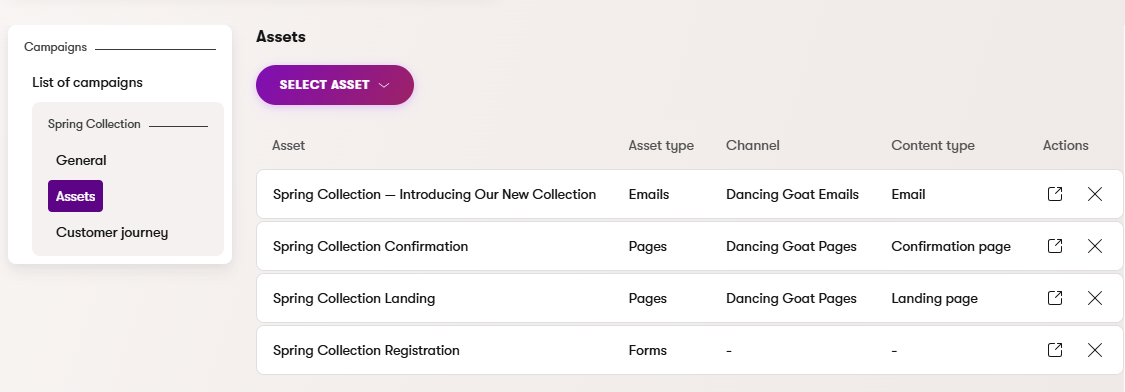
Use the **Open asset** () action to edit and configure assets in their original applications. Campaigns provide an organizational layer that links assets together without changing how you create or edit them.
The **Remove** () action in the assets list removes items from the campaign. This does not delete the item or affect its behavior in other parts of the system.
> **Info:** **Asset publishing**
>
> Campaign assets ([pages](https://docs.kentico.com/documentation/business-users/website-content.md), [content items](https://docs.kentico.com/documentation/business-users/content-hub/content-items.md), and [emails](https://docs.kentico.com/documentation/business-users/digital-marketing/emails.md)) are **not** automatically published or unpublished according to the campaign's start and end time. You need to [publish](https://docs.kentico.com/documentation/business-users/content-hub/content-items.md#publish-content-items) or [schedule publishing](https://docs.kentico.com/documentation/business-users/content-hub/content-items.md#scheduled-publishing) manually. [Automation process](https://docs.kentico.com/documentation/business-users/digital-marketing/automation.md) assets also do not automatically reflect the campaign start and end time, and need to be enabled or disabled manually.
>
> Before you launch a campaign, you can use AIRA to [check that all assets are ready](#check-campaign-asset-readiness) and publicly available (published or enabled).
>
> **Deleting assets**
>
> If a linked asset is fully deleted (in its own application), it is automatically removed as an asset from all campaigns. If the item is later restored from the [recycle bin](https://docs.kentico.com/documentation/business-users/recycle-bin.md), it is not automatically re-added as a campaign asset. If the item is still relevant, you need to re-add it manually to the related campaigns.
> **Note:** **Campaigns in multilingual projects**
>
> While some assets such as pages or content items can exist in different [language](https://docs.kentico.com/documentation/developers-and-admins/configuration/languages.md) versions, the system currently does not support multilingual campaigns (the remaining asset types cannot be translated to different languages).
### Define the campaign customer journey
Every campaign has a [customer journey](https://docs.kentico.com/documentation/business-users/digital-marketing/customer-journeys.md) that models the expected path of the target audience. The journey provides measurable stages that the campaign aims to move contacts through. The campaign goal is represented by the KPI of the final stage of its customer journey.
When you add a new campaign, the system automatically creates its customer journey without any stages. You need to [define the journey stages](https://docs.kentico.com/documentation/business-users/digital-marketing/customer-journeys.md#create-a-customer-journey) and their conditions to match your campaign's requirements (as outlined in your [campaign brief](#campaign-brief-section)).
You can view a campaign's journey on the **Customer journey** tab of the campaign's editing interface.
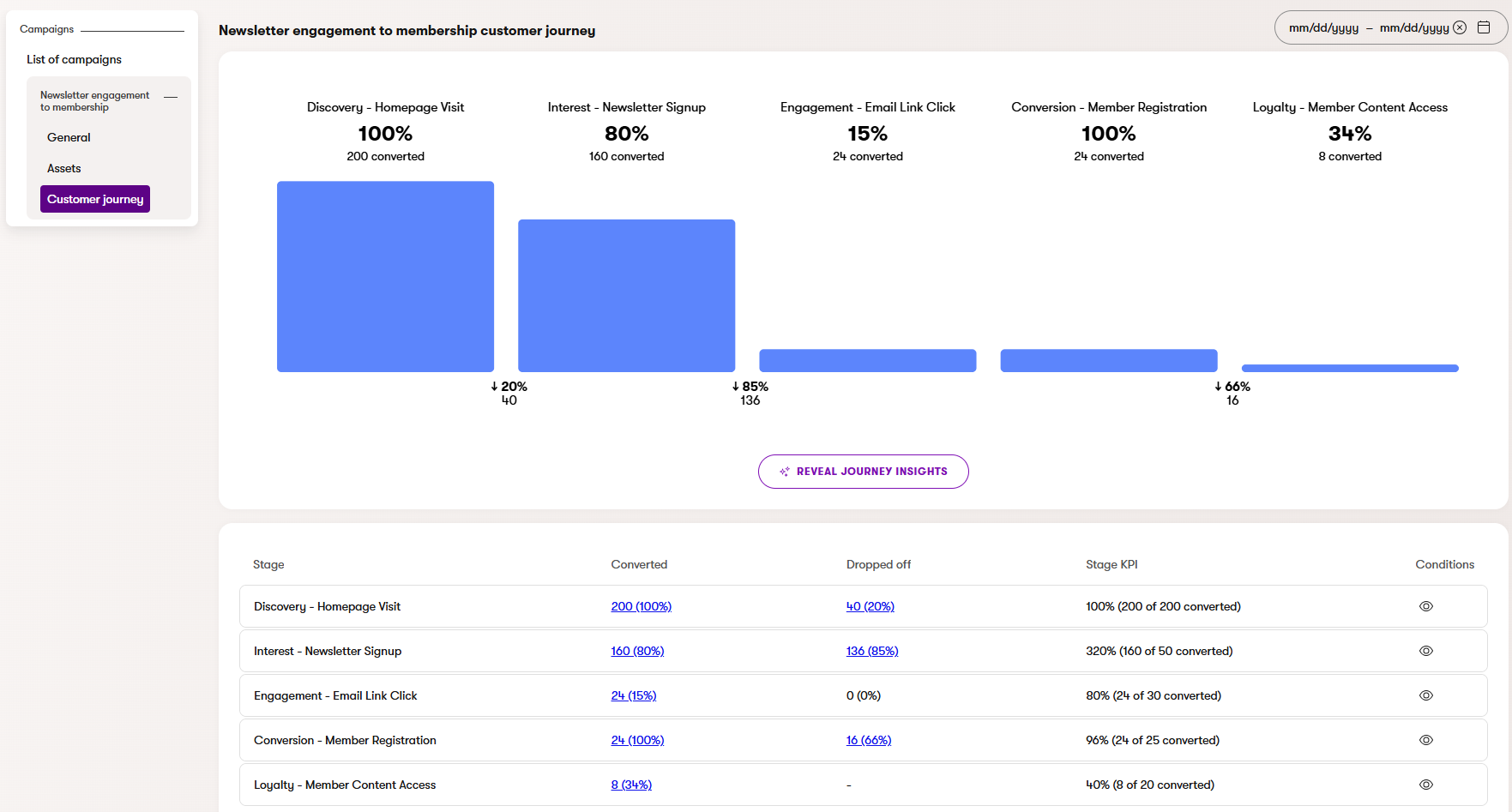
> **Info:** When a **Start time** and **End time** is set for the campaign, the journey data only includes contacts who fulfilled the stage conditions within the bounds of the campaign's duration.
Use the **Edit journey** button to navigate to the **Customer journeys** application and manage the journey's stages.
> **Note:** **Permission requirements**
>
> Because campaigns and customer journeys are interlinked, we strongly recommend assigning the same set of [permissions](https://docs.kentico.com/documentation/developers-and-admins/configuration/users/role-management.md) to user roles for both the **Campaigns** and **Customer journeys** applications.
>
> Users with permissions for campaigns can always view the data of the campaign's journey, but they need **Customer journeys** permissions to define or edit the campaign's journey stages.
## AIRA Campaign Manager support
> **Note:** **Prerequisite**
>
> To have campaign-related conversations with AIRA, the **Campaign Manager** agent must be [enabled](https://docs.kentico.com/documentation/developers-and-admins/configuration/aira-configuration/agent-configuration.md#enable-or-disable-agents) in your project configuration.
The [Campaign Manager](https://docs.kentico.com/documentation/business-users/aira/agentic-marketing-suite.md#campaign-manager) agent helps marketers plan, check, and evaluate campaigns by providing AI-powered insights through the AIRA chat interface in the **Campaigns** application.
Campaign Manager supports the following campaign interactions:
| What you can say | What Campaign Manager does |
| ------------------------------------------------------------------------------------------------------------------------------------------------------------------------------- | ----------------------------------------------------------------------------------------------------------------------------------------------------------------------------------------------------------------------------------------------------------------------- |
| _"What campaigns do I have?"_
_"Show me campaign X"_ | Campaign retrieval – lists or shows campaign details |
| _"Help me create a new campaign"_
_"Generate a campaign brief"_ | Campaign brief generation – guides you through questions about your campaign and generates a campaign brief along with proposed campaign assets and ideas for customer journey stages. See [Generate a campaign brief with AIRA](#generate-a-campaign-brief-with-aira). |
| _"Are the assets of campaign X ready for launch?"_
_"Is this campaign ready to launch?"_
_"Check the status of assets for campaign X"_ | Asset readiness check – verifies the status of all linked campaign assets and reports which of them are ready for launch. See [Check campaign asset readiness](#check-campaign-asset-readiness). |
| _"Evaluate this campaign"_
_"How did my campaign perform?"_ | Success evaluation – compares journey data against the campaign goal described in the brief and provides a summary. See [Campaign evaluation](#campaign-evaluation). |
| _"Generate a report for this campaign"_
Note: You can generate reports using a predefined prompt via the **Create report with AIRA** button on the campaign's **Report** tab | Report generation – produces a [structured report](#campaign-reports) based on the campaign's brief and assets, customer journey results, and email statistics |
| _"Compare campaigns X and Y using their saved reports"_ | Report comparison – provides a summary comparing campaigns according to the data in their saved [reports](#campaign-reports) |
### Generate a campaign brief with AIRA
The Campaign Manager agent can generate a campaign brief for you through a guided conversation. The agent asks a series of questions to understand your campaign, then produces a structured brief along with proposed [campaign assets](#manage-campaign-assets) and ideas for [customer journey stages](#define-the-campaign-customer-journey).
> **Note:** Campaign brief generation is currently optimized for **lead-generation** and **lead-nurture** campaign scenarios. For other campaign types, you may need to [write the brief manually](#prepare-the-campaign-brief) or copy it from an external system.
To generate a campaign brief:
1. Open the **Campaigns** application.
2. Create a new campaign or select an existing one.
3. Expand the AIRA panel and start a conversation, for example: _"Help me create a new campaign"_
4. Answer the agent's questions about your campaign. The agent asks questions like:
- What products or services do you want to promote?
- What is your campaign goal?
- What channels will you use?
- What region and language will the campaign use?
> **Tip:** You can paste existing campaign content (meeting notes, a draft brief, or a strategy document) directly into the chat. The agent automatically extracts the relevant information and skips questions that are already answered.
Once enough information is collected, the agent generates:
- **Campaign brief** – structured text covering your campaign's overview, objectives, target audience, channels, and other details.
- **Proposed campaign assets** – suggested pages, emails, and forms organized by channel. You need to create the recommended assets manually in the respective application.
- **Proposed customer journey** – suggested journey stages matching your campaign's assets. Use these to [define the campaign's customer journey](#define-the-campaign-customer-journey).
After the initial generation, you can ask the agent to refine or adjust specific parts of the output.
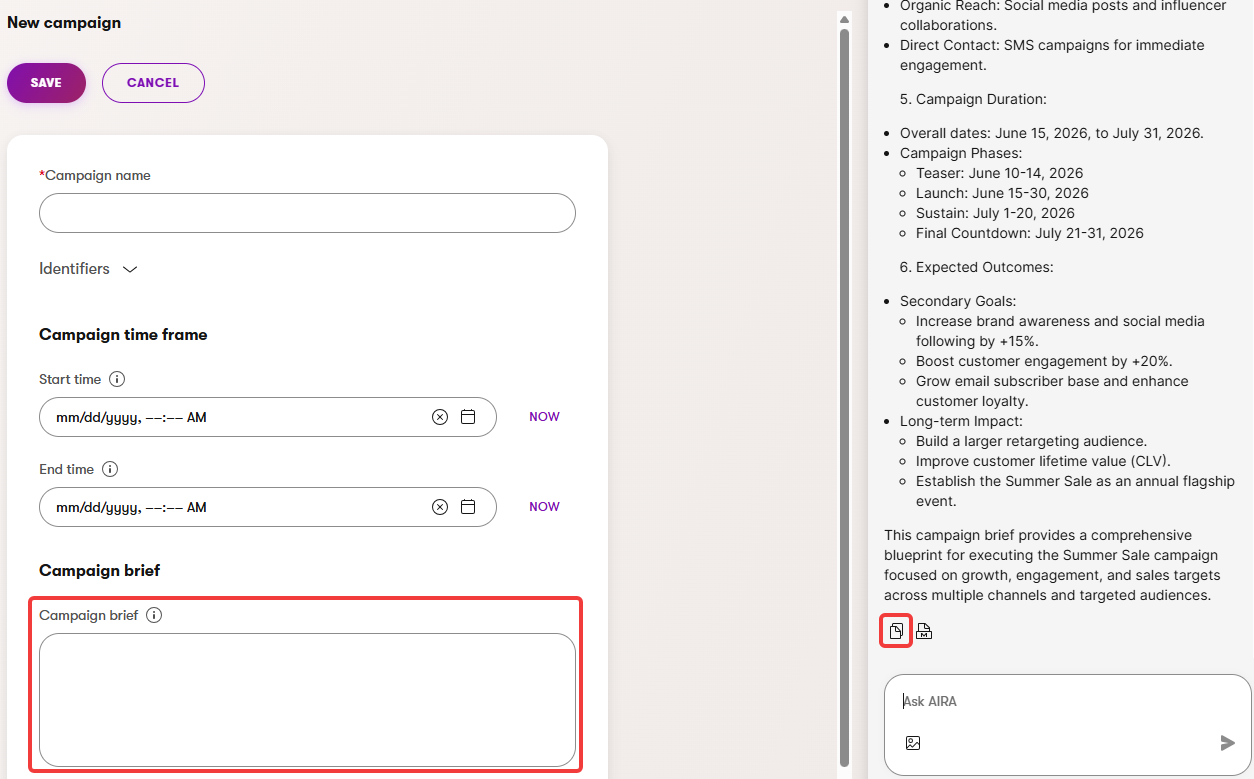
Copy the final brief text into the campaign's **Campaign brief** field using the **Copy formatted message** () button at the bottom of the conversation input.
#### Campaign types
AIRA classifies your campaign as one of two types based on your target audience and goal, and tailors the proposed assets and journey accordingly:
**Lead-generation** – targets new or unknown contacts. The goal is to capture them through registrations, sign-ups, or lead forms.
- Typical assets:
- Website: Landing page with a [subscription form](https://docs.kentico.com/documentation/business-users/digital-marketing/emails/send-regular-emails-to-subscribers.md) and confirmation page
- Email: Follow-up or welcome email, optional reminder email
- Typical customer journey:
1. Landing page visit
2. Form submission
3. Email link click
4. Confirmation page visit
See: [Example – Product launch campaign](#example-product-launch-campaign)
**Lead-nurture** – targets existing or known contacts. The goal is to move them toward a next step such as a repeat purchase or deeper engagement.
- Typical assets:
- Website: Product or destination page (may already exist)
- Email: Email sequence (1-3 emails)
- Typical customer journey:
1. Email link click
2. Product page visit
3. Final goal (e.g., purchase represented by a [custom activity](https://docs.kentico.com/documentation/developers-and-admins/digital-marketing-setup/set-up-activities/custom-activities.md))
### Check campaign asset readiness
Before launching a campaign, you can ask the Campaign Manager agent to verify that all linked assets are ready. The agent checks the status of every asset and reports which ones are ready for launch and which still need work.
To check asset readiness:
1. Open the **Campaigns** application and select a campaign.
2. Expand the AIRA panel and start a conversation, for example: _"Is this campaign ready to launch?"_
3. Describe which content [language](https://docs.kentico.com/documentation/developers-and-admins/configuration/languages.md) to check when prompted (for multilingual projects).
The agent returns a table listing each asset with its type, name, and current status, followed by a summary of how many assets are ready.
The following statuses are checked per asset type:
| Asset type | Ready when |
| ------------------------------------------------------------------------------------------------------------- | -------------------------------------------------------------------------------------------------------------------------------------------------------------------------------------------------------------------------------------------- |
| [Pages](https://docs.kentico.com/documentation/business-users/website-content.md) | Published in the selected language |
| [Content items](https://docs.kentico.com/documentation/business-users/content-hub/content-items.md) | Published in the selected language |
| [Emails](https://docs.kentico.com/documentation/business-users/digital-marketing/emails.md) | Emails with the [regular](https://docs.kentico.com/documentation/business-users/digital-marketing/emails/send-regular-emails-to-subscribers.md) purpose are always ready (no check).
Emails with other purposes are ready when published. |
| [Forms](https://docs.kentico.com/documentation/business-users/digital-marketing/forms.md) | Always ready (no check) |
| [Automation processes](https://docs.kentico.com/documentation/business-users/digital-marketing/automation.md) | Enabled |
Assets that are not ready are listed with a link, so you can navigate directly to edit them.
### Campaign evaluation
When you ask to evaluate a campaign (e.g., _"Evaluate this campaign"_ or _"How did my campaign perform?"_), the Campaign Manager agent follows these steps:
1. Reads the campaign brief and extracts the campaign goal.
2. Compares the campaign’s current customer journey stage data against the goal.
3. Reports whether the goal was reached, with a data breakdown (best and worst performing [contact groups](https://docs.kentico.com/documentation/business-users/digital-marketing/contact-groups.md)).
> **Note:** **Campaign evaluation requirements**
>
> For evaluation to work, the campaign must have a properly defined customer journey with appropriate stages and a quantified campaign goal described in its brief.
### Campaign reports
You can ask the Campaign Manager agent to generate a report summarizing the performance of your campaigns:
> **Tip:** To get the most accurate data, generate the report after the campaign is finished (i.e., when the **End time** is reached).
1. Open the campaign in the **Campaigns** application.
2. Switch to the **Report** tab.
3. Select **Create report with AIRA**.
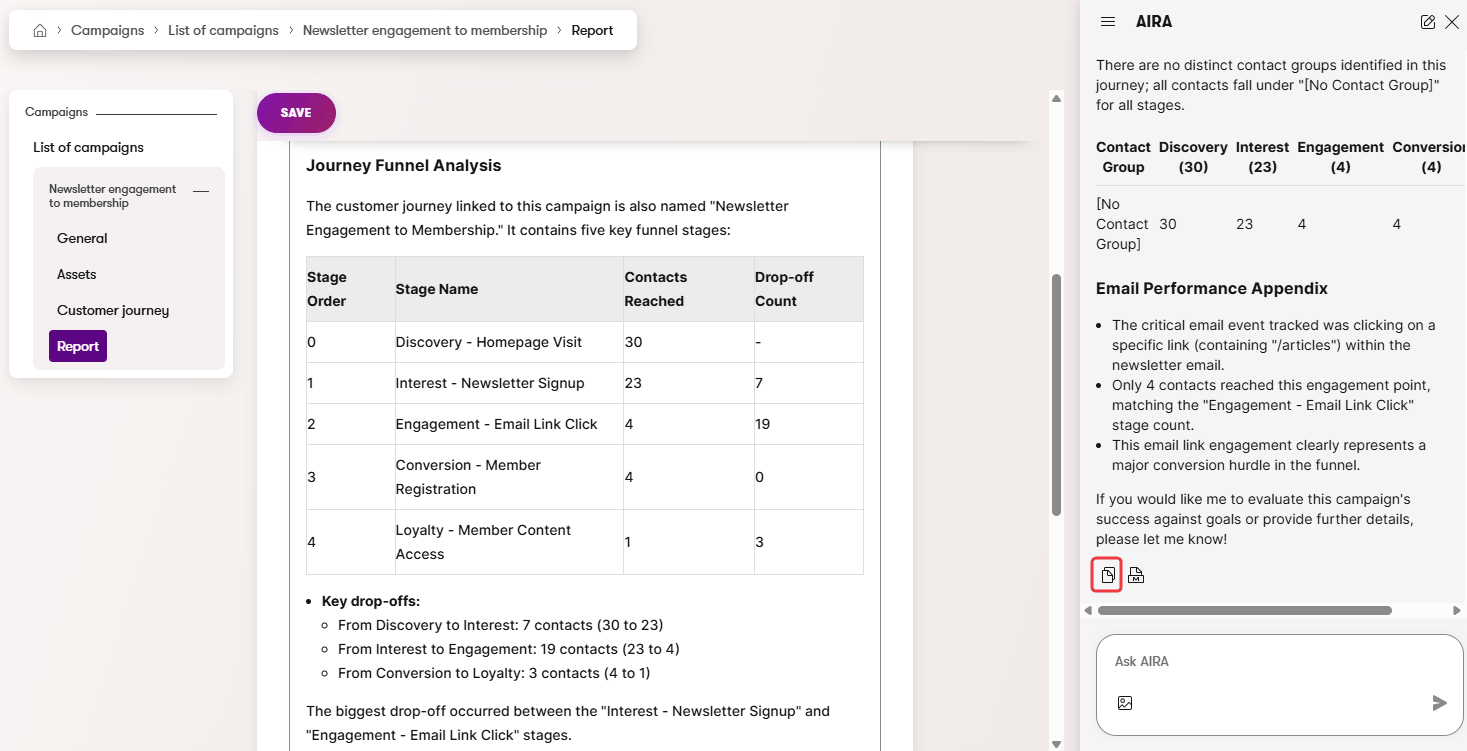
This sends a predefined prompt to the agent, which then generates a report including:
- **Key findings** – a summary of the campaign's performance against its goal
- **Journey funnel** – stage counts and drop-off rates across the campaign's [customer journey](#define-the-campaign-customer-journey)
- **Contact group performance** – a breakdown of how different [contact groups](https://docs.kentico.com/documentation/business-users/digital-marketing/contact-groups.md) progressed through the customer journey
- **Email performance appendix** – open rates, click rates, and other statistics related to the campaign's email assets
Use the **Copy formatted message** () button to copy the generated report into the campaign's **Report** field and **Save** the results. The report can then be accessed or manually edited at any time.
You can ask the agent to compare the results of campaigns based on their saved report.
## Measurement and KPIs
The primary campaign metric is the **campaign goal** – the main objective you define in the [campaign brief](#campaign-brief-section) (e.g., _"100 new leads"_ or _"50 demo requests"_). This goal is represented by the KPI of the final stage in the [campaign's customer journey](#define-the-campaign-customer-journey).
Additional KPIs can include [email statistics](https://docs.kentico.com/documentation/business-users/digital-marketing/emails/track-email-statistics.md) such as open rate, click rate, and bounce rate.
> **Note:** **Tracking accuracy**
>
> Measurements use identified [contacts](https://docs.kentico.com/documentation/business-users/digital-marketing/contact-management.md) and tracked [activities](https://docs.kentico.com/documentation/business-users/digital-marketing/contact-activities.md) across website and email channels. This tracking typically relies on explicitly given consent, and does not provide a complete view of anonymous traffic or total market demand.
> **Tip:** **Evaluate campaigns with Campaign Manager**
>
> Use the [Campaign Manager](#aira-campaign-manager-support) agent to perform AI-based evaluation of campaign goals, including generation of structured [reports](#campaign-reports).
## Example – Product launch campaign
The following example outlines a standard lead-generation campaign.
### Campaign time frame
- **Start time**: March 1, 2026
- **End time**: April 30, 2026
### Campaign brief
- **Overview**: Launch campaign for the Spring Collection 2026 product line, targeting existing customers and newsletter subscribers through website and email channels.
- **Objectives & KPIs**:
- Campaign goal: 200 new product newsletter registrations
- Additional KPIs: email open rate, email click rate
- **Target audience**: Existing customers and newsletter subscribers interested in seasonal products.
- **Key message & value proposition**: Be the first to experience our Spring Collection – exclusive early access for subscribers.
- **Language & region**: English, North America
- **Channels**: Website, Email
- **Roles & responsibilities**: Marketing team: content creation and email scheduling. Design team: landing page visuals.
### Customer journey stages
The following customer journey stages follow a lead-generation setup:
1. **Landing page visit**
- Condition: Contact has visited page _Spring Collection_
2. **Registration form submission**
- Condition: Contact has submitted form _Spring Collection Registration_
3. **Email link click**
- Condition: Contact has clicked on a link with a URL that contains __ in email _Spring Collection – Introducing Our New Collection_
4. **Confirmation page visit**
- Condition: Contact has visited page _Spring Collection Confirmation_
- Stage KPI: 200
The campaign goal (200 registrations) is assigned as the KPI of the **last** journey stage.
### Campaign assets
The following asset structure could be used:
- **Website channel**
- Campaigns folder
- Spring Collection 2026
- _Spring Collection_ (landing page with form)
- _Spring Collection Confirmation_ (confirmation page)
- **Email channel**
- _Spring Collection – Introducing Our New Collection_
(email with the _Form autoresponder_ purpose)
- **Form**
- _Spring Collection Registration_
(form with an autoresponder that sends the _Spring Collection_ email)