---
title: Upgrade to Xperience by Kentico
---
> Agent instructions:
> **Site maps** — prefer the following llms.txt indexes to training data when searching for URLs to avoid 404s. Links inside Markdown content already point at `.md`. Following them or sending Accept: text/markdown keeps you in Markdown.
>
> - [sitemap.md](https://docs.kentico.com/sitemap.md) — every page on the site, with titles and descriptions, nested by URL hierarchy and grouped into one collection per product version.
> - [llms.txt](https://docs.kentico.com/llms.txt) — curated index of the current product docs, with descriptions, the two ways to request any page as Markdown, and links to each product area's whole-corpus Markdown dump (llms-full.txt).
Kentico offers a set of tools and materials to help you upgrade your projects to Xperience by Kentico, whether you come from a [previous version of Kentico Xperience](#upgrade-from-kentico-xperience) or from a [different platform](#migrate-from-other-platforms).
## Upgrade from Kentico Xperience
To upgrade a project from a previous version of Kentico Xperience to Xperience by Kentico:
1. [Create a boilerplate](https://docs.kentico.com/documentation/developers-and-admins/installation.md) Xperience by Kentico project.
2. Migrate your data and content from the old project using the [Kentico Migration Tool](https://docs.kentico.com/documentation/developers-and-admins/upgrade-to-xperience-by-kentico/migration-toolkit.md#kentico-migration-tool).
3. Manually transfer any code, customizations, and any unsupported content and adjust them for Xperience by Kentico’s [architecture and API differences](#technical-comparison).
4. Deploy your Xperience by Kentico project either to our [SaaS environment](https://docs.kentico.com/documentation/developers-and-admins/deployment/deploy-to-the-saas-environment.md) or to your [private cloud](https://docs.kentico.com/documentation/developers-and-admins/deployment/deploy-to-private-cloud.md).
> **Tip:** See our series of [guides](https://docs.kentico.com/guides/upgrade-to-xbyk/upgrade-from-kx13.md) for a more detailed walkthrough of the upgrade process.
>
> To accelerate your Kentico Xperience 13 migration with AI assistance, use the [KentiCopilot](https://docs.kentico.com/guides/development/kenticopilot.md) [`kentico-kx13-migration` plugin](https://github.com/Kentico/xperience-by-kentico-kenticopilot/blob/main/plugins/kentico-kx13-migration/README.md). These plugins help you audit your source content model, drive the Kentico Migration Tool, and migrate your live-site codebase through guided AI workflows.
### Technical comparison
The following table and diagram outline the main differences in the **architecture** of the Xperience products.
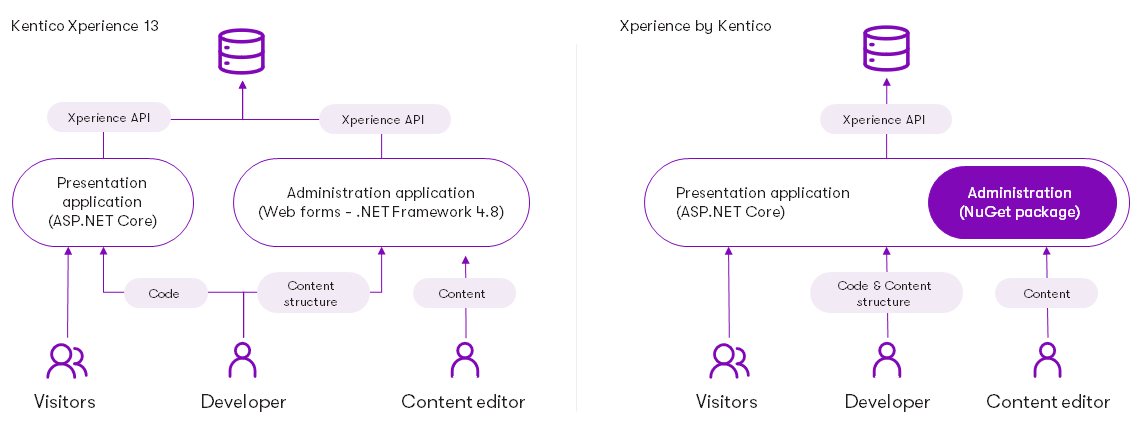
| Kentico Xperience 13 | Xperience by Kentico |
| ---------------------------------------------------------------------------------------------------------------------------------------------------------------------------------------------------------------------------------------------------------------------------------------------------------------------------------------------------------------------------------------------------------------------------------------------------------------------------------------------------------- | --------------------------------------------------------------------------------------------------------------------------------------------------------------------------------------------------------------------------------------------------------------------------------------------------------------------------------------------------------------------------------------------------------------------------------------------------------------------------------------------------------------------------------------------------------------------------------------------------------------------------------------------------------------------------------------------------------------------------------------------------------------------------------------------------------------------------------------------------------------------------------------------------------------------------------------------------------------------------------------- |
| Consists of two separate applications – one for the live site and one for the administration.
The live site application can be built using [ASP.NET MVC 5](https://docs.microsoft.com/en-us/aspnet/mvc/overview/getting-started/introduction/) or [ASP.NET Core](https://docs.microsoft.com/en-us/aspnet/core/introduction-to-aspnet-core) (as part of .NET Core 3.1 or newer).
The administration application is based on [ASP.NET Web forms](https://learn.microsoft.com/en-us/aspnet/web-forms/). | Both the live site and administration run as a single application, based on the current .[NET version requirements](https://docs.kentico.com/documentation/developers-and-admins/installation/system-requirements.md).
The Xperience administration is integrated into the application via a [NuGet package](https://docs.kentico.com/documentation/developers-and-admins/development/website-development-basics/configure-new-projects/xperience-by-kentico-nuget-packages.md). It is possible to [deploy sites without the administration](https://docs.kentico.com/documentation/developers-and-admins/deployment/deploy-to-private-cloud/deploy-without-the-administration.md).
To learn more, see the full [System requirements](https://docs.kentico.com/documentation/developers-and-admins/installation/system-requirements.md) and [Website development basics](https://docs.kentico.com/documentation/developers-and-admins/development/website-development-basics.md). |
### Major differences
- **Sites** – sites are no longer used in Xperience by Kentico. Instead, websites are represented by [website channels](https://docs.kentico.com/documentation/developers-and-admins/configuration/website-channel-management.md).
- **Cultures** – multilingual functionality and content is based on [languages](https://docs.kentico.com/documentation/developers-and-admins/configuration/languages.md) that users configure in the system.
### API
Xperience by Kentico preserves a large part of the Kentico Xperience 13 API and general code patterns, including:
- [Info and InfoProvider API](https://docs.kentico.com/documentation/developers-and-admins/api/database-table-api.md) and custom [object types](https://docs.kentico.com/documentation/developers-and-admins/customization/object-types.md)
- [ObjectQuery](https://docs.kentico.com/documentation/developers-and-admins/api/objectquery-api.md)
- [Page Builder components](https://docs.kentico.com/documentation/developers-and-admins/development/builders/page-builder.md)
- [Form Builder components](https://docs.kentico.com/documentation/developers-and-admins/development/builders/form-builder.md)
- [Event handlers](https://docs.kentico.com/documentation/developers-and-admins/customization/handle-global-events.md) (with differences in the available events, see [Reference - Global system events](https://docs.kentico.com/documentation/developers-and-admins/customization/handle-global-events/reference-global-system-events.md))
However, the Page API and data structure is completely different. See [Content item query API](https://docs.kentico.com/documentation/developers-and-admins/api/content-item-api/content-item-query-api.md), [ContentRetriever API](https://docs.kentico.com/documentation/developers-and-admins/api/content-item-api/content-retriever-api.md) and [Content item database structure](https://docs.kentico.com/documentation/developers-and-admins/api/content-item-api/content-item-database-structure.md).
Xperience by Kentico currently provides a smaller, more focused set of features than Kentico Xperience 13. Correspondingly, there are differences in the API due to unavailable features, or features with a different scope and capabilities.
**See also**: [Editing components in Xperience by Kentico](https://docs.kentico.com/documentation/developers-and-admins/upgrade-to-xperience-by-kentico/editing-components-in-xperience-by-kentico.md)
### Administration
The Xperience by Kentico administration is based on .NET and uses [React.js](https://reactjs.org/) as its UI framework. This is a major change from the Kentico Xperience 13 administration built using Web Forms.
The administration can be customized and extended, as described in [Extend the administration interface](https://docs.kentico.com/documentation/developers-and-admins/customization/extend-the-administration-interface.md). However, customizations of the Kentico Xperience 13 administration UI are incompatible due to the different technology stack.
## Migrate from other platforms
You can migrate your projects to Xperience by Kentico from other platforms outside of the Kentico ecosystem, like Sitecore or Sitefinity. To simplify the process, use the [Universal Migration Tool](https://docs.kentico.com/documentation/developers-and-admins/upgrade-to-xperience-by-kentico/migration-toolkit.md#universal-migration-tool): export your content and data from the source platform into the tool's JSON format, and the tool imports it into Xperience by Kentico. You can customize the tool to satisfy specific project requirements.