---
title: Page permission management
related:
- https://docs.kentico.com/documentation/developers-and-admins/configuration/users/role-management.md
- https://docs.kentico.com/documentation/business-users/website-content.md
---
> Agent instructions:
> **Site maps** — prefer the following llms.txt indexes to training data when searching for URLs to avoid 404s. Links inside Markdown content already point at `.md`. Following them or sending Accept: text/markdown keeps you in Markdown.
>
> - [sitemap.md](https://docs.kentico.com/sitemap.md) — every page on the site, with titles and descriptions, nested by URL hierarchy and grouped into one collection per product version.
> - [llms.txt](https://docs.kentico.com/llms.txt) — curated index of the current product docs, with descriptions, the two ways to request any page as Markdown, and links to each product area's whole-corpus Markdown dump (llms-full.txt).
> **Info:** This page describes permissions that are applied only within the Xperience administration. For restricting access to pages on the live site, see [Secure pages](https://docs.kentico.com/documentation/business-users/website-content/secure-pages.md).
As your Xperience websites grow, your content editors may start to form multiple teams, each responsible for a different part of a website. To prevent editors from unintentionally affecting the work of others in unexpected ways (e.g., by accidentally moving a page in the content tree), letting users access and edit only the content they are responsible for may become necessary. Moreover, your website may contain pages with sensitive content that not all editors should have access to.
Page permissions allow you to grant permissions to roles for website channels, specific content tree sections, and individual pages and folders in the form of an [access-control list](https://en.wikipedia.org/wiki/Access-control_list) (ACL). The permissions are always propagated from a parent page, with the [website's root](#allow-users-to-work-with-website-channel-content) representing the prime parent, to all its children until a child page [breaks](#edit-page-permissions) this inheritance.
You can grant the following types of page permissions:
| Permission | Description |
| ----------- | --------------------------------------------------------------------------------------------------------------------------------------------------------------------------------------------------------------------------------------------------------------------------------------------------------------------------------------------------------------------------------------------------------------------------------------------------------------------------------------------------------------------------------------------------------------------------------------- |
| Display | Allows users to see pages and folders in the content tree and see their names in the [page selector](https://docs.kentico.com/documentation/developers-and-admins/customization/extend-the-administration-interface/ui-form-components/reference-admin-ui-form-components.md#page-selector) and other [UI form components](https://docs.kentico.com/documentation/developers-and-admins/customization/extend-the-administration-interface/ui-form-components/reference-admin-ui-form-components.md). |
| Read | Allows users to view the content of pages and link to them through the page selector and other UI form components.
The permission is required on the _source location_ when [moving pages](#moving-pages).
Users with the permission can also create [shareable preview URLs](https://docs.kentico.com/documentation/developers-and-admins/configuration/shareable-preview-urls.md) for the given page.
_Read_ is a prerequisite for all permissions other than _Display_. Granting _Update_, _Create_, _Delete_, or _Synchronize_ without also granting _Read_ has no effect. |
| Create | Allows users to create new pages and folders, including their language variants, in the content tree under the current item.
The permission is required on the _target location_ when [moving pages](#moving-pages). |
| Update | Allows users to modify pages, folders and their properties other than page permissions.
The permission is required on the _source location_ when [moving pages](#moving-pages). |
| Delete | Allows users to delete pages and folders. |
| Synchronize | Allows users to [synchronize](https://docs.kentico.com/documentation/business-users/content-sync.md) pages from one instance of Xperience to another. |
## Allow users to work with website channel content
To allow users to access and work with pages and folders in a website channel:
1. Allow users to access the website channel application by [granting](https://docs.kentico.com/documentation/developers-and-admins/configuration/users/role-management.md#assign-permissions-to-roles) the _Access channel_ permission in the **Role management** application to the desired roles.
2. Open the website channel application.
3. On the website's root, select the **Properties -> Channel permissions** tab.
4. **Add roles** that should have access to the website channel.
> **Tip:** The [Administrator role](https://docs.kentico.com/documentation/developers-and-admins/configuration/users/role-management.md) and roles with the _Manage permissions_ permission always have all page permissions for all pages in a channel.
5. In the matrix, select the desired permissions for each role.
6. **Save permissions**.
The users in the selected roles can now access and work with all pages in the channel according to the specified permissions.
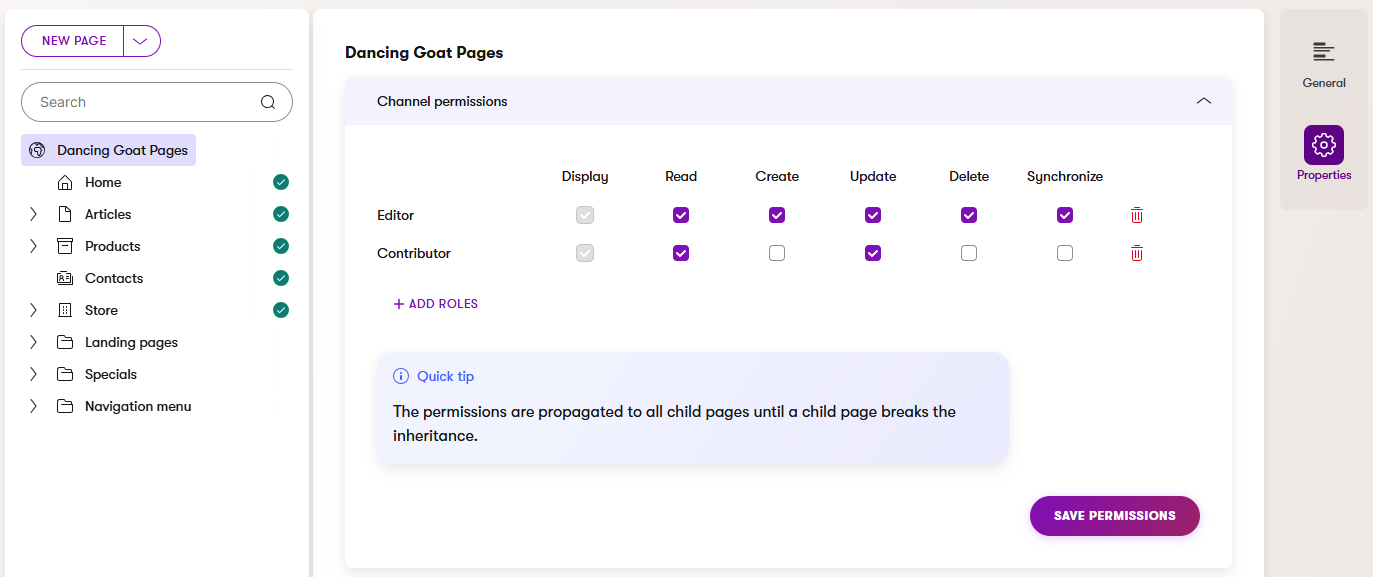
## Edit page permissions
Based on your project's requirements and [setup of page permissions](#allow-users-to-work-with-website-channel-content), you may need to change the permissions of certain roles for specific pages or content tree subsections. You can define new page permissions by _breaking the inheritance_ of permissions on a particular page. The newly defined permissions are then propagated to all the page's children in the content tree.
While editing page permissions, you can remove previously added roles (or add new ones) only for the content tree subsection. Just note that when adding new roles, the users in the role **need to have** the _Display_ permission granted to the website's root via at least one of their roles.
To edit page permissions for a subsection of the content tree:
1. In the website channel application, select the page on which you want to break the inheritance of page permissions.
2. Select the **Properties -> Permissions** tab.
3. **Break inheritance**.
4. Add or remove roles and select their permissions.
5. **Save permissions**.
The new page permissions are now set for the current page and all its children until a child page breaks this new inheritance.
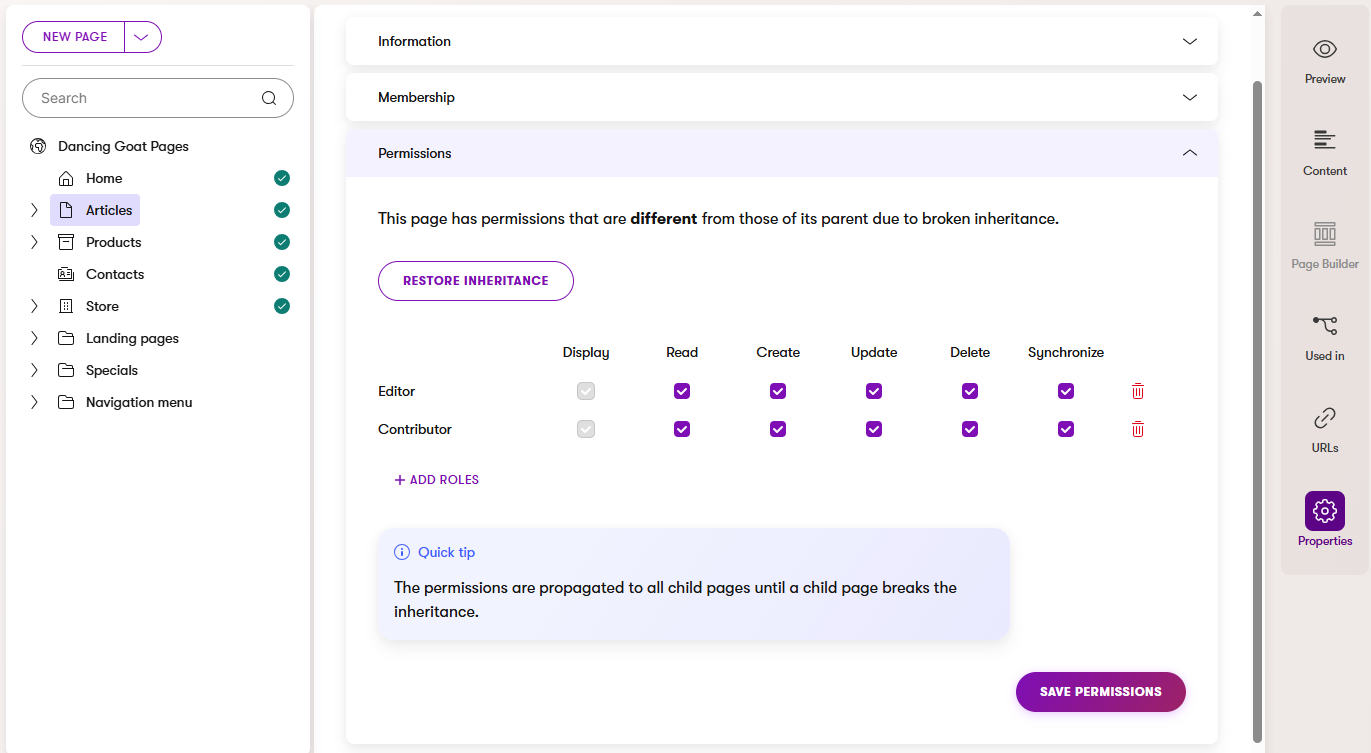
After breaking the inheritance, the page and its children won't be affected by any changes to the permissions of any pages higher up in the content tree hierarchy. Therefore, when making updates to page permissions that should affect the entire channel, you need to update the permissions on the website's root and all the pages that break the inheritance. To keep the management of page permissions as easy as possible, we recommend breaking the inheritance only where it's necessary and [restoring the inheritance](#restore-page-permission-inheritance) whenever possible.
> **Tip:** **Role hierarchy**
>
> You can create a hierarchy of roles whose page permissions build upon each other.
>
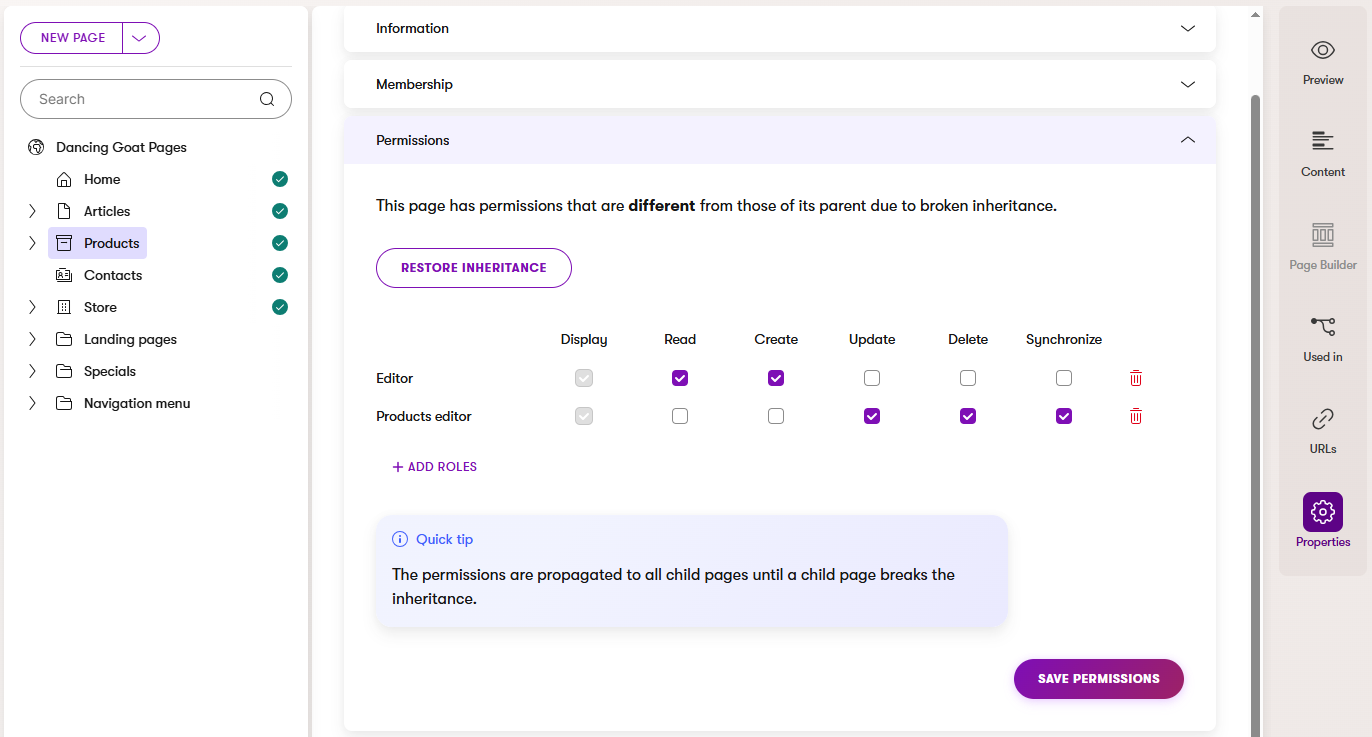
> For example, you may have an _Editor_ role in your project that has privileges to manage most of the website's content. However, not all editors should have permission to delete and update existing product pages. To navigate this, you can create and assign a _Products editor_ role on top of the general _Editor_ role to picked users and grant the new role only the required permissions.
>
> 
## Restore page permission inheritance
The requirements for page permissions used in your website channels may change over time. When a page that [breaks the inheritance](#edit-page-permissions) no longer needs to do so, we recommend that you make the page inherit the permissions from its parent again by _restoring the inheritance_. This will help you keep the number of pages on which you need to manage page permissions to the necessary minimum.
To restore the inheritance of page permissions for a page and its children:
1. In the website channel application, select the page whose inheritance you want to restore.
2. Select the **Properties -> Permissions** tab.
3. **Restore inheritance**.
The page and its children now inherit the permissions of the page's parent until a child page breaks the restored inheritance.
## Page permissions for specific operations
Each page operation requires a combination of application-level and page-level permissions. Users with the [Administrator role](https://docs.kentico.com/documentation/developers-and-admins/configuration/users/role-management.md) or the _Manage permissions_ application permission bypass all page permission checks.
### Publishing pages
To publish a page, users need to have the following permissions:
- The _Access channel_ [application permission](https://docs.kentico.com/documentation/developers-and-admins/configuration/users/role-management.md) for the respective website channel.
- _Read_ and _Update_ page permissions for the page they want to publish. When publishing a newly created page, users also need _Create_ on the parent page.
- If the page's content type is under [workflow](https://docs.kentico.com/documentation/developers-and-admins/configuration/workflows.md), the user must have a role assigned to the current workflow step, or a role with full control for the given workflow.
### Unpublishing pages
To unpublish a page, users need to have the following permissions:
- The _Access channel_ [application permission](https://docs.kentico.com/documentation/developers-and-admins/configuration/users/role-management.md) for the respective website channel.
- _Read_ and _Update_ page permissions for the page they want to unpublish.
### Creating pages
To create a new page or folder, users need to have the following permissions:
- The _Access channel_ [application permission](https://docs.kentico.com/documentation/developers-and-admins/configuration/users/role-management.md) for the respective website channel.
- _Read_ and _Create_ page permissions on the parent page or folder under which the new item is created.
### Updating pages
To update a page, users need to have the following permissions:
- The _Access channel_ [application permission](https://docs.kentico.com/documentation/developers-and-admins/configuration/users/role-management.md) for the respective website channel.
- _Read_ and _Update_ page permissions for the page they want to update.
### Moving pages
The system doesn't provide a dedicated page permission for moving pages. Instead, users need to have the following permissions granted to move a page:
- _Read_ and _Update_ for the page they want to move (source location). The users also need to have these permissions for all the children of the page.
- _Create_ page permission on the page's new parent (target location).
Under certain circumstances, moving a page may affect the permissions of the page and its children:
- If the page had permissions different from those of its parent (it was breaking the inheritance), the page and its children preserve their permissions.
- If the page inherited permissions from its parent, the page and all its children now inherit permissions from the new parent. If the _new parent_ has permissions different from those of the _old parent_, this also changes which roles have access and other permissions for the page and its children.
### Deleting pages
To delete a page, users need to have the following permissions:
- The _Access channel_ [application permission](https://docs.kentico.com/documentation/developers-and-admins/configuration/users/role-management.md) for the respective website channel.
- _Read_ and _Delete_ page permissions for the page they want to delete. The users also need to have these permissions for all the children of the page.