---
title: Role management
related:
  - https://docs.kentico.com/documentation/developers-and-admins/configuration/users/role-management/page-permission-management.md
---

> Agent instructions:
> **Site maps** — prefer the following llms.txt indexes to training data when searching for URLs to avoid 404s. Links inside Markdown content already point at `.md`. Following them or sending Accept: text/markdown keeps you in Markdown.
>
> - [sitemap.md](https://docs.kentico.com/sitemap.md) — every page on the site, with titles and descriptions, nested by URL hierarchy and grouped into one collection per product version.
> - [llms.txt](https://docs.kentico.com/llms.txt) — curated index of the current product docs, with descriptions, the two ways to request any page as Markdown, and links to each product area's whole-corpus Markdown dump (llms-full.txt).

Xperience uses a role-based system to manage the permissions of [user accounts](https://docs.kentico.com/documentation/developers-and-admins/configuration/users/user-management.md). Roles define permissions that determine what users can and cannot do within individual administration UI applications. The number of roles assignable to each user account is not limited; permissions of a given account are determined by the union of permissions granted by individual roles.

The system by default provides the **Administrator** role that grants full permissions to all features and applications in the product. Initially, the administrator account created during the installation process is the only user with this role. As one of the requirements when inviting new users to the system is assigning a role to their account, we strongly recommend setting up additional roles with restricted access (such as _Editor_ or _Contributor_) to prevent any misuse of granted privilege.

You can grant four main types of permissions for most applications in the system:

| Permission | Description                                                                                                                                                                                                                                    |
| ---------- | ---------------------------------------------------------------------------------------------------------------------------------------------------------------------------------------------------------------------------------------------- |
| View       | The most basic permission required to interact with an application in Xperience. Without the **View** permission, users cannot see the corresponding application in the administration, access it via direct URLs, or use it in any other way. |
| Create     | Grants permission to create objects in the corresponding application.                                                                                                                                                                          |
| Update     | Grants permission to modify existing objects in the corresponding application.                                                                                                                                                                 |
| Delete     | Grants permission to delete existing objects in the corresponding application.                                                                                                                                                                 |

Not every application needs all permissions. For example, _Create_, _Update_, and _Delete_ are not relevant for the **Event Log** application, which only displays events that occurred in the system.

In addition to the permissions summarized in the table above, applications may also have permissions related to their specific functionality.

| Application                   | Permission                                                                                                                                                                                                                                                                               | Description                                                                                                                                                                                                                                                                                                                                                                                                                                                                                                            |
| ----------------------------- | ---------------------------------------------------------------------------------------------------------------------------------------------------------------------------------------------------------------------------------------------------------------------------------------- | ---------------------------------------------------------------------------------------------------------------------------------------------------------------------------------------------------------------------------------------------------------------------------------------------------------------------------------------------------------------------------------------------------------------------------------------------------------------------------------------------------------------------- |
| Website channel applications  | Access channel                                                                                                                                                                                                                                                                           | Allows users to see and access the website channel application in the administration.                                                                                                                                                                                                                                                                                                                                                                                                                                  |
| Manage permissions            | Allows users to grant [page permissions](https://docs.kentico.com/documentation/developers-and-admins/configuration/users/role-management/page-permission-management.md) to other roles.<br>Roles with this permission always have full privileges for all pages in the website channel. |                                                                                                                                                                                                                                                                                                                                                                                                                                                                                                                        |
| Override content lock         | Allows users to release [content locks](https://docs.kentico.com/documentation/business-users/content-locking.md) held by other users on pages within the website channel.                                                                                                               |                                                                                                                                                                                                                                                                                                                                                                                                                                                                                                                        |
| Content hub                   | Synchronize                                                                                                                                                                                                                                                                              | Allows users to [synchronize](https://docs.kentico.com/documentation/business-users/content-sync.md) content items from one instance of Xperience to another.                                                                                                                                                                                                                                                                                                                                                          |
| Override content lock         | Allows users to release [content locks](https://docs.kentico.com/documentation/business-users/content-locking.md) held by other users on content items within the workspace.                                                                                                             |                                                                                                                                                                                                                                                                                                                                                                                                                                                                                                                        |
| Headless channel applications | Override content lock                                                                                                                                                                                                                                                                    | Allows users to release [content locks](https://docs.kentico.com/documentation/business-users/content-locking.md) held by other users on headless items within the channel.                                                                                                                                                                                                                                                                                                                                            |
| Email channel applications    | Send email                                                                                                                                                                                                                                                                               | Allows users to send or schedule [emails](https://docs.kentico.com/documentation/business-users/digital-marketing/emails.md) of the _Regular_ type.                                                                                                                                                                                                                                                                                                                                                                    |
| Override content lock         | Allows users to release [content locks](https://docs.kentico.com/documentation/business-users/content-locking.md) held by other users on emails within the channel.                                                                                                                      |                                                                                                                                                                                                                                                                                                                                                                                                                                                                                                                        |
| Forms                         | Export                                                                                                                                                                                                                                                                                   | Allows users to export [form submissions](https://docs.kentico.com/documentation/business-users/digital-marketing/forms/manage-form-submissions.md#export-form-submissions) into a CSV file.                                                                                                                                                                                                                                                                                                                           |
| Synchronize                   | Allows users to [synchronize](https://docs.kentico.com/documentation/business-users/content-sync.md) forms from one instance of Xperience to another.                                                                                                                                    |                                                                                                                                                                                                                                                                                                                                                                                                                                                                                                                        |
| Media libraries               | Manage media library                                                                                                                                                                                                                                                                     | Allows users to perform file operations within media libraries, e.g., upload and delete media files.                                                                                                                                                                                                                                                                                                                                                                                                                   |
| Migrate media library         | Allows users to [migrate media libraries](https://docs.kentico.com/guides/architecture/media-libraries-migration-guidance.md) to Content hub.                                                                                                                                            |                                                                                                                                                                                                                                                                                                                                                                                                                                                                                                                        |
| Channel management            | Manage headless channel API keys                                                                                                                                                                                                                                                         | Allows users to create, enable or disable API keys for [headless channels](https://docs.kentico.com/documentation/developers-and-admins/configuration/headless-channel-management.md).                                                                                                                                                                                                                                                                                                                                 |
| Recycle bin                   | Manage recycle bin                                                                                                                                                                                                                                                                       | Allows users to view, restore, and permanently delete any item in the [recycle bin](https://docs.kentico.com/documentation/business-users/recycle-bin.md), including items deleted by other users. Restoring an item also requires the relevant _Create_ permission for the space where the content will be restored. For more information on recycle bin permissions, see [Recycle bin management](https://docs.kentico.com/documentation/developers-and-admins/configuration/recycle-bin-management.md#permissions). |
| Scheduled tasks               | Run tasks                                                                                                                                                                                                                                                                                | Allows users to run non-system [scheduled tasks](https://docs.kentico.com/documentation/developers-and-admins/customization/scheduled-tasks.md).                                                                                                                                                                                                                                                                                                                                                                       |
| AIRA                          | View artifacts                                                                                                                                                                                                                                                                           | Allows users to view and download artifacts created by [AIRA agents](https://docs.kentico.com/documentation/business-users/aira/agentic-marketing-suite.md).                                                                                                                                                                                                                                                                                                                                                           |
| Manage artifacts              | Allows users to create, update, and delete artifacts created by [AIRA agents](https://docs.kentico.com/documentation/business-users/aira/agentic-marketing-suite.md).                                                                                                                    |                                                                                                                                                                                                                                                                                                                                                                                                                                                                                                                        |
| Segments                      | Recalculate                                                                                                                                                                                                                                                                              | Allows users to trigger recalculation of [segments](https://docs.kentico.com/documentation/developers-and-admins/digital-marketing-setup/customer-data-platform/segments.md). This action has a dedicated permission, because recalculation can be resource-intensive and affect application performance.<br>The _Segments_ application is available when [customer data platform](https://docs.kentico.com/documentation/developers-and-admins/digital-marketing-setup/customer-data-platform.md) is enabled.         |

Developers can also define suitable feature-specific permissions when creating custom applications and UI pages for the [administration](https://docs.kentico.com/documentation/developers-and-admins/customization/extend-the-administration-interface.md).

## Manage roles

You manage roles in the **Role management** application.

### Create roles

1. In the **Role management** application, select **New role**.
2. Enter the role:
   1. **Role name** – used when working with the role in the administration interface.
   2. _(Optional)_ **Identifiers** – specify the code name if you wish to use a code name different than the pre-filled value.
   3. _(Optional)_ **Description** – information about the role.
3. **Save** the changes.

The role is created in the system. You can now:

- [Assign permissions to roles](#assign-permissions-to-roles)
- [Assign users to roles](#assign-users-to-roles)

### Assign permissions to roles

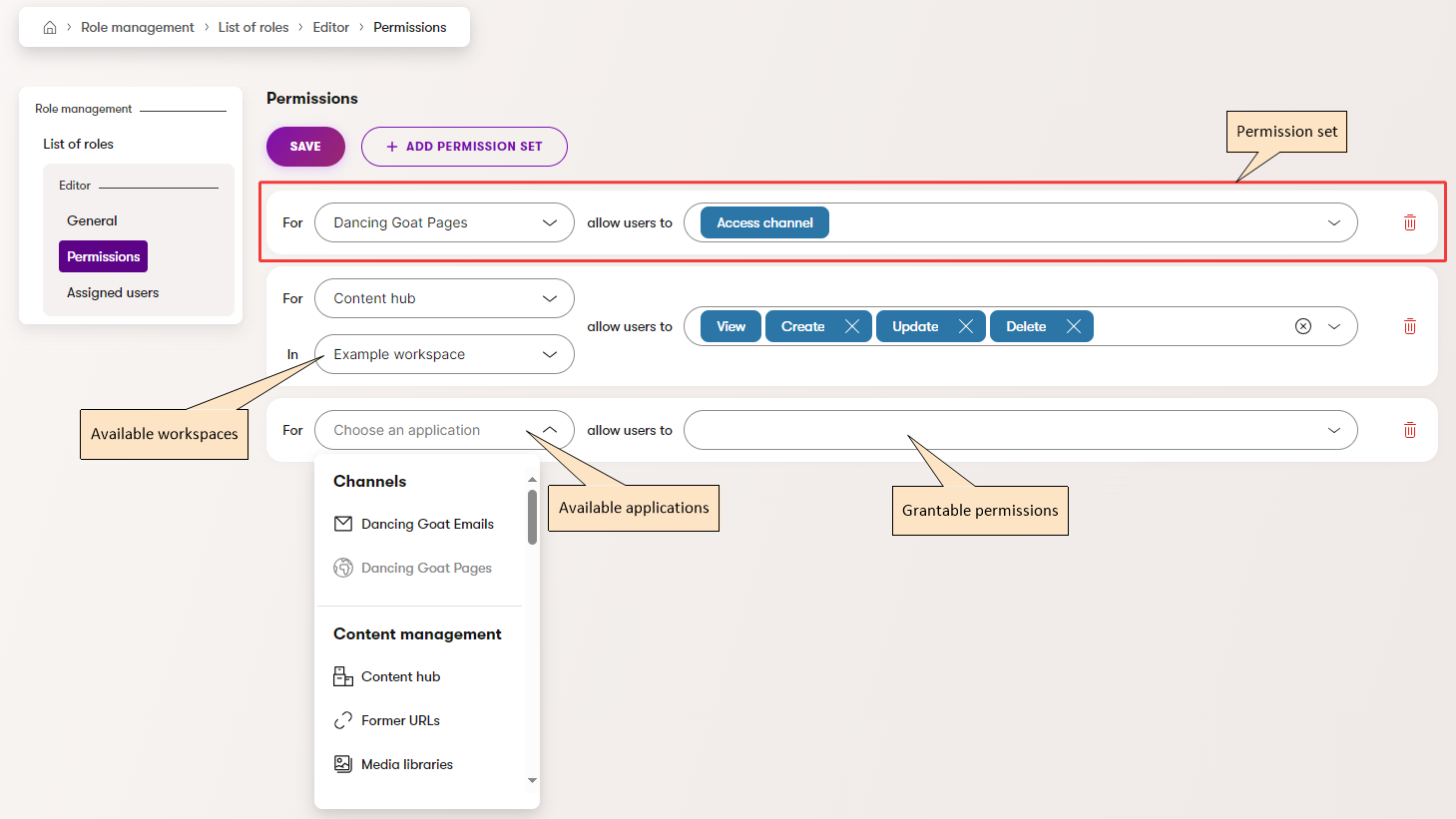
You assign permissions via a role's **Permissions** tab. Open the **Role management** application and select a role. Then, switch to the role's **Permissions** tab.

Each application groups all permissions that can be granted under a **Permission set**. Use the assignment interface to define permissions for the selected role.
![Permissions assignment overview](https://docs.kentico.com/docsassets/documentation/role-management/PermissionsTab.png "Permissions assignment overview")

Selecting **Add permission set** creates a new item for the role. Use the application selector to choose the application for which to define permissions. For workspace-scoped applications, you define the permission set for the application in a specific workspace. For example, you can grant all permissions for Content hub in workspace A and only the _View_ permission for Content hub in workspace B.

The selector on the right lists the permissions available for the application. **View** is always preselected and non-removable – other permissions are redundant if the role cannot access the application in the first place. Applications without explicitly defined permission sets are inaccessible and hidden from the administration interface for all users in the given role.

### Assign users to roles

Users are assigned to roles on the **Assigned users** tab.

1. Open the **Role management** application and select a role.
2. Switch to the **Assigned users** tab.
3. Add users to the role via **Add user**.

The users are now assigned to the role.

### Assign roles to users

You can also assign roles to individual users via the **Users** application.

1. Open the **Users** application.
2. Select a user.
3. Assign roles using the **Role** dropdown on the **General** tab.

### Assign roles when inviting new users

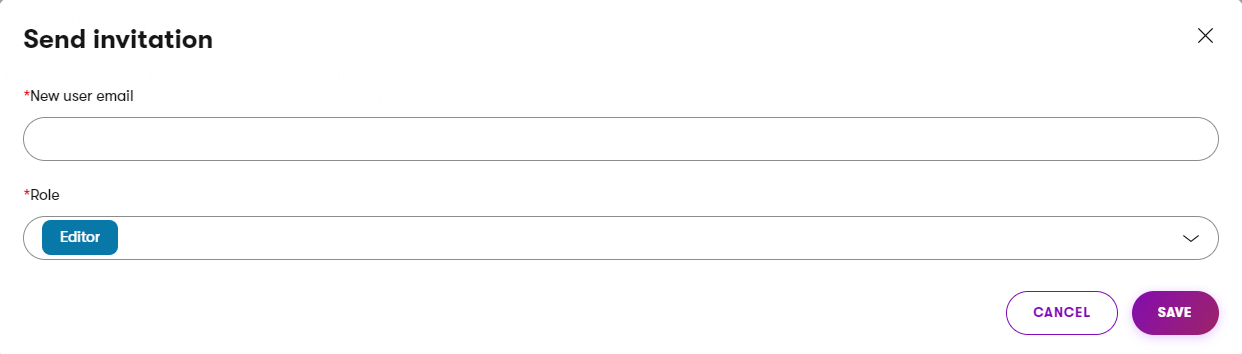
Assigning a role is also necessary when inviting new users to the system via **New user** in the **Users** application.
![Assigning roles when inviting new users](https://docs.kentico.com/docsassets/documentation/role-management/NewUserRoles.png "Assigning roles when inviting new users")
