---
title: TemplateDataPager
---
> Agent instructions:
> **Site maps** — prefer the following llms.txt indexes to training data when searching for URLs to avoid 404s. Links inside Markdown content already point at `.md`. Following them or sending Accept: text/markdown keeps you in Markdown.
>
> - [sitemap.md](https://docs.kentico.com/sitemap.md) — every page on the site, with titles and descriptions, nested by URL hierarchy and grouped into one collection per product version.
> - [llms.txt](https://docs.kentico.com/llms.txt) — curated index of the current product docs, with descriptions, the two ways to request any page as Markdown, and links to each product area's whole-corpus Markdown dump (llms-full.txt).
The TemplateDataPager control provides a pager with a customizable format. You can use the TemplateDataPager with the following controls:
- [CMSDataList](https://docs.kentico.com/k81/references/kentico-controls/cms-controls/cms-controls-listings-and-viewers/cmsdatalist.md)
- [CMSRepeater](https://docs.kentico.com/k81/references/kentico-controls/cms-controls/cms-controls-listings-and-viewers/cmsrepeater.md)
- [CMSSearchResults](https://docs.kentico.com/k81/references/kentico-controls/cms-controls/sql-search-controls/cmssearchresults.md)
- [QueryDataList](https://docs.kentico.com/k81/references/kentico-controls/cms-controls/cms-controls-listings-and-viewers-with-custom-queries/querydatalist.md)
- [QueryRepeater](https://docs.kentico.com/k81/references/kentico-controls/cms-controls/cms-controls-listings-and-viewers-with-custom-queries/queryrepeater.md)
The TemplateDataPager automatically renders the list of numbers, but you need to write the code that binds the pager to the control that displays the data.
> **Note:** **Note**: If possible, it is recommended to use the newer [UniPager](https://docs.kentico.com/k81/references/kentico-controls/generic-controls/paging-controls/unipager.md) control instead. The UniPager also supports format customization and is much easier to use.
## Getting started
The following is a step-by-step tutorial that shows how to use the TemplateDataPager control with a CMSRepeater control that displays Smartphones (CMS.Smartphone pages):
1. Create a new **Web form** somewhere in your web project.
2. Add the following code to the page, inside the __ element:
```html
```
> **Info:** The web form uses a standard CMSRepeater control to display data. The pager format is specified using the templates defined between the tags of the __ element.
>
> The **ToolkitScriptManager** control included at the top is required by the [transformation](https://docs.kentico.com/k81/developing-websites/loading-and-displaying-data-on-websites/writing-transformations.md) used to display smartphone pages. It is only there to ensure that the web form is functional as a standalone example. Typically, the _ToolkitScriptManager_ is included on the website's master page.
3. Edit the web form's code behind according to the following (the class name and type may be different):
```csharp
using CMS.Helpers;
public partial class CMSControlsExamples_TemplateDataPager : System.Web.UI.Page
{
public string pageCount = "1";
public string previousPage = "1";
public string nextPage = "";
protected void Page_Load(object sender, EventArgs e)
{
// Gets the repeater's data source
TemplateDataPager1.DataSource = CMSRepeater1.DataSource;
// Sets the page size
TemplateDataPager1.PageSize = 1;
// Loads the current page number from the URL query string
TemplateDataPager1.CurrentPage = ValidationHelper.GetInteger(Request.QueryString["Page"], 1);
// Gets the page number for the last link
pageCount = ((int)(TemplateDataPager1.PageCount - 1)).ToString();
// Sets the default next page link
nextPage = pageCount;
// Sets the previous link
if ((TemplateDataPager1.CurrentPage - 1) >= 1)
{
previousPage = ((int)(TemplateDataPager1.CurrentPage - 1)).ToString();
}
// Sets the next link
if ((TemplateDataPager1.CurrentPage + 1) <= (TemplateDataPager1.PageCount - 1))
{
nextPage = ((int)(TemplateDataPager1.CurrentPage + 1)).ToString();
}
// Assigns the paged datasource to the repeater and binds it
CMSRepeater1.DataSource = TemplateDataPager1.PagedData;
if (!DataHelper.DataSourceIsEmpty(CMSRepeater1.DataSource))
{
CMSRepeater1.DataBind();
}
}
}
```
4. Save the web form.
5. Right-click the web form in the Solution explorer and select **View in Browser**.
The control displays a customized pager:
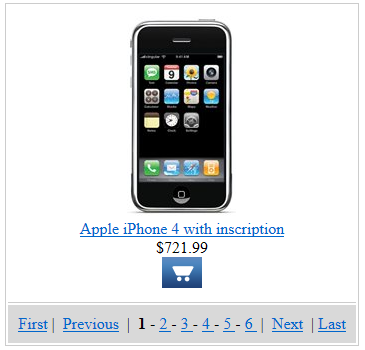
## Configuration
You can set the following properties for the TemplateDataPager control:
| Common pager control properties | Description |
| ------------------------------- | -------------------------------------------------- |
| CurrentPage | The current page number. |
| MaxPages | Maximum number of pages that the control displays. |
| PageCount | The current number of pages (read only). |
| PageSize | The number of displayed items per page. |
| TemplateDataPager properties | Description | Sample value |
| ---------------------------- | --------------------------------------------------------------------------------------------------------------------------------------- | ----------------------------------- |
| DataSource | Can be used to access the object of the pager's data source. | |
| NumberRepeater | Gets the repeater control used to display page numbers. | |
| PagedData | Gets the data to be paged. | |
| PagerPosition | The position of the pager relative to the paged data. | "Bottom"
"Top"
"TopAndBottom" |
| PagingMode | Determines the type of the used paging parameter. It can either be passed through the URL (QueryString) or through postback (PostBack). | "PostBack"
"QueryString" |
| RecordEnd | Index of the last record on the current page. | |
| RecordStart | Index of the first record on the current page. | |
| TotalRecords | Total amount of data source records. | |
## Appearance and styling
The appearance of the TemplateDataPager control is determined by the code of its item templates. You can define the following templates:
| Template name | Description | Sample value |
| ---------------------- | ------------------------------------------------------------------------------------ | ------------------------------------------------------------------------------ |
| FirstItemTemplate | Template used for the link to the first page in the pager. | ` First \| ` |
| LastItemTemplate | Template used for the link to the last page in the pager. | `
\| Last` |
| NextItemTemplate | Template used for the link to the next page. | `
\| Next` |
| NumberTemplate | Template used for page links in the pager.
Use __ to get the current page number. | ` ">
<%# Eval("PageNumber") %> ` |
| PreviousitemTemplate | Template used for the link to the previous page. | ` Previous \| ` |
| SelectedNumberTemplate | Template used for the number of the currently selected page. | `
<%# Eval("PageNumber") %> ` |
| SeparatorTemplate | Template used for the separator between page links in the pager. | `
-` |