---
title: Displaying catalog discounts on the live site
related:
- https://docs.kentico.com/k12sp/e-commerce-features/managing-on-line-stores/discounts/working-with-catalog-discounts.md
---
> Agent instructions:
> **Site maps** — prefer the following llms.txt indexes to training data when searching for URLs to avoid 404s. Links inside Markdown content already point at `.md`. Following them or sending Accept: text/markdown keeps you in Markdown.
>
> - [sitemap.md](https://docs.kentico.com/sitemap.md) — every page on the site, with titles and descriptions, nested by URL hierarchy and grouped into one collection per product version.
> - [llms.txt](https://docs.kentico.com/llms.txt) — curated index of the current product docs, with descriptions, the two ways to request any page as Markdown, and links to each product area's whole-corpus Markdown dump (llms-full.txt).
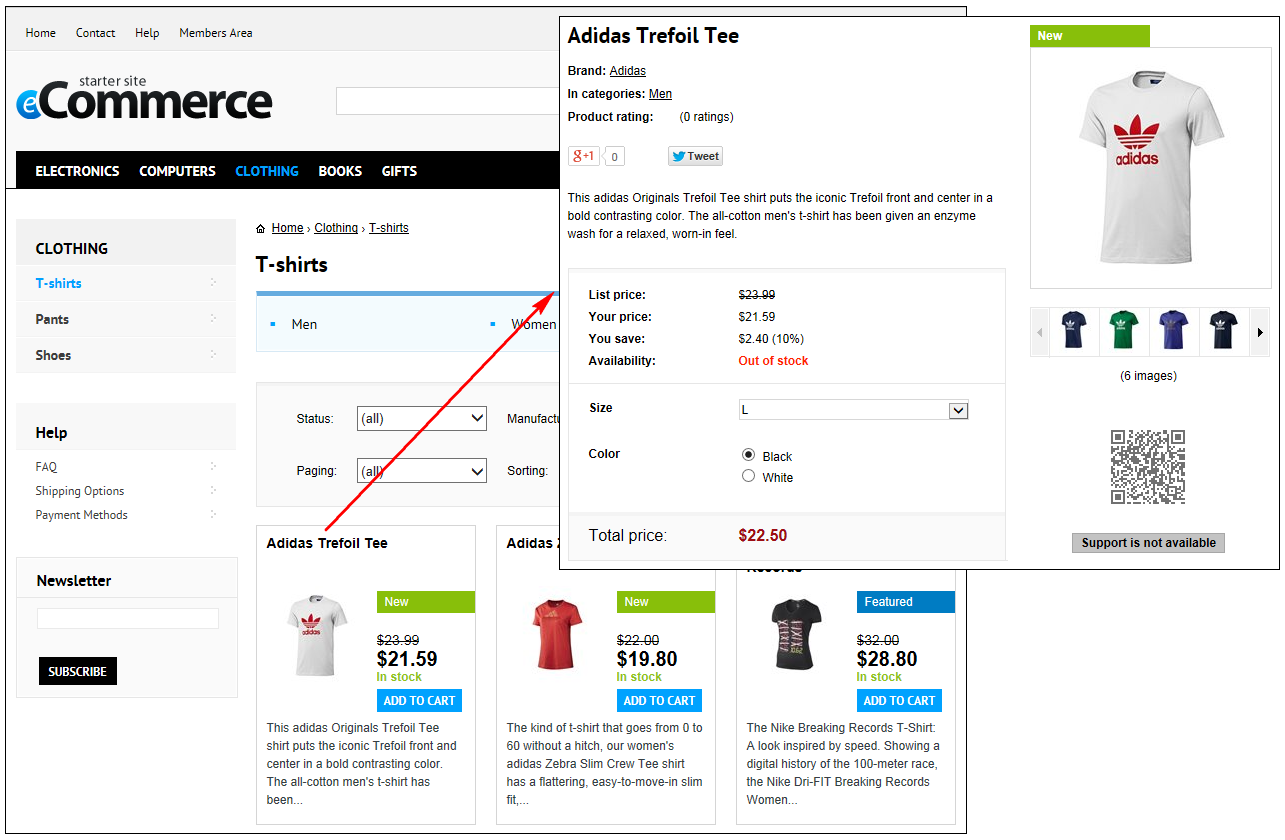
The system allows you to attract the customers by showing them what economical and convenient purchases they can make in your on-line store. Specifically, the system can display original and also discounted prices of products. The system can also display special status labels, for example, _Sale_, _New_, _Featured_, etc.
### Offering products at discounted prices
The sample _E-commerce Site_ can display the products\*\* with the original and discounted prices\*\*. Whether and how the system displays the prices depends on each product's configuration, and availability of catalog discounts:
| Product price | Product list price | Catalog discount | Description |
| ------------- | ------------------ | ---------------- | ---------------------------------------------------------------------------------------------------------------------------- |
| defined | defined | doesn't apply | The list price is crossed out and the price is highlighted. |
| defined | not defined | applies | The price is crossed out and the price reduced by the discount is highlighted. |
| defined | defined | applies | The list price is crossed out and the price reduced by the discount is highlighted. |
| defined | not defined | doesn't apply | Only the price is displayed for the product; the price is highlighted. (The system displays only one price for the product). |
The sample _E-commerce Site_ can display the products **with the original and discounted prices. The amount (and percentage of the original prices) that the customers can save is also displayed**. Whether and how the system displays this information depends on the products' configuration, and availability of catalog discounts:
| Product price | Product list price | Catalog discount | Description |
| ------------- | ------------------ | ---------------- | ------------------------------------------------------------------------------------------------------------------------------------------- |
| defined | defined | doesn't apply | The list price, displayed as _List price_, is crossed out and the price, displayed as _Your price_, is highlighted. |
| defined | not defined | applies | The price, displayed as _List price_, is crossed out and the price reduced by the discount, displayed as _Your price_, is highlighted. |
| defined | defined | applies | The list price, displayed as _List price_, is crossed out and the price reduced by the discount, displayed as _Your price_, is highlighted. |
| defined | not defined | doesn't apply | The system displays for the product only the price as_Total price_. |
> **Tip:** You can specify the products' **Price** and **List price** properties while editing the products on the [General](https://docs.kentico.com/k12sp/e-commerce-features/managing-on-line-stores/products.md#general-tab) tab.
>
> Alternatively, you can specify these properties in the **Pages** application while editing the corresponding product pages on the **Form** tab.
> **Info:** _List price_ stands for the recommended retail price (RRP) or manufacturer's suggested retail price (MSRP) of the product. The list price is typically determined by factors such as supply, demand and manufacturing costs.
### Offering products highlighted with statuses
You can motivate your customers to purchase selected products by showing [product statuses](https://docs.kentico.com/k12sp/e-commerce-features/managing-on-line-stores/products/product-statuses.md), e.g., _Sale_, _New_, _Featured_, etc.
> **Tip:** You can specify the products' statuses by modifying their **Public status** properties on the **General** tab.
>
> Alternatively, you can specify the products' statuses in the **Pages** application while editing the corresponding product pages on the **Form** tab.
### Configuring pages to display product discounts
The sample product listing pages and sample product details pages contain [web parts](https://docs.kentico.com/k12sp/developing-websites/developing-websites-using-portal-engine/using-and-configuring-web-parts.md) using [transformations](https://docs.kentico.com/k12sp/developing-websites/loading-and-displaying-data-on-websites/writing-transformations.md) that can display product discount information (product prices and statuses).
| Kentico sample pages | Web part | Transformation |
| ------------------------------------------------------ | ------------------ | ----------------------------------------------------------------- |
| Product listing pages, e.g., _T-shirts_ page | Product List | EcommerceSite.Transformations.ProductPreviewForThreeColumnsLayout |
| Product details pages, e.g., _Adidas Trefoil Tee_ page | Product Detail | EcommerceSite.Transformations.ProductDetail |
| Product details pages, e.g., _Adidas Trefoil Tee_ page | Product Main Image | EcommerceSite.Transformations.ProductDetailGalleryProductImage |
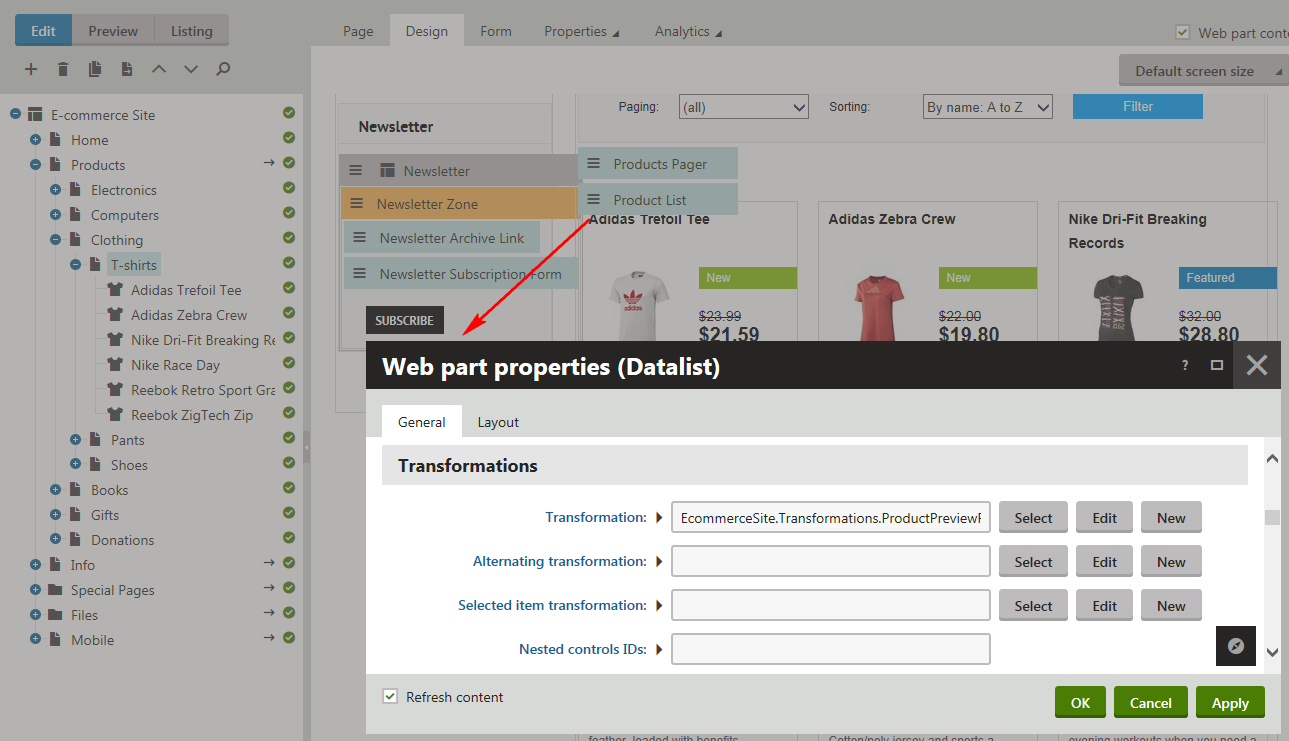
To configure a product listing/product details page to display product prices and product statuses:
1. Open the **Pages** application.
2. Select the required page from the content tree.
3. Switch to the **Edit -> Design** tab.
4. Add appropriate web parts to the selected web part zones.
> **Tip:** You can do this by copying the web part(s) from any sample product listing/product details page. If you are editing:
>
> - your custom product listing page, add the _Product List_ web part;
> - your custom product details page, add the _Product Detail_ and _Product Main Image_ web parts.
5. Modify the web parts' **Transformation** properties as required:
- **Product listing pages**
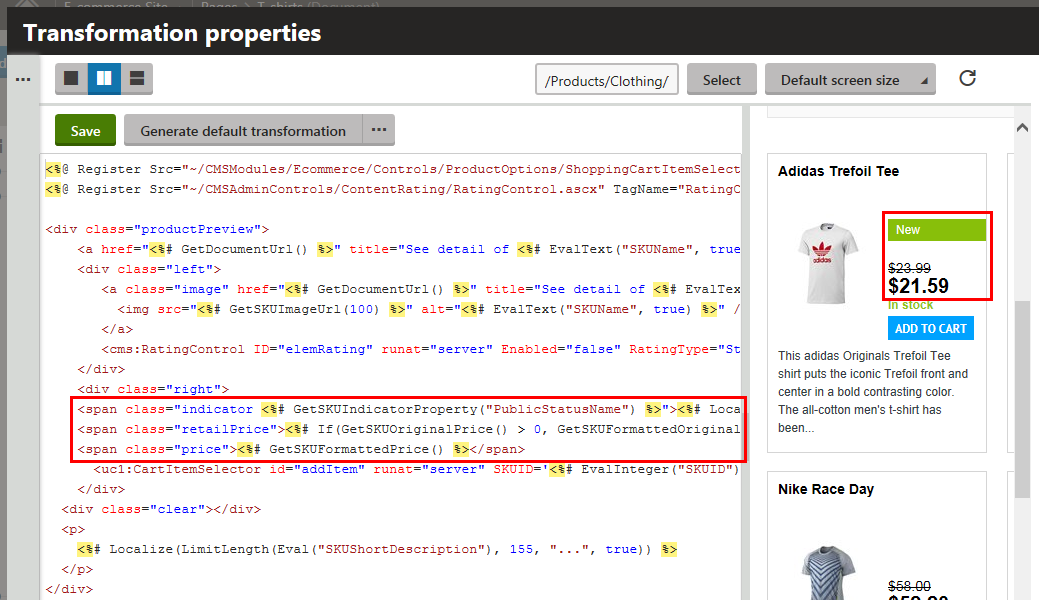
- If you want the page to display product prices, i.e., the currently valid price and the undiscounted price (if available), make sure the transformation contains the following code:
```csharp
<%# If(GetSKUOriginalPrice() > 0, GetSKUFormattedOriginalPrice(), "") %>
<%# GetSKUFormattedPrice() %>
```
- If you want the page to display product statuses (if available), make sure the transformation contains the following code:
```csharp
"><%# Localize(GetSKUIndicatorProperty("PublicStatusDisplayName")) %>
```
- **Product details pages**
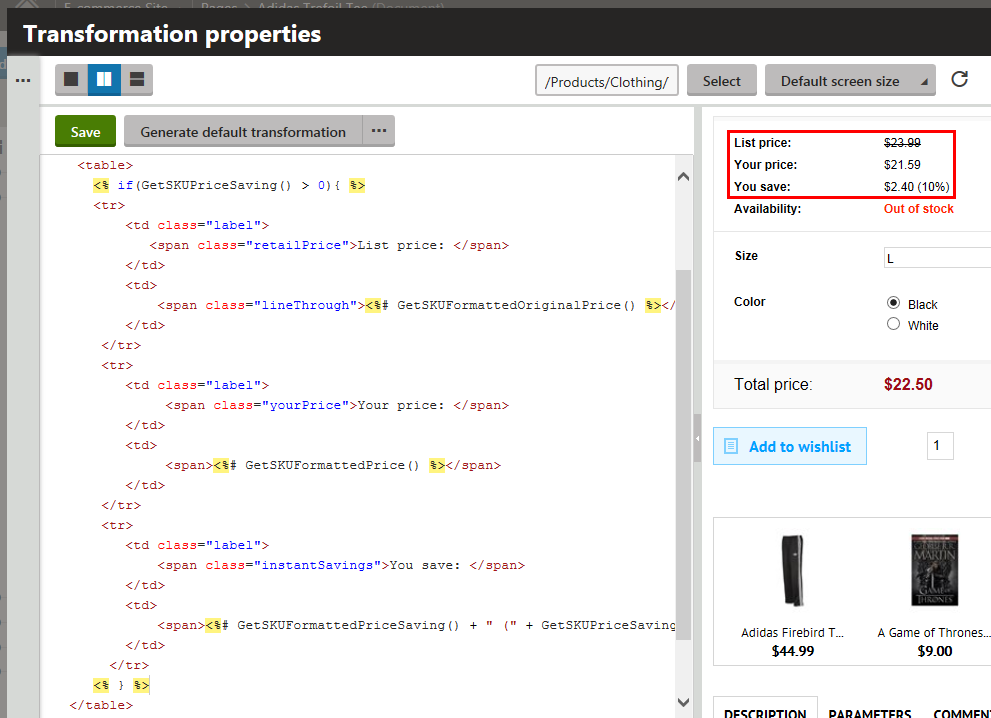
- If you want the page to display product prices, i.e., the currently valid price and the undiscounted price (if available), and the amount (percentage of the original price) that the customers can save, make sure the transformation contains the following code:
```csharp
<% if(GetSKUPriceSaving() > 0){ %>
|
List price:
|
<%# GetSKUFormattedOriginalPrice() %>
|
|
Your price:
|
<%# GetSKUFormattedPrice() %>
|
|
You save:
|
<%# GetSKUFormattedPriceSaving() + " (" + GetSKUPriceSaving(true) + "%)" %>
|
<% } %>
```
- If you want the page to display the product's status (if available), make sure the transformation contains the following code:
```csharp
">
<%# Localize(GetSKUIndicatorProperty("PublicStatusDisplayName")) %>
```
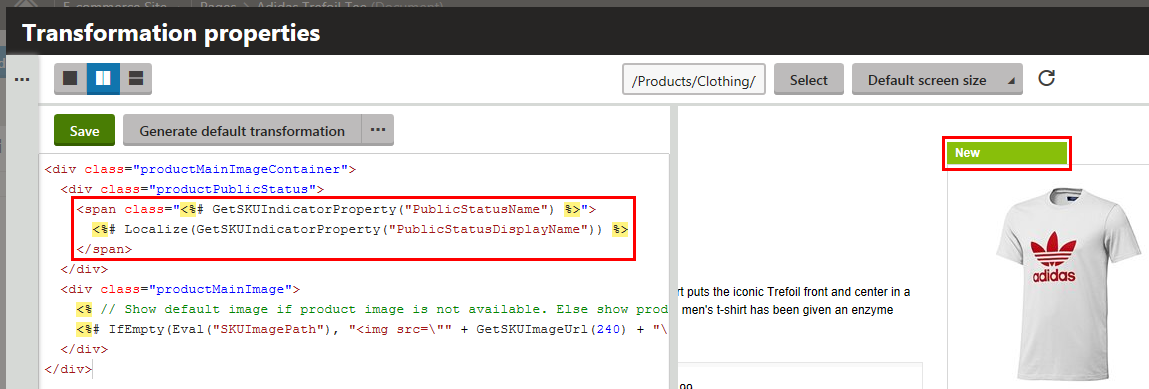
6. (Optional) Modify other properties of the web parts if required.
7. Click **OK**.
If your customers now view the page on the live site, they can see the product's discount information.