---
title: Promotions
related:
- https://docs.kentico.com/documentation/developers-and-admins/digital-commerce-setup/promotions/catalog-discounts.md
- https://docs.kentico.com/documentation/developers-and-admins/digital-commerce-setup/promotions/cart-item-discounts.md
- https://docs.kentico.com/documentation/developers-and-admins/digital-commerce-setup/promotions/order-discounts.md
- https://docs.kentico.com/documentation/developers-and-admins/digital-commerce-setup/promotions/free-shipping.md
- https://docs.kentico.com/documentation/developers-and-admins/digital-commerce-setup/promotions/coupon-codes.md
- https://docs.kentico.com/documentation/developers-and-admins/digital-commerce-setup/promotions/customer-eligibility-customization.md
---
> Agent instructions:
> **Site maps** — prefer the following llms.txt indexes to training data when searching for URLs to avoid 404s. Links inside Markdown content already point at `.md`. Following them or sending Accept: text/markdown keeps you in Markdown.
>
> - [sitemap.md](https://docs.kentico.com/sitemap.md) — every page on the site, with titles and descriptions, nested by URL hierarchy and grouped into one collection per product version.
> - [llms.txt](https://docs.kentico.com/llms.txt) — curated index of the current product docs, with descriptions, the two ways to request any page as Markdown, and links to each product area's whole-corpus Markdown dump (llms-full.txt).
> **License:** Advanced license required.
>
> Features described on this page require the Xperience by Kentico **Advanced** license tier.
Promotions allow you to offer discounts and special offers to your customers. The system evaluates active promotions during checkout and automatically applies the best available discount.
To learn how to create and manage promotions in the administration, see [Manage promotions](https://docs.kentico.com/documentation/business-users/manage-commerce-stores.md#manage-promotions).
Xperience by Kentico provides a promotion framework that allows developers to implement custom discount rules. The framework integrates with the [price calculation API](https://docs.kentico.com/documentation/developers-and-admins/digital-commerce-setup/price-calculation.md) to automatically apply promotions during checkout.
## Promotion types
The system supports four types of promotions based on when and how they're applied:
| Promotion type | Description | Use cases |
| -------------------------------------------------------------------------------------------------------------------------------------------- | ----------------------------------------------------------------------------------------------------------------------------------------------------------------------------------------------------------------------------------------------------------------------------------------------------------------------------------------------------------------------------------------------------------------------------------------------------------------------------------------- | ----------------------------------------------------------------------------------------------------------------------------------------------------------------------- |
| [Catalog discounts](https://docs.kentico.com/documentation/developers-and-admins/digital-commerce-setup/promotions/catalog-discounts.md) | Discounts applied to individual products during price calculation. The system evaluates all applicable promotions and automatically selects the best discount for each product. Only one catalog promotion can apply per product. | Percentage discounts (10% off coffees)
Fixed amount discounts ($5 off)
Category-based promotions
Member-only pricing |
| [Cart item discounts](https://docs.kentico.com/documentation/developers-and-admins/digital-commerce-setup/promotions/cart-item-discounts.md) | Discounts that reward the content of the shopping cart. A rule evaluates the whole cart and decides which units to discount and by how much, so the reward can depend on other products in the cart. The discount applies to units that are already in the cart and never adds products. Each unit gets either a catalog discount or a cart item discount, whichever is better for the customer. Cart item discounts are evaluated in the shopping cart and checkout, not in the catalog. | Buy 3 coffees, the cheapest is half price
Buy a laptop, get a mouse 50% off
Rewards that depend on several products in the cart |
| [Order discounts](https://docs.kentico.com/documentation/developers-and-admins/digital-commerce-setup/promotions/order-discounts.md) | Discounts applied to the entire order total. Order discounts are evaluated after catalog and cart item discounts and can be combined with product-level promotions. Only one order discount can apply per order. | Order total discounts based on shopping cart contents, total price, etc. |
| [Free shipping](https://docs.kentico.com/documentation/developers-and-admins/digital-commerce-setup/promotions/free-shipping.md) | Removes the entire shipping cost of the order when the cart qualifies. Free shipping cannot be used to grant partial shipping discounts. It doesn't compete with other promotions – a qualifying customer keeps any applicable catalog, cart item, and order discounts together with free shipping. | Free shipping above a minimum order amount or quantity
Free shipping earned by specific products or categories
Free shipping limited to selected shipping methods |
## Discount applicability and priority
Discounts in Xperience can be combined and stacked in various ways. Promotions are evaluated during the price calculation pipeline:
1. **Catalog discounts** are evaluated first, applying product-level discounts based on configured promotion rules. The system evaluates all applicable promotions and records the best discount for each product.
2. **Cart item discounts** are evaluated next, in the shopping cart and checkout only. Rules evaluate the whole cart and offer discounts on cart items. The system then compares each offer with the catalog discount of the same cart item: a cart item discount applies only to the units where it saves more, and the catalog discount keeps the remaining units. See [How discounts compete](https://docs.kentico.com/documentation/developers-and-admins/digital-commerce-setup/promotions/cart-item-discounts.md#how-discounts-compete) for details.
3. **Order discounts** are evaluated after the catalog and cart item discounts are resolved, so rules and minimum requirements work with the total after those discounts. They apply order-level discounts to that total. The system evaluates all applicable order-level promotions and selects the highest eligible discount, applying it to the order total.
4. **Free shipping** is evaluated last, after order discounts, so a minimum order amount is checked against the price after all other discounts. Free shipping doesn't compete with catalog, cart item, and order discounts – a qualifying customer keeps them together with free shipping. When multiple free shipping promotions qualify, the system selects one to credit (a coupon-activated promotion wins, otherwise the newest), but the customer's reward is the same either way. See [Promotion selection logic](https://docs.kentico.com/documentation/developers-and-admins/digital-commerce-setup/promotions/free-shipping.md#promotion-selection-logic) for details.
> **Tip:** The selected [price calculation mode](https://docs.kentico.com/documentation/developers-and-admins/digital-commerce-setup/price-calculation/implementation.md#calculate-prices) also determines what types of promotion are evaluated. For example, [catalog price calculation](https://docs.kentico.com/documentation/developers-and-admins/digital-commerce-setup/price-calculation/implementation.md#catalog-price-calculation) applies catalog discounts only. Cart item discounts are evaluated only in the shopping cart and checkout modes. Additionally, the entire calculation pipeline can be [customized](https://docs.kentico.com/documentation/developers-and-admins/digital-commerce-setup/price-calculation/customization.md#create-a-custom-steps-provider) to your preference.
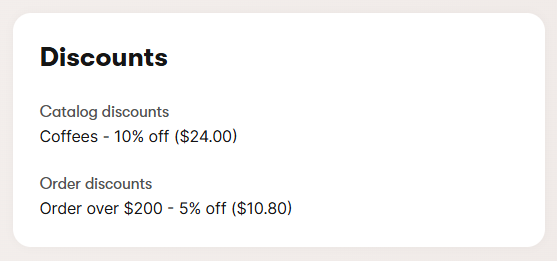
The [order creation service](https://docs.kentico.com/documentation/developers-and-admins/digital-commerce-setup/checkout-process/order-creation.md) persists promotion data with orders for reporting and order history. Viewing order details in the **Orders** application provides a breakdown of each applied discount and its impact on the overall unit and order prices. Moreover, clicking on a specific item on the **Ordered items** tab provides a list of promotions applied to the item, including free shipping when triggered by the item. For items discounted by cart item discounts, the panel also lists the related items that qualified the item for the discount and the items that the item helped to earn a reward on.
## Redemption methods
Promotions support two redemption methods that control how customers receive discounts:
| Redemption method | Description |
| --------------------------- | ------------------------------------------------------------------------------------------------------------------------------------------------------------------------------------------------------------------------------------------------------------------------------------------------------------------------------ |
| **Automatic** | The default behavior. Promotions are automatically evaluated and applied during price calculation when customers meet the configured conditions. |
| **Multi-use discount code** | Requires customers to enter a specific code (e.g., _WINTER20_) to receive the discount. The promotion is only applied if the customer provides the matching code. Codes are generic and can be used by any customer, any number of times during the promotion period. Single-use or customer-specific codes are not supported. |
Coupon codes can be configured for catalog discounts, cart item discounts, order discounts, and free shipping. For implementation details, see [Coupon codes](https://docs.kentico.com/documentation/developers-and-admins/digital-commerce-setup/promotions/coupon-codes.md).
> **Tip:** Use coupon codes for targeted marketing campaigns, newsletter subscriber discounts, influencer partnerships, or limited-time promotional offers.
## Customer eligibility
Promotions can be restricted to specific customer groups using the **Target customers** setting. This controls which customers are eligible for the promotion during price calculation.
The following table shows the default set of customer eligibility options. Developers can extend this default selection with custom options. See [Customize customer eligibility](https://docs.kentico.com/documentation/developers-and-admins/digital-commerce-setup/promotions/customer-eligibility-customization.md).
| Target customers | Description |
| -------------------------- | ------------------------------------------------------------------------------------------------------------------------------------------------------------------------------ |
| **All visitors** | The default setting. The promotion applies to all customers, including anonymous visitors. |
| **All registered members** | The promotion only applies to authenticated [members](https://docs.kentico.com/documentation/business-users/members.md). Anonymous visitors are not eligible for the discount. |
Customer eligibility is evaluated automatically during price calculation alongside [coupon code](https://docs.kentico.com/documentation/developers-and-admins/digital-commerce-setup/promotions/coupon-codes.md) requirements. If a promotion is restricted to registered members, the system checks whether the buyer is a registered member based on the `BuyerIdentifier` provided in the price calculation request.
## Implement promotions
- **Catalog discounts** – See [Implement catalog discounts](https://docs.kentico.com/documentation/developers-and-admins/digital-commerce-setup/promotions/catalog-discounts.md) for creating product-level promotion rules.
- **Cart item discounts** – See [Implement cart item discounts](https://docs.kentico.com/documentation/developers-and-admins/digital-commerce-setup/promotions/cart-item-discounts.md) for creating rules that discount units in the cart based on the whole cart content.
- **Order discounts** – See [Implement order discounts](https://docs.kentico.com/documentation/developers-and-admins/digital-commerce-setup/promotions/order-discounts.md) for creating order-level promotion rules.
- **Free shipping** – See [Implement free shipping](https://docs.kentico.com/documentation/developers-and-admins/digital-commerce-setup/promotions/free-shipping.md) for creating rules that grant free shipping.
- **Coupon codes** – See [Coupon codes](https://docs.kentico.com/documentation/developers-and-admins/digital-commerce-setup/promotions/coupon-codes.md) for requiring discount codes for redemption.
## Manage promotions
Marketers [create and manage promotions](https://docs.kentico.com/documentation/business-users/manage-commerce-stores.md) in the administration interface. After you register a promotion rule in code, it becomes available for selection when creating new promotions.
Promotions support:
- **Activation scheduling** – Set start and end dates for time-limited offers.
- **Configurable properties** – Define promotion parameters (discount percentage, target categories, eligibility rules) through the admin UI.
- **Customer targeting** – Restrict promotions to all visitors or registered members only.
- **Redemption methods** – Choose between automatic application or require customers to enter a discount code.
- **Multiple active promotions** – Run several promotions simultaneously with automatic best-discount selection.